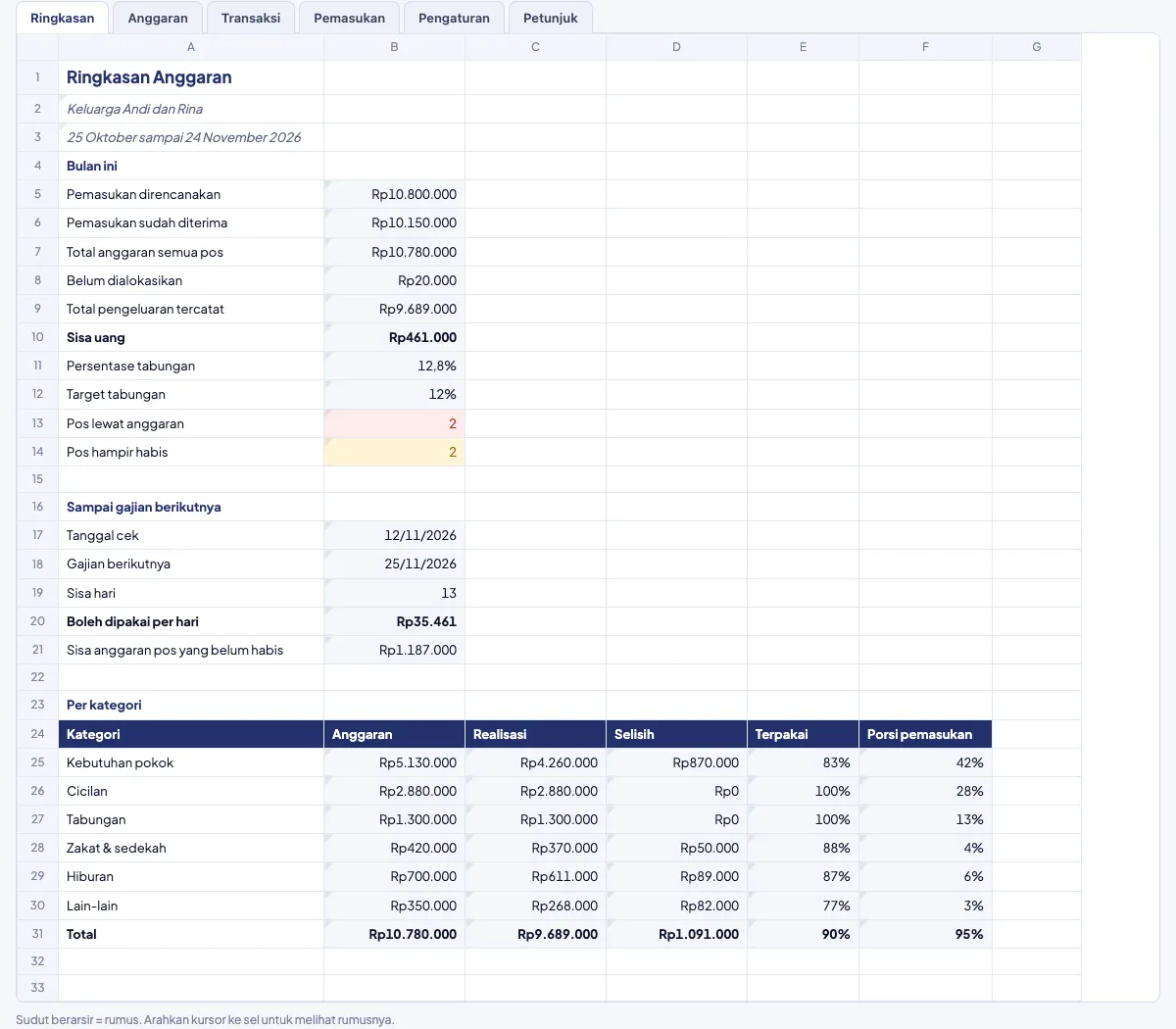
Summary: money left, savings rate, daily allowance until payday, and a per-category table
SKILL.md contents
Premium subscribers can read, copy, and install this skill.
Unlock with Premium Sign inHousehold Monthly Budget
Description
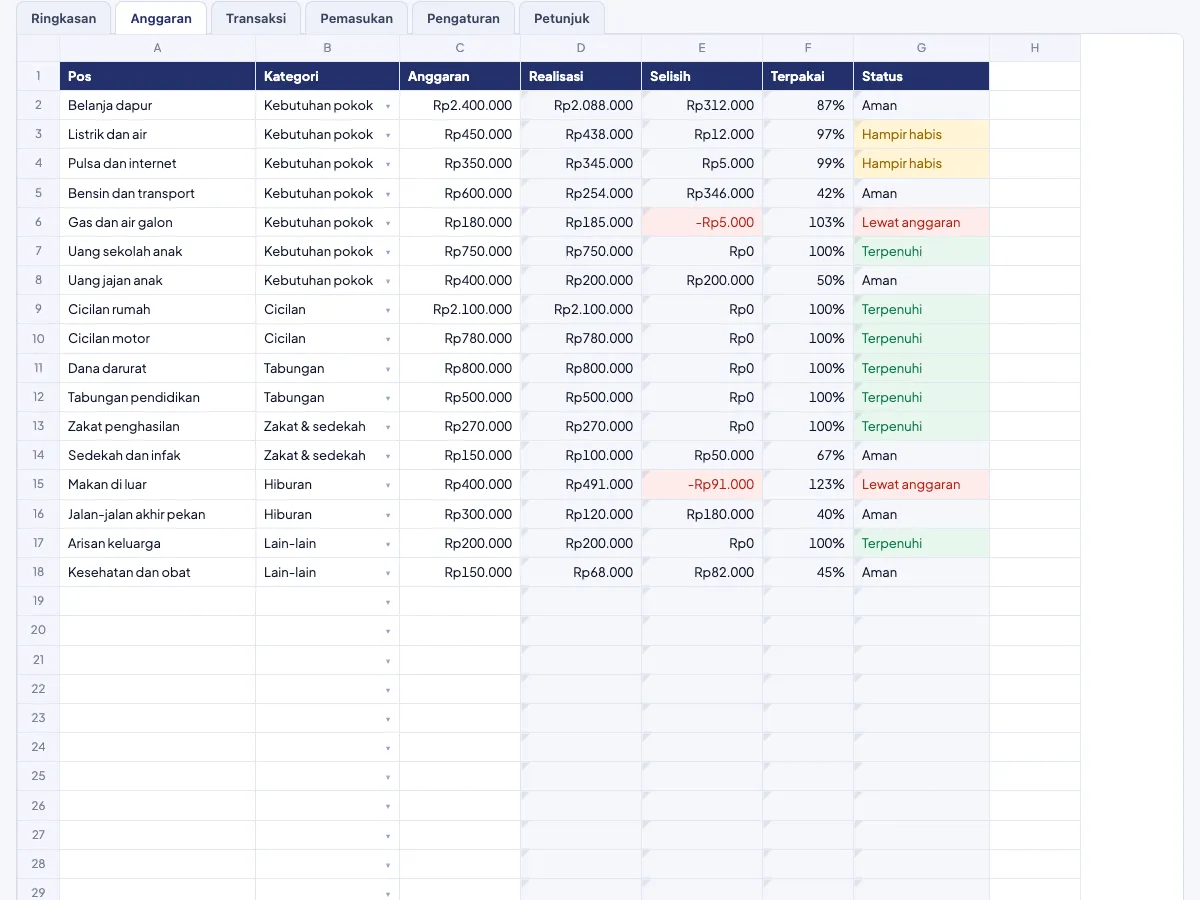
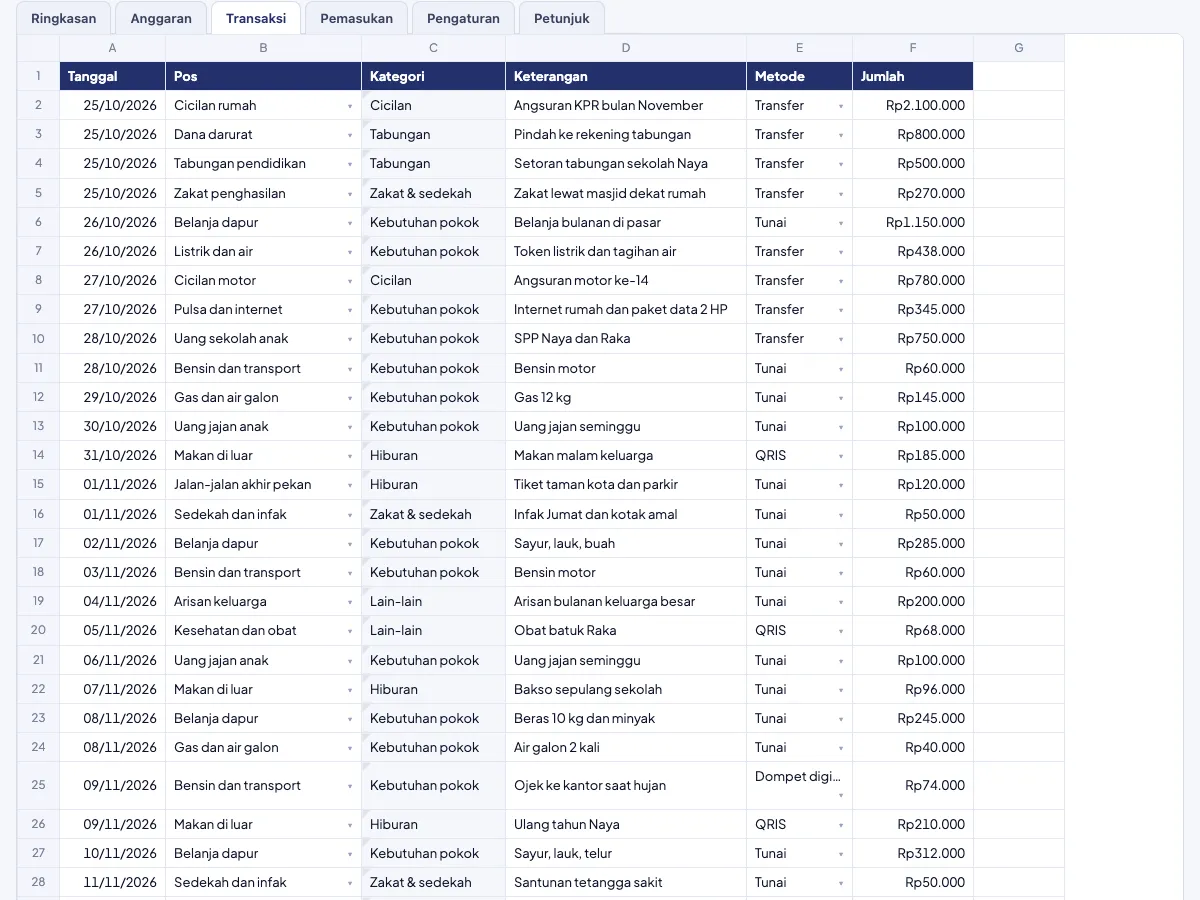
An Excel household budget from payday to payday: planned and received income, budget lines with category dropdowns (essentials, debt payments, savings, giving, fun), budget vs actual per line with the difference and an over-budget status, a daily transaction log whose category fills itself in, a per-category summary, the savings rate, and money left per day until payday. Opens in Excel, Numbers or Google Sheets.
Verified by SkillFlow
We checked every file in this skill automatically: no command that downloads and runs a program, no hidden code, no instruction telling your AI to ignore you.
- Loads from outside
- Fonts: Google Fonts SkillFlow: directory.skillflow.ai.id
See the 6 files inside
skill.json9 KBSKILL.md7 KBprompt.md8 KBprompt.en.md8 KBfiles/contoh/keluarga-besar-38-pos.html98 KBfiles/template.html84 KB
Checked 14 Nov 2026
Part of SkillFlow Pro
Pro opens every skill in every category: copy, ZIP, Send to AI, install, save, and request new skills.
Get Pro Already subscribed? Sign inWhat you get
- An .xlsx file with Summary, Budget, Transactions, Income, Settings and Guide sheets
- Budget vs actual per line with the difference and an OK, Nearly used, Met or Over budget status
- A transaction log with a line dropdown that follows the Budget sheet and a category that fills itself in
- A per-category summary, savings rate vs target, and the number of lines over budget
- Days left until payday (DAYS) and the amount that can be spent per day
- An HTML template with a sheet preview and a Download Excel button
Good fit
- Households that want to see where the money goes and whether it lasts until payday
- Salaried employees with loan payments and a side business
- Family finance educators or coaches who need a template for participants
Not for
- Not a business cash book; for shop cash use the Daily Cash Book
- It does not connect to bank accounts, every transaction is logged by hand
- Not financial or investment advice, and it does not calculate tax
- The giving amount in the sample is only an example, adjust it to the rules you follow
About this skill
/anggaran-rumah-tangga Make a household budget from the 25 October payday to 24 November: salary 8,500,000 and a cake side business 2,300,000, with home and motorbike loans and a 12 percent savings target
Show more
An Excel household budget from payday to payday: planned and received income, budget lines with category dropdowns (essentials, debt payments, savings, giving, fun), budget vs actual per line with the difference and an over-budget status, a daily transaction log whose category fills itself in, a per-category summary, the savings rate, and money left per day until payday. Opens in Excel, Numbers or Google Sheets.
User reviews
FAQ
Why is there a Met status besides Nearly used?
Loan payments and savings transfers are usually paid exactly as budgeted. The Met status separates them from lines that really are running out, so the Nearly used count in the Summary is not misleading.
Do I have to type the check date every day?
It is typed by default so results can be checked. Replace that cell in Settings with =TODAY() if you want days left and the daily allowance to follow the date automatically.
How do I add a new budget line?
Write it in an empty row of the Budget sheet (prepared down to row 41). The Line dropdown in Transactions follows that column, and its category fills in automatically.
Which AI can I use it with?
Copy the prompt into a chat AI (ChatGPT, Claude, Gemini, DeepSeek); or download the ZIP and install it in an AI agent (Claude Code, Codex, Antigravity, Hermes Agent, Cursor, GitHub Copilot, Gemini CLI, OpenCode, Kimi Code, Trae), which then builds the files for you.
What is in the ZIP?
One folder named anggaran-rumah-tangga with SKILL.md (the instructions an AI agent reads) and the prompt, 6 files in all. Extract it into your agent's skills folder, or install it with npx skillflow-ai add anggaran-rumah-tangga. Pro only.
Is there a per-use fee or credits?
Not from SkillFlow. The skill runs on the AI you already use, so any cost follows that plan.
Which plan includes it?
SkillFlow Pro. It opens every skill in every category.
Can I use my own colours and brand?
Yes. Pick a colour theme on this page, or fill in your brand profile once; both go into the prompt you copy and into the ZIP.
Can I share what I made?
Pro members can upload the result and get a page at share.skillflow.ai.id to send to anyone. The page carries a small "Made with SkillFlow AI" mark.
Is there a download limit?
Yes, per day: 50 skills on Pro, 10 on other plans. Downloading a skill again on the same day does not count.