

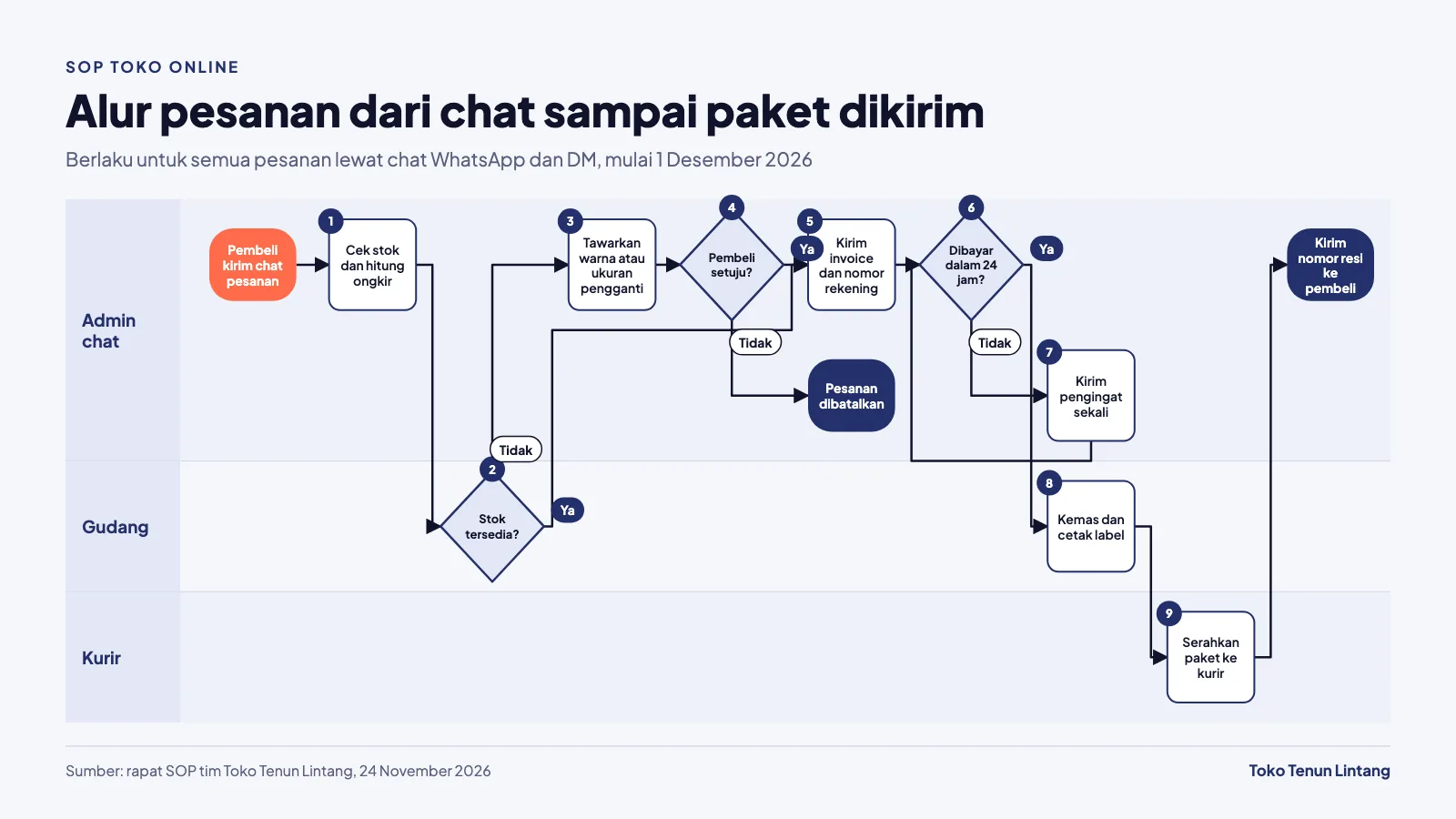
Order flow from chat to shipping with admin, warehouse, and courier lanes
SKILL.md contents
Premium subscribers can read, copy, and install this skill.
Unlock with Premium Sign inProcess Flowchart
Description
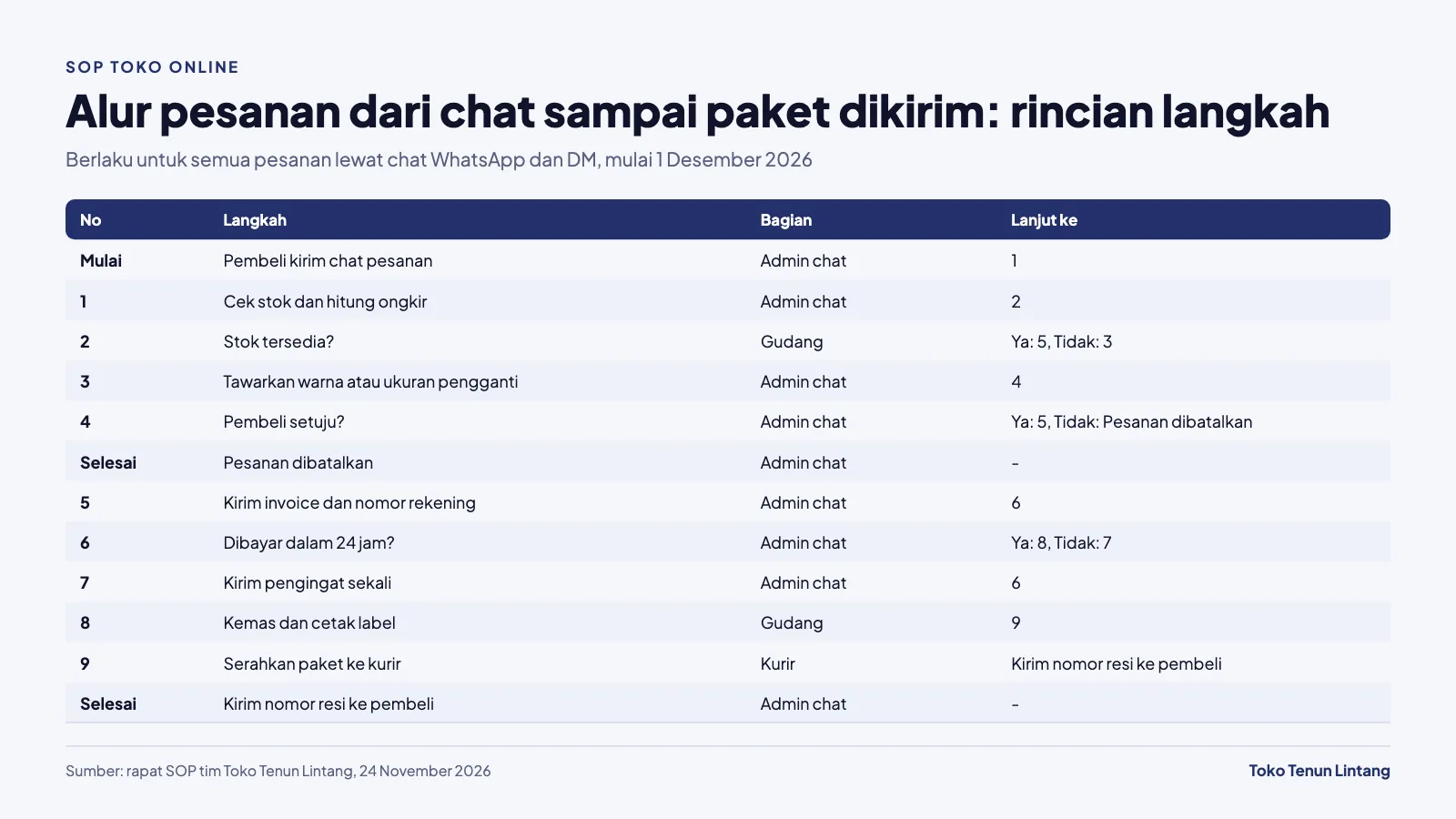
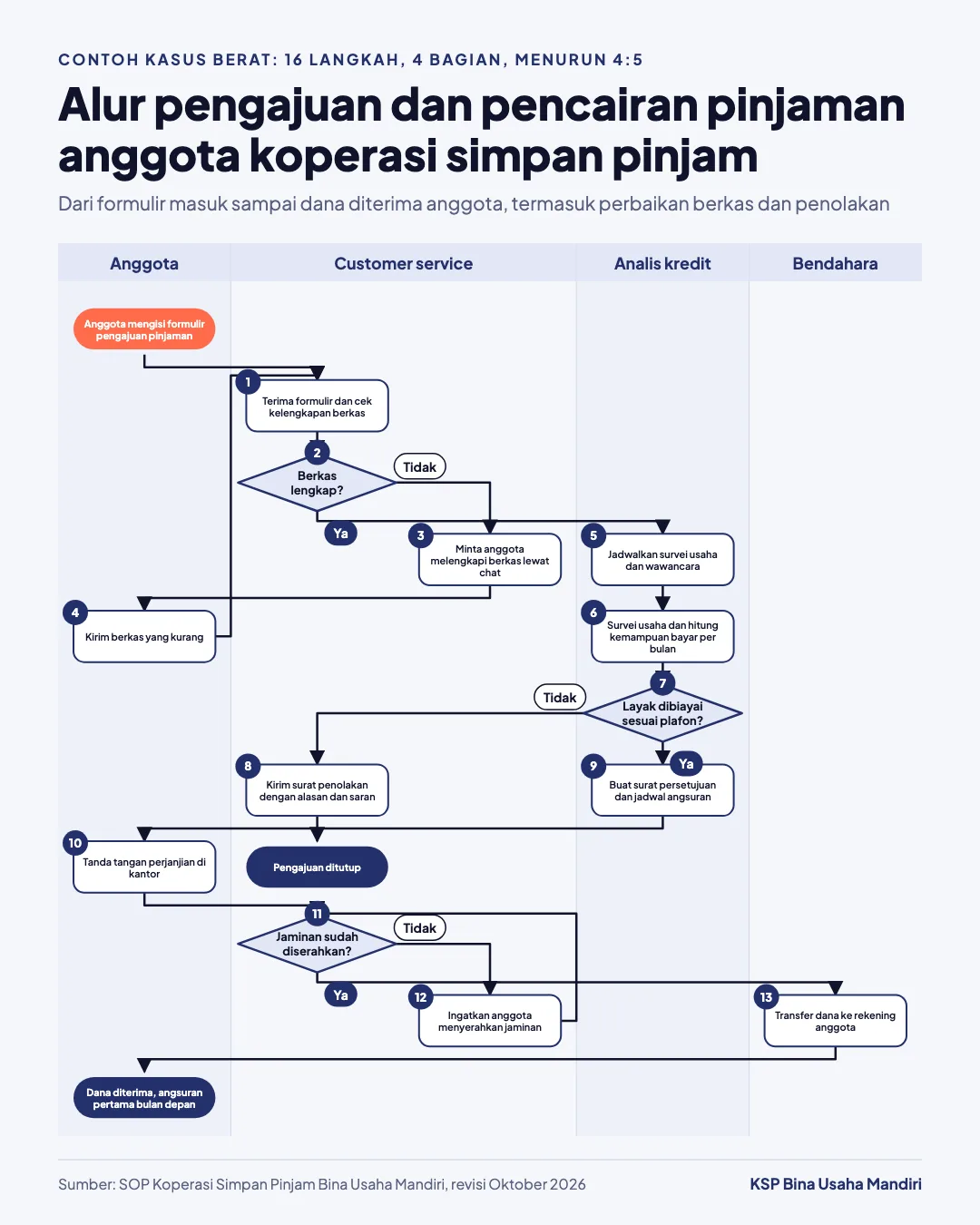
A flowchart built from a list of steps: start, steps, yes or no decisions that branch, loop arrows back to an earlier step, and end. An optional swimlane per role (e.g. admin, warehouse, courier) shows who does what. The layout is worked out for you: columns from the step order, arrows routed through the gaps between boxes so they never cross one, steps numbered. A second page holds a step table for your SOP. Left to right at 16:9, top to bottom at 4:5, downloadable as PDF, PNG, Word, or Excel.
Verified by SkillFlow
We checked every file in this skill automatically: no command that downloads and runs a program, no hidden code, no instruction telling your AI to ignore you.
- Loads from outside
- Fonts: Google Fonts SkillFlow: directory.skillflow.ai.id
See the 6 files inside
skill.json9 KBSKILL.md5 KBprompt.md5 KBprompt.en.md5 KBfiles/contoh/alur-16-langkah-menurun-4x5.html32 KBfiles/diagram.html33 KB
Checked 14 Nov 2026
Part of SkillFlow Pro
Pro opens every skill in every category: copy, ZIP, Send to AI, install, save, and request new skills.
Get Pro Already subscribed? Sign inWhat you get
- A flowchart from a step list: start, steps, yes/no decisions, loop arrows, end
- Swimlanes per role or none, the No branch gets its own track
- Layout and arrow routes worked out automatically, arrows never cross a box
- Numbered steps and a step table: step, role, next, if yes, if no
- Left to right at 16:9, top to bottom at 4:5, 3 palettes
- Download PDF, PNG (ZIP), Word for your SOP, and Excel with the step list
Good fit
- Owners writing SOPs for admin, warehouse, or service teams
- Consultants and teachers explaining a client's process or class material
- Organisations that need an application, approval, or service flow in one picture
Not for
- It does not design the process for you; steps and decisions come from your description
- Not a freehand drawing tool: box positions come from the order and cannot be dragged
- Clearest up to about 16 steps; longer processes are better split by stage
About this skill
/diagram-alur-proses Make a flowchart of my online shop's orders from the buyer's chat to the tracking number, with a stock check, an alternative offer when sold out, and a reminder when unpaid. Roles: chat admin, warehouse, courier.
Show more
A flowchart built from a list of steps: start, steps, yes or no decisions that branch, loop arrows back to an earlier step, and end. An optional swimlane per role (e.g. admin, warehouse, courier) shows who does what. The layout is worked out for you: columns from the step order, arrows routed through the gaps between boxes so they never cross one, steps numbered. A second page holds a step table for your SOP. Left to right at 16:9, top to bottom at 4:5, downloadable as PDF, PNG, Word, or Excel.
User reviews
FAQ
How do I draw a step that goes back to an earlier one?
Point lanjut at the earlier step's id, or send a decision's no branch there. The template recognises it as a loop and draws the back arrow through the lower gap.
When should I use swimlanes?
When more than one person or team is involved. Each step gets a role, and a step without one follows the previous step's role. Turn lanes off when one person runs the whole process.
Why is there a table on the second page?
So the chart can go into an SOP document with step numbers, roles, and where each step leads, and so the Word and Excel files read well without the picture.
Which AI can I use it with?
Copy the prompt into a chat AI (ChatGPT, Claude, Gemini, DeepSeek); or download the ZIP and install it in an AI agent (Claude Code, Codex, Antigravity, Hermes Agent, Cursor, GitHub Copilot, Gemini CLI, OpenCode, Kimi Code, Trae), which then builds the files for you.
What is in the ZIP?
One folder named diagram-alur-proses with SKILL.md (the instructions an AI agent reads) and the prompt, 6 files in all. Extract it into your agent's skills folder, or install it with npx skillflow-ai add diagram-alur-proses. Pro only.
Is there a per-use fee or credits?
Not from SkillFlow. The skill runs on the AI you already use, so any cost follows that plan.
Which plan includes it?
SkillFlow Pro. It opens every skill in every category.
Can I use my own colours and brand?
Yes. Pick a colour theme on this page, or fill in your brand profile once; both go into the prompt you copy and into the ZIP.
Can I share what I made?
Pro members can upload the result and get a page at share.skillflow.ai.id to send to anyone. The page carries a small "Made with SkillFlow AI" mark.
Is there a download limit?
Yes, per day: 50 skills on Pro, 10 on other plans. Downloading a skill again on the same day does not count.



