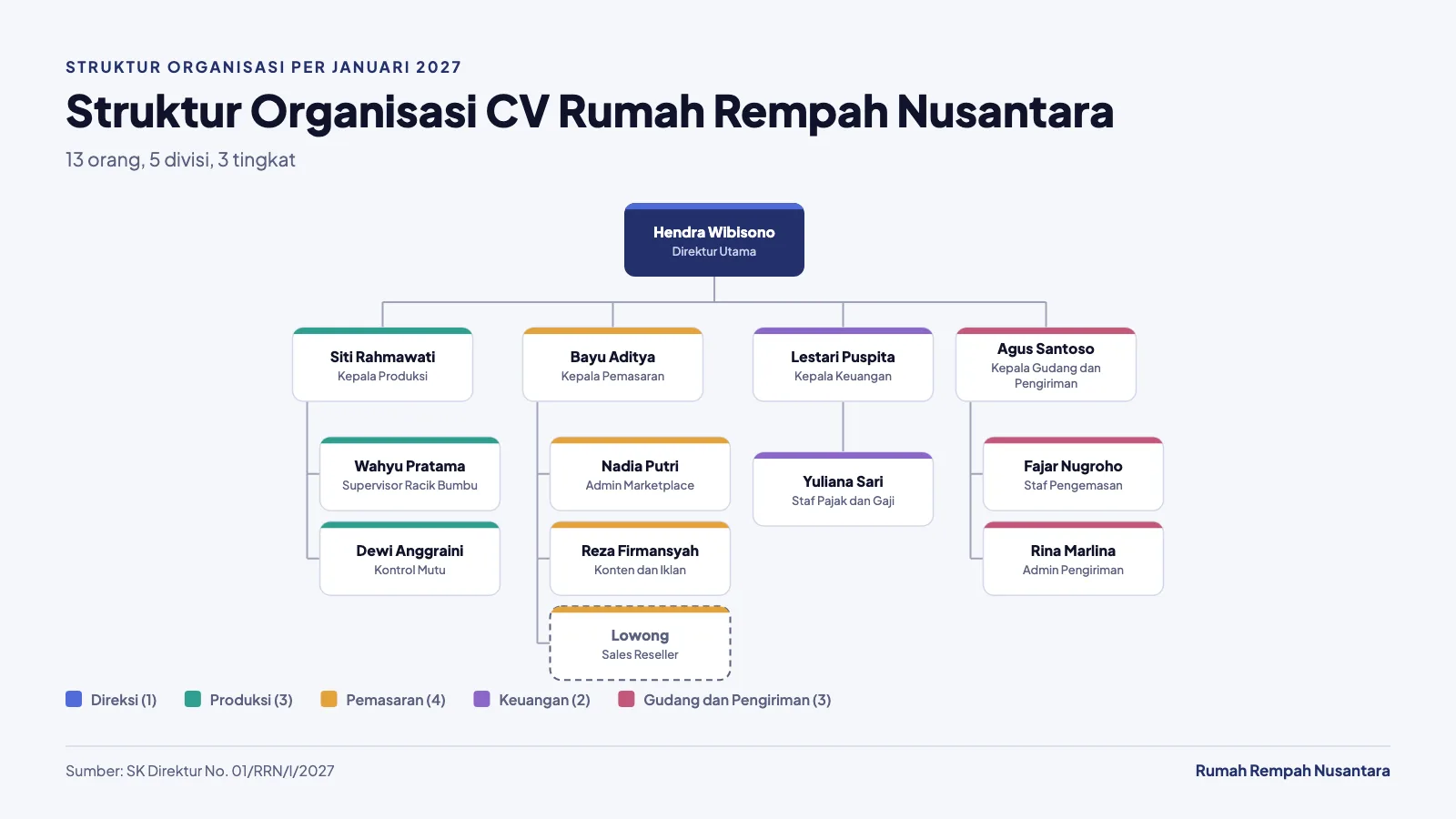
A 13-person company: five colour-coded teams, one vacant position
SKILL.md contents
Premium subscribers can read, copy, and install this skill.
Unlock with Premium Sign inOrg Chart
Description
An org chart built from a list of people: name, job title, team, and direct manager. The tree arranges itself with levels and widths worked out, boxes are coloured by team with a legend and headcount, and unfilled positions show as Vacant with a dashed outline. When the chart gets too wide, the lowest staff are stacked downward so it still fits. One HTML file from one data object, downloadable as PDF, PNG, Word, or an Excel file with the position list.
Verified by SkillFlow
We checked every file in this skill automatically: no command that downloads and runs a program, no hidden code, no instruction telling your AI to ignore you.
- Loads from outside
- Fonts: Google Fonts SkillFlow: directory.skillflow.ai.id
See the 6 files inside
skill.json7 KBSKILL.md5 KBprompt.md4 KBprompt.en.md4 KBfiles/contoh/organisasi-36-orang.html31 KBfiles/diagram.html29 KB
Checked 14 Nov 2026
Part of SkillFlow Pro
Pro opens every skill in every category: copy, ZIP, Send to AI, install, save, and request new skills.
Get Pro Already subscribed? Sign inWhat you get
- A position tree from a list of people and their direct managers, levels and widths worked out
- Colour per team with a legend and headcount per team
- Unfilled positions shown as Vacant with a dashed outline
- Lowest staff stacked downward when the chart gets too wide
- Long names and titles wrapped or trimmed neatly inside the boxes
- Download PDF, PNG, Word, and Excel with names, titles, teams, managers, and levels
Good fit
- Owners updating the team structure for new hires or a company profile
- Cooperatives, foundations, and associations attaching a structure to proposals or reports
- HR consultants reworking a client's roles
Not for
- It does not suggest an ideal structure; the chart follows the managers you list
- No staff photos, one direct manager per person (not a matrix structure)
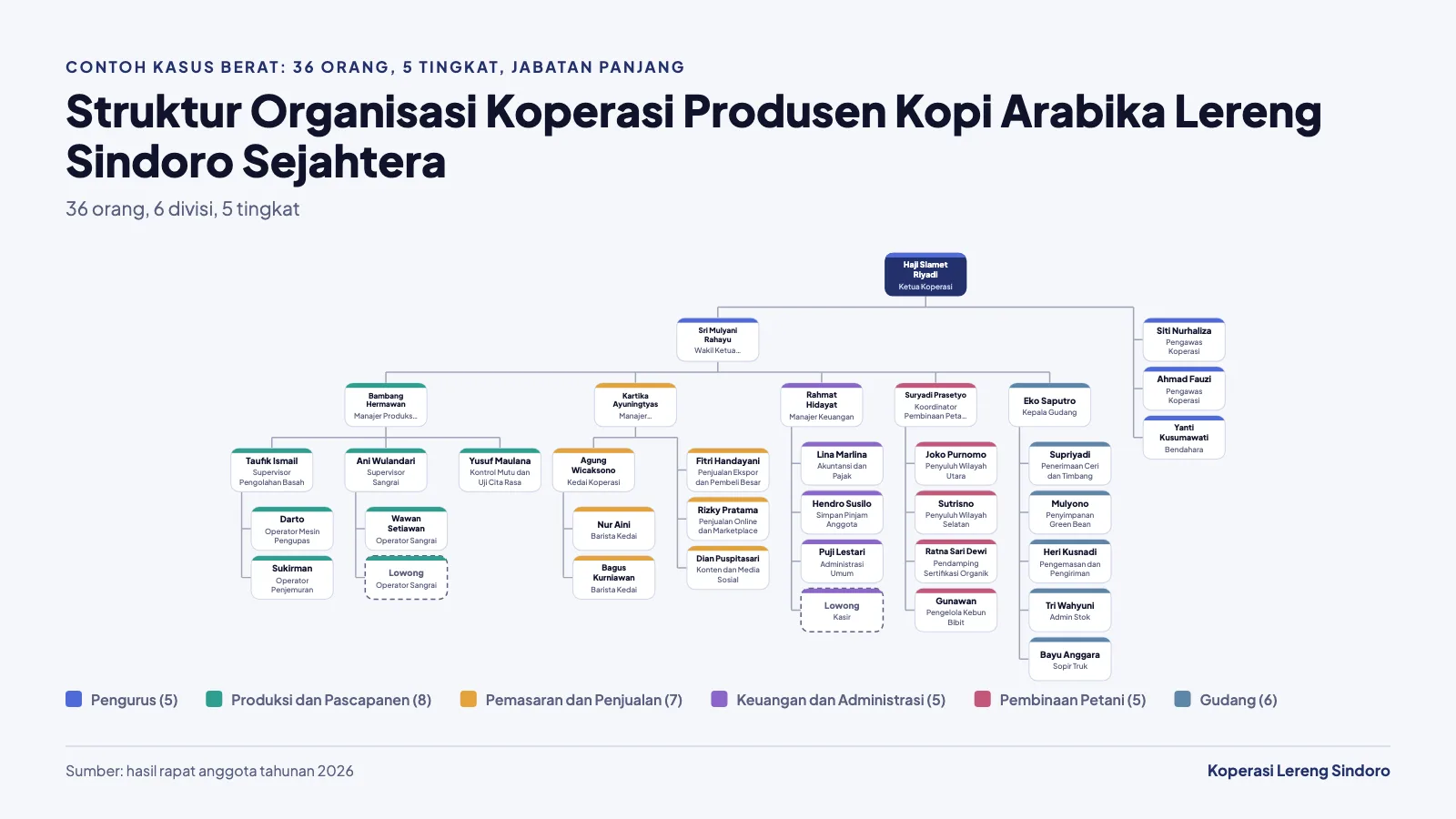
- More than about 40 people on one chart makes text small; split it by team
About this skill
/bagan-struktur-organisasi Make an org chart for my company: a director, four team heads (production, marketing, finance, warehouse), and staff under each. One sales position is still open.
Show more
An org chart built from a list of people: name, job title, team, and direct manager. The tree arranges itself with levels and widths worked out, boxes are coloured by team with a legend and headcount, and unfilled positions show as Vacant with a dashed outline. When the chart gets too wide, the lowest staff are stacked downward so it still fits. One HTML file from one data object, downloadable as PDF, PNG, Word, or an Excel file with the position list.
User reviews
FAQ
How do I mark an unfilled position?
Enter the title with an empty name. The box shows a dashed outline with the word Vacant and still counts toward its team.
What happens when the chart is too wide?
The template tries several box sizes and stacks the lowest staff downward. If it still does not fit, the chart is scaled down and the console suggests splitting it by team.
Which AI can I use it with?
Copy the prompt into a chat AI (ChatGPT, Claude, Gemini, DeepSeek); or download the ZIP and install it in an AI agent (Claude Code, Codex, Antigravity, Hermes Agent, Cursor, GitHub Copilot, Gemini CLI, OpenCode, Kimi Code, Trae), which then builds the files for you.
What is in the ZIP?
One folder named bagan-struktur-organisasi with SKILL.md (the instructions an AI agent reads) and the prompt, 6 files in all. Extract it into your agent's skills folder, or install it with npx skillflow-ai add bagan-struktur-organisasi. Pro only.
Is there a per-use fee or credits?
Not from SkillFlow. The skill runs on the AI you already use, so any cost follows that plan.
Which plan includes it?
SkillFlow Pro. It opens every skill in every category.
Can I use my own colours and brand?
Yes. Pick a colour theme on this page, or fill in your brand profile once; both go into the prompt you copy and into the ZIP.
Can I share what I made?
Pro members can upload the result and get a page at share.skillflow.ai.id to send to anyone. The page carries a small "Made with SkillFlow AI" mark.
Is there a download limit?
Yes, per day: 50 skills on Pro, 10 on other plans. Downloading a skill again on the same day does not count.