

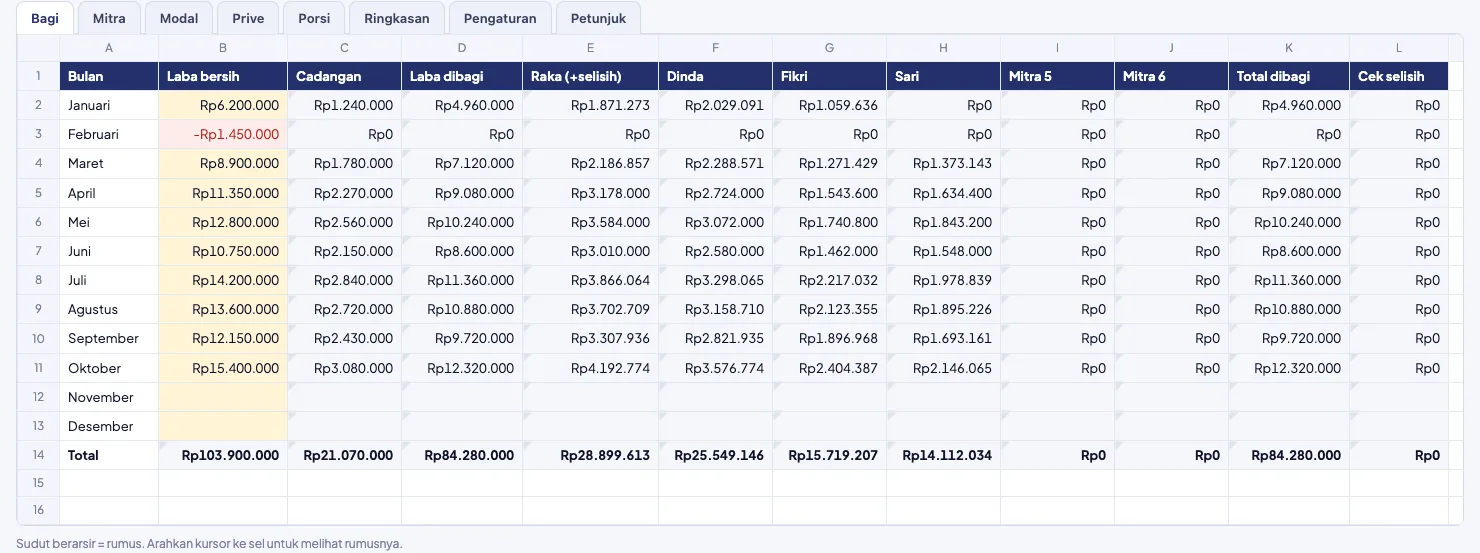
Share sheet: net profit, reserve, profit shared, 4 partners' shares per month, a 0 difference check
SKILL.md contents
Premium subscribers can read, copy, and install this skill.
Unlock with Premium Sign inPartnership Profit Sharing
Description
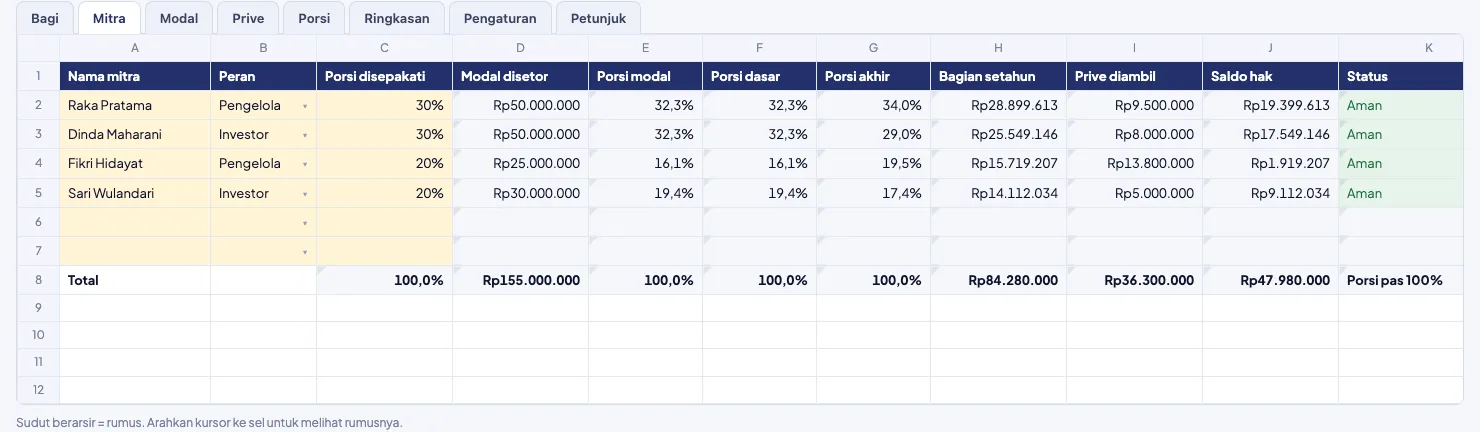
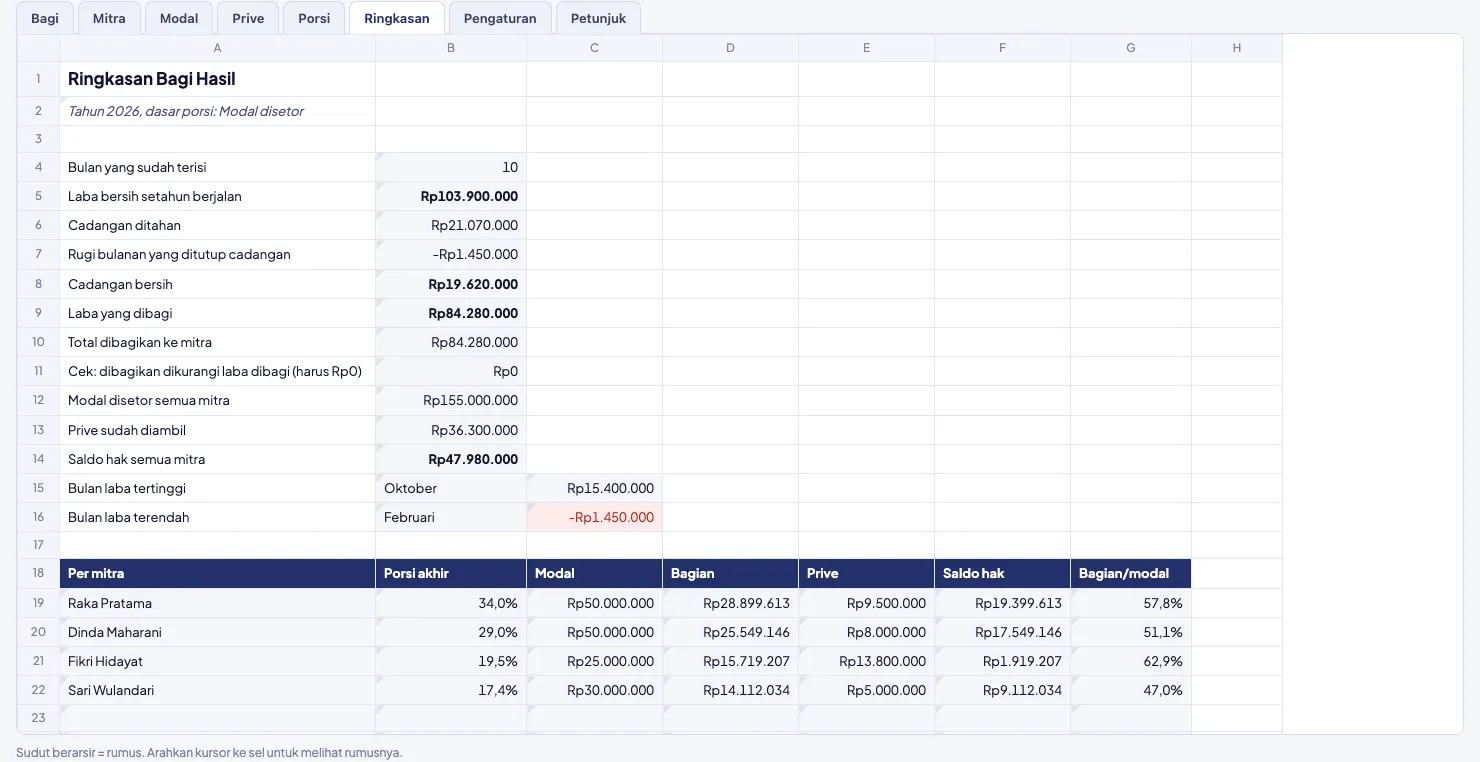
A profit sharing Excel file for a business owned by 2 to 6 partners: dated capital contributions paid in stages, ownership shares from capital paid in or fixed agreed shares (picked from a dropdown), an extra share for managing partners, a profit reserve, each partner's share every month that always adds up to the profit shared, drawings already taken, each partner's balance owed, and a yearly summary. Opens in Excel, Numbers or Google Sheets.
Verified by SkillFlow
We checked every file in this skill automatically: no command that downloads and runs a program, no hidden code, no instruction telling your AI to ignore you.
- Loads from outside
- Fonts: Google Fonts SkillFlow: directory.skillflow.ai.id
See the 6 files inside
skill.json10 KBSKILL.md8 KBprompt.md8 KBprompt.en.md9 KBfiles/contoh/laundry-6-mitra-setahun.html104 KBfiles/template.html95 KB
Checked 14 Nov 2026
Part of SkillFlow Pro
Pro opens every skill in every category: copy, ZIP, Send to AI, install, save, and request new skills.
Get Pro Already subscribed? Sign inWhat you get
- An .xlsx file with Share, Partners, Capital, Drawings, Shares, Summary, Settings and Guide sheets
- Each partner's share every month, always adding up to the profit shared (rounding goes to one partner)
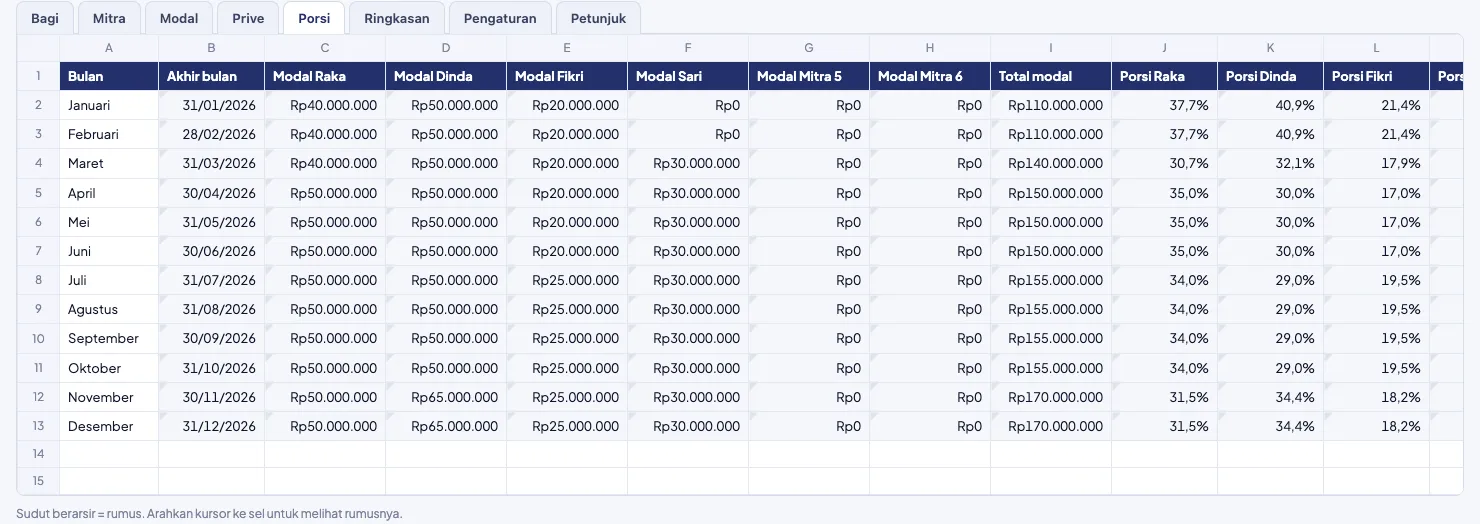
- Shares from capital paid in by month or agreed shares, picked from a dropdown
- An extra manager share and a profit reserve in percent; loss months share nothing
- Drawings, balance owed, and a red status for partners who took more than their share
- An HTML template with a sheet preview and a Download Excel button
Good fit
- Businesses run with friends or family where capital is paid in stages and shares get confusing
- Managing partners who want a clear extra share on top of their capital share
- Managers who need to show investors what they are owed and what they have already taken
Not for
- Not a profit and loss report: you type the monthly net profit from your existing report
- Not a partnership agreement, legal advice, or a tax calculation
- It does not split losses among partners or reduce capital; losses only reduce the reserve
- Up to 6 partners and one year per file
About this skill
/bagi-hasil-usaha-patungan Make a profit sharing file for a laundry business funded by 3 partners, shares by capital, the manager gets an extra 10 percent, and a 20 percent reserve
Show more
A profit sharing Excel file for a business owned by 2 to 6 partners: dated capital contributions paid in stages, ownership shares from capital paid in or fixed agreed shares (picked from a dropdown), an extra share for managing partners, a profit reserve, each partner's share every month that always adds up to the profit shared, drawings already taken, each partner's balance owed, and a yearly summary. Opens in Excel, Numbers or Google Sheets.
User reviews
FAQ
Why is the first partner's share sometimes a few units off?
Each share is rounded to whole currency units. So the total shared matches the profit shared exactly, the rounding difference goes to the partner in the first row of the Partners sheet. The difference check column is always 0.
From when does capital paid in mid-year count?
When shares are based on capital paid in, the Shares sheet adds up each partner's capital to the end of every month. A contribution made in March only takes part in the profit from March.
Can we use fixed agreed shares instead of capital?
Yes. Pick Agreed shares in the dropdown on the Settings sheet and fill in each partner's percentage on the Partners sheet. They must add up to 100 percent; if not, the status on the Total row turns red.
Which AI can I use it with?
Copy the prompt into a chat AI (ChatGPT, Claude, Gemini, DeepSeek); or download the ZIP and install it in an AI agent (Claude Code, Codex, Antigravity, Hermes Agent, Cursor, GitHub Copilot, Gemini CLI, OpenCode, Kimi Code, Trae), which then builds the files for you.
What is in the ZIP?
One folder named bagi-hasil-usaha-patungan with SKILL.md (the instructions an AI agent reads) and the prompt, 6 files in all. Extract it into your agent's skills folder, or install it with npx skillflow-ai add bagi-hasil-usaha-patungan. Pro only.
Is there a per-use fee or credits?
Not from SkillFlow. The skill runs on the AI you already use, so any cost follows that plan.
Which plan includes it?
SkillFlow Pro. It opens every skill in every category.
Can I use my own colours and brand?
Yes. Pick a colour theme on this page, or fill in your brand profile once; both go into the prompt you copy and into the ZIP.
Can I share what I made?
Pro members can upload the result and get a page at share.skillflow.ai.id to send to anyone. The page carries a small "Made with SkillFlow AI" mark.
Is there a download limit?
Yes, per day: 50 skills on Pro, 10 on other plans. Downloading a skill again on the same day does not count.



