

Rendered sample video
SKILL.md contents
Premium subscribers can read, copy, and install this skill.
Unlock with Premium Sign inHow to Track a Package
Description
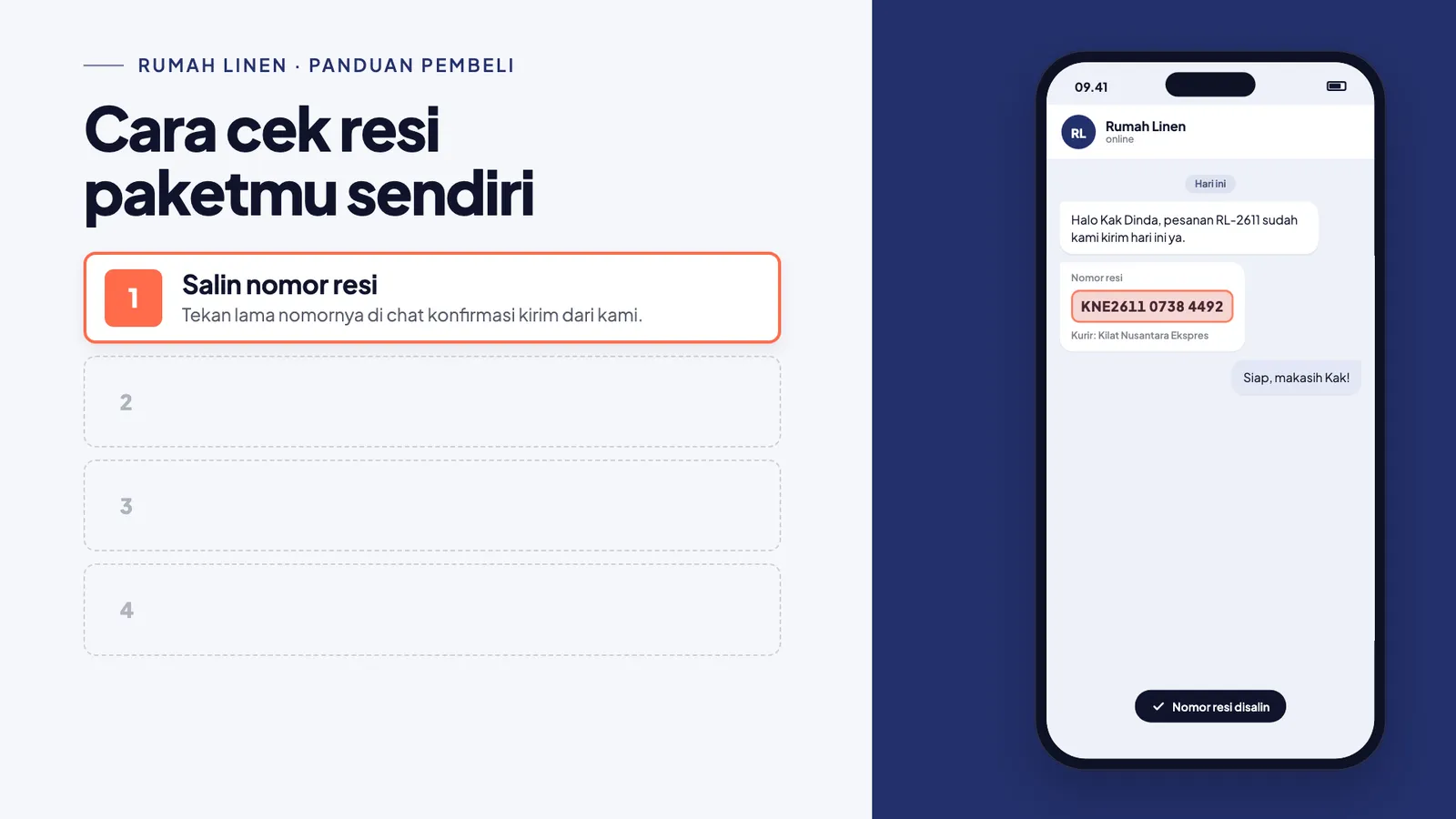
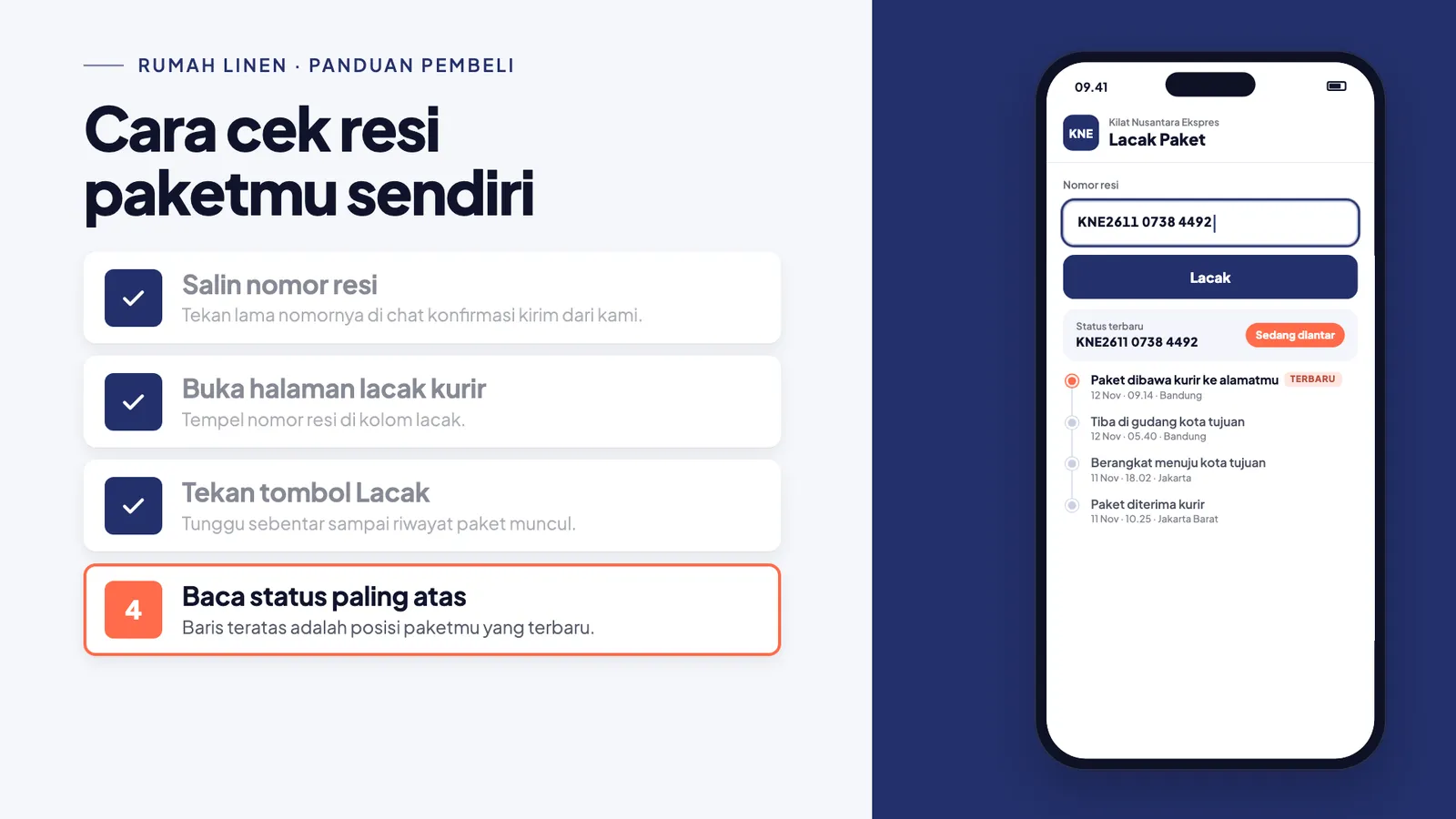
A buyer guide clip for tracking a parcel on their own, so fewer "where is my package" chats come in. Four step cards run beside a phone screen: the tracking number is long-pressed in the shop chat and copied, pasted on the courier's tracking page, the Track button is tapped, then the journey history appears with the latest status highlighted and tagged LATEST. It closes with when the buyer should contact the shop. The courier name is fictional by default and can be replaced. 16:9 and 9:16, rendered to MP4 with one command.
Verified by SkillFlow
We checked every file in this skill automatically: no command that downloads and runs a program, no hidden code, no instruction telling your AI to ignore you.
- Loads from outside
- Fonts: Google Fonts
See the 6 files inside
skill.json7 KBSKILL.md7 KBprompt.md6 KBprompt.en.md6 KBfiles/contoh-kebun-teh-9x16.html28 KBfiles/scene.html28 KB
Checked 14 Nov 2026
Part of SkillFlow Pro
Pro opens every skill in every category: copy, ZIP, Send to AI, install, save, and request new skills.
Get Pro Already subscribed? Sign inWhat you get
- A 4-step script: copy the number, open the tracking page, tap Track, read the top status, plus a closing line
- An animated phone screen: shipping chat, Copy menu, copied toast, number pasted in the field, Track button loading
- A 3-5 row status history (latest on top) with a status label and a LATEST tag
- MP4 1920x1080 (16:9) or 1080x1920 (9:16), 30 fps, 16.6 seconds
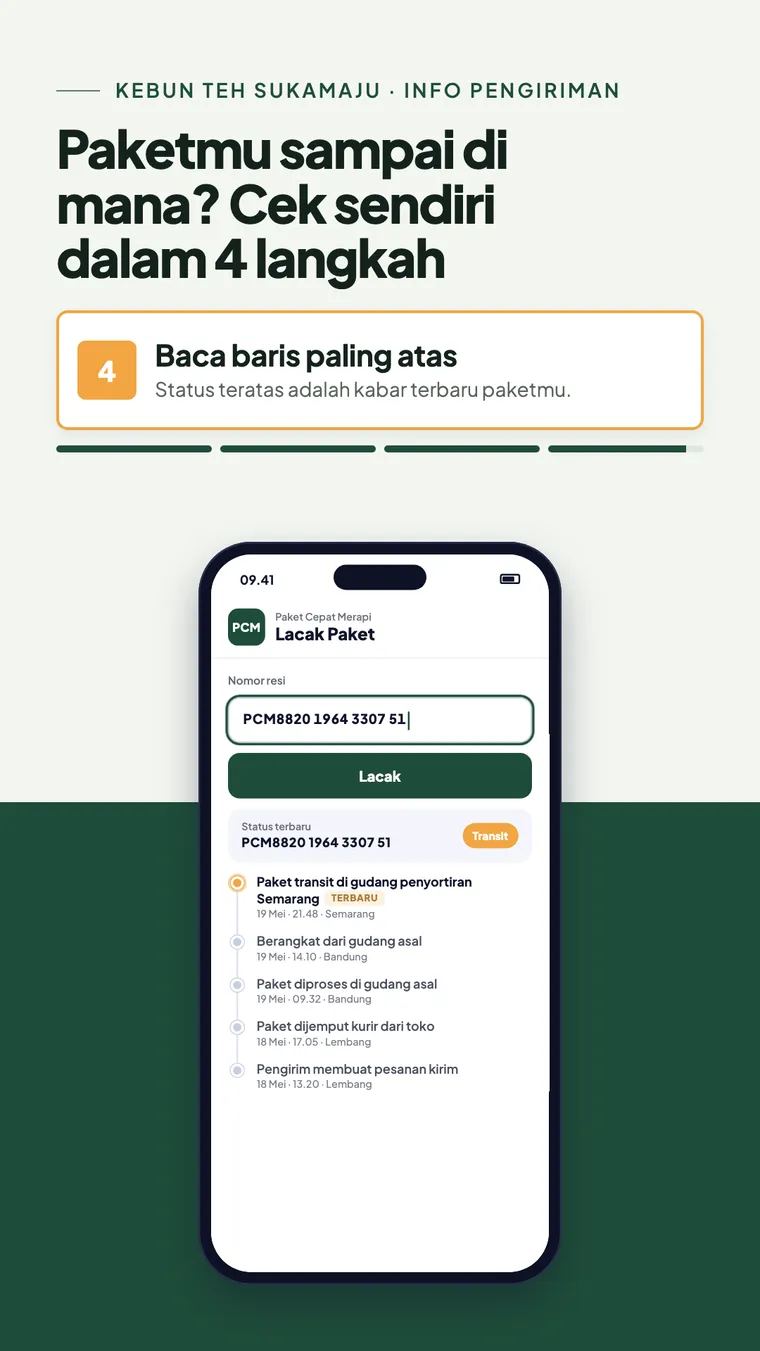
- 3 palettes (indigo, ink, tea green) and a second example: a tea shop, 5 history rows, 9:16
Good fit
- Online shops flooded with "where's my parcel?" chats
- Admins wanting to send one video when buyers ask about delivery
- Shops wanting a profile highlight with a parcel tracking guide
Not for
- Needs an AI agent on your computer to render the MP4
- The phone and tracking page are fictional screens, not a real courier app
- It does not track real parcels; it's a guide video
About this skill
/cara-cek-resi Make a how-to-track-your-parcel video for Ceria Kids Toy Shop buyers, with a fictional courier name, 4 status updates, closing with when to contact the shop
Show more
A buyer guide clip for tracking a parcel on their own, so fewer "where is my package" chats come in. Four step cards run beside a phone screen: the tracking number is long-pressed in the shop chat and copied, pasted on the courier's tracking page, the Track button is tapped, then the journey history appears with the latest status highlighted and tagged LATEST. It closes with when the buyer should contact the shop. The courier name is fictional by default and can be replaced. 16:9 and 9:16, rendered to MP4 with one command.
User reviews
FAQ
Can the courier name change?
Yes. The built-in courier name is fictional and can be changed in the config, but the tracking page stays neutral rather than copying any courier app.
How many status rows are shown?
Three to five, newest at the top, highlighted and marked LATEST.
Which AI can I use it with?
Copy the prompt into a chat AI (ChatGPT, Claude, Gemini, DeepSeek): you get an HTML file; open it in Chrome and press Download MP4 (silent video, a minute or two to render); or download the ZIP and install it in an AI agent (Claude Code, Codex, Antigravity, Hermes Agent, Cursor, GitHub Copilot, Gemini CLI, OpenCode, Kimi Code, Trae), which then builds the files for you.
What is in the ZIP?
One folder named cara-cek-resi with SKILL.md (the instructions an AI agent reads) and the prompt, 6 files in all. Extract it into your agent's skills folder, or install it with npx skillflow-ai add cara-cek-resi. Pro only.
Is there a per-use fee or credits?
Not from SkillFlow. The skill runs on the AI you already use, so any cost follows that plan.
Which plan includes it?
SkillFlow Pro. It opens every skill in every category.
Can I use my own colours and brand?
Yes. Pick a colour theme on this page, or fill in your brand profile once; both go into the prompt you copy and into the ZIP.
Can I share what I made?
Pro members can upload the result and get a page at share.skillflow.ai.id to send to anyone. The page carries a small "Made with SkillFlow AI" mark.
Is there a download limit?
Yes, per day: 50 skills on Pro, 10 on other plans. Downloading a skill again on the same day does not count.



