

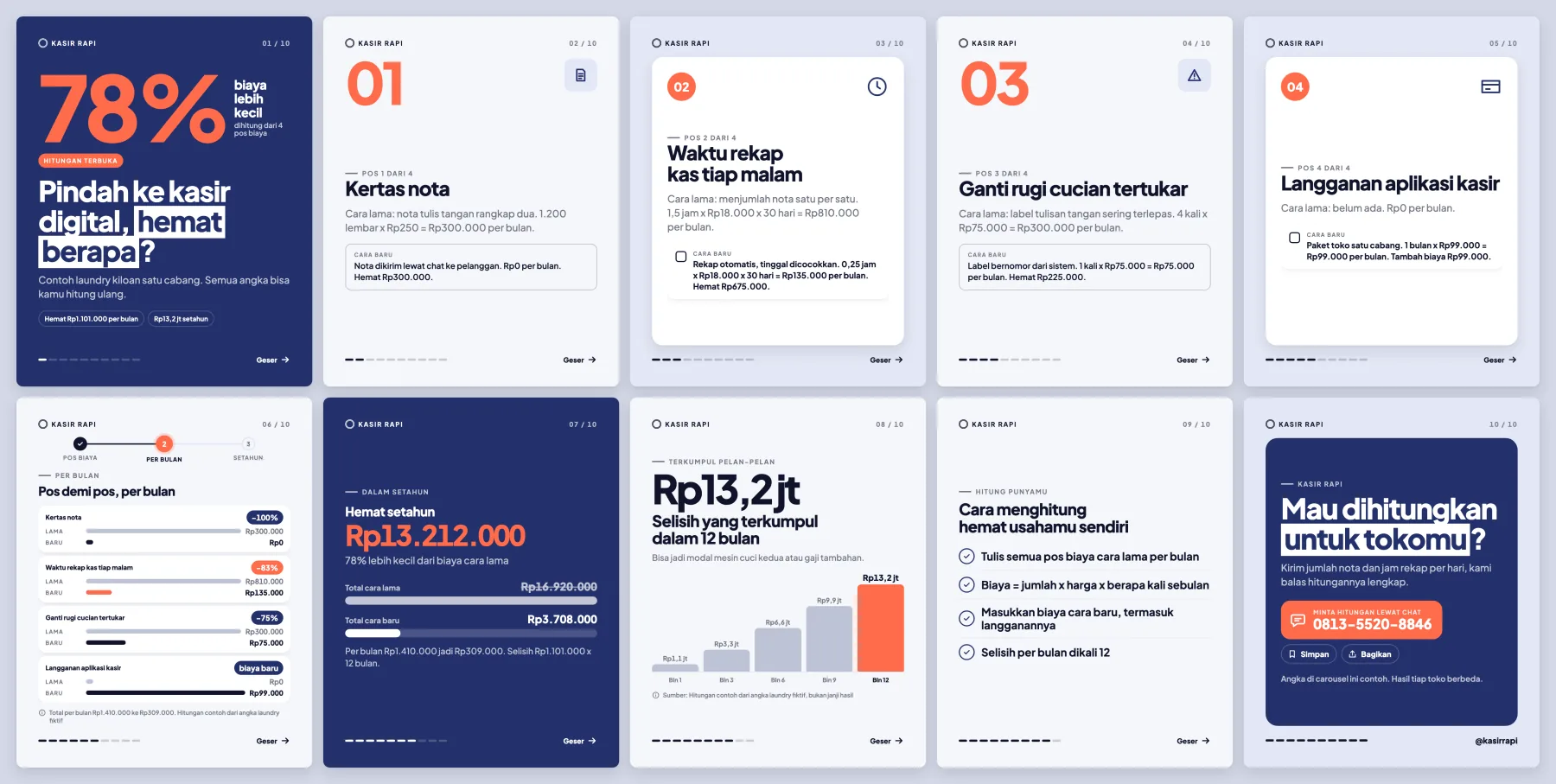
Ten slides: percent cover, 4 cost lines with formulas, line by line, yearly saving, running total, how to, closing
SKILL.md contents
Premium subscribers can read, copy, and install this skill.
Unlock with Premium Sign inSavings Math
Description
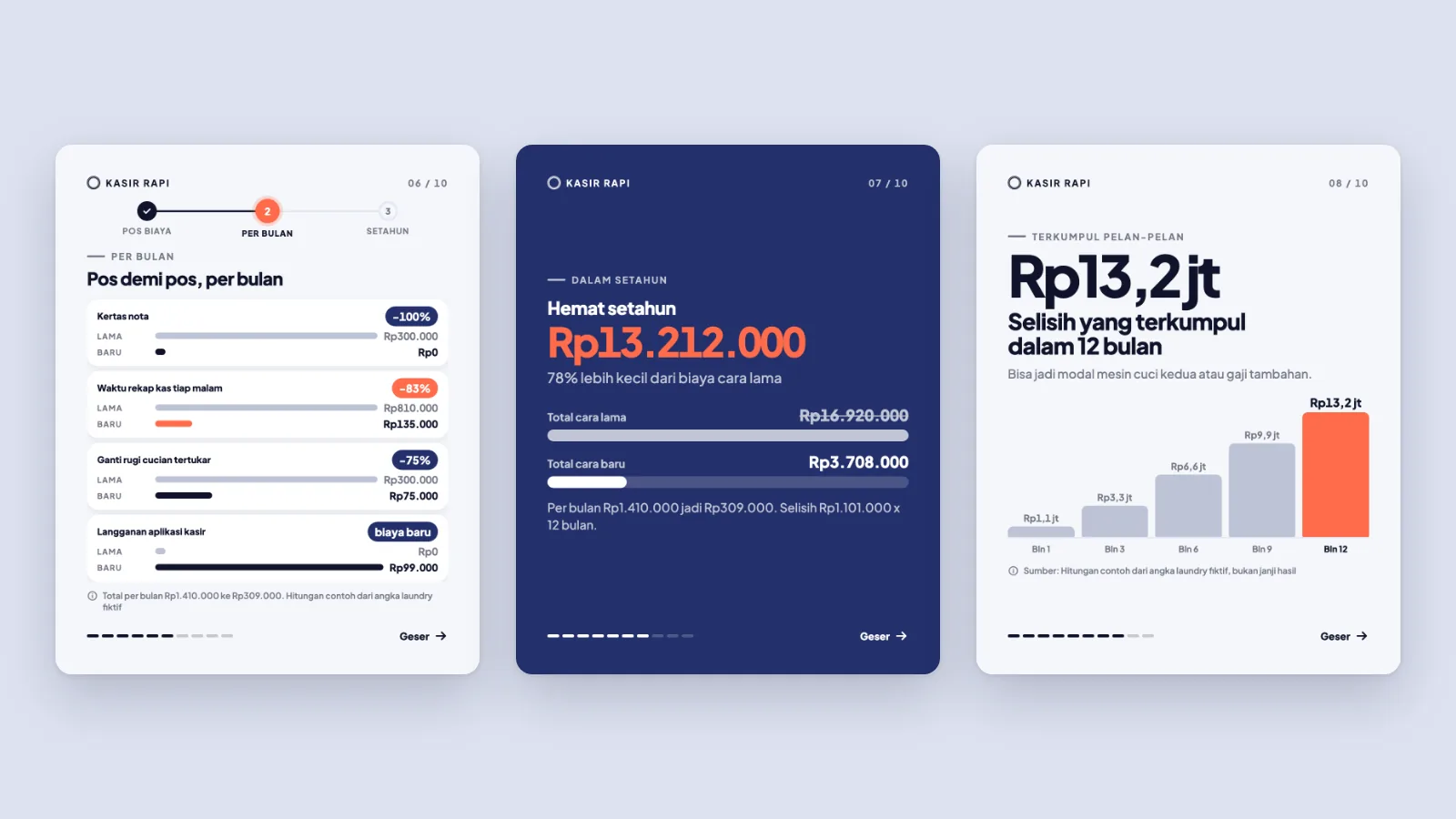
A sales carousel that proves a saving with open maths, for sellers of tools, apps, services, or refill products: each cost line gets one slide with the old and new formula (amount x price x times a month), the extra cost of the new way is written down too, then a line by line comparison with automatic percentages, the yearly saving with old vs new bars, and a chart of the difference adding up month by month. Every total and saving is worked out from one table of raw figures in the config, so the numbers match on every slide. 2 to 4 cost lines, 1080x1350 or 1080x1080.
Verified by SkillFlow
We checked every file in this skill automatically: no command that downloads and runs a program, no hidden code, no instruction telling your AI to ignore you.
- Loads from outside
- Fonts: Google Fonts
See the 5 files inside
skill.json10 KBSKILL.md8 KBprompt.md4 KBprompt.en.md4 KBfiles/carousel.html386 KB
Checked 14 Nov 2026
Part of SkillFlow Pro
Pro opens every skill in every category: copy, ZIP, Send to AI, install, save, and request new skills.
Get Pro Already subscribed? Sign inWhat you get
- A calculation table: each monthly cost line for the old and new way, totals, monthly saving, yearly saving, percentage
- An HTML template driven by one config object; raw figures are written once in HITUNG and every total is calculated
- One slide per cost line with the full formula, including the extra cost of the new way
- A line by line comparison, the yearly saving, and a running total chart, all from the same figures
- PNG per slide at 1080x1350 (4:5) or 1080x1080 (1:1), plus a combined sheet, 4 palettes
- A caption summarising the maths with a call to ask for a calculation by chat
Good fit
- Sellers of apps, tools, or machines that feel expensive at first
- Subscription service businesses showing the hidden cost of the old way
- Sellers of refill or bulk products whose saving shows after a month
- Consultants explaining an efficiency gain to a prospective client
Not for
- It does not invent figures; without real data, state clearly that it is a sample calculation
- At most 4 cost lines so the line by line comparison fits on one slide
- Not a bundle promotion or a score comparison of two products
- The saving is a sample calculation, not a promise for every buyer
About this skill
/carousel-hitungan-hemat Make a savings math carousel for a laundry switching from handwritten receipts to a point of sale app, covering paper, time spent on the daily tally, compensation for mixed-up laundry, and a subscription of 99 a month
Show more
A sales carousel that proves a saving with open maths, for sellers of tools, apps, services, or refill products: each cost line gets one slide with the old and new formula (amount x price x times a month), the extra cost of the new way is written down too, then a line by line comparison with automatic percentages, the yearly saving with old vs new bars, and a chart of the difference adding up month by month. Every total and saving is worked out from one table of raw figures in the config, so the numbers match on every slide. 2 to 4 cost lines, 1080x1350 or 1080x1080.


User reviews
FAQ
Why are the figures not typed straight onto the slides?
So they always agree. Each line's raw figures are written once in HITUNG, and the formulas, monthly totals, yearly saving, percentage, and chart are calculated from there. Changing one price updates every slide that uses it.
Do I have to include new costs such as a subscription?
Yes. Add it as its own line with an old way cost of zero. Maths that hides the new cost falls apart the moment a buyer does the sums, and that is where trust is lost.
How do I count a line such as working time?
Hours per day x the value of one hour x working days a month. Use a sensible hourly value for that business, such as wages divided by hours worked, and show it on the slide so readers can swap in their own.
Which AI can I use it with?
Copy the prompt into a chat AI (ChatGPT, Claude, Gemini, DeepSeek); or download the ZIP and install it in an AI agent (Claude Code, Codex, Antigravity, Hermes Agent, Cursor, GitHub Copilot, Gemini CLI, OpenCode, Kimi Code, Trae), which then builds the files for you.
What is in the ZIP?
One folder named carousel-hitungan-hemat with SKILL.md (the instructions an AI agent reads) and the prompt, 5 files in all. Extract it into your agent's skills folder, or install it with npx skillflow-ai add carousel-hitungan-hemat. Pro only.
Is there a per-use fee or credits?
Not from SkillFlow. The skill runs on the AI you already use, so any cost follows that plan.
Which plan includes it?
SkillFlow Pro. It opens every skill in every category.
Can I use my own colours and brand?
Yes. Pick a colour theme on this page, or fill in your brand profile once; both go into the prompt you copy and into the ZIP.
Can I share what I made?
Pro members can upload the result and get a page at share.skillflow.ai.id to send to anyone. The page carries a small "Made with SkillFlow AI" mark.
Is there a download limit?
Yes, per day: 50 skills on Pro, 10 on other plans. Downloading a skill again on the same day does not count.



