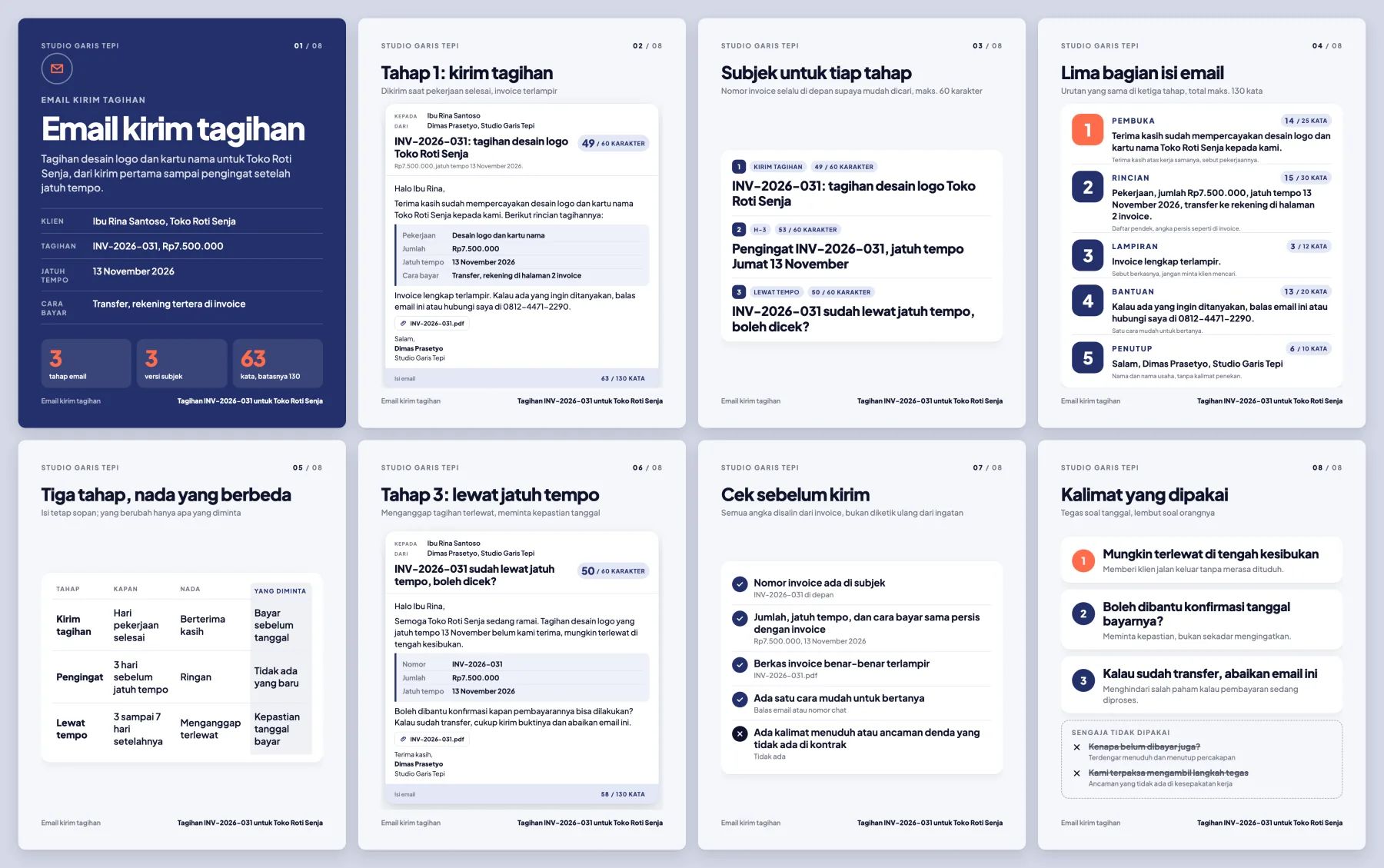
Eight cards: cover, invoice email, subject per stage, five parts, stage table, overdue email, checks, wording
SKILL.md contents
Premium subscribers can read, copy, and install this skill.
Unlock with Premium Sign inInvoice Email
Description
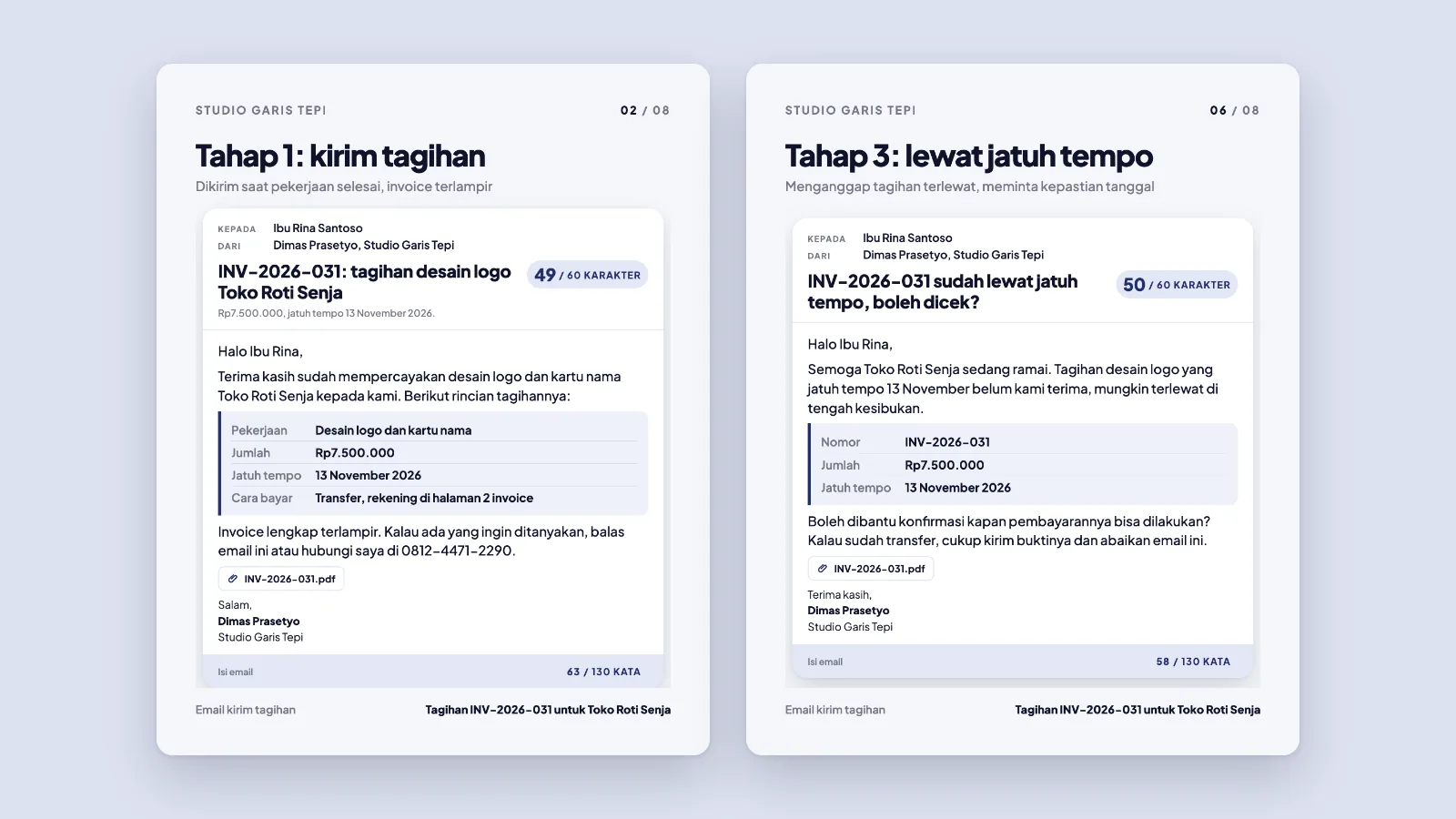
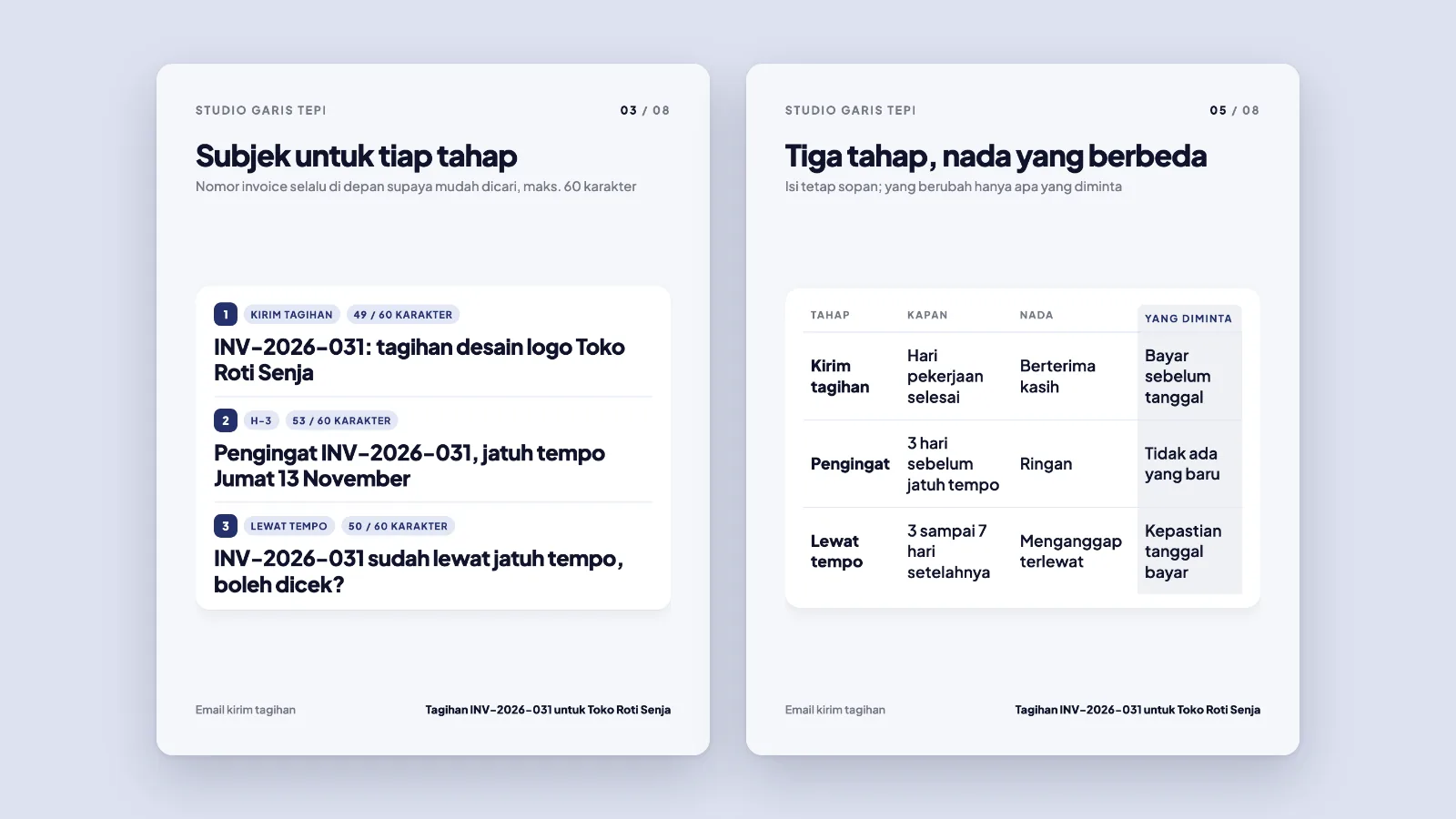
Write a polite, clear invoice email for service clients or wholesale orders, in three stages: sending the invoice, a reminder before the due date, and a follow-up after it is overdue. Subject lines with the invoice number first, a body of max 130 words in five parts (thanks, amount, due date and how to pay, attachment, how to ask), a tone that never accuses, and only the numbers on the invoice. The result renders as cards with email mockups showing subject and body counts.
Verified by SkillFlow
We checked every file in this skill automatically: no command that downloads and runs a program, no hidden code, no instruction telling your AI to ignore you.
- Loads from outside
- Fonts: Google Fonts
See the 7 files inside
skill.json8 KBSKILL.md7 KBprompt.md3 KBprompt.en.md3 KBfiles/brief.md1 KBfiles/contoh-hasil.md4 KBfiles/kartu.html65 KB
Checked 14 Nov 2026
Part of SkillFlow Pro
Pro opens every skill in every category: copy, ZIP, Send to AI, install, save, and request new skills.
Get Pro Already subscribed? Sign inWhat you get
- Three emails: sending the invoice, a reminder before the due date, an overdue follow-up
- A subject line per stage with the invoice number first, max 60 characters, plus preview text
- A five-part body of max 130 words with a details box for amount, due date, and how to pay
- A table of when each stage is sent and its tone, pre-send checks, wording to use and to avoid
- Result cards with email mockups and automatic subject character and body word counts
Good fit
- Freelancers and service studios (design, photo, video, writing) billing clients by email
- Consultants and private tutors sending monthly invoices
- Wholesalers or caterers billing orders on payment terms
- Anyone who feels awkward chasing payment and wants wording that is firm but polite
Not for
- It does not create the invoice or calculate tax; numbers are copied from an invoice you already made
- Not a legal demand letter; for long silent debts, talk directly or get professional help
- It does not send emails or schedule reminders; you get ready-to-paste text
- Late fees are only mentioned if they are actually in the contract or agreement
About this skill
/copy-email-tagihan Write an invoice email to Ms Rina at Senja Bakery for invoice INV-2026-031, due 13 November, plus a follow-up if it goes overdue
Show more
Write a polite, clear invoice email for service clients or wholesale orders, in three stages: sending the invoice, a reminder before the due date, and a follow-up after it is overdue. Subject lines with the invoice number first, a body of max 130 words in five parts (thanks, amount, due date and how to pay, attachment, how to ask), a tone that never accuses, and only the numbers on the invoice. The result renders as cards with email mockups showing subject and body counts.
User reviews
FAQ
Why does the invoice number go first in the subject?
Clients handling many bills search by invoice number, and finance teams often read only the subject. Putting the number first makes your email easy to find and keeps it from being cut off on a phone.
What if the client is weeks past the due date?
The stage three email still assumes the bill was missed and asks for a payment date. If there is still no reply, change channel: a call or direct chat works far better than a second and third email that get harsher each time.
Which AI can I use it with?
Copy the prompt into a chat AI (ChatGPT, Claude, Gemini, DeepSeek); or download the ZIP and install it in an AI agent (Claude Code, Codex, Antigravity, Hermes Agent, Cursor, GitHub Copilot, Gemini CLI, OpenCode, Kimi Code, Trae), which then builds the files for you.
What is in the ZIP?
One folder named copy-email-tagihan with SKILL.md (the instructions an AI agent reads) and the prompt, 7 files in all. Extract it into your agent's skills folder, or install it with npx skillflow-ai add copy-email-tagihan. Pro only.
Is there a per-use fee or credits?
Not from SkillFlow. The skill runs on the AI you already use, so any cost follows that plan.
Which plan includes it?
SkillFlow Pro. It opens every skill in every category.
Can it use my brand details?
Yes. Fill in your brand profile once (name, product, price, contact) and it goes into every prompt you copy.
Can I share what I made?
Pro members can upload the result and get a page at share.skillflow.ai.id to send to anyone. The page carries a small "Made with SkillFlow AI" mark.
Is there a download limit?
Yes, per day: 50 skills on Pro, 10 on other plans. Downloading a skill again on the same day does not count.