

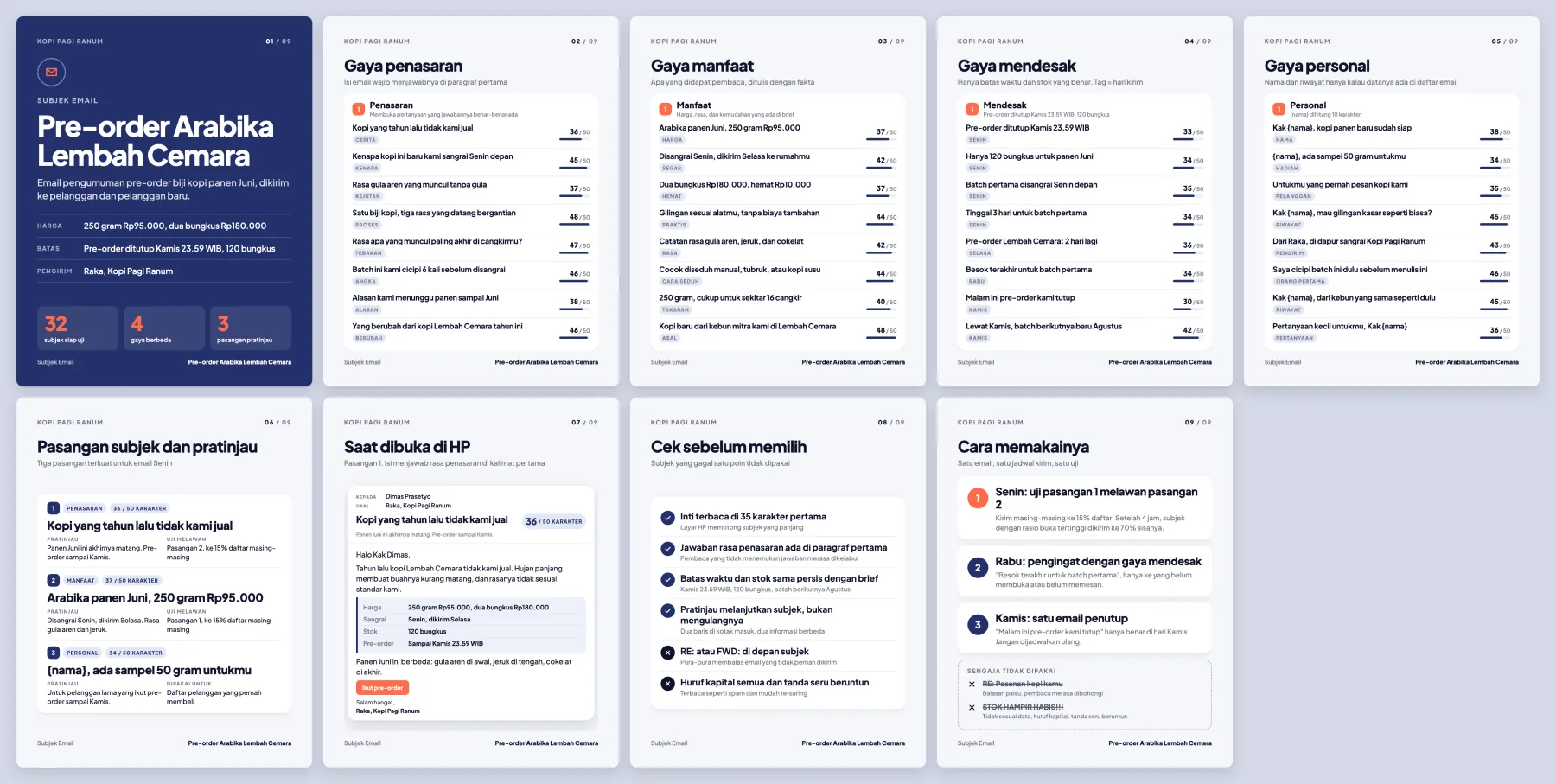
Nine cards: brief, 32 subject lines in 4 styles, preview text pairs, email view, checks, and how to use them
SKILL.md contents
Premium subscribers can read, copy, and install this skill.
Unlock with Premium Sign inEmail Subject Lines
Description
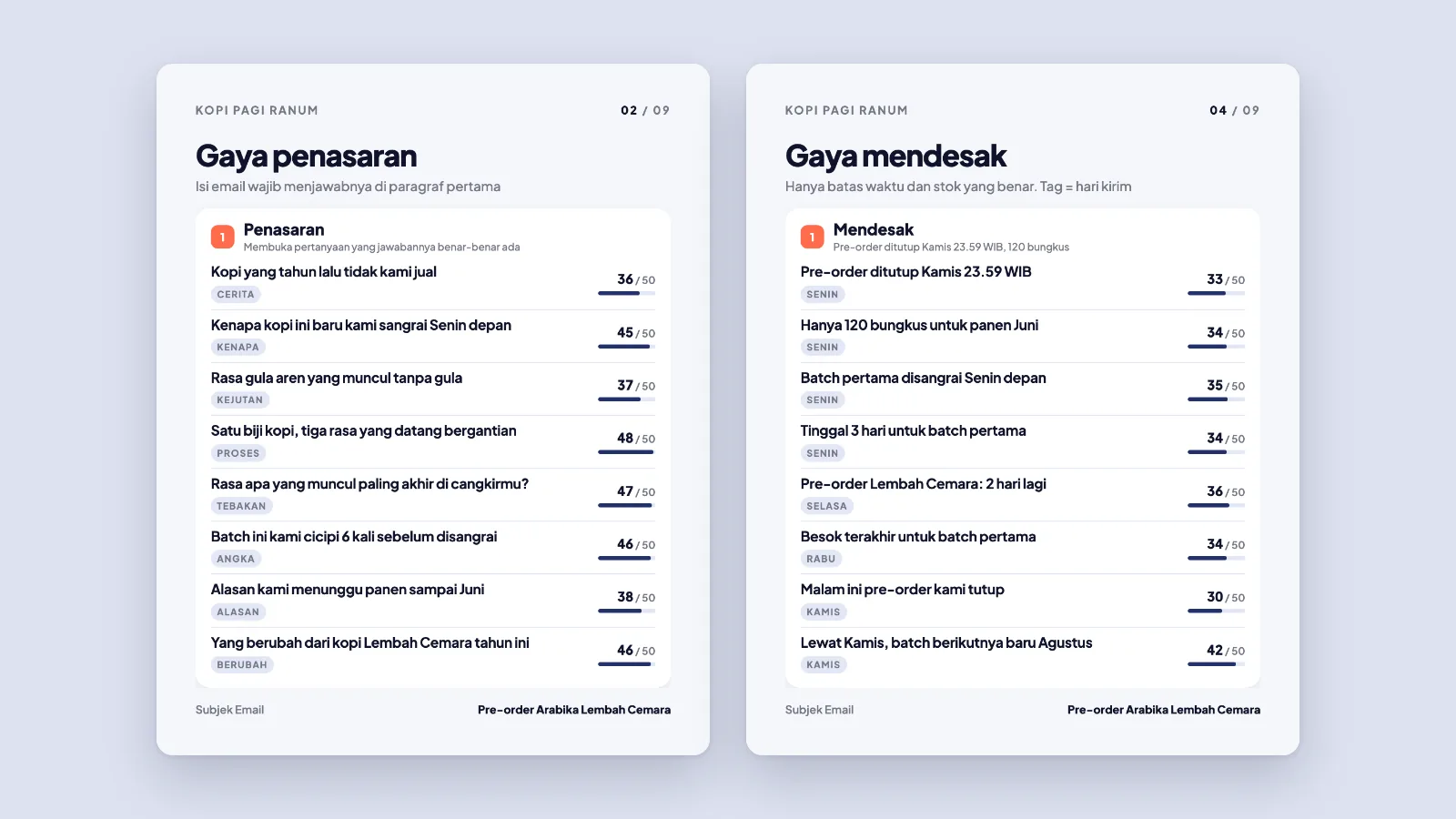
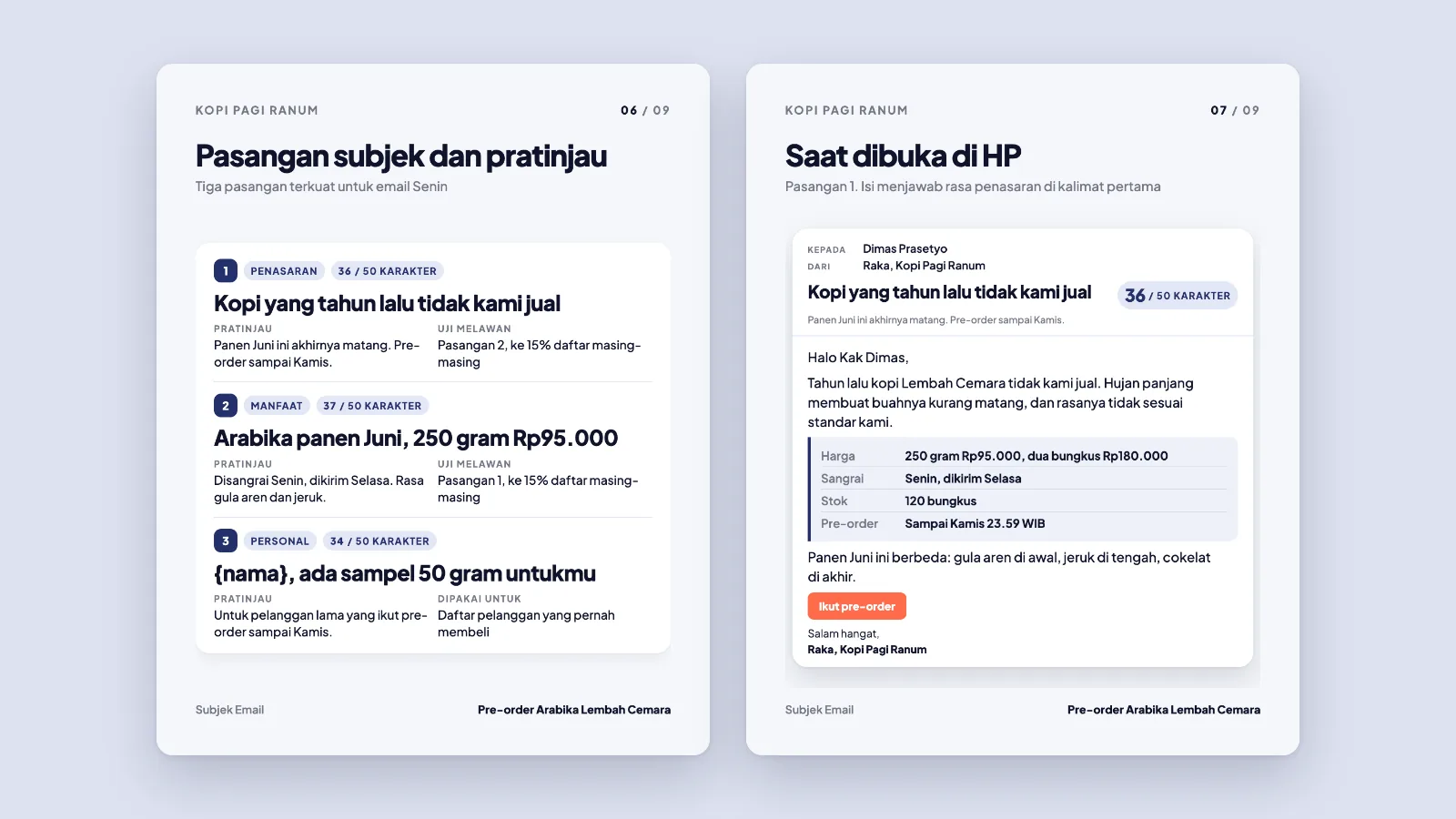
A bank of subject lines for one email you plan to send: 32 subject lines in four styles (curiosity, benefit, urgency, personal), 50 characters max with the point in the first 35, each with its pattern. Includes three subject and preview text pairs that complete each other, a send schedule for urgency lines that only use real deadlines, rules for using the reader's name, a six-point check before choosing, and a plan for testing two subject lines. Rendered as cards with automatic character counts.
Verified by SkillFlow
We checked every file in this skill automatically: no command that downloads and runs a program, no hidden code, no instruction telling your AI to ignore you.
- Loads from outside
- Fonts: Google Fonts
See the 7 files inside
skill.json9 KBSKILL.md7 KBprompt.md3 KBprompt.en.md3 KBfiles/brief.md2 KBfiles/contoh-hasil.md6 KBfiles/kartu.html66 KB
Checked 14 Nov 2026
Part of SkillFlow Pro
Pro opens every skill in every category: copy, ZIP, Send to AI, install, save, and request new skills.
Get Pro Already subscribed? Sign inWhat you get
- 32 email subject lines in 4 styles (curiosity, benefit, urgency, personal), with character counts and patterns
- 3 subject and preview text pairs that complete each other
- A send schedule for urgency lines, using only real deadlines and stock
- A six-point check before choosing and a plan for testing two subject lines
- A fill-in brief, a full worked example, a scoring rubric, and subject lines deliberately left out
- An HTML card template that counts characters by itself and exports to PNG
Good fit
- Online shops that email customers regularly and want more opens
- Owners preparing an announcement, reminder, and last-call email sequence
- Writers who want subject lines to test, not a single guess
Not for
- It does not write the email body; use Promo Email or Newsletter for that
- It does not invent deadlines, stock, or buyer history that are not in the brief
- It does not send emails or measure open rates; you get text and cards
About this skill
/copy-subjek-email Write subject lines for the email announcing a pre-order of our new harvest coffee beans, pre-order closes Thursday, four styles, plus the preview text
Show more
A bank of subject lines for one email you plan to send: 32 subject lines in four styles (curiosity, benefit, urgency, personal), 50 characters max with the point in the first 35, each with its pattern. Includes three subject and preview text pairs that complete each other, a send schedule for urgency lines that only use real deadlines, rules for using the reader's name, a six-point check before choosing, and a plan for testing two subject lines. Rendered as cards with automatic character counts.
User reviews
FAQ
Why 50 characters, and what does the point in the first 35 mean?
Phone inboxes usually show only about 35 to 40 characters of a subject line before cutting it off. The words that make people open have to come first; the rest is extra.
Can I use the reader's name in the subject?
Yes, if the name field in your list is clean. This skill counts {name} as 10 characters and gives a no-name version for lists where the name field is empty or messy.
How do I know which subject line works best?
Send two subject lines to two small groups (say 15% of the list each), wait about 4 hours, then send the one with the higher open rate to the rest. Keep the email body the same so the comparison is fair.
Which AI can I use it with?
Copy the prompt into a chat AI (ChatGPT, Claude, Gemini, DeepSeek); or download the ZIP and install it in an AI agent (Claude Code, Codex, Antigravity, Hermes Agent, Cursor, GitHub Copilot, Gemini CLI, OpenCode, Kimi Code, Trae), which then builds the files for you.
What is in the ZIP?
One folder named copy-subjek-email with SKILL.md (the instructions an AI agent reads) and the prompt, 7 files in all. Extract it into your agent's skills folder, or install it with npx skillflow-ai add copy-subjek-email. Pro only.
Is there a per-use fee or credits?
Not from SkillFlow. The skill runs on the AI you already use, so any cost follows that plan.
Which plan includes it?
SkillFlow Pro. It opens every skill in every category.
Can it use my brand details?
Yes. Fill in your brand profile once (name, product, price, contact) and it goes into every prompt you copy.
Can I share what I made?
Pro members can upload the result and get a page at share.skillflow.ai.id to send to anyone. The page carries a small "Made with SkillFlow AI" mark.
Is there a download limit?
Yes, per day: 50 skills on Pro, 10 on other plans. Downloading a skill again on the same day does not count.



