

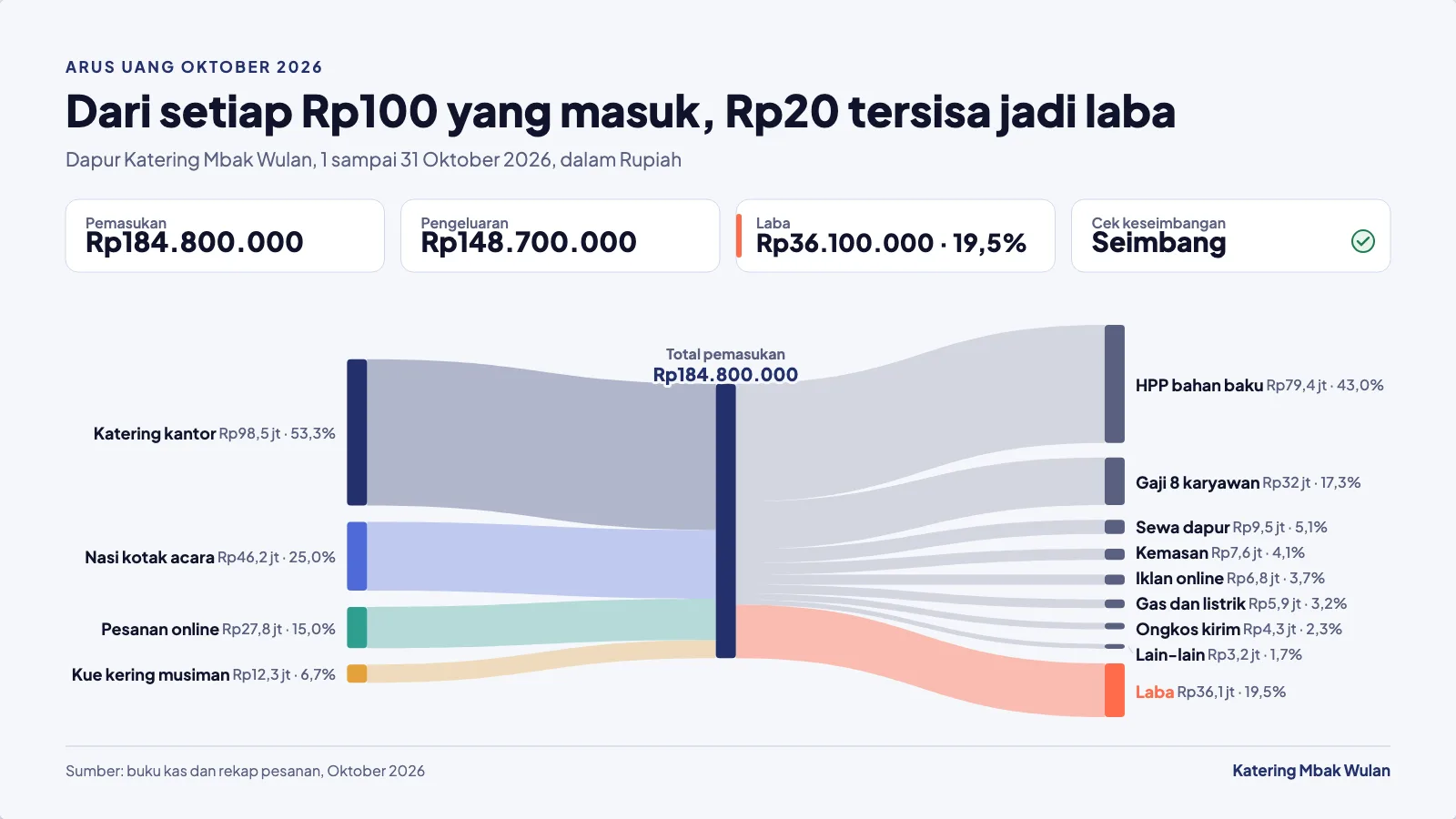
16:9 Sankey for a caterer: 4 income sources, 8 expense lines, 19.5% profit, balanced check
SKILL.md contents
Premium subscribers can read, copy, and install this skill.
Unlock with Premium Sign inMoney Flow Sankey Diagram
Description
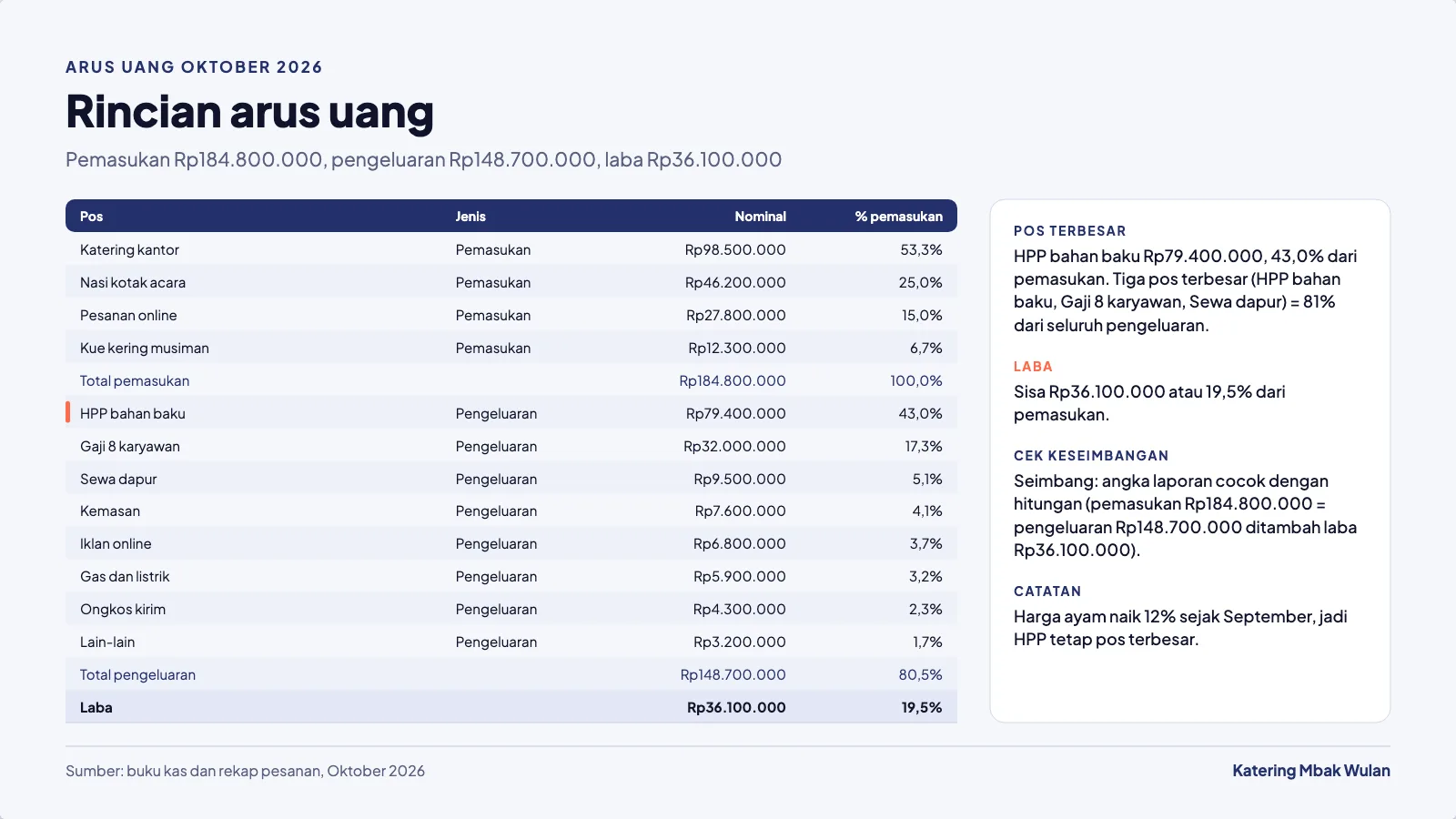
A Sankey diagram that shows where money comes from and where it goes: income from each source flows into one total, then out to expense lines and the remaining profit, or a red hatched shortfall when there is a loss. Ribbon widths follow the amounts, amount and percentage labels never overlap, and your report figures are checked automatically with a warning when they do not balance. A second slide holds the breakdown table and notes on the largest line. For small businesses, household budgets and foundation reports, downloaded as PDF, PNG, Word or Excel.
Verified by SkillFlow
We checked every file in this skill automatically: no command that downloads and runs a program, no hidden code, no instruction telling your AI to ignore you.
- Loads from outside
- Fonts: Google Fonts SkillFlow: directory.skillflow.ai.id
See the 6 files inside
skill.json10 KBSKILL.md6 KBprompt.md6 KBprompt.en.md6 KBfiles/contoh/yayasan-defisit-4x5.html35 KBfiles/diagram.html35 KB
Checked 14 Nov 2026
Part of SkillFlow Pro
Pro opens every skill in every category: copy, ZIP, Send to AI, install, save, and request new skills.
Get Pro Already subscribed? Sign inWhat you get
- Summary: total in and out, profit or loss and its percentage, the largest line, the balance check result
- A three-column Sankey diagram (sources, total, expense lines and profit) with ribbon widths following the amounts
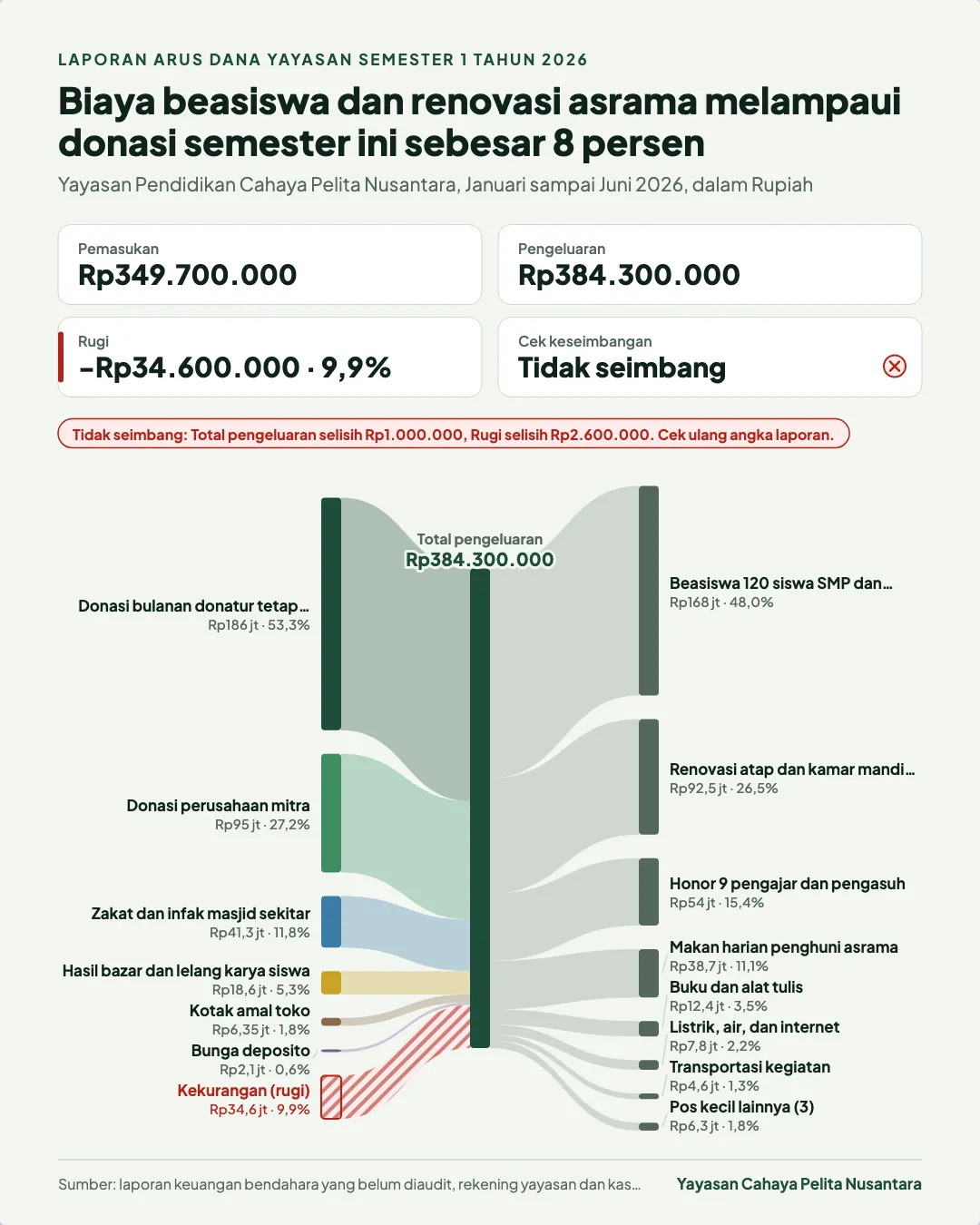
- A loss shown honestly as a red hatched shortfall node so in and out still balance
- A balance check card and a warning strip when report figures differ from the calculation
- A breakdown slide: a table of lines with percent of income, a marker on the largest line, a notes box
- Small lines merged in the diagram, automatic labels without overlaps
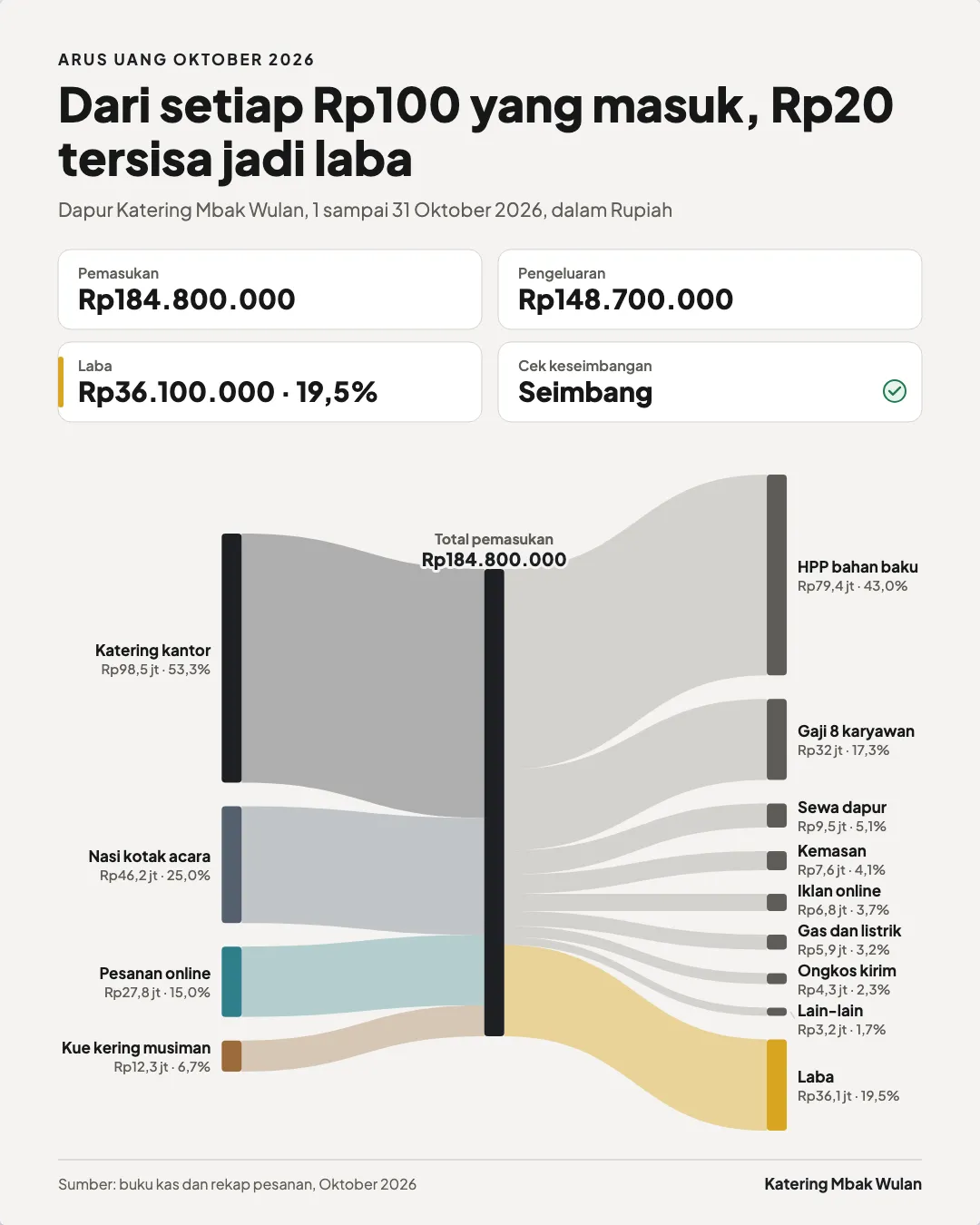
- 16:9 and 4:5 sizes, 3 palettes, PDF, PNG, Word and Excel download with flow, breakdown and summary sheets
Good fit
- Small businesses explaining where monthly revenue goes in a team meeting or to partners
- Foundations, mosques and communities reporting donations openly to donors
- Households summing up income and spending in one picture
Not for
- Not a daily cash flow by date or a comparison across periods
- It does not fix numbers on its own; when a report does not balance, the difference is shown and you are asked
- Not a replacement for official audited financial statements
About this skill
/diagram-sankey-arus-uang Make a money flow Sankey for my catering business in October: income from office catering, boxed meals, online orders and cookies; spending on ingredients, wages, rent, ads and other costs, and check whether the 36.1 million profit is right
Show more
A Sankey diagram that shows where money comes from and where it goes: income from each source flows into one total, then out to expense lines and the remaining profit, or a red hatched shortfall when there is a loss. Ribbon widths follow the amounts, amount and percentage labels never overlap, and your report figures are checked automatically with a warning when they do not balance. A second slide holds the breakdown table and notes on the largest line. For small businesses, household budgets and foundation reports, downloaded as PDF, PNG, Word or Excel.
User reviews
FAQ
What if my business made a loss this month?
The Profit node is replaced by a red hatched Shortfall (loss) node in the left column, so the in and out ribbons still match and the loss is plain to see, not hidden.
What does the Balance check check?
The total in, total out and balance from your report are compared with the sum of the lines. If any differs, even by one unit, the card shows a cross and the difference appears in a warning strip.
I have a lot of expense lines, will it stay readable?
The diagram holds 10 lines; the smallest of the rest are merged automatically. You can also merge lines below a set percentage in the diagram only, while the breakdown table still lists them all.
Which AI can I use it with?
Copy the prompt into a chat AI (ChatGPT, Claude, Gemini, DeepSeek); or download the ZIP and install it in an AI agent (Claude Code, Codex, Antigravity, Hermes Agent, Cursor, GitHub Copilot, Gemini CLI, OpenCode, Kimi Code, Trae), which then builds the files for you.
What is in the ZIP?
One folder named diagram-sankey-arus-uang with SKILL.md (the instructions an AI agent reads) and the prompt, 6 files in all. Extract it into your agent's skills folder, or install it with npx skillflow-ai add diagram-sankey-arus-uang. Pro only.
Is there a per-use fee or credits?
Not from SkillFlow. The skill runs on the AI you already use, so any cost follows that plan.
Which plan includes it?
SkillFlow Pro. It opens every skill in every category.
Can I use my own colours and brand?
Yes. Pick a colour theme on this page, or fill in your brand profile once; both go into the prompt you copy and into the ZIP.
Can I share what I made?
Pro members can upload the result and get a page at share.skillflow.ai.id to send to anyone. The page carries a small "Made with SkillFlow AI" mark.
Is there a download limit?
Yes, per day: 50 skills on Pro, 10 on other plans. Downloading a skill again on the same day does not count.



