

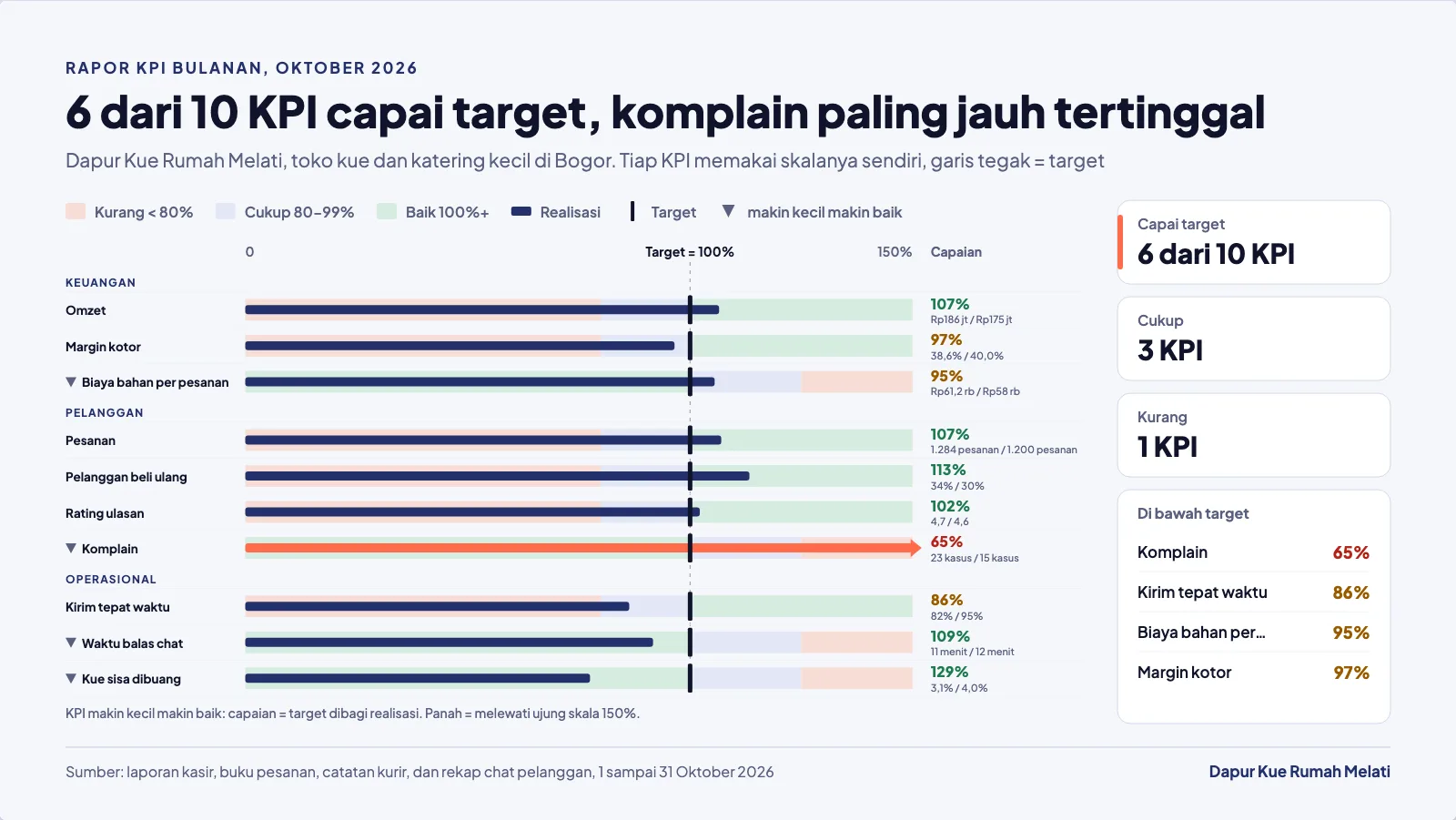
A cake shop, 10 KPIs in 3 groups: revenue, margin, complaints, on-time delivery, chat reply time
SKILL.md contents
Premium subscribers can read, copy, and install this skill.
Unlock with Premium Sign inKPI Bullet Chart
Description
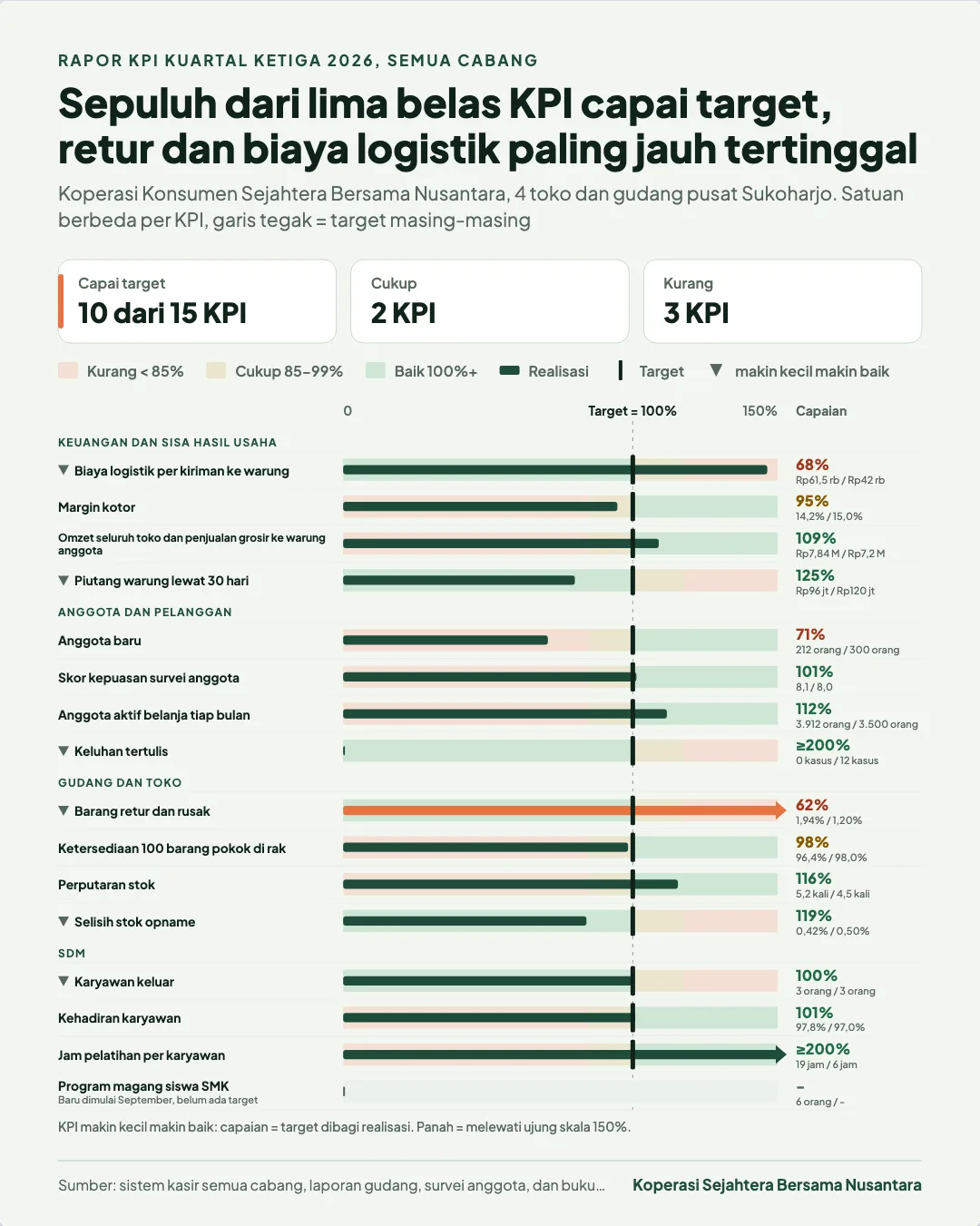
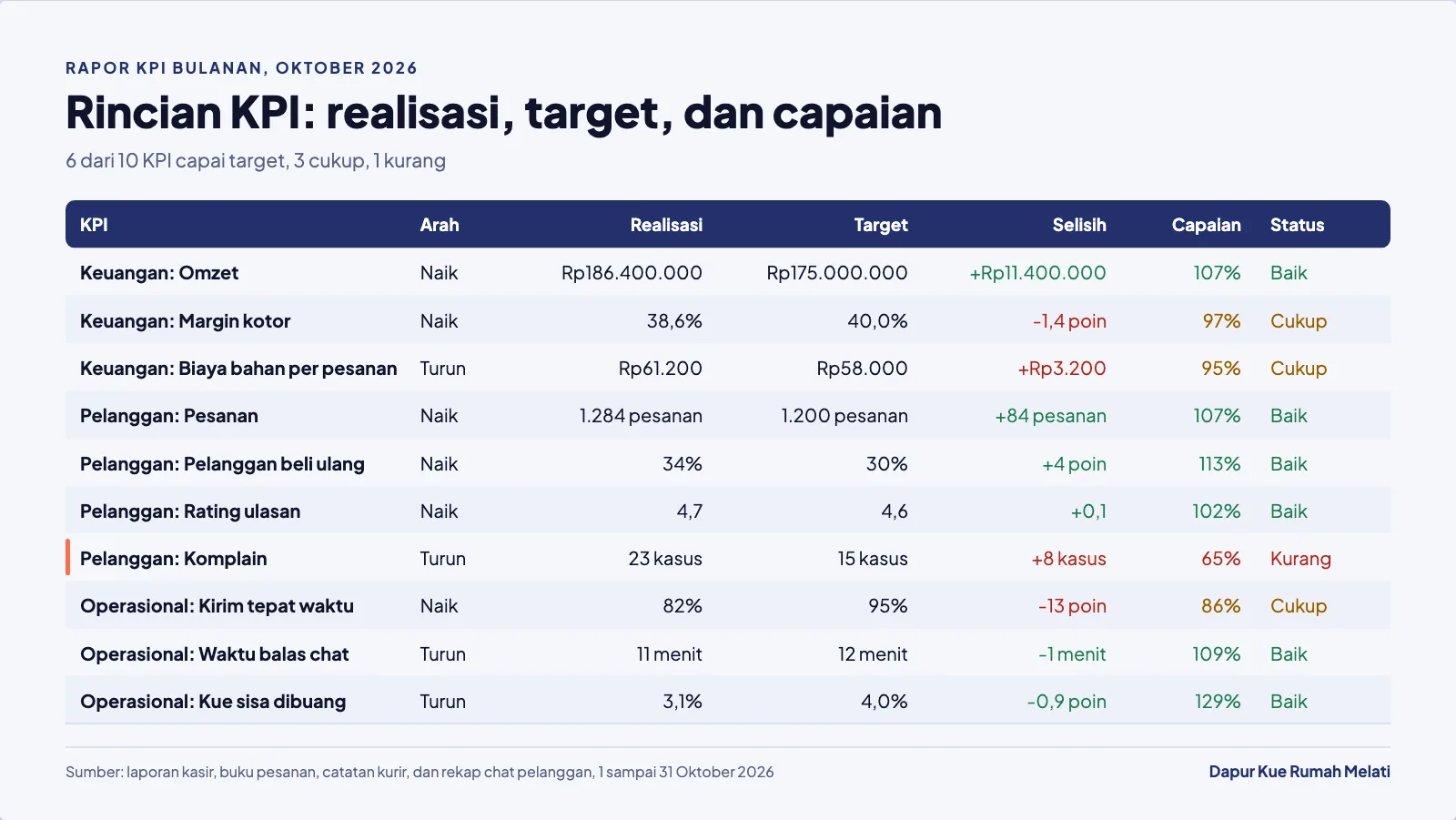
A bullet chart for a monthly or quarterly KPI scorecard: many KPIs with different units (money, percent, counts, minutes) stacked with a scale per KPI, so every target falls on one vertical line. Each row has an actual bar, Behind, Close, and Good bands, and a coloured achievement percent; lower-is-better KPIs such as complaints and costs are calculated in reverse. It has groups, cards counting KPIs on target, a below-target list, and a table page. Download PDF, PNG, Word, or Excel.
Verified by SkillFlow
We checked every file in this skill automatically: no command that downloads and runs a program, no hidden code, no instruction telling your AI to ignore you.
- Loads from outside
- Fonts: Google Fonts SkillFlow: directory.skillflow.ai.id
See the 6 files inside
skill.json9 KBSKILL.md8 KBprompt.md6 KBprompt.en.md6 KBfiles/contoh/koperasi-16-kpi-4x5.html36 KBfiles/diagram.html36 KB
Checked 14 Nov 2026
Part of SkillFlow Pro
Pro opens every skill in every category: copy, ZIP, Send to AI, install, save, and request new skills.
Get Pro Already subscribed? Sign inWhat you get
- A two-page HTML file: a KPI bullet chart and a detail table
- A scale per KPI with targets on one vertical line, for money, percent, and counts at once
- Direction per KPI: higher or lower is better, with bands and achievement flipped
- Coloured achievement percent, Good, Close, Behind status, and the lowest KPI marked
- Cards for on target, close, and behind, plus a list of KPIs below target
- Download PDF, PNG, Word, and Excel buttons with the numbers
Good fit
- Business owners making a monthly KPI scorecard for themselves, investors, or a board
- Team or branch heads reporting 6 to 16 measures at once to their manager
- Cooperatives and foundations with a scorecard per area: finance, members, operations, people
Not for
- It does not show trends from month to month; one chart is one period
- It does not compare many people on one measure; use Target vs Actual Chart for that
- It does not set targets; it only draws the targets you already have
- It does not pull data from apps automatically; numbers are pasted or typed
About this skill
/grafik-bullet-kpi Make an October KPI bullet chart for my cake shop: revenue, margin, orders, rating, complaints, on-time delivery, and chat reply time, each with its own target
Show more
A bullet chart for a monthly or quarterly KPI scorecard: many KPIs with different units (money, percent, counts, minutes) stacked with a scale per KPI, so every target falls on one vertical line. Each row has an actual bar, Behind, Close, and Good bands, and a coloured achievement percent; lower-is-better KPIs such as complaints and costs are calculated in reverse. It has groups, cards counting KPIs on target, a below-target list, and a table page. Download PDF, PNG, Word, or Excel.
User reviews
FAQ
How are lower-is-better KPIs calculated?
For complaints, costs, returns, or waiting time, achievement = target divided by actual. 23 complaints against a target of 15 becomes 65 percent. The bands flip too: Good on the left, Behind on the right. An actual of 0 is shown as 200 percent or more.
Why does each KPI have its own scale?
Because the units differ: revenue in hundreds of millions, margin in tens of percent, a rating under five. With a scale per KPI every target falls on the same vertical line, so you read the distance from target, not the size of the number.
How many KPIs fit?
Up to 12 KPIs at 16:9 and 16 at 4:5. Beyond that, split by group into two charts so the text stays readable.
Which AI can I use it with?
Copy the prompt into a chat AI (ChatGPT, Claude, Gemini, DeepSeek); or download the ZIP and install it in an AI agent (Claude Code, Codex, Antigravity, Hermes Agent, Cursor, GitHub Copilot, Gemini CLI, OpenCode, Kimi Code, Trae), which then builds the files for you.
What is in the ZIP?
One folder named grafik-bullet-kpi with SKILL.md (the instructions an AI agent reads) and the prompt, 6 files in all. Extract it into your agent's skills folder, or install it with npx skillflow-ai add grafik-bullet-kpi. Pro only.
Is there a per-use fee or credits?
Not from SkillFlow. The skill runs on the AI you already use, so any cost follows that plan.
Which plan includes it?
SkillFlow Pro. It opens every skill in every category.
Can I use my own colours and brand?
Yes. Pick a colour theme on this page, or fill in your brand profile once; both go into the prompt you copy and into the ZIP.
Can I share what I made?
Pro members can upload the result and get a page at share.skillflow.ai.id to send to anyone. The page carries a small "Made with SkillFlow AI" mark.
Is there a download limit?
Yes, per day: 50 skills on Pro, 10 on other plans. Downloading a skill again on the same day does not count.



