

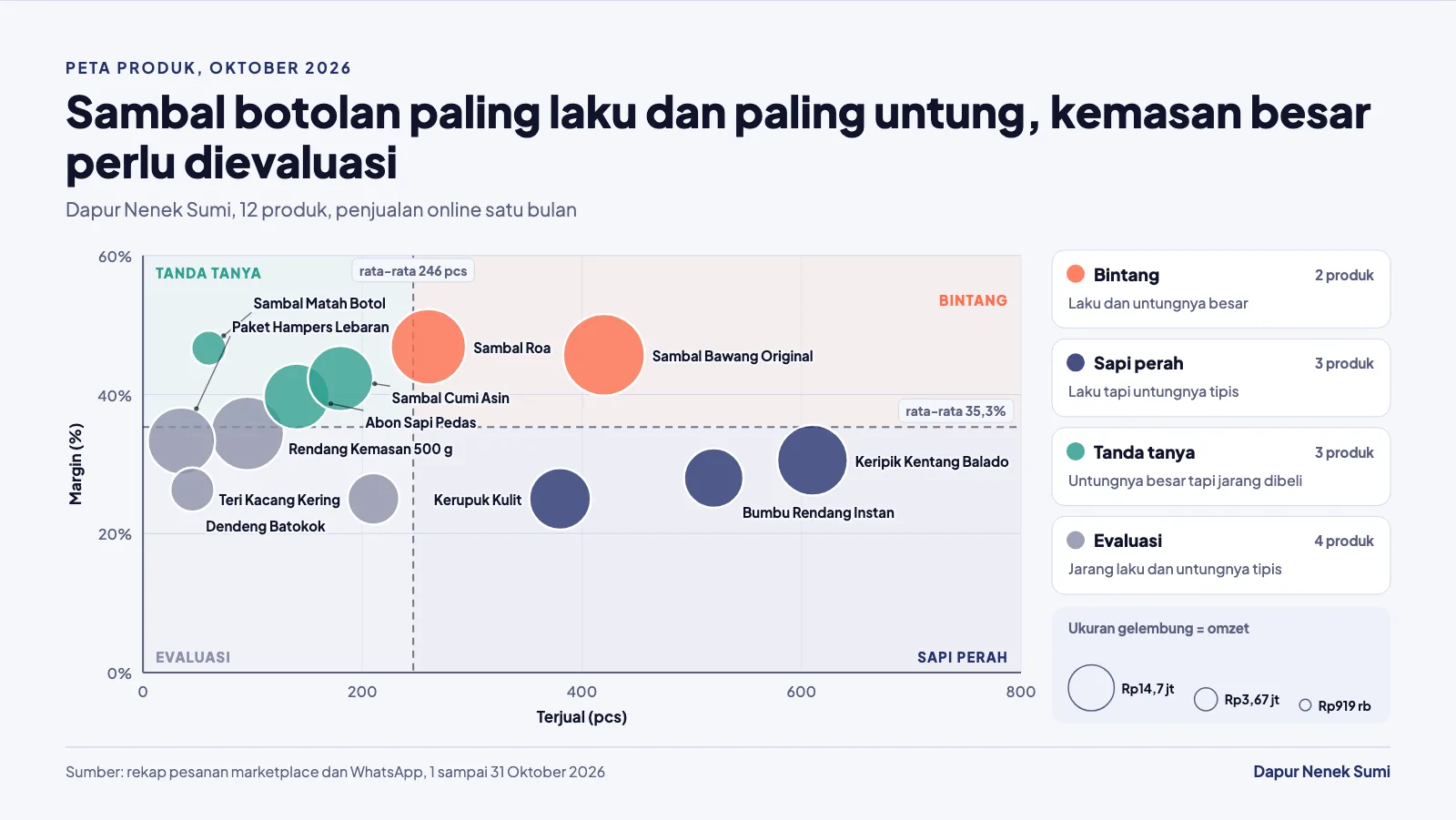
16:9 bubble chart: 12 products, four colour-coded quadrants, labels moved with leader lines
SKILL.md contents
Premium subscribers can read, copy, and install this skill.
Unlock with Premium Sign inProduct Bubble Chart
Description
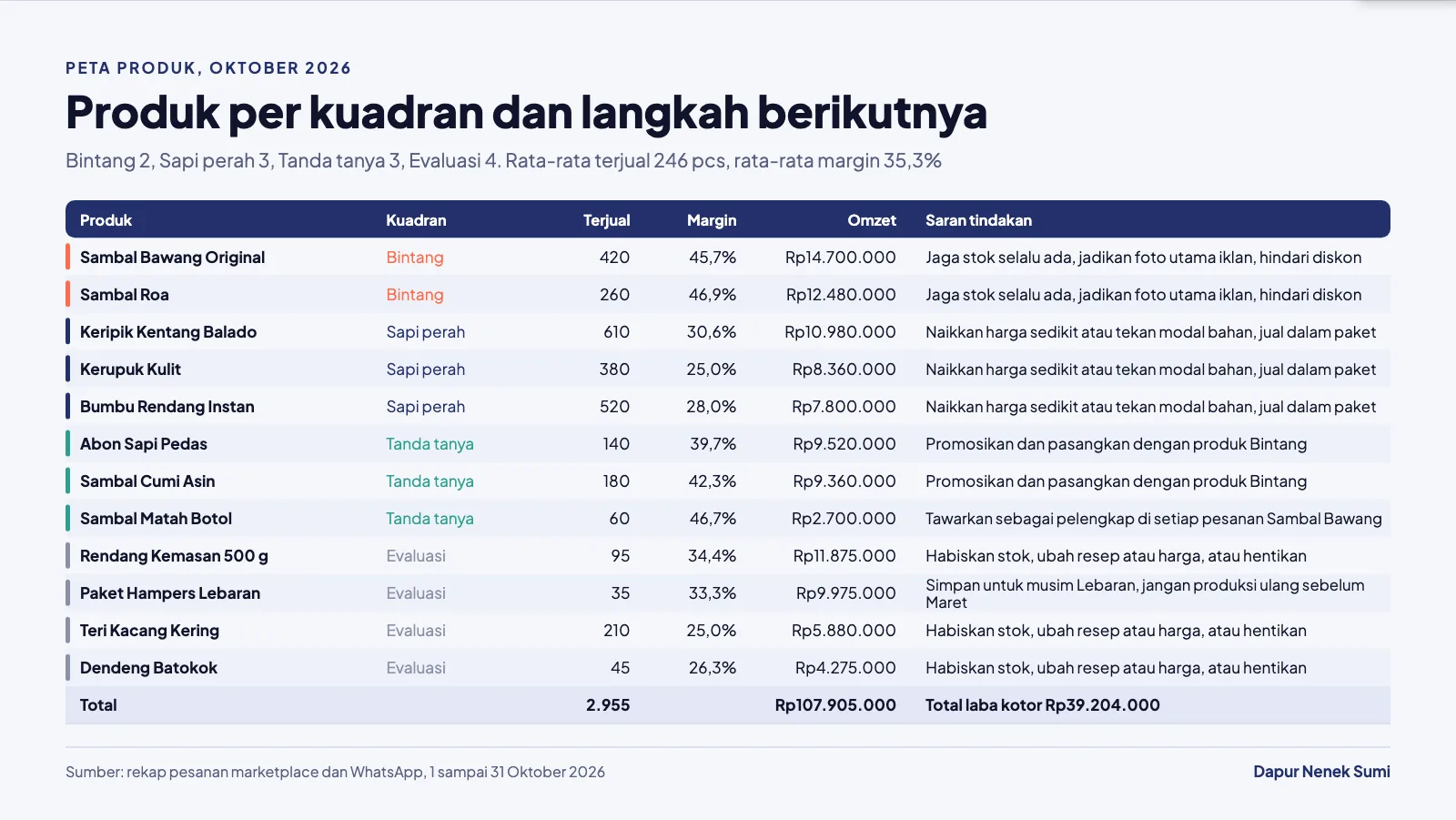
A bubble chart for online shops and small businesses with 5 to 20 products: one bubble per product, units sold on X, margin percent on Y (from price and cost), bubble size by revenue, gross profit, or stock. Average lines or your own cut-offs split products into Star, Cash cow, Question mark, and Review quadrants with short meanings, and name labels move automatically so they never overlap, with leader lines. A second page lists products by quadrant with actions. Download PDF, PNG, Word, or Excel.
Verified by SkillFlow
We checked every file in this skill automatically: no command that downloads and runs a program, no hidden code, no instruction telling your AI to ignore you.
- Loads from outside
- Fonts: Google Fonts SkillFlow: directory.skillflow.ai.id
See the 6 files inside
skill.json9 KBSKILL.md5 KBprompt.md6 KBprompt.en.md6 KBfiles/contoh/20-produk-4x5.html37 KBfiles/diagram.html36 KB
Checked 14 Nov 2026
Part of SkillFlow Pro
Pro opens every skill in every category: copy, ZIP, Send to AI, install, save, and request new skills.
Get Pro Already subscribed? Sign inWhat you get
- Margin, revenue, gross profit, and quadrant per product calculated from units, price, and cost
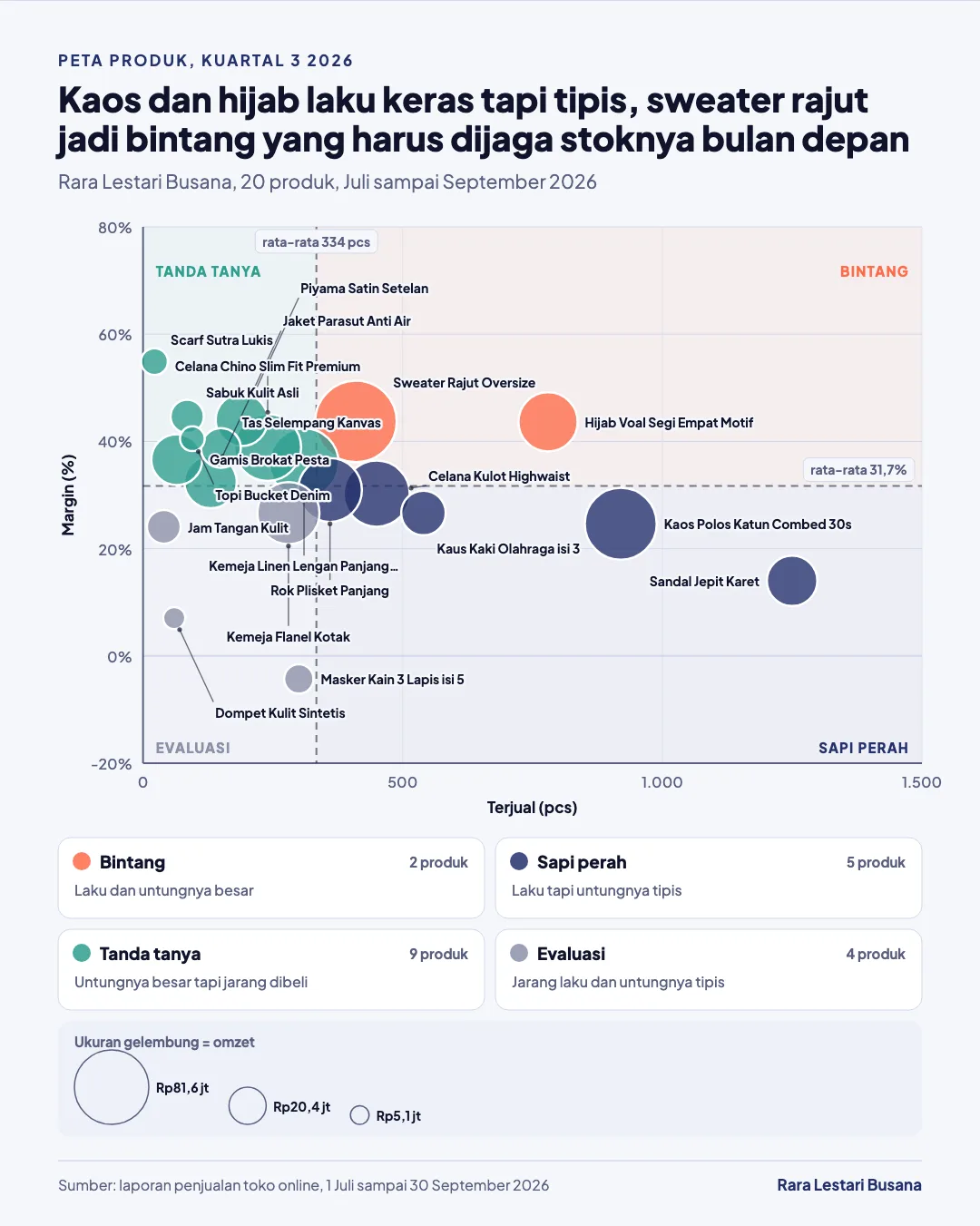
- A bubble chart: area proportional to value, tidy automatic axes, negative margins allowed
- Average lines or your own cut-offs split 4 labelled, colour-coded quadrants
- Product name labels never overlap: moved automatically with leader lines
- Quadrant cards with product counts and meanings, a bubble size legend
- A table by quadrant with suggested actions; download PDF, PNG (ZIP), Word, and Excel with numbers
Good fit
- Online shops and small businesses with 5 to 20 products deciding what to protect, push, or drop
- Monthly meetings or investor reports that need one picture of the product range
- Consultants helping small businesses rethink prices and menus
Not for
- Not a task or idea priority matrix; this is for products with sales and margin numbers
- Not a comparison of several brands across many aspects; use a radar chart for that
- More than 20 products will not draw neatly; group them by category first
- Suggested actions are general per quadrant, not an analysis of why sales moved
About this skill
/grafik-gelembung-produk Make a bubble chart of my coffee shop's 12 products this month: units sold against margin, bubble size by revenue, then a table of actions per quadrant
Show more
A bubble chart for online shops and small businesses with 5 to 20 products: one bubble per product, units sold on X, margin percent on Y (from price and cost), bubble size by revenue, gross profit, or stock. Average lines or your own cut-offs split products into Star, Cash cow, Question mark, and Review quadrants with short meanings, and name labels move automatically so they never overlap, with leader lines. A second page lists products by quadrant with actions. Download PDF, PNG, Word, or Excel.
User reviews
FAQ
What if I don't know the cost of each product?
Enter the margin percent directly for that product. The chart still works; gross profit is then calculated from the margin you entered.
Where do the quadrant lines come from?
By default they are the average units sold and average margin across all products. If you have your own cut-off, such as a 35 percent margin target, enter it and the quadrants are recalculated.
What if product labels still overlap?
Each label is tried in a dozen positions around its bubble. If no spot is free, it sits on the bubble and the Console warns you; shorten the product name or show fewer products.
Which AI can I use it with?
Copy the prompt into a chat AI (ChatGPT, Claude, Gemini, DeepSeek); or download the ZIP and install it in an AI agent (Claude Code, Codex, Antigravity, Hermes Agent, Cursor, GitHub Copilot, Gemini CLI, OpenCode, Kimi Code, Trae), which then builds the files for you.
What is in the ZIP?
One folder named grafik-gelembung-produk with SKILL.md (the instructions an AI agent reads) and the prompt, 6 files in all. Extract it into your agent's skills folder, or install it with npx skillflow-ai add grafik-gelembung-produk. Pro only.
Is there a per-use fee or credits?
Not from SkillFlow. The skill runs on the AI you already use, so any cost follows that plan.
Which plan includes it?
SkillFlow Pro. It opens every skill in every category.
Can I use my own colours and brand?
Yes. Pick a colour theme on this page, or fill in your brand profile once; both go into the prompt you copy and into the ZIP.
Can I share what I made?
Pro members can upload the result and get a page at share.skillflow.ai.id to send to anyone. The page carries a small "Made with SkillFlow AI" mark.
Is there a download limit?
Yes, per day: 50 skills on Pro, 10 on other plans. Downloading a skill again on the same day does not count.



