

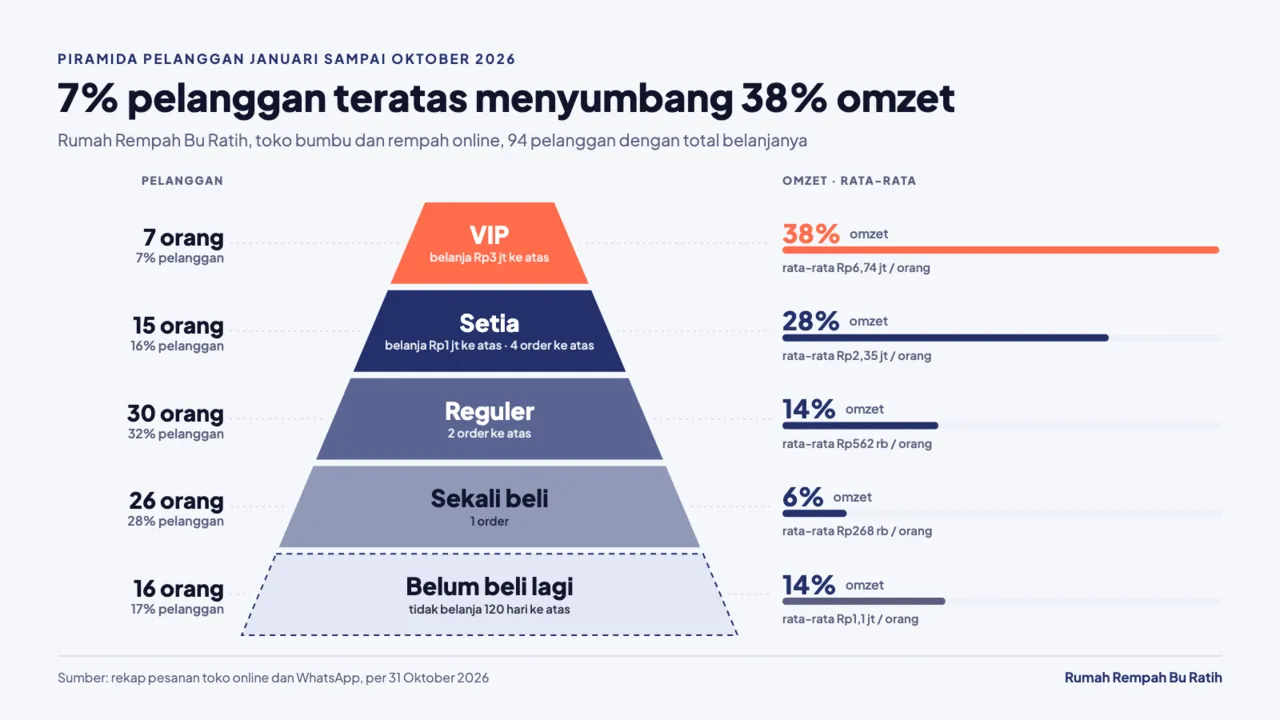
A 5-tier pyramid: the top 7% of customers bring in 38% of revenue
SKILL.md contents
Premium subscribers can read, copy, and install this skill.
Unlock with Premium Sign inCustomer Pyramid Chart
Description
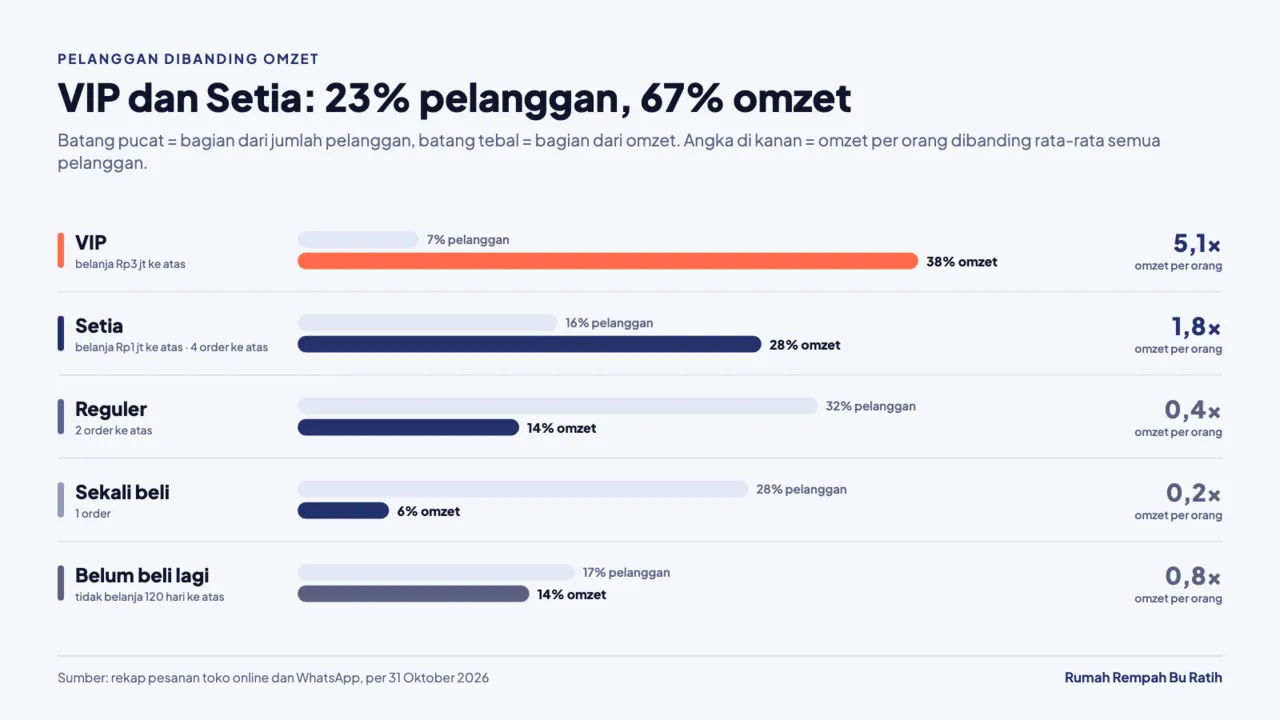
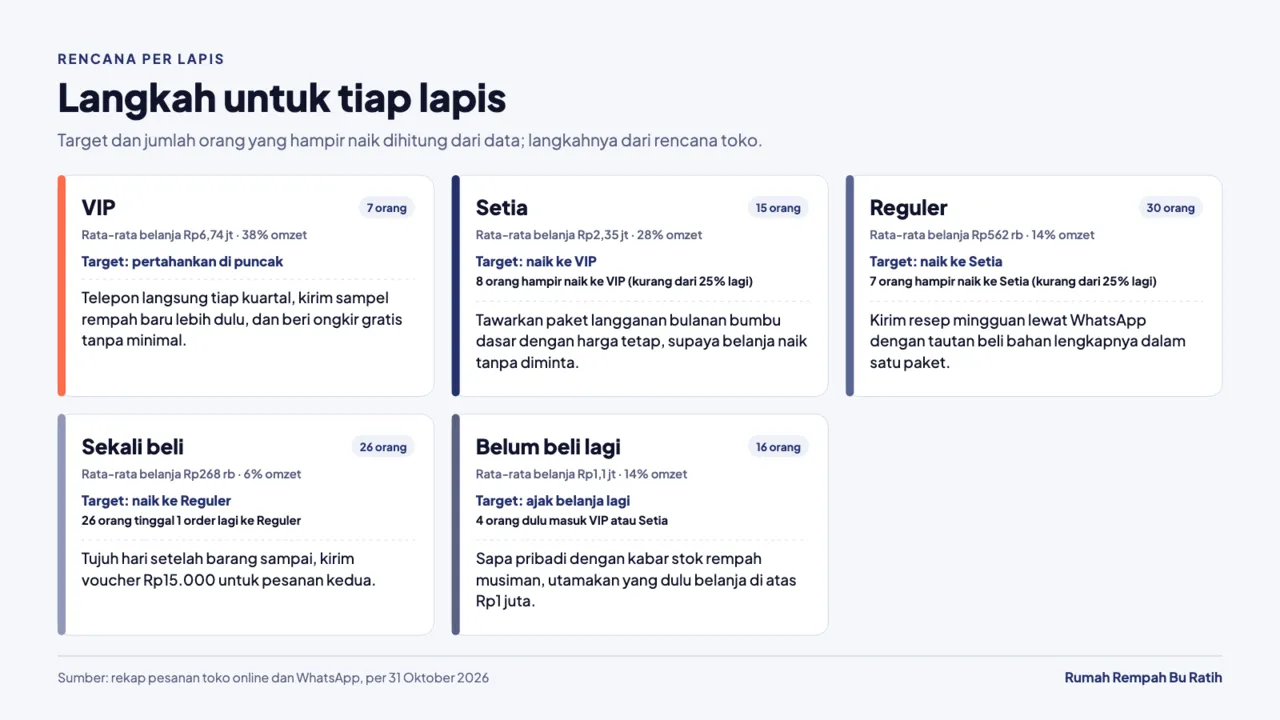
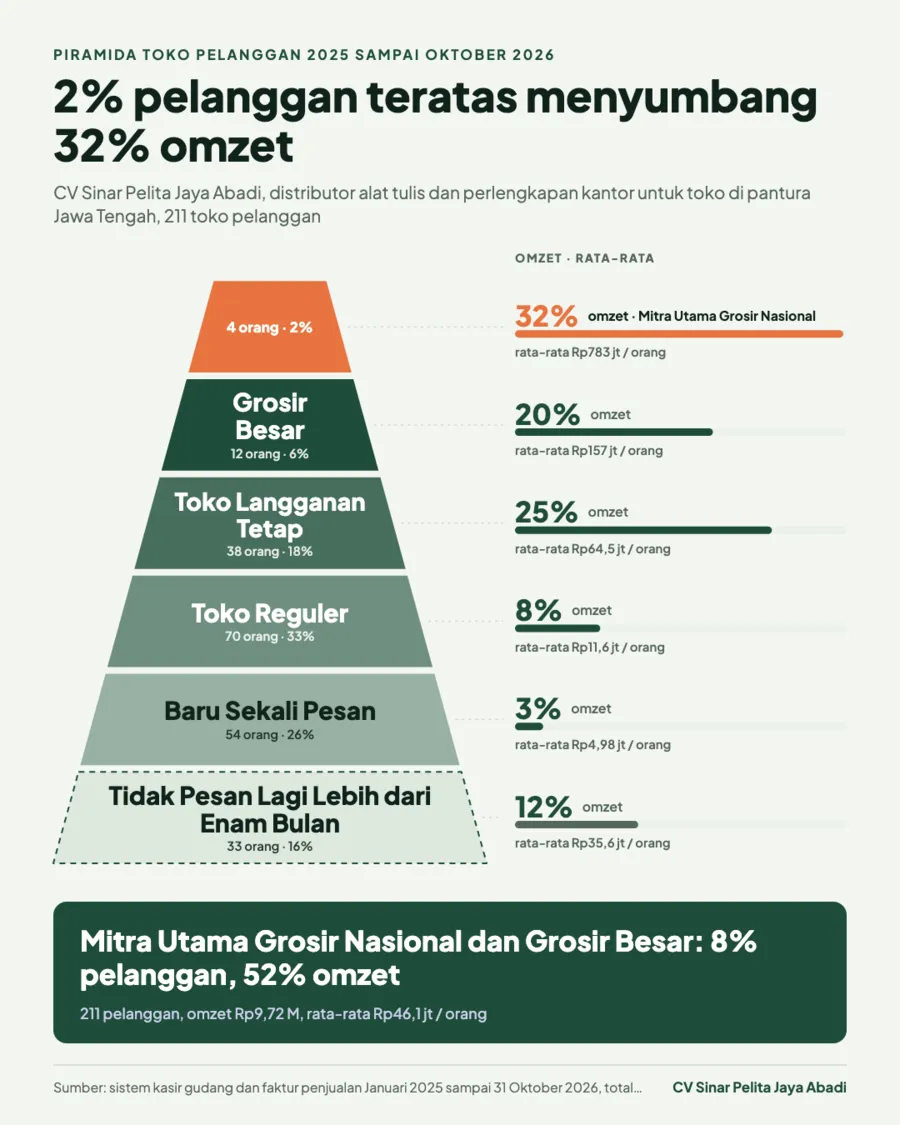
A customer pyramid worked out automatically from raw data (name, total spend, orders, last purchase date): 3 to 6 tiers with adjustable thresholds, such as VIP, loyal, regular, one-time, and lapsed. Each tier shows head count and customer percent on one side, revenue percent and average spend on the other, so a small tier bringing in large revenue stands out. Plus a contribution index page, step cards per tier with who is close to moving up, and a table. Download PDF, PNG, Word, or Excel.
Verified by SkillFlow
We checked every file in this skill automatically: no command that downloads and runs a program, no hidden code, no instruction telling your AI to ignore you.
- Loads from outside
- Fonts: Google Fonts SkillFlow: directory.skillflow.ai.id
See the 6 files inside
skill.json10 KBSKILL.md7 KBprompt.md7 KBprompt.en.md7 KBfiles/contoh/distributor-6-lapis-4x5.html49 KBfiles/diagram.html42 KB
Checked 14 Nov 2026
Part of SkillFlow Pro
Pro opens every skill in every category: copy, ZIP, Send to AI, install, save, and request new skills.
Get Pro Already subscribed? Sign inWhat you get
- A 3 to 6 tier pyramid: head count and customer percent on the left, revenue percent and average spend on the right
- Tiers worked out from raw data pasted from a spreadsheet, with spend, order, and day thresholds
- A customers versus revenue page with a contribution index per person
- Step cards per tier: target, how many are close to moving up, and big customers who went quiet
- A detail table; Excel holds Tiers, Customers, and Steps sheets
- 16:9 or 4:5, 3 palettes, automatic conclusion titles
Good fit
- Online shops and distributors with a spend summary per customer
- Loyalty programme meetings: who to keep, who to move up, who to win back
- Deciding which customers deserve special prices or a sales visit
Not for
- Needs data per customer; daily sales totals alone are not enough
- It does not pull data from a till or online shop; you paste it in
- Not a forecast of future customer value, only a picture of the chosen period
- It does not send messages or vouchers to customers
About this skill
/grafik-piramida-pelanggan Make a customer pyramid for my online spice shop from 94 customers, January to October 2026: VIP above 3,000, loyal above 1,000 with 4 orders, regular, one-time buyers, and those who have not bought in 120 days
Show more
A customer pyramid worked out automatically from raw data (name, total spend, orders, last purchase date): 3 to 6 tiers with adjustable thresholds, such as VIP, loyal, regular, one-time, and lapsed. Each tier shows head count and customer percent on one side, revenue percent and average spend on the other, so a small tier bringing in large revenue stands out. Plus a contribution index page, step cards per tier with who is close to moving up, and a table. Download PDF, PNG, Word, or Excel.
User reviews
FAQ
What if I do not know the threshold for each tier yet?
Paste the data first. The skill suggests thresholds from it, for example VIP around the top 5 to 10% of customers, and waits for your approval. Thresholds can change any time in the configuration object and every number is recalculated.
Where do VIP customers who stopped buying end up?
The lapsed tier is checked first, so they land there instead of hiding at the top. Its step card says how many of them used to sit in an upper tier.
Do customer names end up in the downloaded files?
The PDF, PNG, and Word files only hold numbers per tier. The Excel file has a Customers sheet with every name and its tier, so share the Excel file only within your team.
Which AI can I use it with?
Copy the prompt into a chat AI (ChatGPT, Claude, Gemini, DeepSeek); or download the ZIP and install it in an AI agent (Claude Code, Codex, Antigravity, Hermes Agent, Cursor, GitHub Copilot, Gemini CLI, OpenCode, Kimi Code, Trae), which then builds the files for you.
What is in the ZIP?
One folder named grafik-piramida-pelanggan with SKILL.md (the instructions an AI agent reads) and the prompt, 6 files in all. Extract it into your agent's skills folder, or install it with npx skillflow-ai add grafik-piramida-pelanggan. Pro only.
Is there a per-use fee or credits?
Not from SkillFlow. The skill runs on the AI you already use, so any cost follows that plan.
Which plan includes it?
SkillFlow Pro. It opens every skill in every category.
Can I use my own colours and brand?
Yes. Pick a colour theme on this page, or fill in your brand profile once; both go into the prompt you copy and into the ZIP.
Can I share what I made?
Pro members can upload the result and get a page at share.skillflow.ai.id to send to anyone. The page carries a small "Made with SkillFlow AI" mark.
Is there a download limit?
Yes, per day: 50 skills on Pro, 10 on other plans. Downloading a skill again on the same day does not count.



