

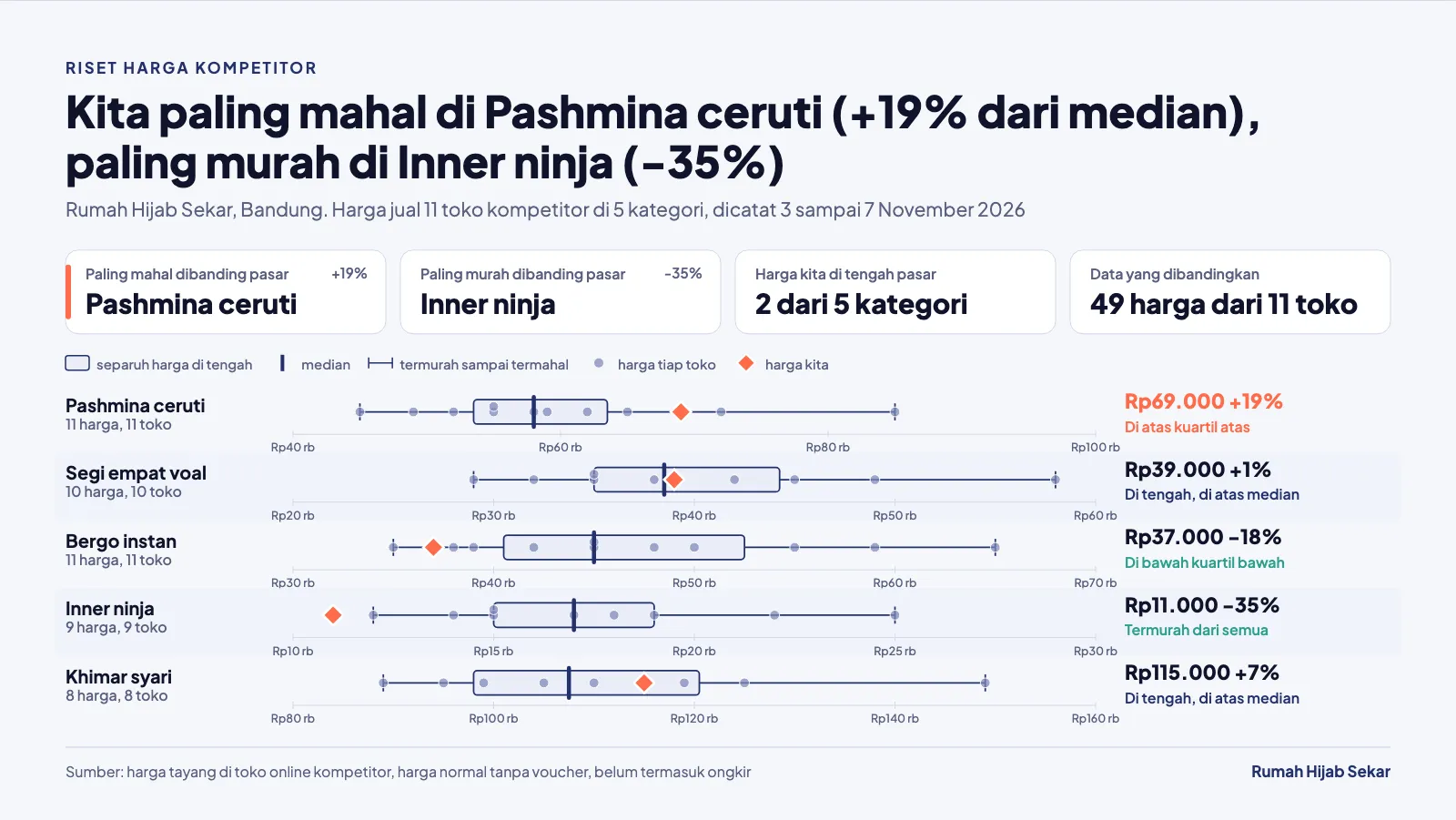
A headscarf shop versus 11 competitors in 5 categories: pashmina above the upper quartile, inner caps cheapest
SKILL.md contents
Premium subscribers can read, copy, and install this skill.
Unlock with Premium Sign inCompetitor Price Spread Chart
Description
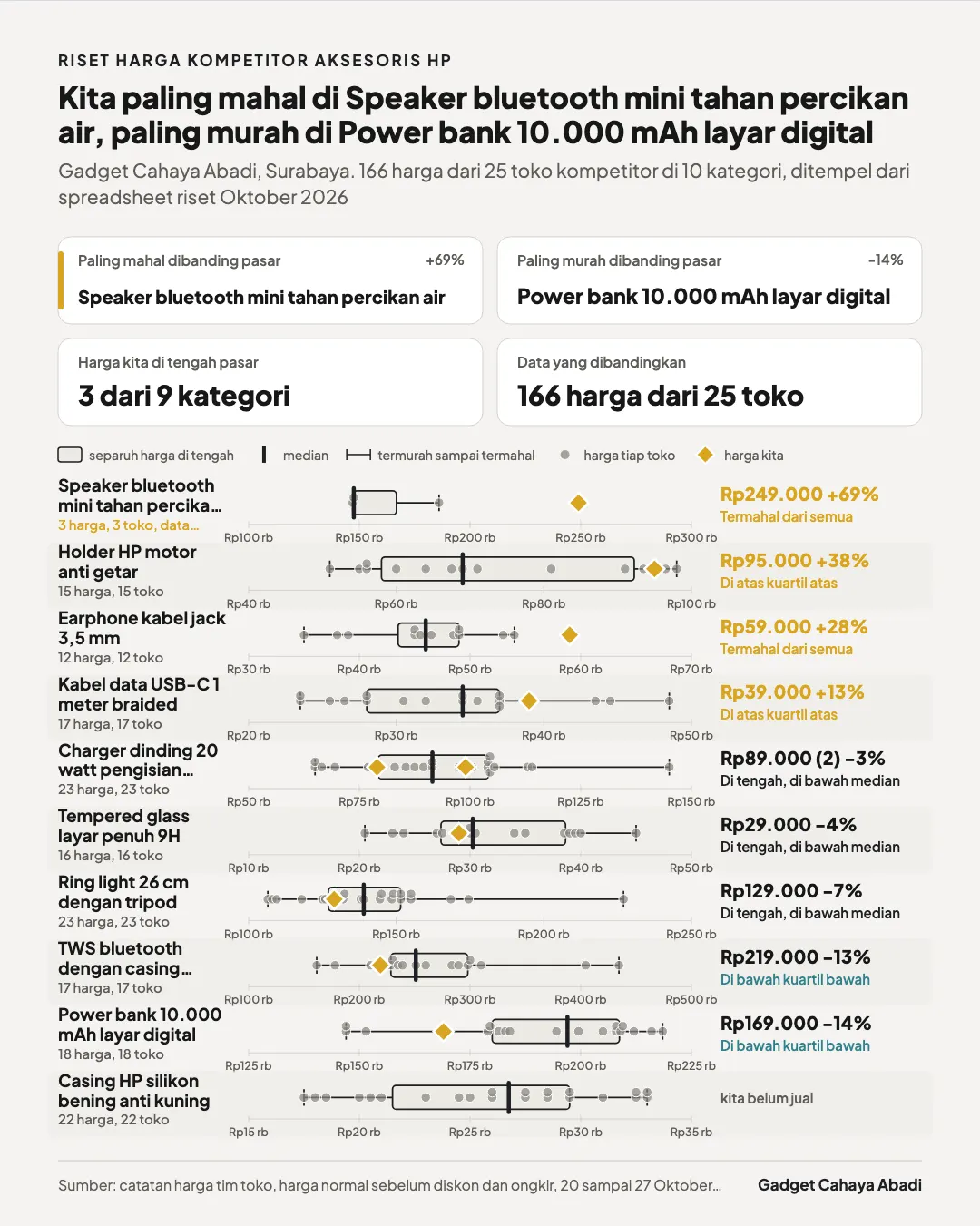
A box plot of competitor prices per category from pasted price notes (shop, product, category, price): a box from the lower to the upper quartile, a median line, a lowest to highest line, and a dot for every shop, with your own price marked as an accent diamond labelled below the lower quartile, in the middle, or above the upper quartile, plus the percent difference from the median. Includes cards for where you are priciest and cheapest, a difference from median page, and a statistics table. Download PDF, PNG, Word, or Excel.
Verified by SkillFlow
We checked every file in this skill automatically: no command that downloads and runs a program, no hidden code, no instruction telling your AI to ignore you.
- Loads from outside
- Fonts: Google Fonts SkillFlow: directory.skillflow.ai.id
See the 6 files inside
skill.json10 KBSKILL.md7 KBprompt.md8 KBprompt.en.md8 KBfiles/contoh/aksesoris-hp-10-kategori-tempel-4x5.html58 KBfiles/diagram.html49 KB
Checked 14 Nov 2026
Part of SkillFlow Pro
Pro opens every skill in every category: copy, ZIP, Send to AI, install, save, and request new skills.
Get Pro Already subscribed? Sign inWhat you get
- A box plot per category: Q1 to Q3 box, median, lowest to highest, a dot for every competitor price
- Your price as an accent diamond with the percent from the median and its position label
- Cards for most expensive and cheapest versus the market, categories in the middle, and data size
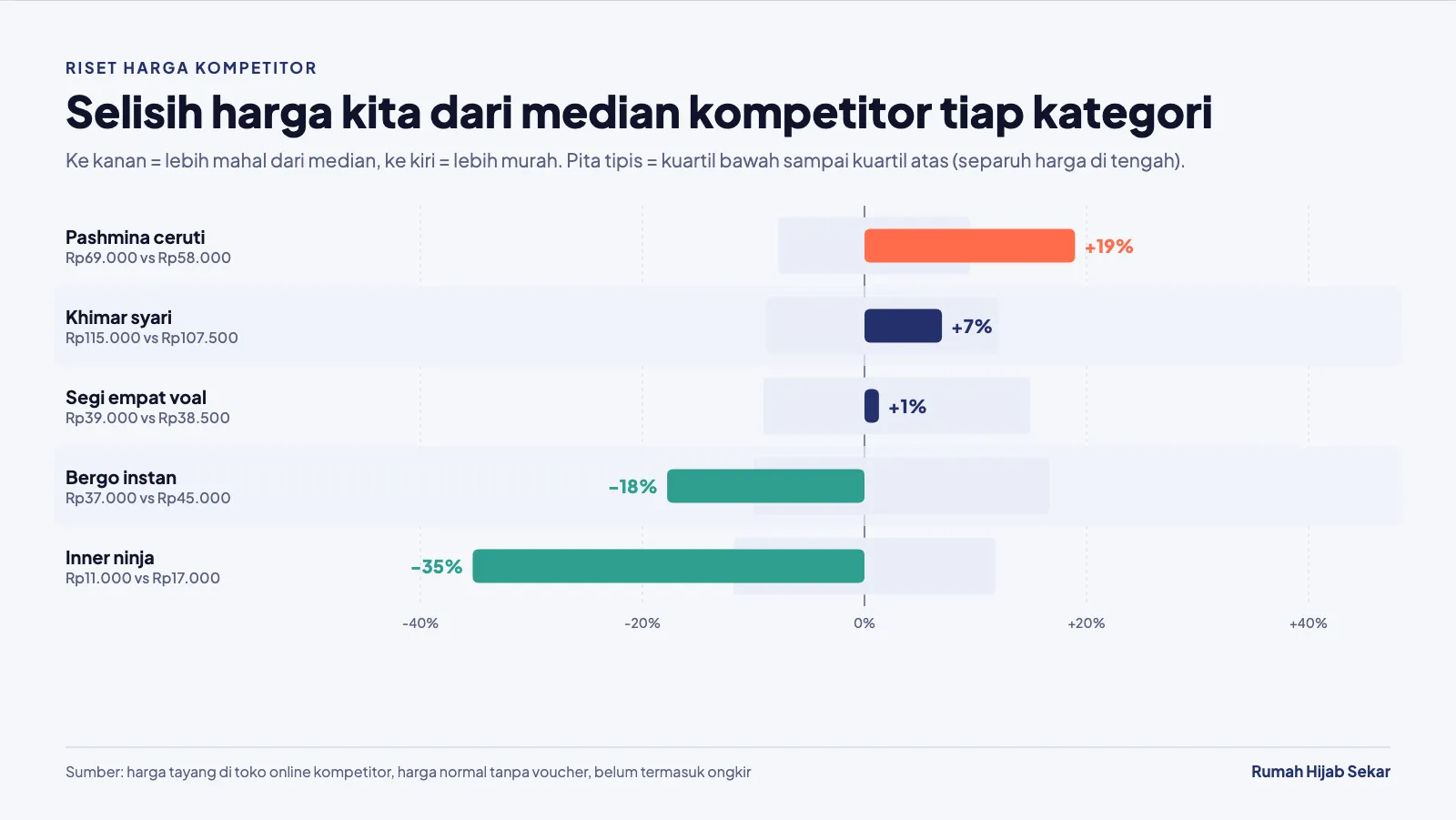
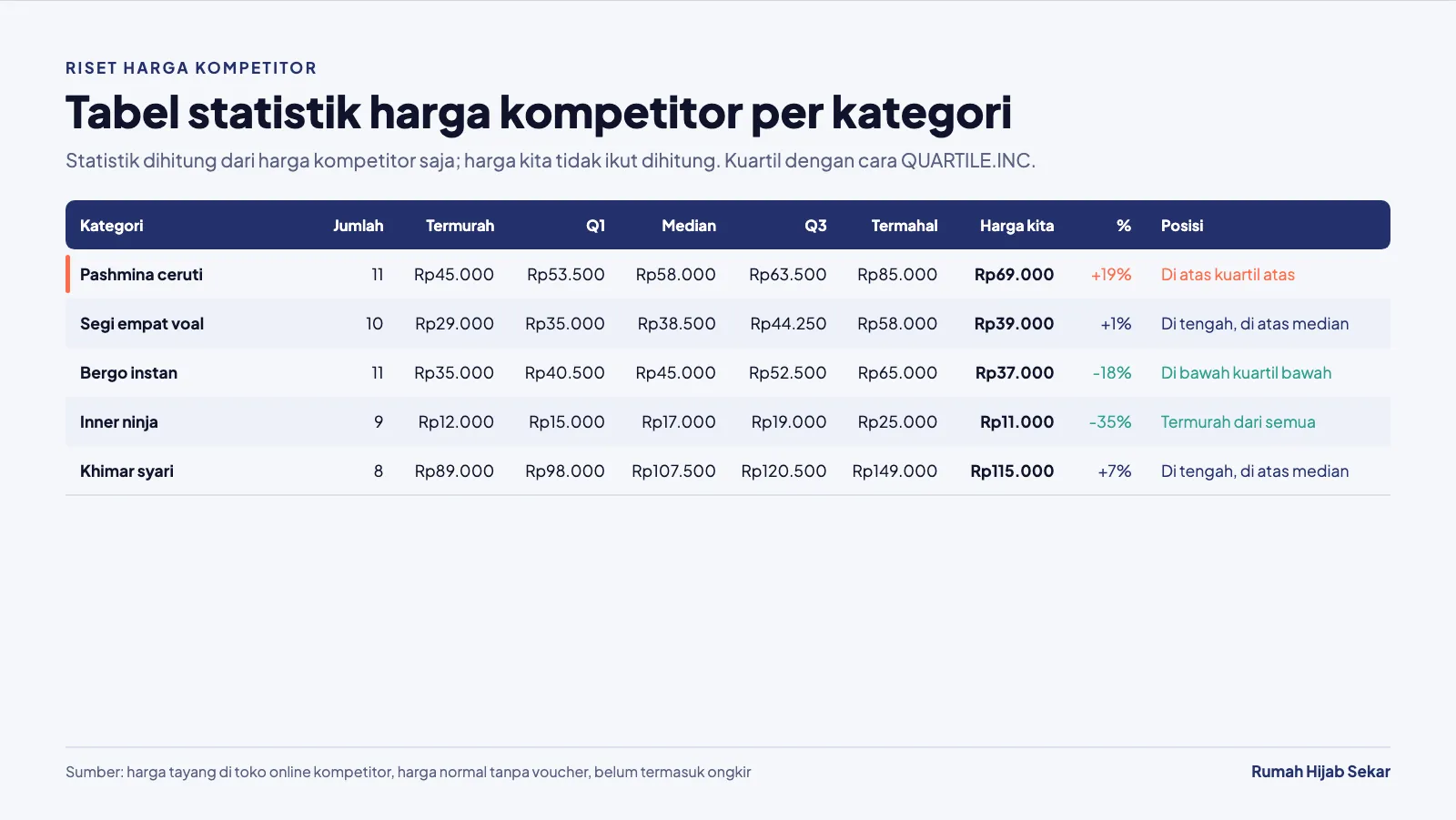
- A difference from median page with quartile bands, and a statistics table per category
- Statistics from competitor prices only, QUARTILE.INC quartiles, a per-category axis when prices differ widely
- Data pasted from a spreadsheet, download PDF, PNG (ZIP), Word, Excel, 3 palettes, 16:9 or 4:5
Good fit
- Online shops that record competitor prices and want to know which categories are overpriced
- Owners weighing a price rise or a new product launch
- Consultants and marketing teams reporting a client's price position per category
Not for
- It does not fetch prices from the internet; you record and paste them
- Not a chart of prices over time
- It does not decide which price will sell; it only shows your position against competitors
- More than 8 categories in 16:9 or 10 in 4:5 are not all drawn on the main chart
About this skill
/grafik-sebaran-harga-kompetitor Make a box plot of prices from 11 competing headscarf shops in 5 categories and mark where my shop, Rumah Hijab Sekar, sits: too pricey or too cheap
Show more
A box plot of competitor prices per category from pasted price notes (shop, product, category, price): a box from the lower to the upper quartile, a median line, a lowest to highest line, and a dot for every shop, with your own price marked as an accent diamond labelled below the lower quartile, in the middle, or above the upper quartile, plus the percent difference from the median. Includes cards for where you are priciest and cheapest, a difference from median page, and a statistics table. Download PDF, PNG, Word, or Excel.
User reviews
FAQ
Why the median and quartiles instead of the average?
One shop far pricier or cheaper can drag the average. The median is the middle price, and the quartile box holds the middle half of competitor prices. Inside the box your price is normal for the market; to the right of it you are pricier than three quarters of competitors.
Is my own price included in the box?
No. The box, median, and range come from competitor prices only, so your price is compared with the market without shifting it. Your price is drawn separately as a diamond.
My product categories differ a lot in price. Is the chart still readable?
Yes. When the highest price is more than 4 times the lowest, each category automatically gets its own axis with numbers under its box, so cheap categories do not squash into a corner. You can also force one shared axis.
Which AI can I use it with?
Copy the prompt into a chat AI (ChatGPT, Claude, Gemini, DeepSeek); or download the ZIP and install it in an AI agent (Claude Code, Codex, Antigravity, Hermes Agent, Cursor, GitHub Copilot, Gemini CLI, OpenCode, Kimi Code, Trae), which then builds the files for you.
What is in the ZIP?
One folder named grafik-sebaran-harga-kompetitor with SKILL.md (the instructions an AI agent reads) and the prompt, 6 files in all. Extract it into your agent's skills folder, or install it with npx skillflow-ai add grafik-sebaran-harga-kompetitor. Pro only.
Is there a per-use fee or credits?
Not from SkillFlow. The skill runs on the AI you already use, so any cost follows that plan.
Which plan includes it?
SkillFlow Pro. It opens every skill in every category.
Can I use my own colours and brand?
Yes. Pick a colour theme on this page, or fill in your brand profile once; both go into the prompt you copy and into the ZIP.
Can I share what I made?
Pro members can upload the result and get a page at share.skillflow.ai.id to send to anyone. The page carries a small "Made with SkillFlow AI" mark.
Is there a download limit?
Yes, per day: 50 skills on Pro, 10 on other plans. Downloading a skill again on the same day does not count.



