

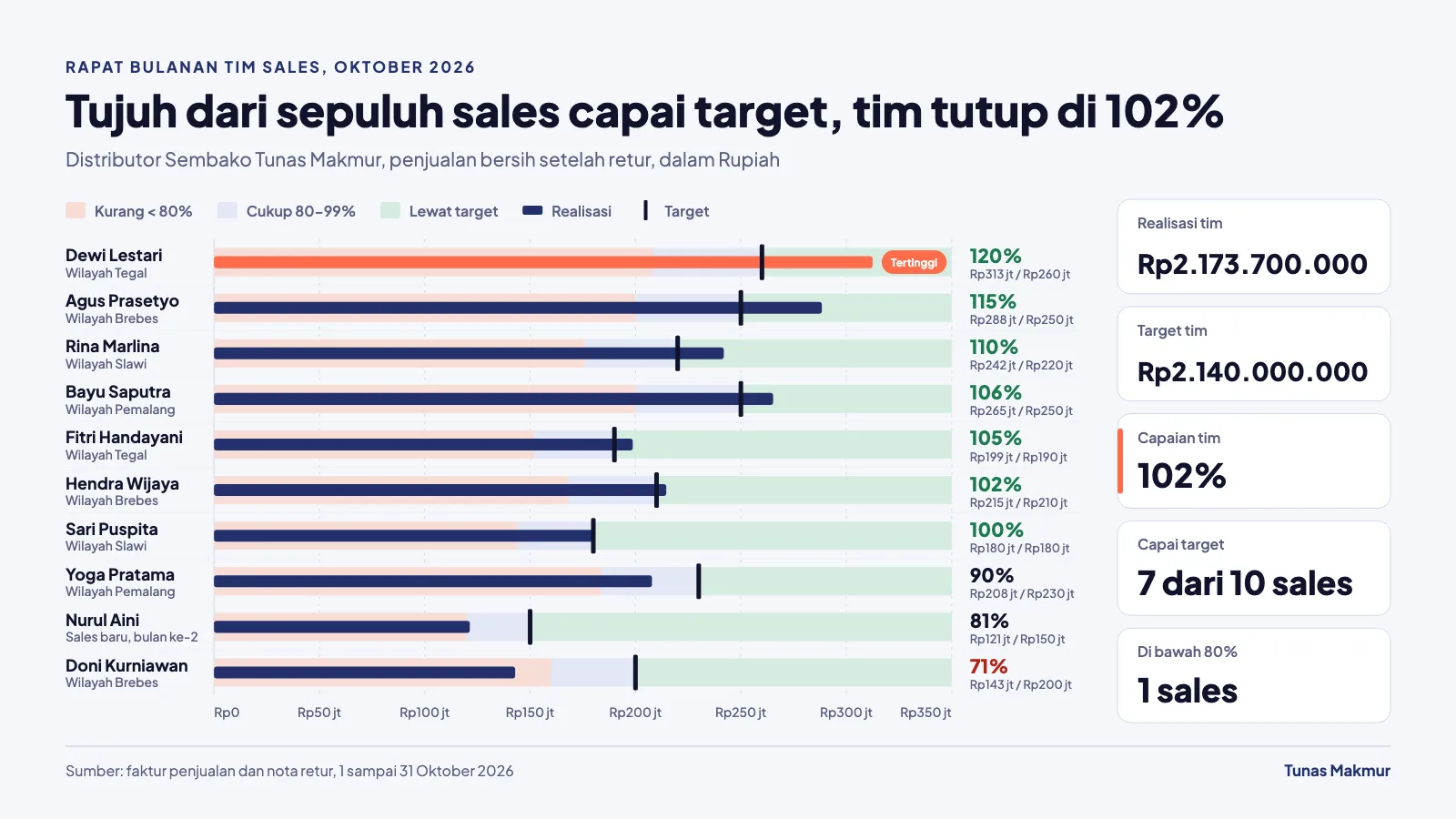
Bullet chart of 10 reps: colour ranges, target markers, percent achieved, team cards
SKILL.md contents
Premium subscribers can read, copy, and install this skill.
Unlock with Premium Sign inTarget vs Actual Chart
Description
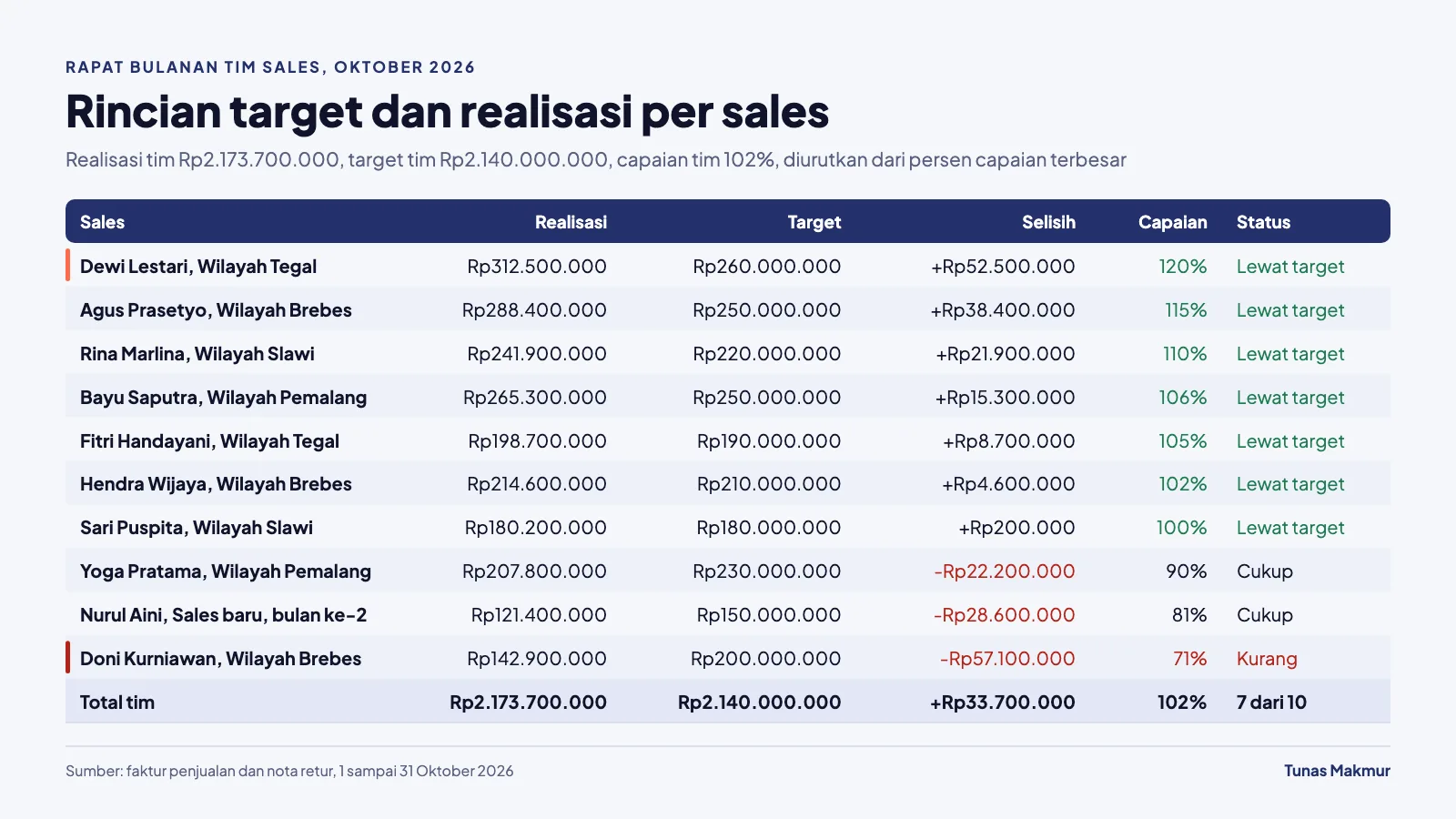
A horizontal bullet chart for the monthly meeting: one row per salesperson, branch, or product with an actual bar, its own target marker, and colour ranges for below, close, and beat target. Percent achieved sits on the right in colour, rows are sorted by achievement, the top row is marked, and cards work out the team actual, team target, team achievement, and how many hit target. A second page holds a detail table with a status per row. One HTML file from one data object, downloadable as PDF, PNG, Word, or an Excel file with the numbers.
Verified by SkillFlow
We checked every file in this skill automatically: no command that downloads and runs a program, no hidden code, no instruction telling your AI to ignore you.
- Loads from outside
- Fonts: Google Fonts SkillFlow: directory.skillflow.ai.id
See the 6 files inside
skill.json8 KBSKILL.md7 KBprompt.md5 KBprompt.en.md5 KBfiles/contoh/cabang-16-4x5.html31 KBfiles/diagram.html31 KB
Checked 14 Nov 2026
Part of SkillFlow Pro
Pro opens every skill in every category: copy, ZIP, Send to AI, install, save, and request new skills.
Get Pro Already subscribed? Sign inWhat you get
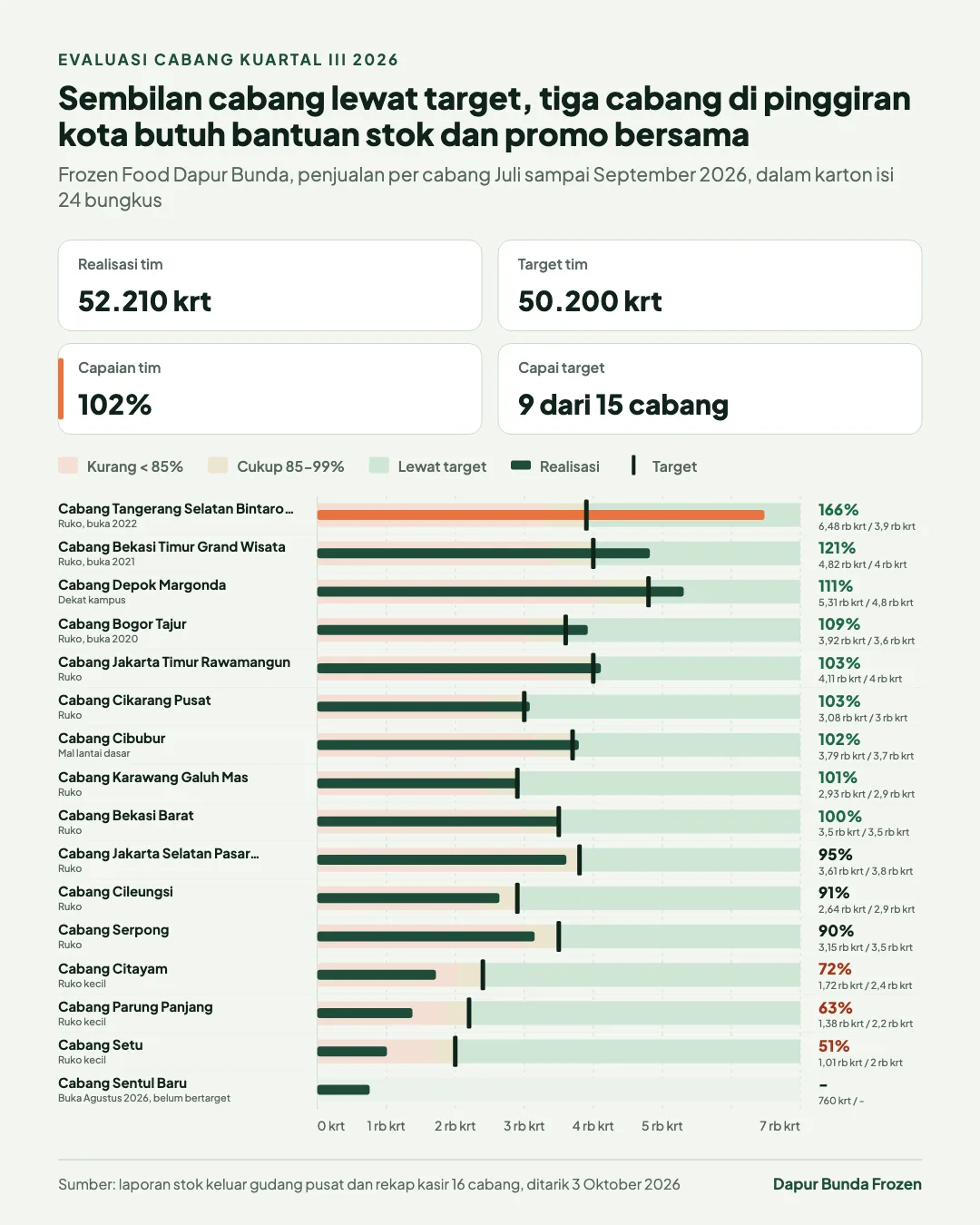
- A bullet chart of up to 15 rows (16:9) or 18 rows (4:5), one shared axis with a tidy scale
- Below, close, and beat target ranges per row from each row's own target, with an adjustable close threshold
- Percent achieved in colour, short actual and target figures, the top row capped in the accent colour
- Cards for team actual, team target, team achievement, beat target n of m, and the count below threshold
- A detail table: actual, target, gap, achieved, status, and a team total row
- Download PDF, PNG (ZIP), Word, and Excel; money or another unit, 3 palettes, rows without a target
Good fit
- Sales supervisors running the monthly field team meeting
- Owners with several branches comparing each branch's achievement
- Admins sharing a per-product or per-partner sales report in a group chat
Not for
- It does not pull figures from your till or sales app; you enter actuals and targets
- Not a monthly trend; one chart compares many rows within one period
- It does not work out commission or bonuses; use a target and commission workbook for that
About this skill
/grafik-target-vs-realisasi Make an October target vs actual chart for the 10 reps at my distribution business, each with a different target, for next Monday's monthly meeting.
Show more
A horizontal bullet chart for the monthly meeting: one row per salesperson, branch, or product with an actual bar, its own target marker, and colour ranges for below, close, and beat target. Percent achieved sits on the right in colour, rows are sorted by achievement, the top row is marked, and cards work out the team actual, team target, team achievement, and how many hit target. A second page holds a detail table with a status per row. One HTML file from one data object, downloadable as PDF, PNG, Word, or an Excel file with the numbers.
User reviews
FAQ
Why are the colour ranges a different length on each row?
The ranges come from that row's own target: Below up to the threshold times target, Close up to target, then Beat target. A rep with a small target is judged against that target, not against other reps.
Can it use a unit other than money?
Yes. Enter a unit such as cartons, portions, or new customers; the chart, cards, and table use it and the Excel file uses a plain number format.
What about a new rep with no target yet?
Leave the target blank. The row still shows, with a grey range and a dash for the percent, and is left out of the team target and team achievement.
Which AI can I use it with?
Copy the prompt into a chat AI (ChatGPT, Claude, Gemini, DeepSeek); or download the ZIP and install it in an AI agent (Claude Code, Codex, Antigravity, Hermes Agent, Cursor, GitHub Copilot, Gemini CLI, OpenCode, Kimi Code, Trae), which then builds the files for you.
What is in the ZIP?
One folder named grafik-target-vs-realisasi with SKILL.md (the instructions an AI agent reads) and the prompt, 6 files in all. Extract it into your agent's skills folder, or install it with npx skillflow-ai add grafik-target-vs-realisasi. Pro only.
Is there a per-use fee or credits?
Not from SkillFlow. The skill runs on the AI you already use, so any cost follows that plan.
Which plan includes it?
SkillFlow Pro. It opens every skill in every category.
Can I use my own colours and brand?
Yes. Pick a colour theme on this page, or fill in your brand profile once; both go into the prompt you copy and into the ZIP.
Can I share what I made?
Pro members can upload the result and get a page at share.skillflow.ai.id to send to anyone. The page carries a small "Made with SkillFlow AI" mark.
Is there a download limit?
Yes, per day: 50 skills on Pro, 10 on other plans. Downloading a skill again on the same day does not count.



