

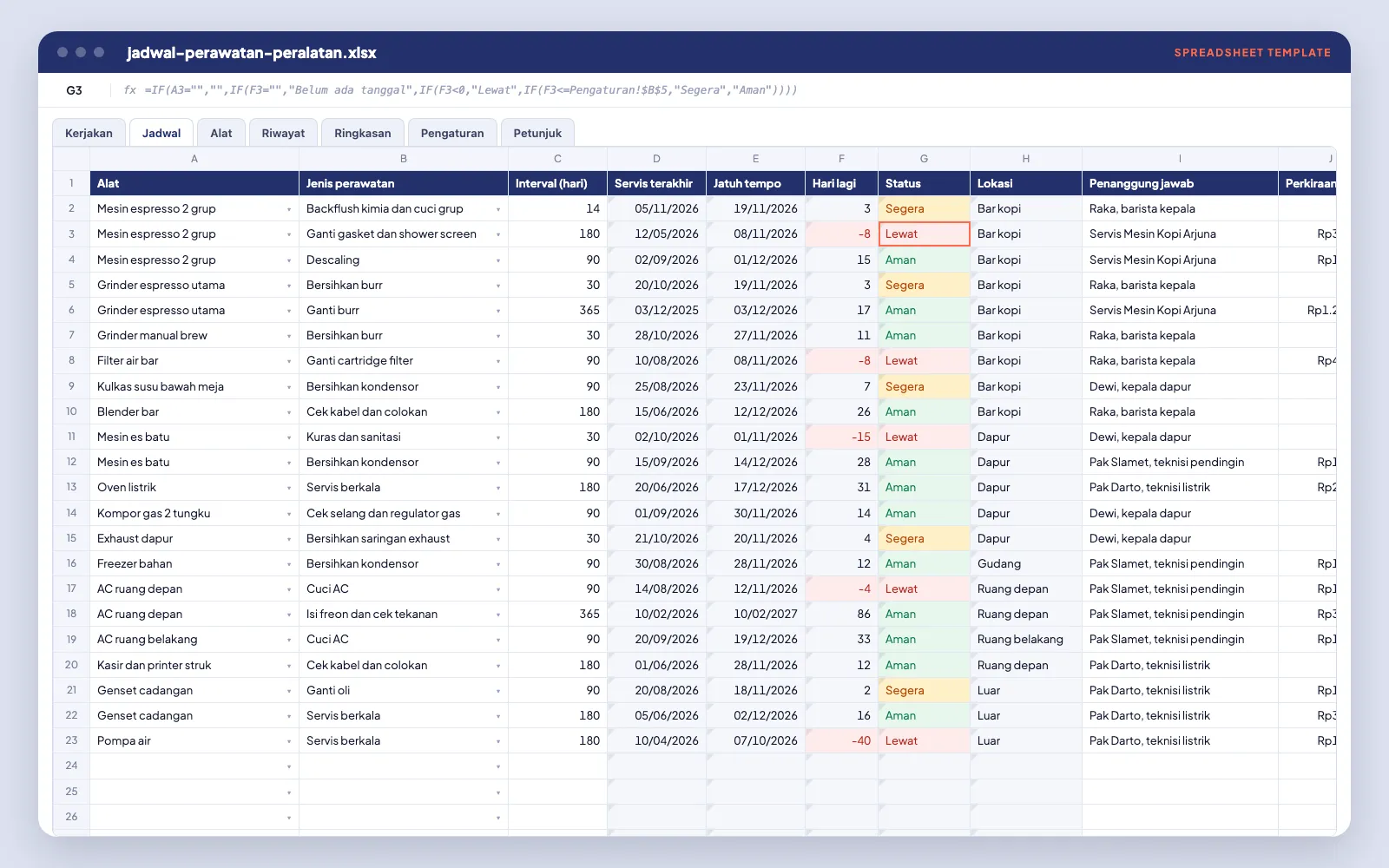
Schedule sheet: 22 cafe maintenance tasks with due dates and an Ok, Soon, or Overdue status
SKILL.md contents
Premium subscribers can read, copy, and install this skill.
Unlock with Premium Sign inEquipment Maintenance Schedule
Description
An Excel file for businesses that run on machines and equipment (cafes, laundries, workshops, garment makers, clinics, boarding houses): an equipment list with location, purchase date, and warranty, maintenance tasks per item with an interval in days, a service history (date, technician, cost, result), last service and next due date calculated automatically, days until due, an Ok, Soon, or Overdue status, a this-week task list sorted from most urgent, warranties about to expire, and maintenance cost per item, per month, and per location. Opens in Excel, Numbers, or Google Sheets.
Verified by SkillFlow
We checked every file in this skill automatically: no command that downloads and runs a program, no hidden code, no instruction telling your AI to ignore you.
- Loads from outside
- Fonts: Google Fonts SkillFlow: directory.skillflow.ai.id
See the 6 files inside
skill.json14 KBSKILL.md9 KBprompt.md9 KBprompt.en.md10 KBfiles/contoh/klinik-40-alat.html303 KBfiles/template.html273 KB
Checked 14 Nov 2026
Part of SkillFlow Pro
Pro opens every skill in every category: copy, ZIP, Send to AI, install, save, and request new skills.
Get Pro Already subscribed? Sign inWhat you get
- An .xlsx file with Tasks, Schedule, Equipment, History, Summary, Settings, and Guide sheets
- A schedule per item and type: last service from history, due date, days left, and an Ok, Soon, or Overdue status
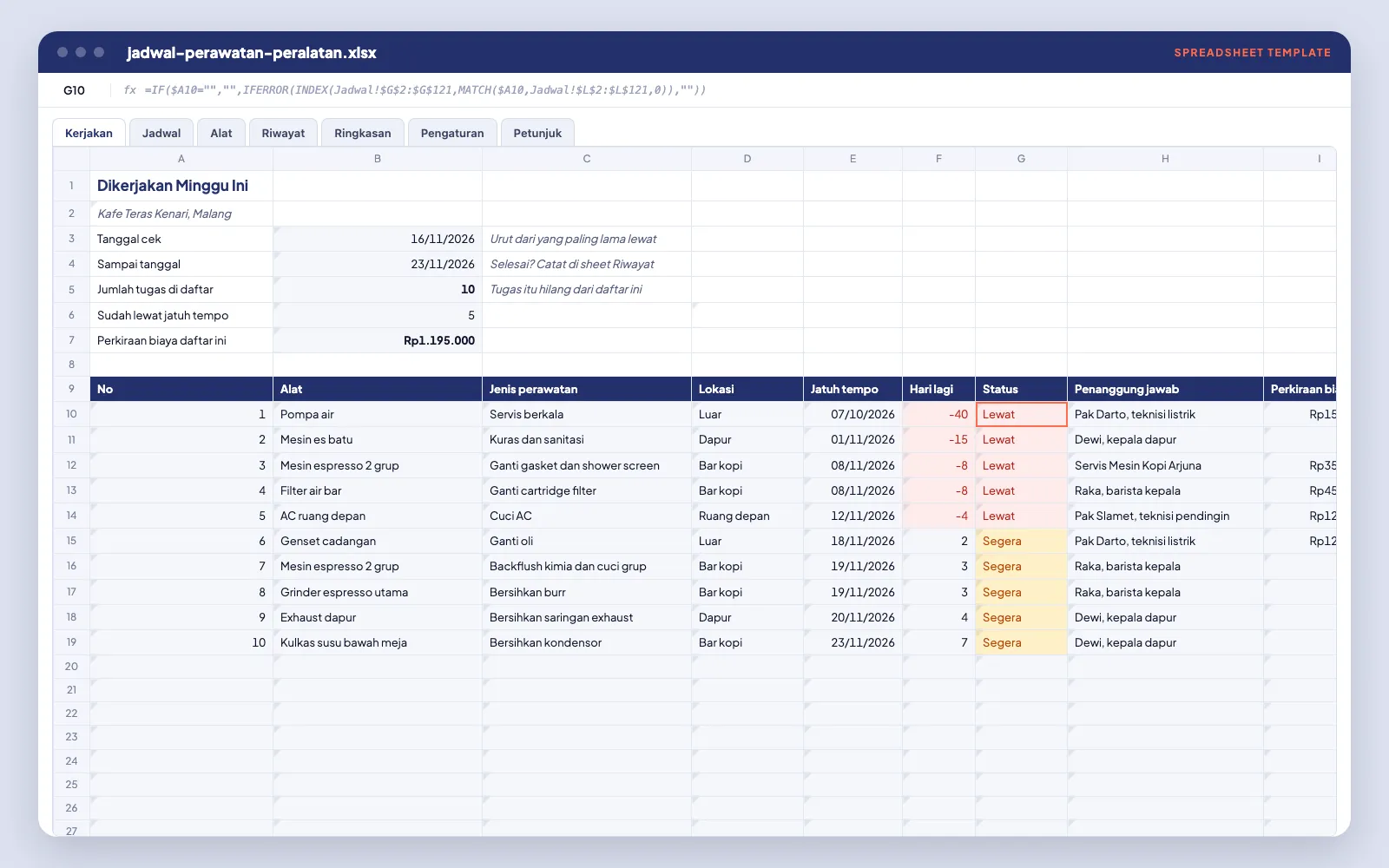
- A this-week list: overdue tasks and tasks due in 7 days, sorted from most urgent, with estimated cost
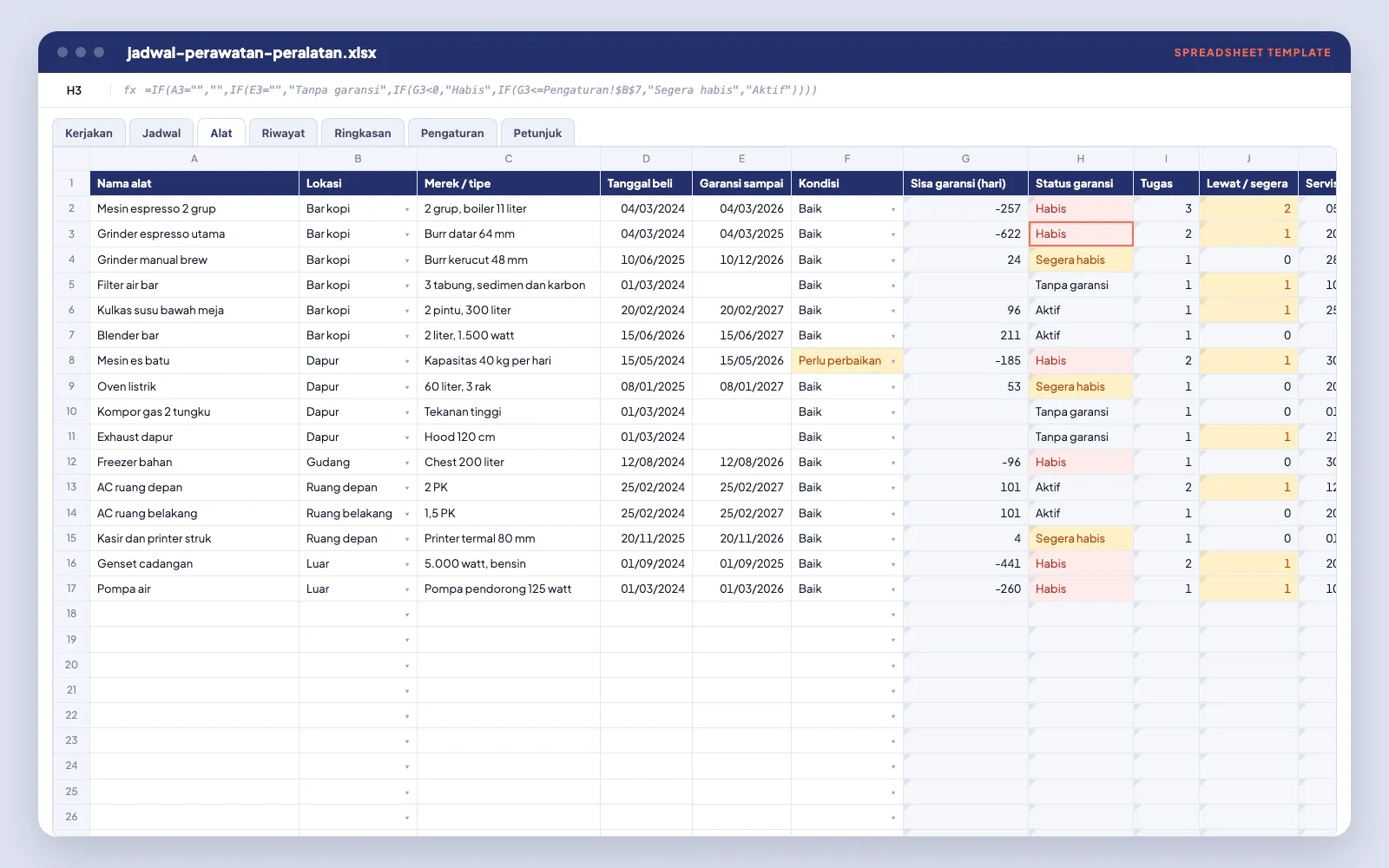
- Equipment sheet: warranty days left and status, condition, overdue or upcoming tasks, last service, total and yearly cost
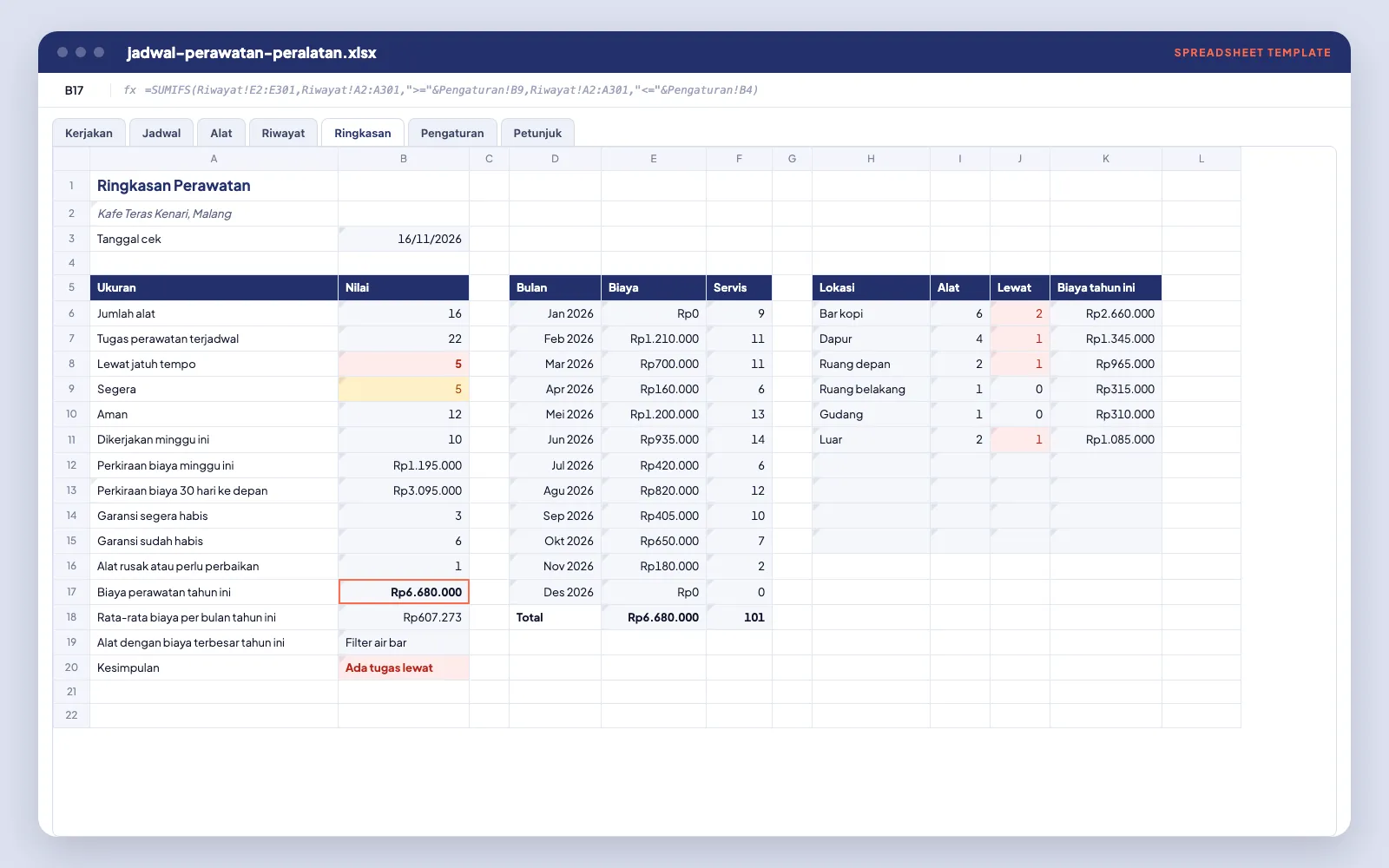
- A summary: counts per status, expiring warranties, cost per month and per location, and the most expensive item
- An HTML template with a sheet preview and a Download Excel button
Good fit
- Cafes, laundries, workshops, garment makers, clinics, or boarding houses with many machines and no record of the last service
- Owners who want to see which item eats the most maintenance money before deciding to replace it
- Operations leads who hand out weekly maintenance tasks to baristas, kitchen staff, or on-call technicians
- Businesses that want to claim warranties before they run out
Not for
- Not an asset register for depreciation or book value; that is the Asset Register and Depreciation skill
- It does not send automatic reminders by WhatsApp or email; you open or print the this-week list yourself
- It does not decide the right maintenance interval for your equipment; match the sample intervals to the manual or your technician
- It does not track spare-part stock or supplier orders
About this skill
/jadwal-perawatan-peralatan Make a maintenance schedule for the 16 machines in my cafe: espresso machine, grinders, air conditioners, fridges, generator, with service history, what needs doing this week, and maintenance cost per month.
Show more
An Excel file for businesses that run on machines and equipment (cafes, laundries, workshops, garment makers, clinics, boarding houses): an equipment list with location, purchase date, and warranty, maintenance tasks per item with an interval in days, a service history (date, technician, cost, result), last service and next due date calculated automatically, days until due, an Ok, Soon, or Overdue status, a this-week task list sorted from most urgent, warranties about to expire, and maintenance cost per item, per month, and per location. Opens in Excel, Numbers, or Google Sheets.
User reviews
FAQ
How does the next due date move after an item is serviced?
Log the service in the History sheet with exactly the same item and maintenance type as the row in Schedule. The last service is the newest date in History for that item and type, plus the interval in days. The task leaves the this-week list as soon as its new due date is more than 7 days away.
My older machines have no service record. What then?
Without a history, the due date counts from the purchase date, so older items show as Overdue right away. If you remember the last time an item was serviced, add one History row with that date; if not, do the maintenance this week and log it.
Are breakdown repairs counted too?
Their cost is. Log them as Breakdown repair: the cost goes into the totals per item, per month, and per location, but it does not move the routine schedule because the type differs from the scheduled tasks.
Which AI can I use it with?
Copy the prompt into a chat AI (ChatGPT, Claude, Gemini, DeepSeek); or download the ZIP and install it in an AI agent (Claude Code, Codex, Antigravity, Hermes Agent, Cursor, GitHub Copilot, Gemini CLI, OpenCode, Kimi Code, Trae), which then builds the files for you.
What is in the ZIP?
One folder named jadwal-perawatan-peralatan with SKILL.md (the instructions an AI agent reads) and the prompt, 6 files in all. Extract it into your agent's skills folder, or install it with npx skillflow-ai add jadwal-perawatan-peralatan. Pro only.
Is there a per-use fee or credits?
Not from SkillFlow. The skill runs on the AI you already use, so any cost follows that plan.
Which plan includes it?
SkillFlow Pro. It opens every skill in every category.
Can I use my own colours and brand?
Yes. Pick a colour theme on this page, or fill in your brand profile once; both go into the prompt you copy and into the ZIP.
Can I share what I made?
Pro members can upload the result and get a page at share.skillflow.ai.id to send to anyone. The page carries a small "Made with SkillFlow AI" mark.
Is there a download limit?
Yes, per day: 50 skills on Pro, 10 on other plans. Downloading a skill again on the same day does not count.



