

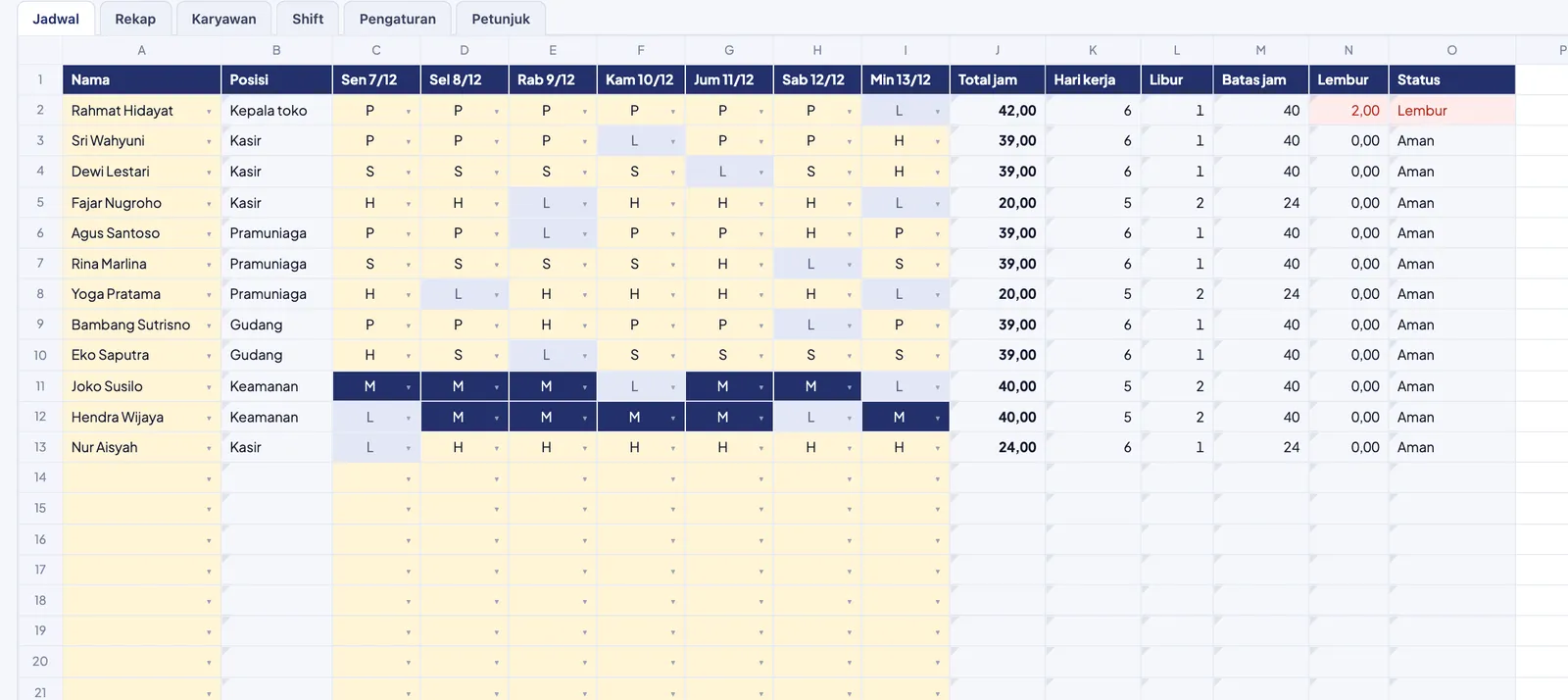
Schedule sheet: shift codes from a dropdown, total hours calculated, overtime highlighted red
SKILL.md contents
Premium subscribers can read, copy, and install this skill.
Unlock with Premium Sign inEmployee Shift Schedule
Description
An Excel shift schedule for shops, cafes, clinics, and small warehouses: a staff list with roles and hour limits, a shift code table (Morning, Afternoon, Night, Part-time, Day off) with start, end, paid hours, and minimum staff, then a 7-day or 1-month schedule grid filled with shift codes from a dropdown. Total hours per person come from the codes, overtime turns red past the limit, and a daily summary counts staff per shift and flags shifts below the minimum, with a days-off summary. Opens in Excel, Numbers, or Google Sheets.
Verified by SkillFlow
We checked every file in this skill automatically: no command that downloads and runs a program, no hidden code, no instruction telling your AI to ignore you.
- Loads from outside
- Fonts: Google Fonts SkillFlow: directory.skillflow.ai.id
See the 6 files inside
skill.json10 KBSKILL.md9 KBprompt.md7 KBprompt.en.md7 KBfiles/contoh/gudang-24-jam-1-bulan.html376 KBfiles/template.html112 KB
Checked 14 Nov 2026
Part of SkillFlow Pro
Pro opens every skill in every category: copy, ZIP, Send to AI, install, save, and request new skills.
Get Pro Already subscribed? Sign inWhat you get
- An .xlsx file with Schedule, Summary, Staff, Shifts, Settings, and Guide sheets
- A 7-day or 1-month grid with name and shift code dropdowns, night shifts and days off coloured
- Total hours per person from each code's paid hours, with highlighted overtime and status columns
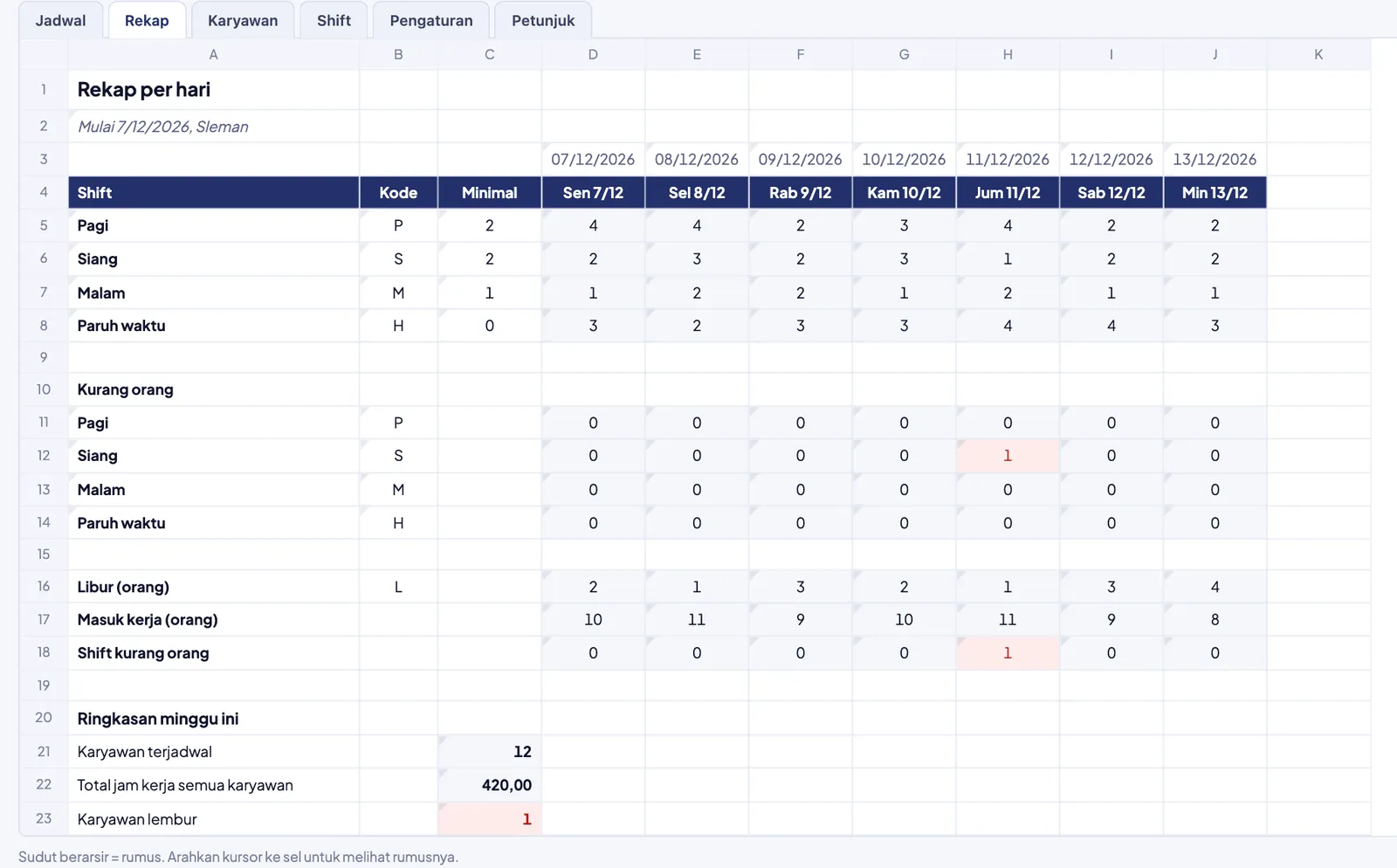
- A summary of staff per shift per day with a short-of-staff block flagging shifts below the minimum
- Days off per person and per day, plus total hours and overtime hours for the period
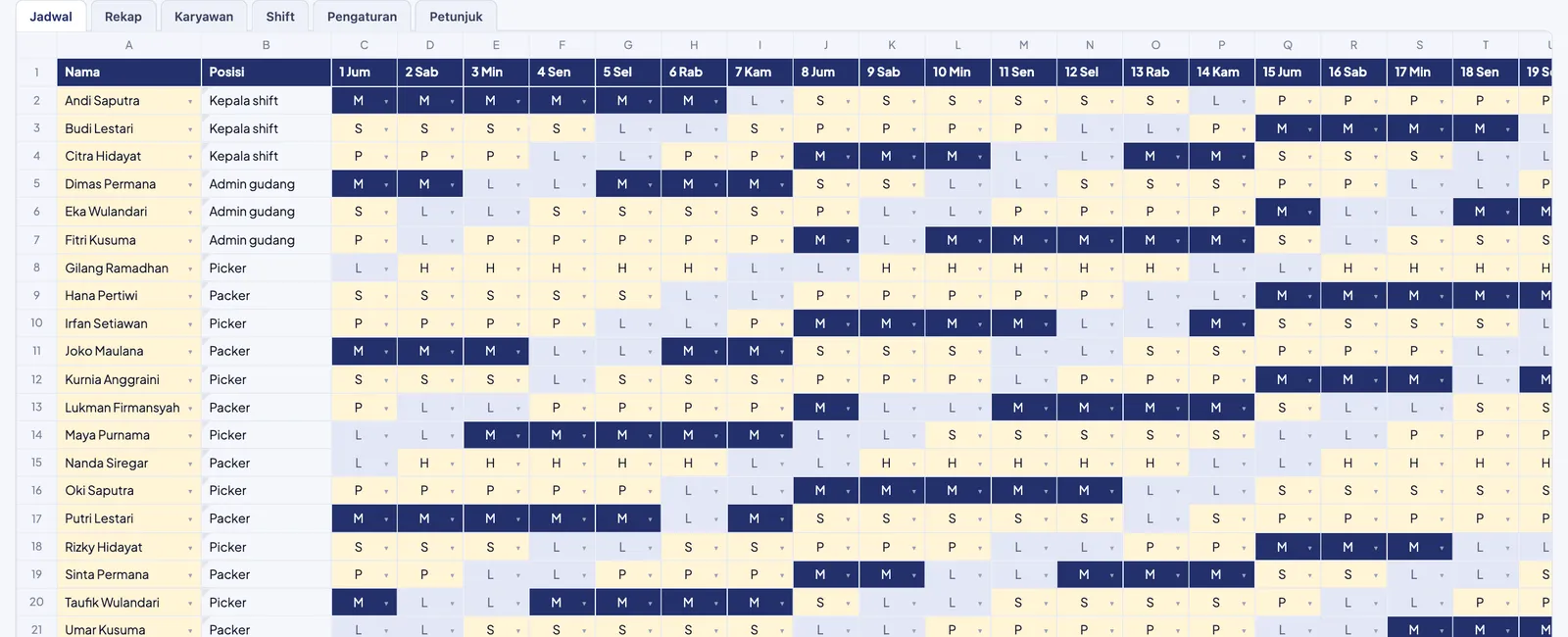
- An HTML template with a sheet preview and a Download Excel button, plus a heavy example of 28 staff over 31 days
Good fit
- Owners of shops, cafes, clinics, or small warehouses planning staff rosters weekly or monthly
- Store managers who want to see who is on overtime and which shift is short before sharing the roster
- Businesses open long hours or 24 hours with morning, afternoon, and night shifts
Not for
- Not an attendance app: it does not record actual clock-in and clock-out times
- It does not calculate pay or overtime pay; use a payroll summary for that
- Hour limits and minimum staff are examples you must adjust, not employment law advice
- It does not build the roster automatically; you choose the shift codes, the file counts and flags
About this skill
/jadwal-shift-karyawan Make a one-week shift schedule for our 24-hour convenience store with 12 staff, morning, afternoon, and night shifts, flagging anyone over 40 hours and any short-staffed shift
Show more
An Excel shift schedule for shops, cafes, clinics, and small warehouses: a staff list with roles and hour limits, a shift code table (Morning, Afternoon, Night, Part-time, Day off) with start, end, paid hours, and minimum staff, then a 7-day or 1-month schedule grid filled with shift codes from a dropdown. Total hours per person come from the codes, overtime turns red past the limit, and a daily summary counts staff per shift and flags shifts below the minimum, with a days-off summary. Opens in Excel, Numbers, or Google Sheets.
User reviews
FAQ
How is a night shift that crosses midnight counted?
Each shift's paid hours are typed as a number on the Shifts sheet (for example Night 8 hours) and counted on the day it starts. A Monday night shift from 22:00 to Tuesday 07:00 goes in the Monday column.
Can it cover a whole month?
Yes. Choose a 1-month period: the grid gets 28 to 31 day columns and the hour limit is set per month. The heavy example in the ZIP covers 28 staff over 31 days.
Do the dropdowns work in Numbers?
The shift code and role dropdowns become pop-up menus in Numbers. The name dropdown reads its list from the Staff sheet; if your app does not support lists from another sheet, you can still type the name and the formulas still work.
Which AI can I use it with?
Copy the prompt into a chat AI (ChatGPT, Claude, Gemini, DeepSeek); or download the ZIP and install it in an AI agent (Claude Code, Codex, Antigravity, Hermes Agent, Cursor, GitHub Copilot, Gemini CLI, OpenCode, Kimi Code, Trae), which then builds the files for you.
What is in the ZIP?
One folder named jadwal-shift-karyawan with SKILL.md (the instructions an AI agent reads) and the prompt, 6 files in all. Extract it into your agent's skills folder, or install it with npx skillflow-ai add jadwal-shift-karyawan. Pro only.
Is there a per-use fee or credits?
Not from SkillFlow. The skill runs on the AI you already use, so any cost follows that plan.
Which plan includes it?
SkillFlow Pro. It opens every skill in every category.
Can I use my own colours and brand?
Yes. Pick a colour theme on this page, or fill in your brand profile once; both go into the prompt you copy and into the ZIP.
Can I share what I made?
Pro members can upload the result and get a page at share.skillflow.ai.id to send to anyone. The page carries a small "Made with SkillFlow AI" mark.
Is there a download limit?
Yes, per day: 50 skills on Pro, 10 on other plans. Downloading a skill again on the same day does not count.



