

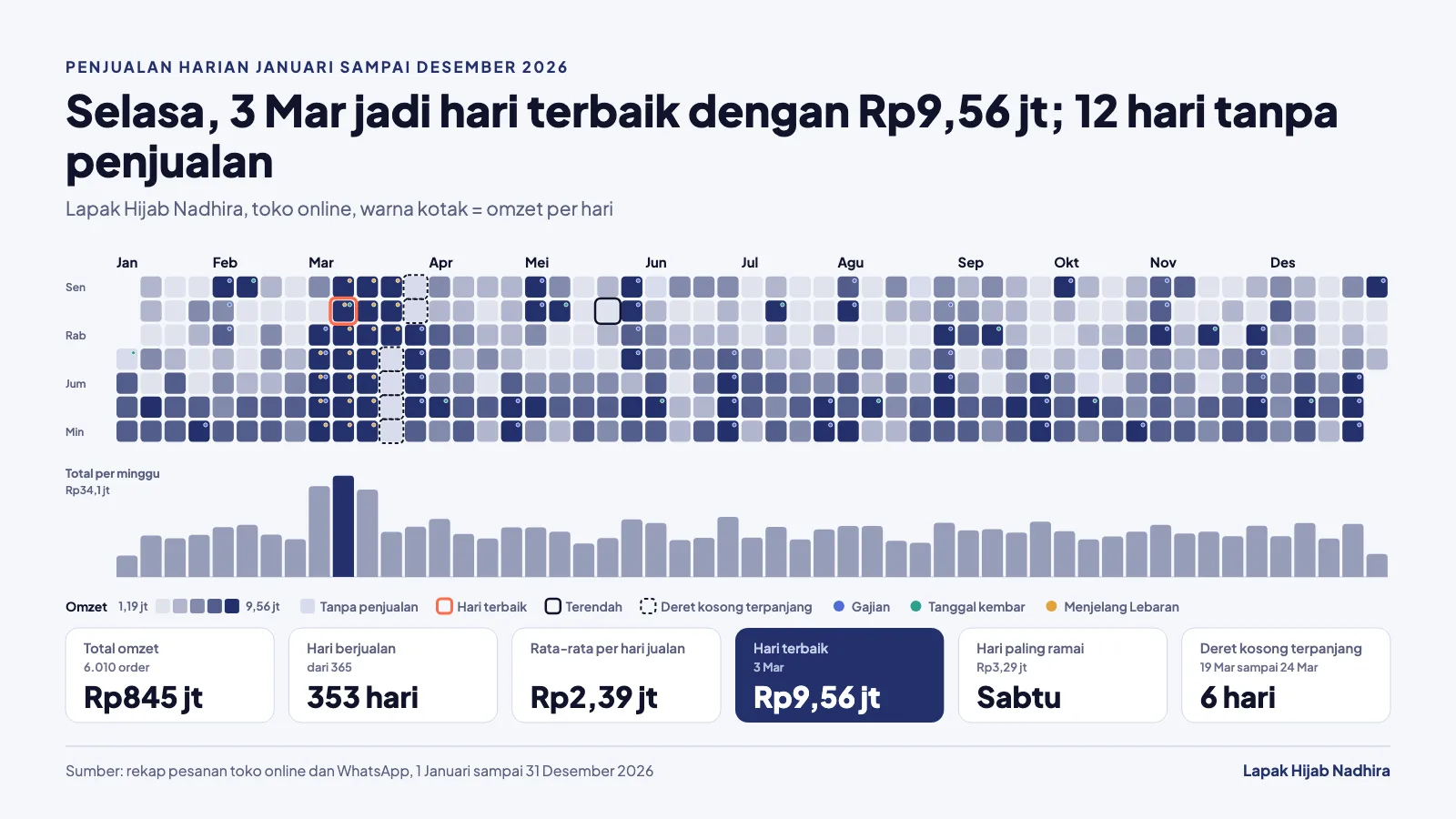
A year of an online hijab shop's sales: best day, the holiday closure, paydays and matching dates
SKILL.md contents
Premium subscribers can read, copy, and install this skill.
Unlock with Premium Sign inSales Calendar Heatmap
Description
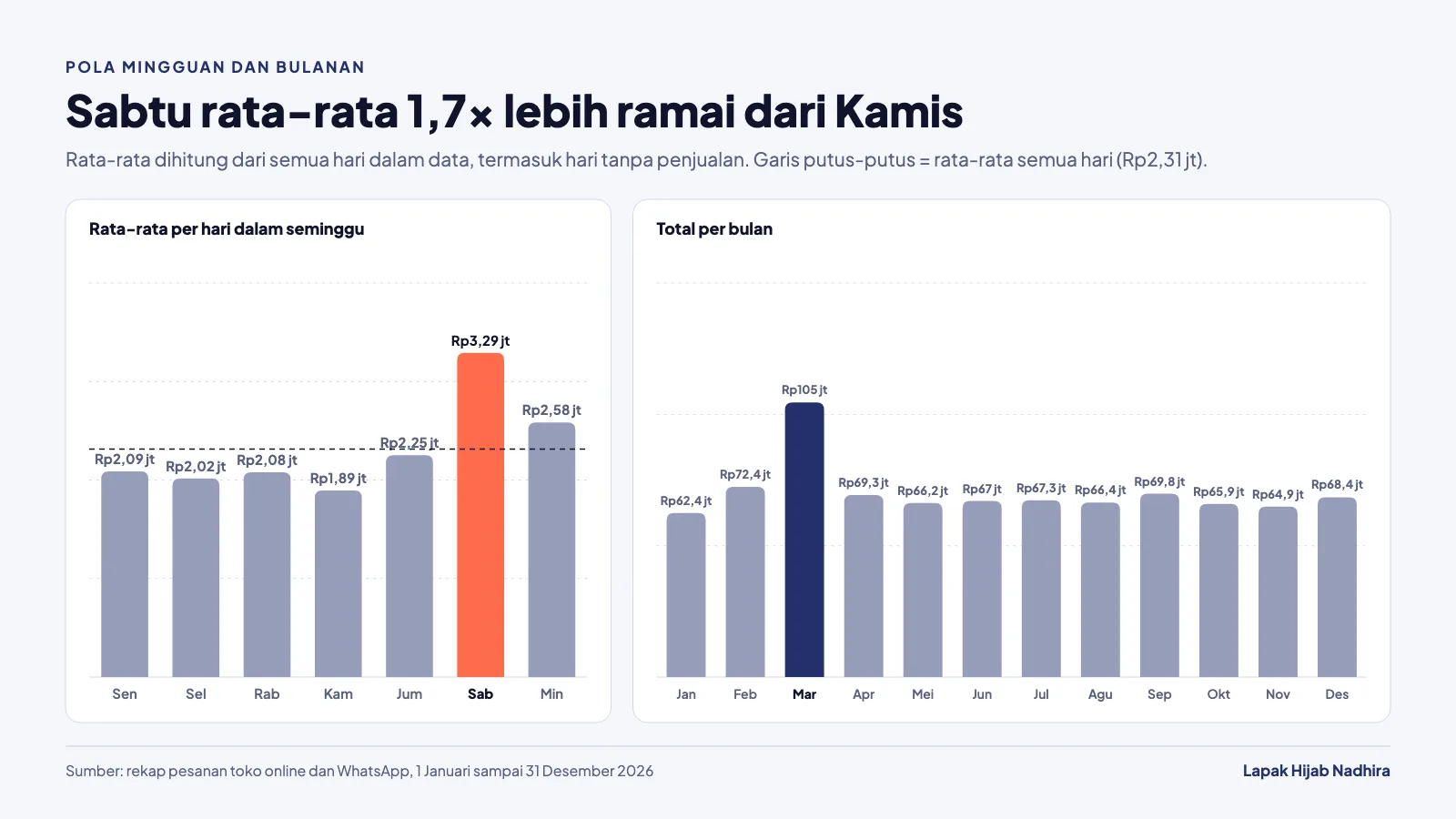
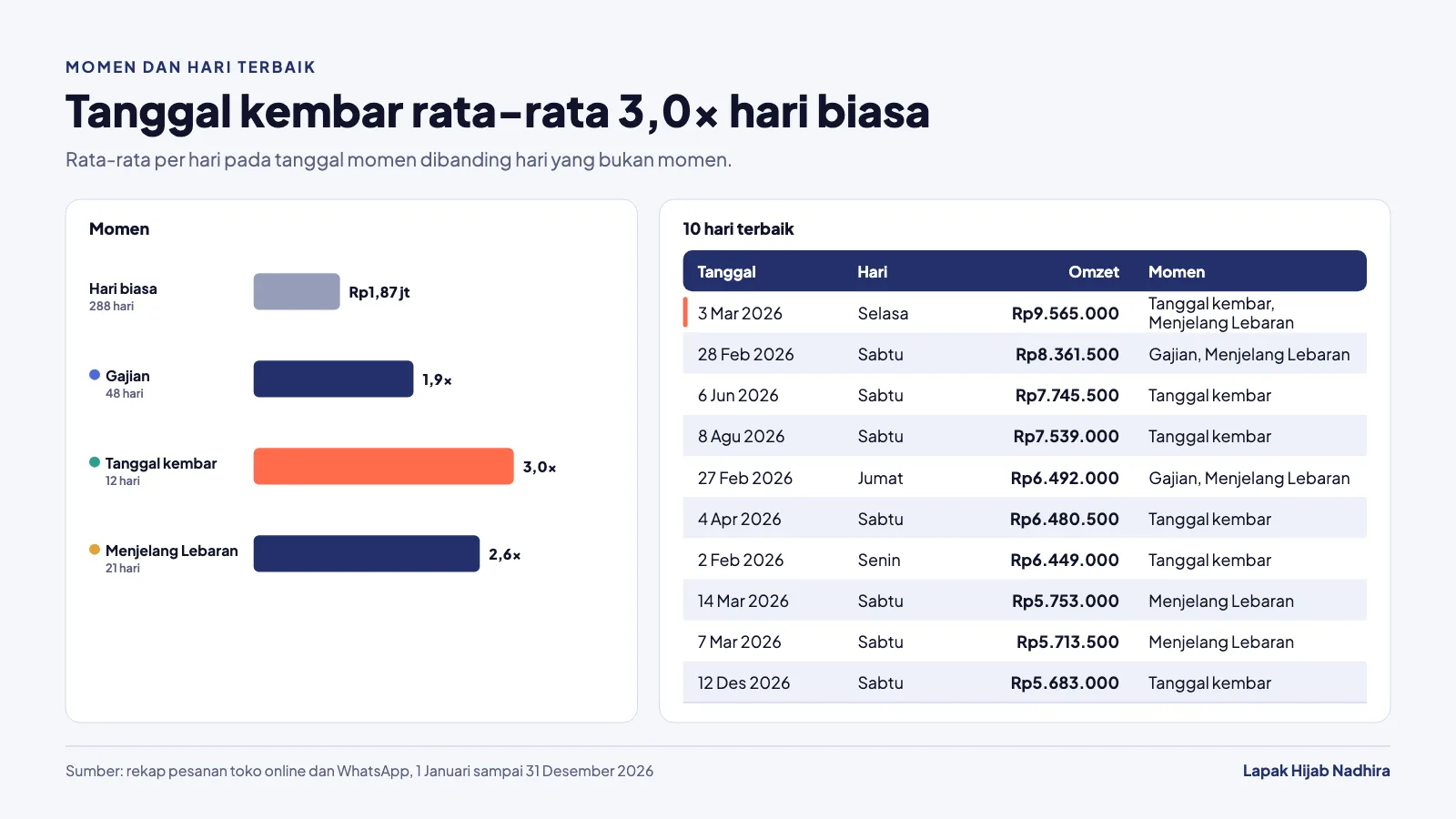
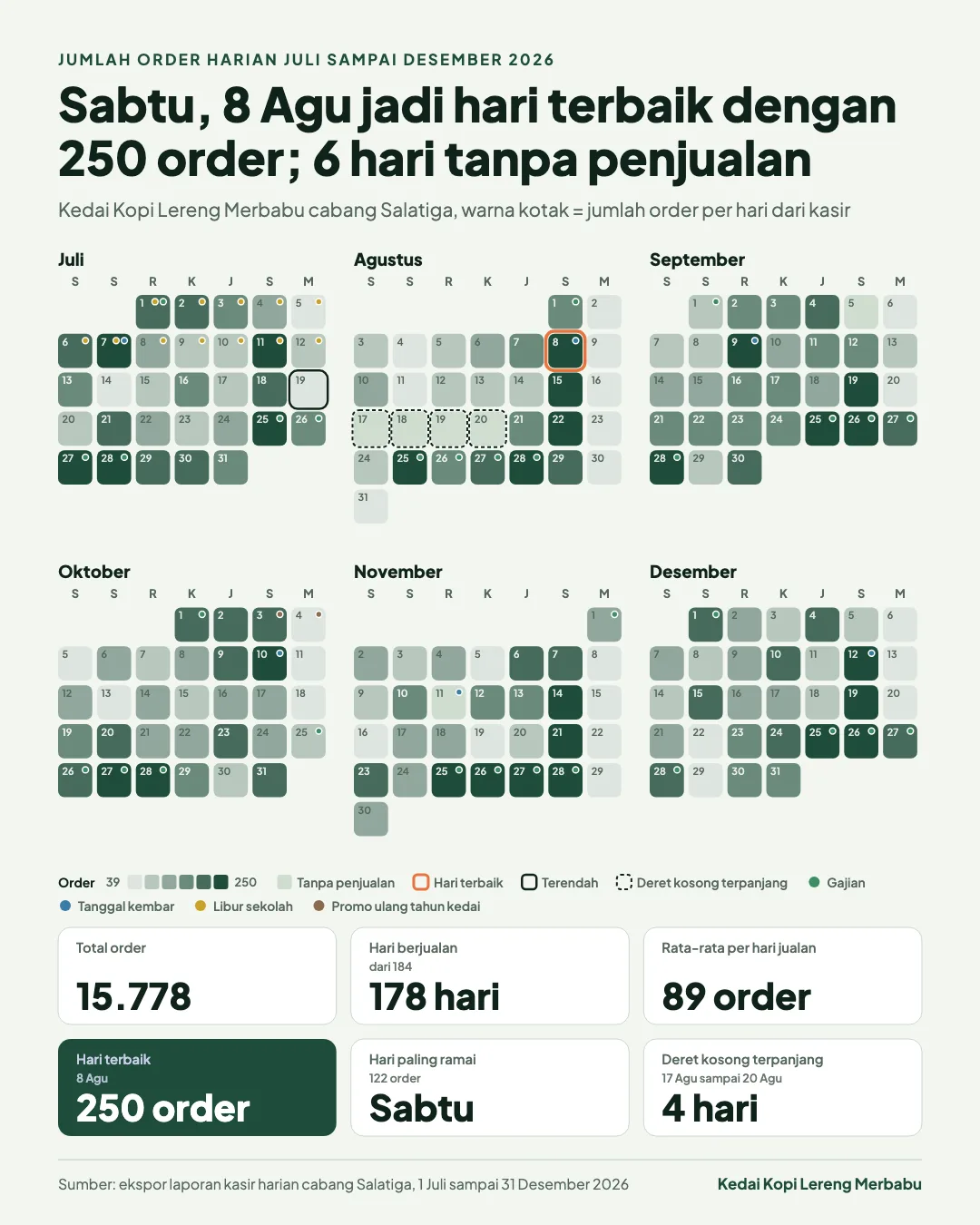
A calendar heatmap from raw sales dates and values: one box per day for 3, 6, or 12 months, colour levels by revenue or order count with a legend, the best and lowest days ringed, the longest run of days without sales marked, dots for the key dates you enter (payday, matching dates, holidays, promotions), and weekly total bars. There is a page of weekday and monthly patterns, the effect of each key date against ordinary days with the 10 best days, and a monthly table. Download as PDF, PNG, Word, or Excel.
Verified by SkillFlow
We checked every file in this skill automatically: no command that downloads and runs a program, no hidden code, no instruction telling your AI to ignore you.
- Loads from outside
- Fonts: Google Fonts SkillFlow: directory.skillflow.ai.id
See the 6 files inside
skill.json10 KBSKILL.md7 KBprompt.md7 KBprompt.en.md7 KBfiles/contoh/kedai-kopi-6-bulan-order-4x5.html52 KBfiles/diagram.html55 KB
Checked 14 Nov 2026
Part of SkillFlow Pro
Pro opens every skill in every category: copy, ZIP, Send to AI, install, save, and request new skills.
Get Pro Already subscribed? Sign inWhat you get
- A calendar of daily boxes, a strip of weeks (16:9) or month blocks (4:5), 3-7 colour levels with a legend
- Best and lowest days ringed, the longest empty run marked, dots for each key date group, weekly total bars
- Six cards: total, selling days, average per selling day, best day, busiest weekday, empty run
- Average per weekday and total per month patterns, with automatic conclusion titles
- Each key date's effect against ordinary days (times), the 10 best days, and a monthly table
- Raw data pasted from a spreadsheet; Excel holds Daily, Weekday, Month, Key dates, and Summary sheets
Good fit
- Online shops, cafes, and stores wanting to see daily patterns over a year or half a year
- Checking whether paydays, matching dates, or holiday seasons really lift sales
- Year-end reports that show the whole year in one picture
Not for
- It does not show busy hours within a day; use a sales-hour heatmap for that
- Not a year-on-year comparison and not a sales forecast
- It does not pull data from a till or marketplace; you paste the data yourself
- A key date's effect is a comparison of averages, not proof that the date caused it
About this skill
/kalender-heatmap-penjualan Make a calendar heatmap of my online hijab shop's daily revenue for 2026, marking paydays, matching dates, and the run-up to the holiday; I will paste the daily data from a spreadsheet
Show more
A calendar heatmap from raw sales dates and values: one box per day for 3, 6, or 12 months, colour levels by revenue or order count with a legend, the best and lowest days ringed, the longest run of days without sales marked, dots for the key dates you enter (payday, matching dates, holidays, promotions), and weekly total bars. There is a page of weekday and monthly patterns, the effect of each key date against ordinary days with the 10 best days, and a monthly table. Download as PDF, PNG, Word, or Excel.
User reviews
FAQ
My data is per transaction, not per day. Does that work?
Yes. Paste every transaction row with its date and value. Rows with the same date are added into one day, and if there is no order count column, each row counts as one order.
Why are some boxes at the start or end of the calendar dashed?
Those days are outside the data range, for example a 12-month period with data only up to October. They are not counted as zero, so averages and empty runs stay correct. Days inside the data range with no row count as no sales.
What is the difference between the quantile and equal scales?
Quantile puts the same number of selling days in each colour level, so weekly and monthly patterns show more. Equal splits the value range into equal widths, so big spikes like matching dates stand out more but ordinary days look alike.
Which AI can I use it with?
Copy the prompt into a chat AI (ChatGPT, Claude, Gemini, DeepSeek); or download the ZIP and install it in an AI agent (Claude Code, Codex, Antigravity, Hermes Agent, Cursor, GitHub Copilot, Gemini CLI, OpenCode, Kimi Code, Trae), which then builds the files for you.
What is in the ZIP?
One folder named kalender-heatmap-penjualan with SKILL.md (the instructions an AI agent reads) and the prompt, 6 files in all. Extract it into your agent's skills folder, or install it with npx skillflow-ai add kalender-heatmap-penjualan. Pro only.
Is there a per-use fee or credits?
Not from SkillFlow. The skill runs on the AI you already use, so any cost follows that plan.
Which plan includes it?
SkillFlow Pro. It opens every skill in every category.
Can I use my own colours and brand?
Yes. Pick a colour theme on this page, or fill in your brand profile once; both go into the prompt you copy and into the ZIP.
Can I share what I made?
Pro members can upload the result and get a page at share.skillflow.ai.id to send to anyone. The page carries a small "Made with SkillFlow AI" mark.
Is there a download limit?
Yes, per day: 50 skills on Pro, 10 on other plans. Downloading a skill again on the same day does not count.



