

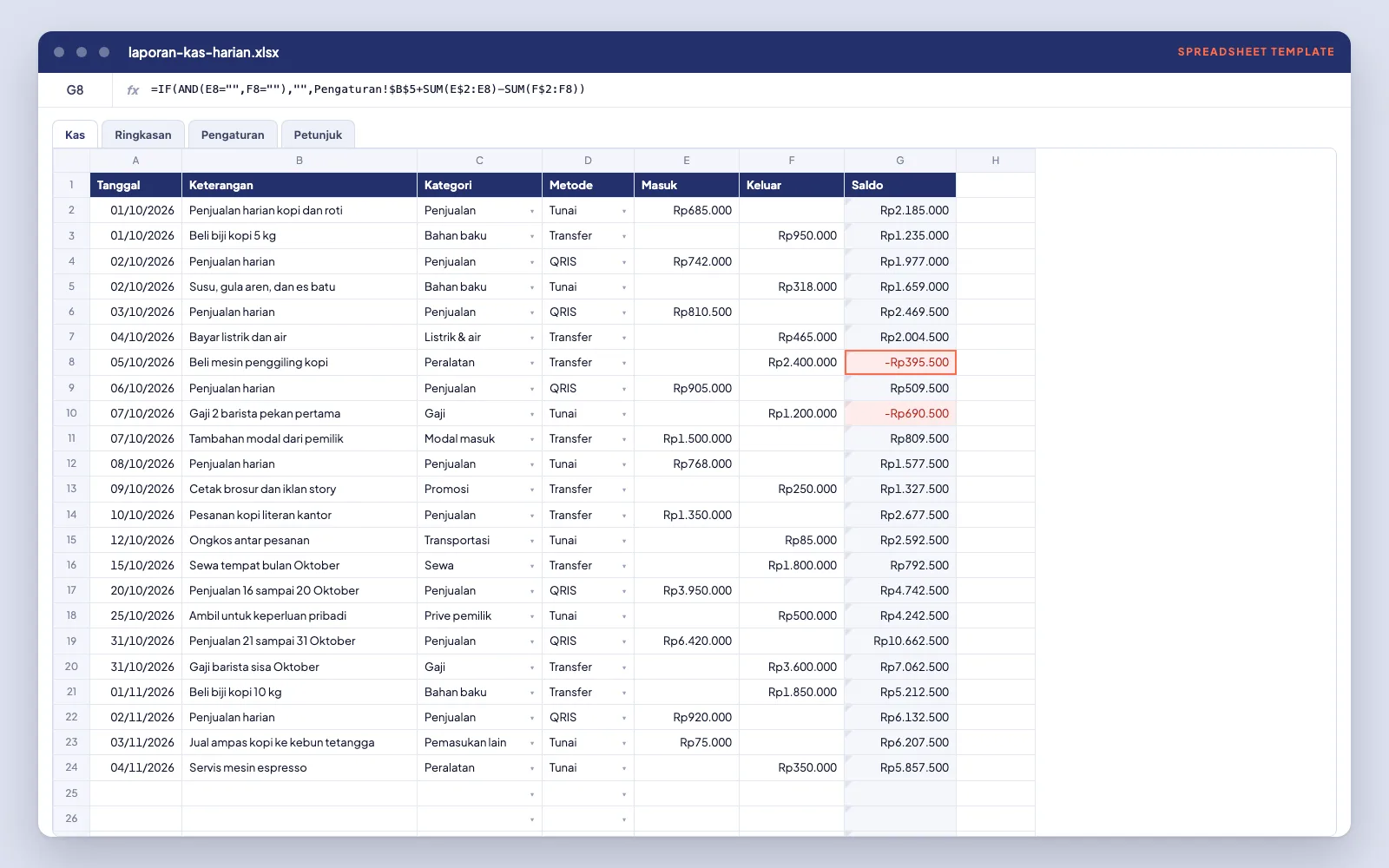
Cash sheet: category and method dropdowns, running balance, negative balance highlighted
SKILL.md contents
Premium subscribers can read, copy, and install this skill.
Unlock with Premium Sign inDaily Cash Book
Description
An Excel daily cash book for small businesses: log every cash in and cash out with a category and payment method from dropdowns, a running balance that calculates itself, negative balances highlighted in red, totals, spending per category and the difference per month, plus Settings and Guide sheets. Opens in Excel, Numbers or Google Sheets.
Verified by SkillFlow
We checked every file in this skill automatically: no command that downloads and runs a program, no hidden code, no instruction telling your AI to ignore you.
- Loads from outside
- Fonts: Google Fonts SkillFlow: directory.skillflow.ai.id
See the 6 files inside
skill.json8 KBSKILL.md7 KBprompt.md6 KBprompt.en.md6 KBfiles/contoh/toko-bangunan-3-bulan.html88 KBfiles/template.html81 KB
Checked 14 Nov 2026
Part of SkillFlow Pro
Pro opens every skill in every category: copy, ZIP, Send to AI, install, save, and request new skills.
Get Pro Already subscribed? Sign inWhat you get
- An .xlsx file with Cash, Summary, Settings and Guide sheets
- A running balance column with formulas down to row 301, negative balances highlighted red
- Category and payment method dropdowns (cash, transfer, QR code, debit card)
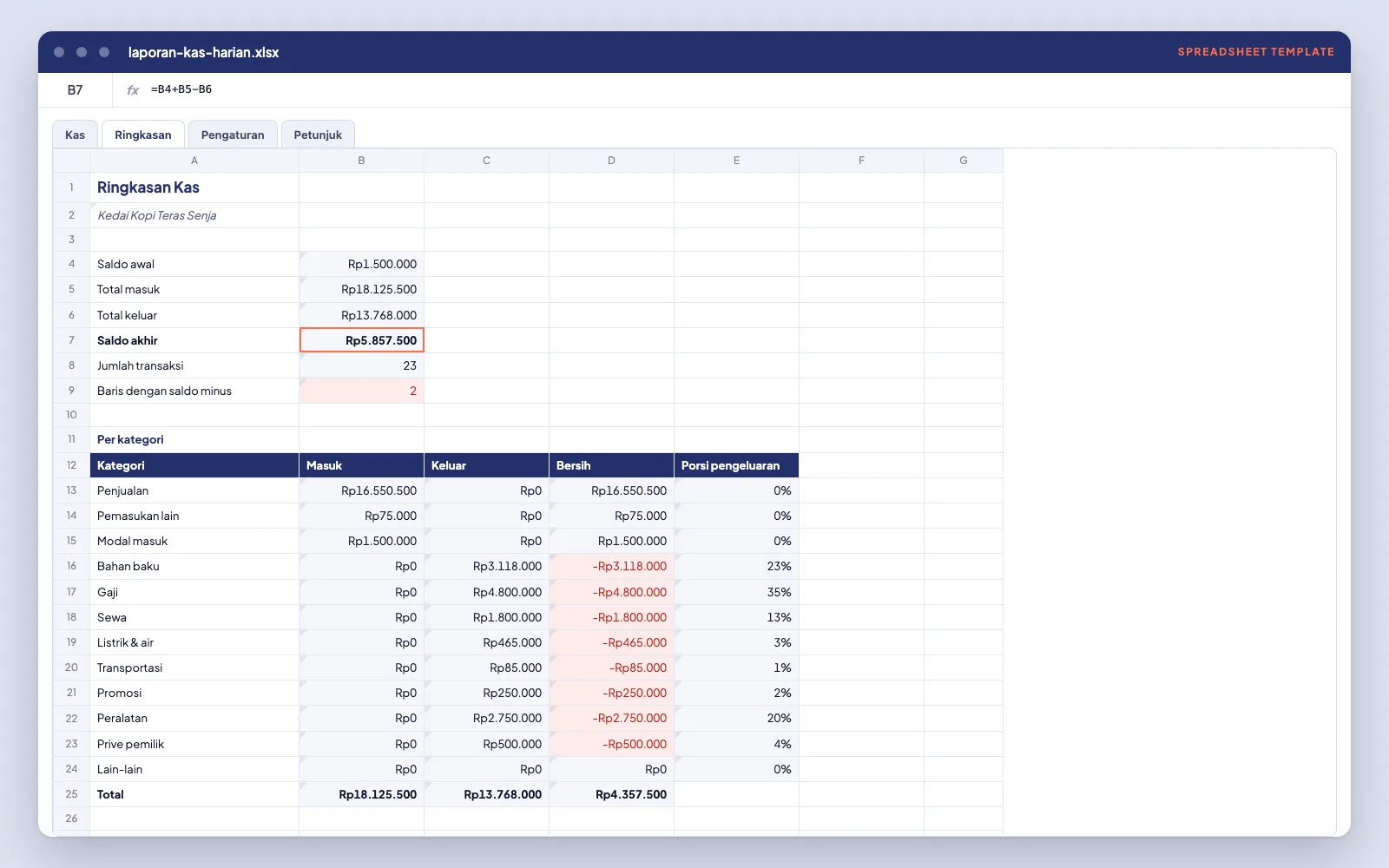
- Summary: opening balance, total in and out, closing balance, number of negative-balance rows
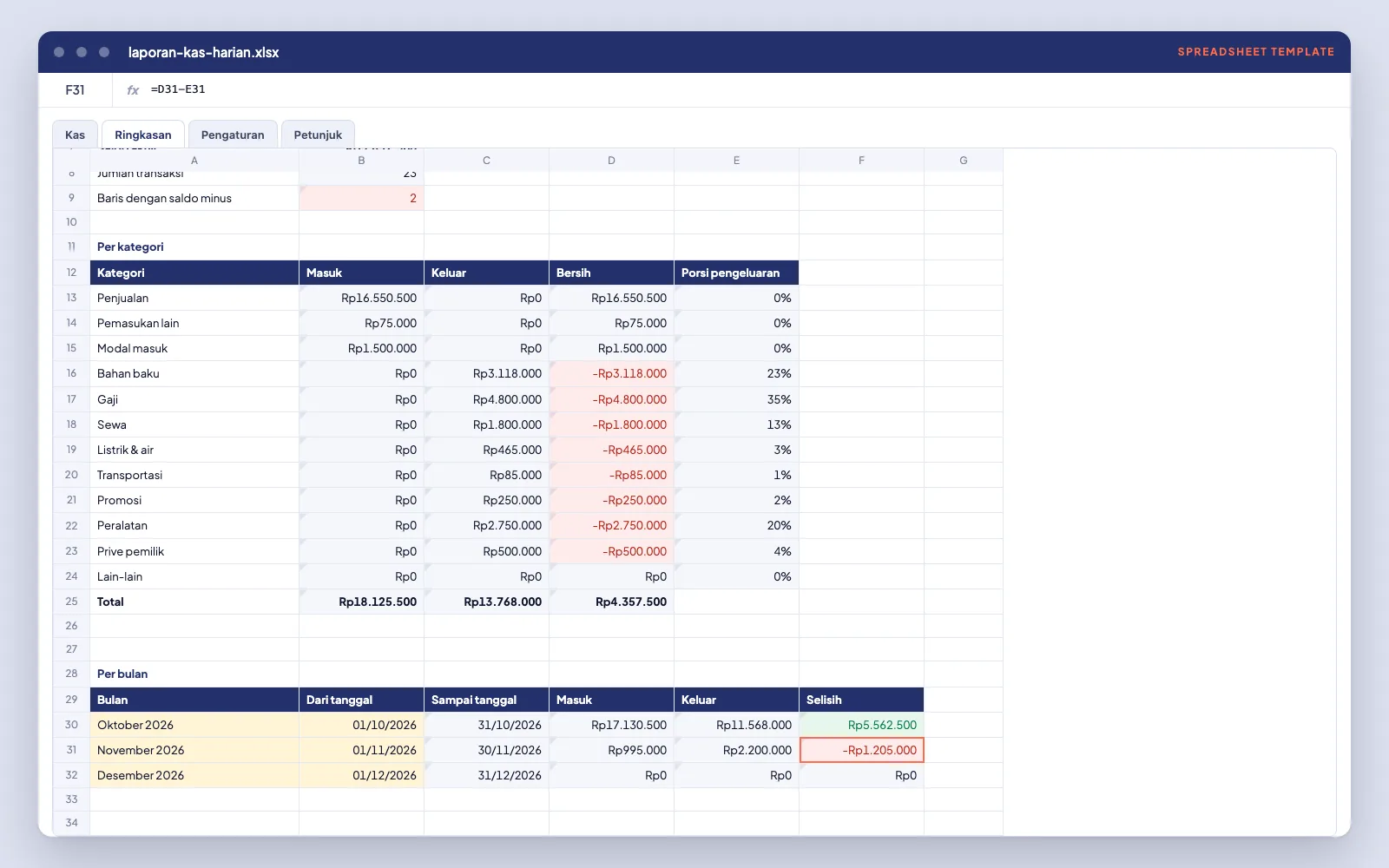
- A per-category table (in, out, net, share of spending) and a per-month table (in, out, difference)
- An HTML template with a sheet preview and a Download Excel button
Good fit
- Stall, cafe or shop owners still keeping cash in a notebook
- Small business admins who need a daily balance and monthly recap
- Small business mentors teaching simple cash records
Not for
- Not accounting software: no journal, ledger, balance sheet or profit and loss
- It does not calculate tax
- Not connected to bank accounts or a POS app; data is entered by hand
About this skill
/laporan-kas-harian Make an Excel daily cash book for my food stall, opening balance 2,000,000, with categories for ingredients, wages, rent and electricity.
Show more
An Excel daily cash book for small businesses: log every cash in and cash out with a category and payment method from dropdowns, a running balance that calculates itself, negative balances highlighted in red, totals, spending per category and the difference per month, plus Settings and Guide sheets. Opens in Excel, Numbers or Google Sheets.
User reviews
FAQ
Can I open it on my phone or in Google Sheets?
Yes. The .xlsx opens in Excel, Numbers or Google Sheets with the same formulas. On a phone, upload it to Google Drive and open it with Google Sheets.
Why is the opening balance on the Settings sheet?
So it is typed once and every balance formula reads it from one place. Change it and the whole balance column follows.
What if I have more than 300 transactions?
Copy the last row of the Cash sheet down so the balance formula comes along, or ask the AI to prepare more rows.
Which AI can I use it with?
Copy the prompt into a chat AI (ChatGPT, Claude, Gemini, DeepSeek); or download the ZIP and install it in an AI agent (Claude Code, Codex, Antigravity, Hermes Agent, Cursor, GitHub Copilot, Gemini CLI, OpenCode, Kimi Code, Trae), which then builds the files for you.
What is in the ZIP?
One folder named laporan-kas-harian with SKILL.md (the instructions an AI agent reads) and the prompt, 6 files in all. Extract it into your agent's skills folder, or install it with npx skillflow-ai add laporan-kas-harian. Pro only.
Is there a per-use fee or credits?
Not from SkillFlow. The skill runs on the AI you already use, so any cost follows that plan.
Which plan includes it?
SkillFlow Pro. It opens every skill in every category.
Can I use my own colours and brand?
Yes. Pick a colour theme on this page, or fill in your brand profile once; both go into the prompt you copy and into the ZIP.
Can I share what I made?
Pro members can upload the result and get a page at share.skillflow.ai.id to send to anyone. The page carries a small "Made with SkillFlow AI" mark.
Is there a download limit?
Yes, per day: 50 skills on Pro, 10 on other plans. Downloading a skill again on the same day does not count.



