

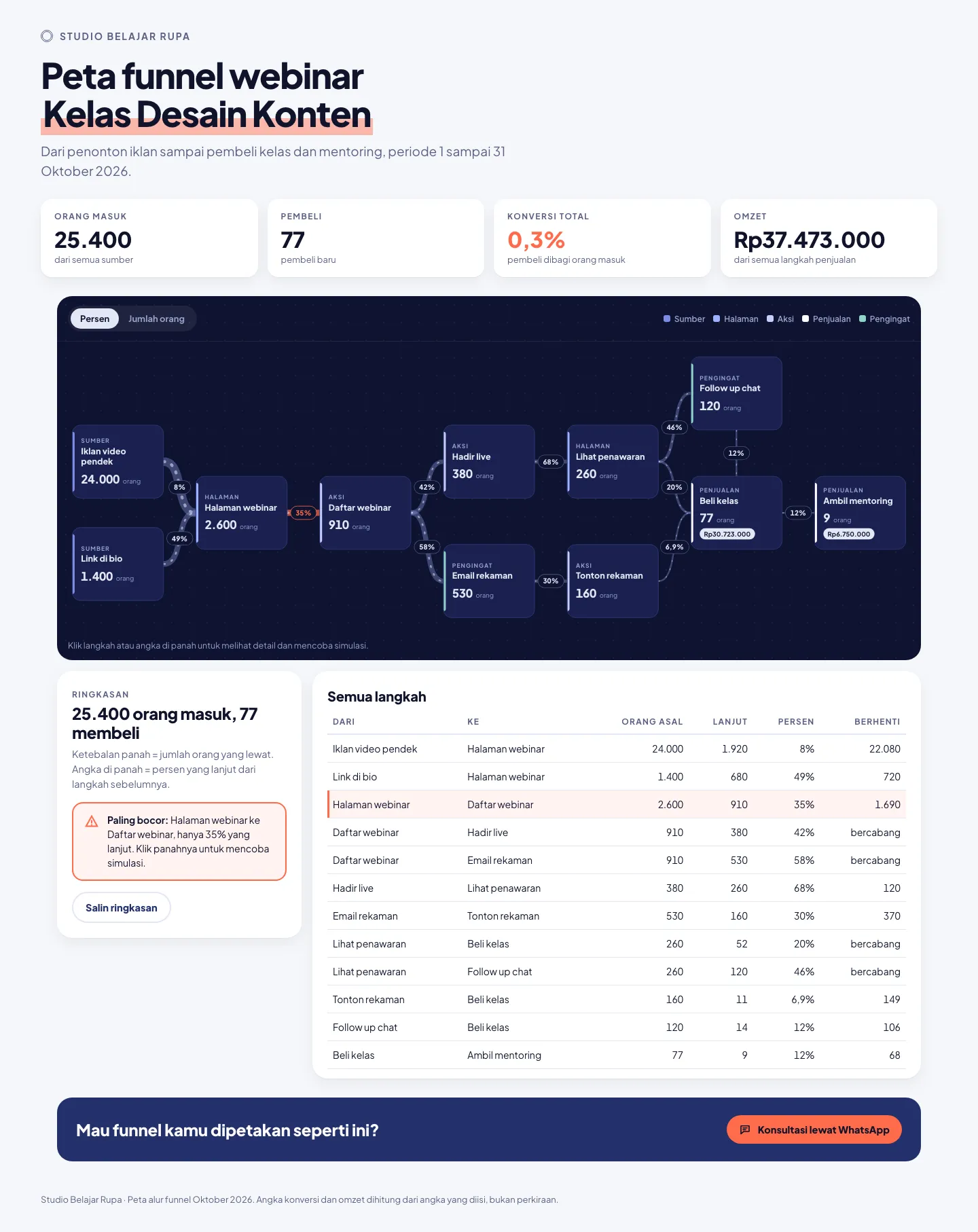
Full page: headline numbers, a branching funnel map, a summary naming the leakiest step, and the step table
SKILL.md contents
Premium subscribers can read, copy, and install this skill.
Unlock with Premium Sign inInteractive Funnel Flow Map
Description
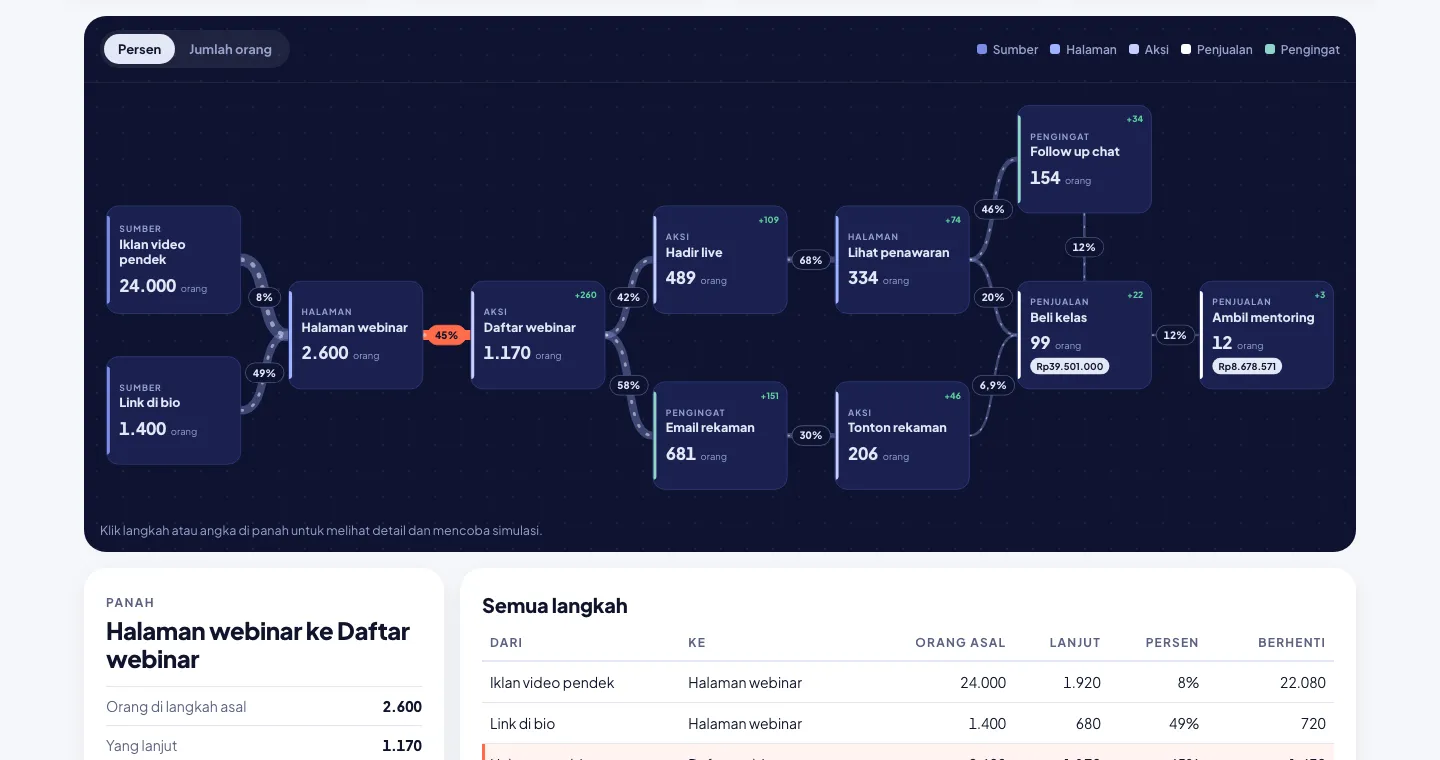
A tool page for marketers and consultants: a dark node graph of funnel steps from traffic sources to sales and upsells, including reminder branches like replay emails and chat follow-ups. Arrows thicken with head count; percent moving on, buyers, total conversion, and revenue come from one config object. The leakiest step is marked automatically, click a step for details or an arrow for a what-if. Plus a step table, copy summary, and a WhatsApp button. One HTML file, no server.
Verified by SkillFlow
We checked every file in this skill automatically: no command that downloads and runs a program, no hidden code, no instruction telling your AI to ignore you.
- Loads from outside
- Fonts: Google Fonts
See the 5 files inside
skill.json9 KBSKILL.md7 KBprompt.md2 KBprompt.en.md2 KBfiles/peta-funnel.html32 KB
Checked 14 Nov 2026
Part of SkillFlow Pro
Pro opens every skill in every category: copy, ZIP, Send to AI, install, save, and request new skills.
Get Pro Already subscribed? Sign inWhat you get
- One responsive HTML file: a dark node graph, a detail panel, a step table, a consultation button
- Every step and arrow set from one FUNNEL object (column, row, type, count, price)
- Percent moving on, drop-offs, buyers, total conversion, and revenue worked out automatically
- A leakiest-step marker and a what-if when one arrow's percent goes up
- Percent or head count on the arrows, and the path of the selected step highlighted
- A copyable text summary and a WhatsApp message that names the leakiest step
- 3 palettes (indigo, forest, charcoal)
Good fit
- Marketers wanting to see where prospects drop off most
- Consultants presenting a funnel audit to clients with the client's own numbers
- Online course owners with webinar or lead magnet funnels that branch
- Teams checking the effect of raising one conversion rate before changing anything
Not for
- It does not pull data automatically from ads, a shop, or email; you enter the numbers in the config
- Not an animated funnel video; for video content use the funnel diagram video
- The what-if changes one arrow at a time and assumes the other percents stay the same
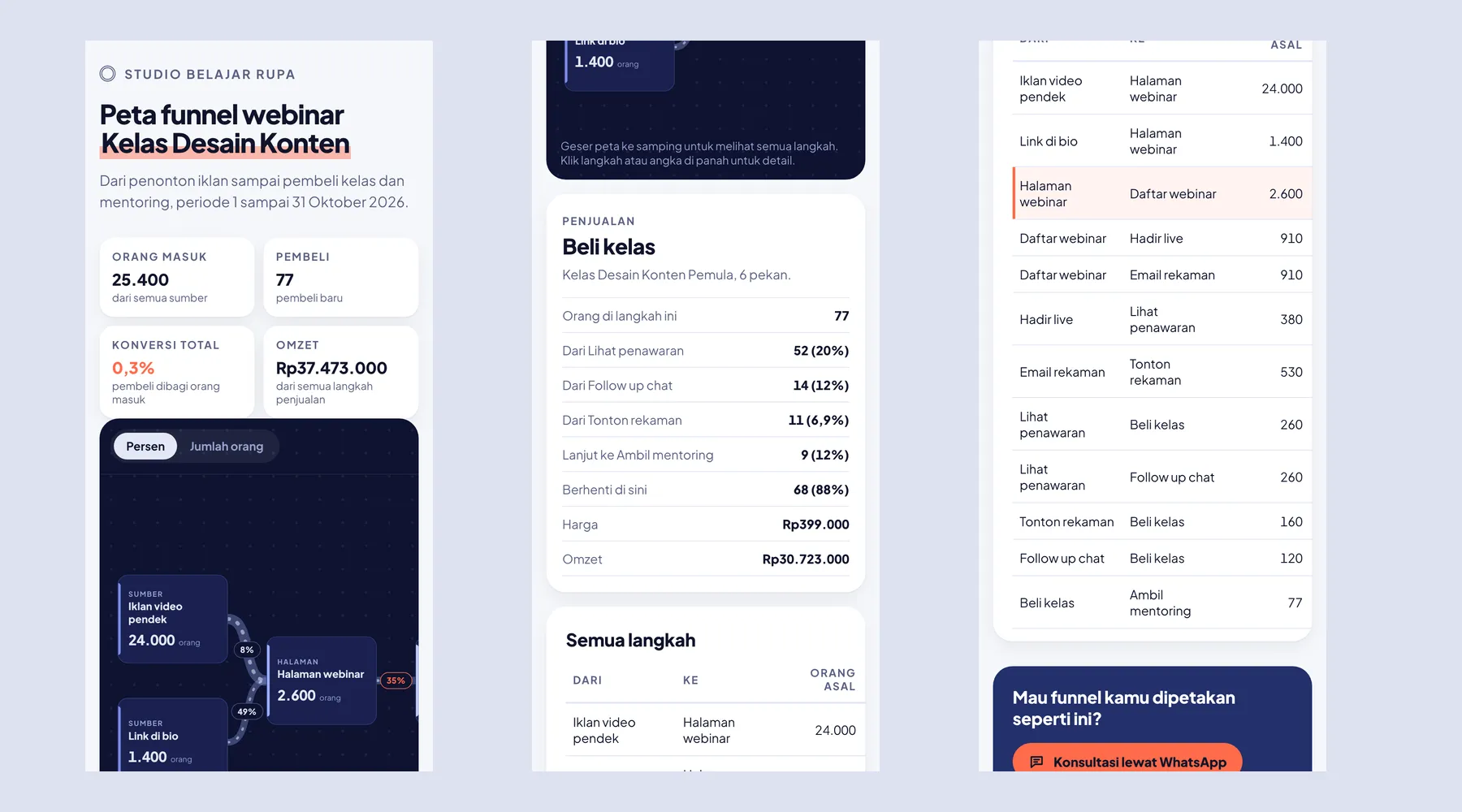
- Best read on a wide screen; on a phone the map scrolls sideways
About this skill
/peta-alur-funnel Build an interactive funnel map for our free webinar: a video ad with 24,000 viewers, a bio link, the webinar page, 910 sign-ups, 380 attendees, a replay email, the offer, chat follow-ups, a 399,000 class, and a mentoring upsell
Show more
A tool page for marketers and consultants: a dark node graph of funnel steps from traffic sources to sales and upsells, including reminder branches like replay emails and chat follow-ups. Arrows thicken with head count; percent moving on, buyers, total conversion, and revenue come from one config object. The leakiest step is marked automatically, click a step for details or an arrow for a what-if. Plus a step table, copy summary, and a WhatsApp button. One HTML file, no server.
User reviews
FAQ
Which numbers are required?
Source steps (ads, bio link) must have a head count. Other steps just need the number on the node, or on the arrow when a step receives people from several paths. The page warns in the console if an arrow's number cannot be worked out.
How is the leakiest step chosen?
From arrows with a low percent that also lose many people, excluding arrows out of traffic sources (ad viewers to clicks), which are always low. Treat it as a starting point to check, not a verdict.
Which AI can I use it with?
Copy the prompt into a chat AI (ChatGPT, Claude, Gemini, DeepSeek); or download the ZIP and install it in an AI agent (Claude Code, Codex, Antigravity, Hermes Agent, Cursor, GitHub Copilot, Gemini CLI, OpenCode, Kimi Code, Trae), which then builds the files for you.
What is in the ZIP?
One folder named peta-alur-funnel with SKILL.md (the instructions an AI agent reads) and the prompt, 5 files in all. Extract it into your agent's skills folder, or install it with npx skillflow-ai add peta-alur-funnel. Pro only.
Is there a per-use fee or credits?
Not from SkillFlow. The skill runs on the AI you already use, so any cost follows that plan.
Which plan includes it?
SkillFlow Pro. It opens every skill in every category.
Can I use my own colours and brand?
Yes. Pick a colour theme on this page, or fill in your brand profile once; both go into the prompt you copy and into the ZIP.
Can I share what I made?
Pro members can upload the result and get a page at share.skillflow.ai.id to send to anyone. The page carries a small "Made with SkillFlow AI" mark.
Is there a download limit?
Yes, per day: 50 skills on Pro, 10 on other plans. Downloading a skill again on the same day does not count.



