

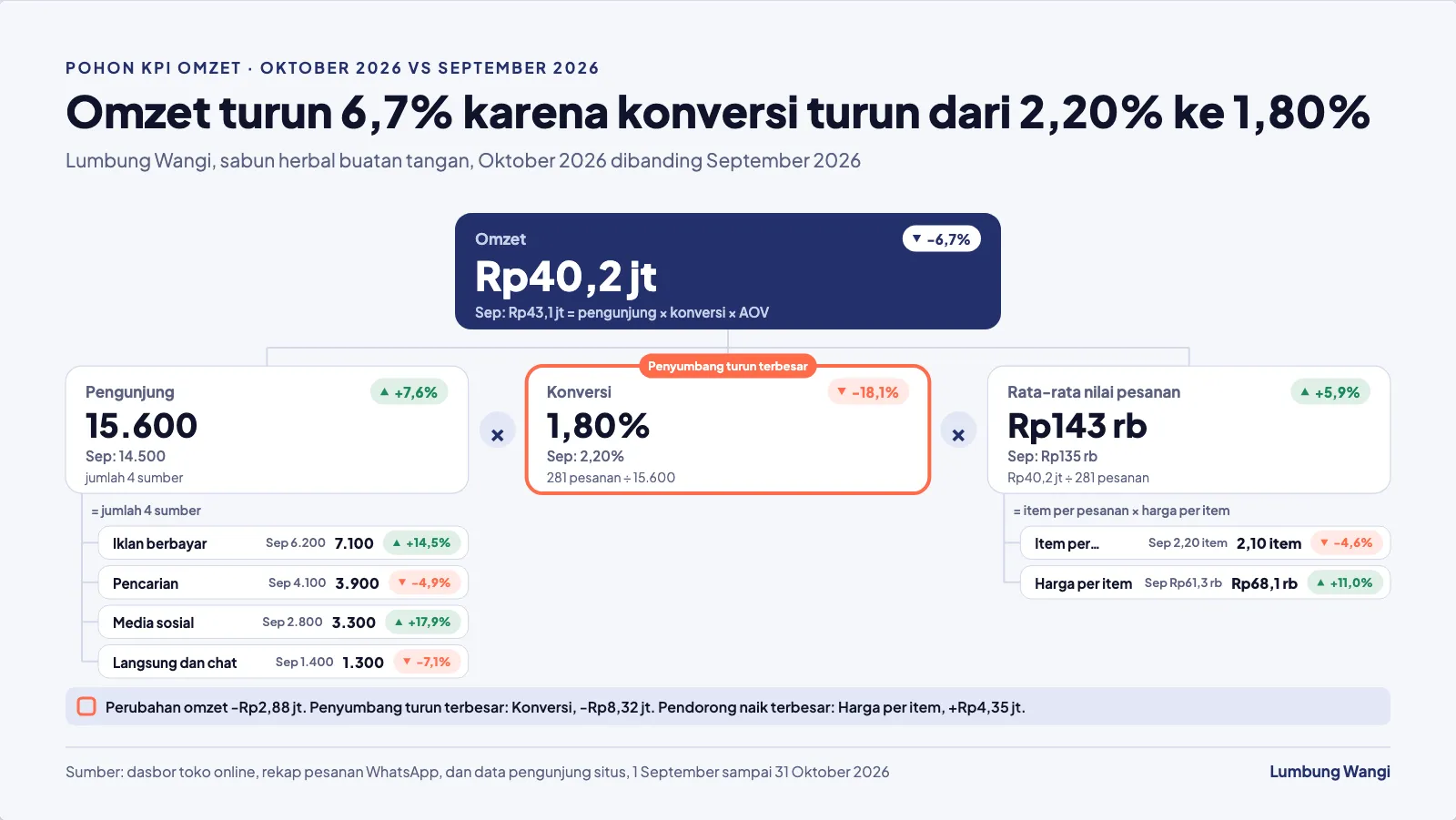
A herbal soap shop: revenue down 6.7% with conversion marked as the biggest drag
SKILL.md contents
Premium subscribers can read, copy, and install this skill.
Unlock with Premium Sign inRevenue KPI Tree
Description
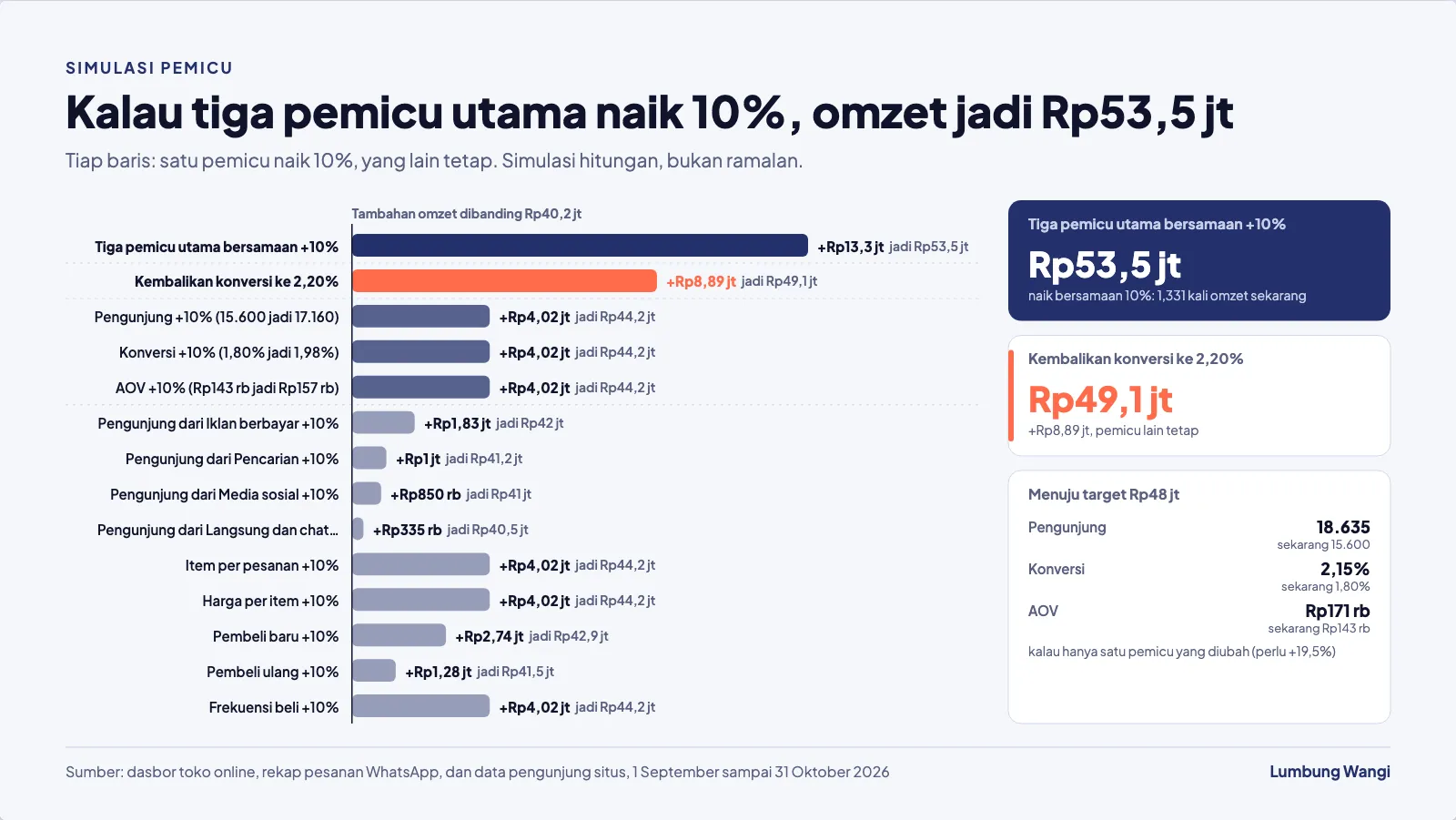
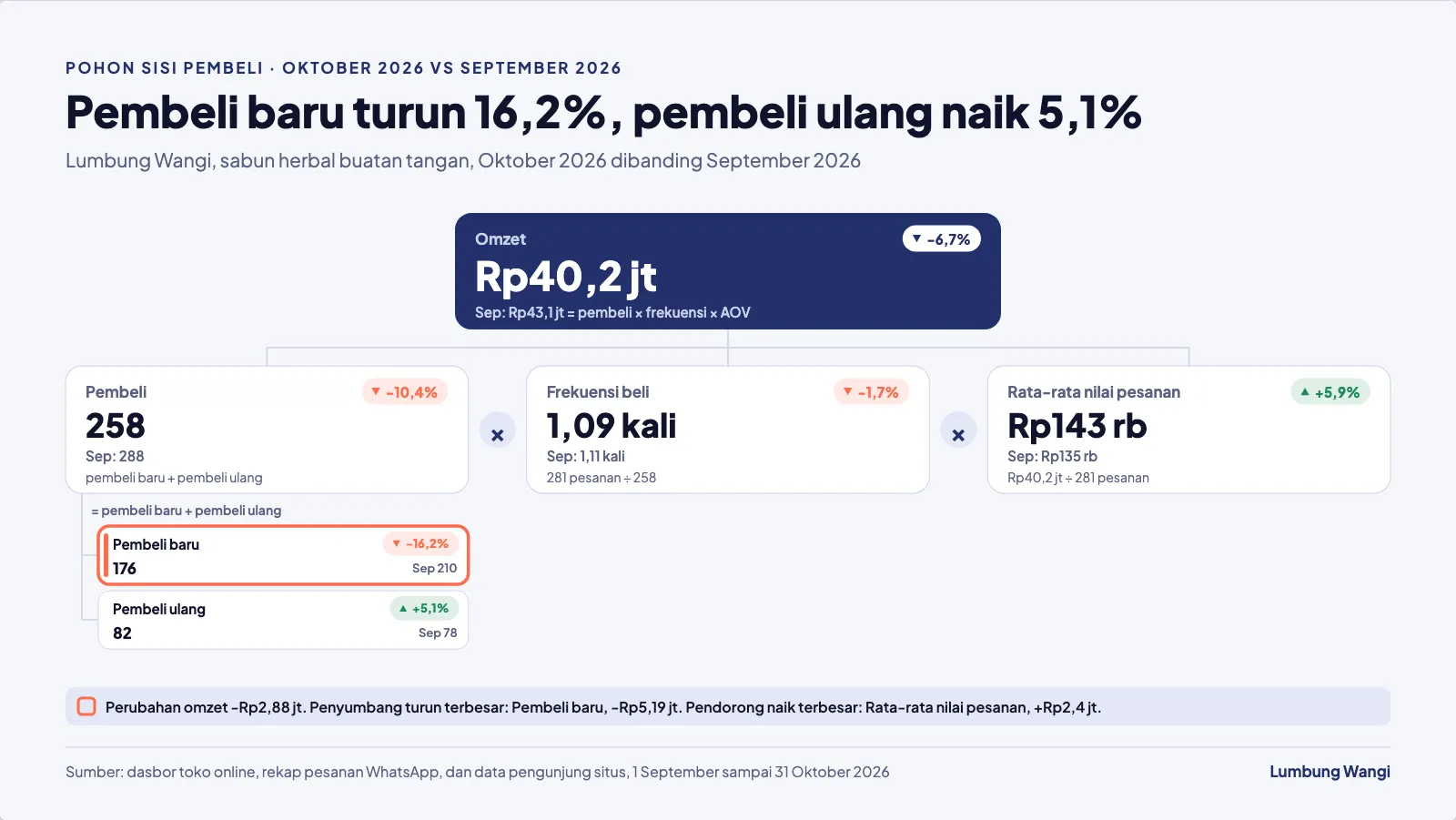
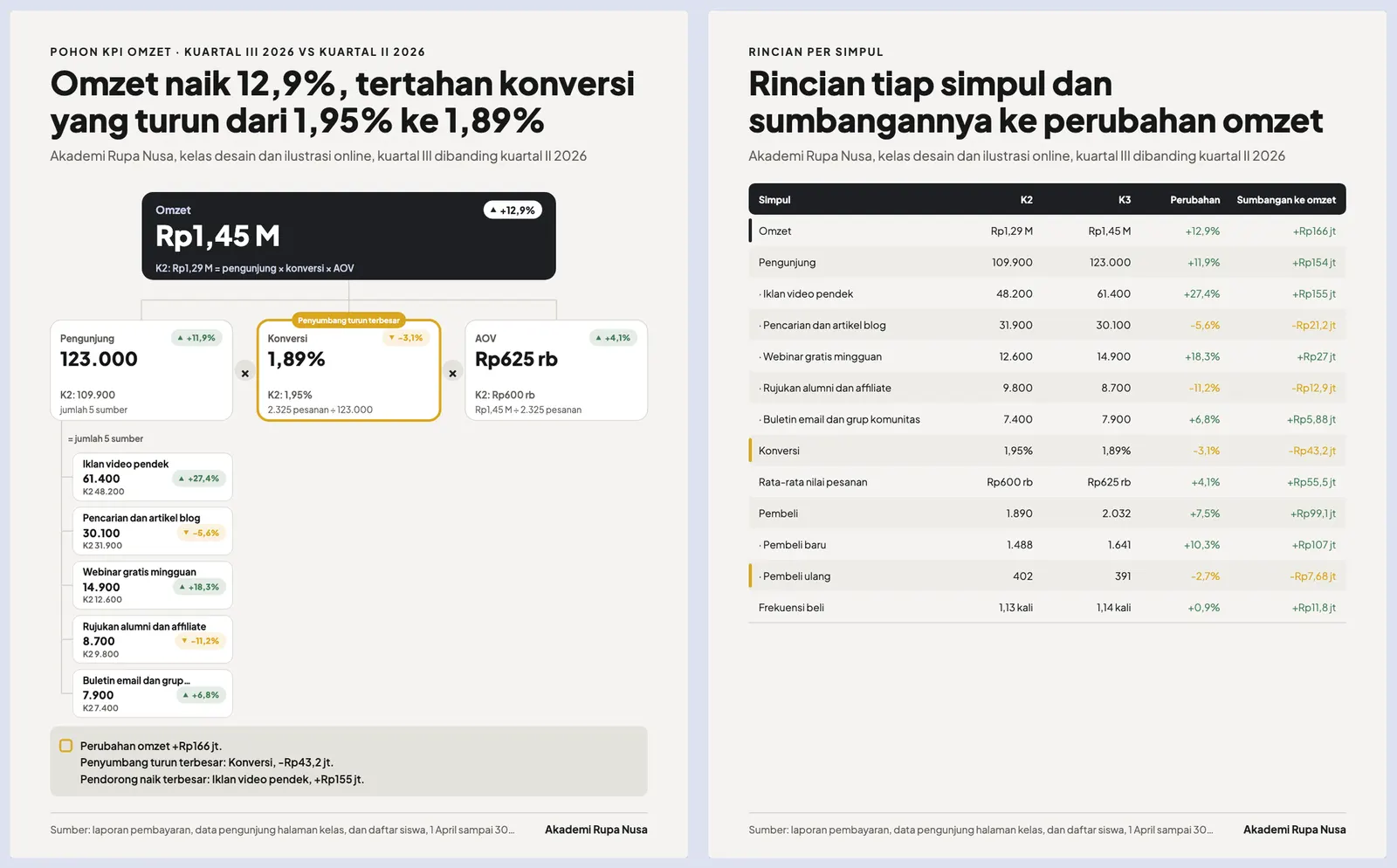
A revenue driver tree from raw figures for two periods: revenue at the top split into visitors x conversion x average order value, with visitors per source, items per order x price per item, and a buyer-side tree of new and repeat buyers x frequency. Every node shows this period, last period, and the percent change (up in green, down in coral), the biggest drag is marked, then a simulation page for each driver rising 10 percent and a table of contributions in money. Download PDF, PNG, Word, or Excel.
Verified by SkillFlow
We checked every file in this skill automatically: no command that downloads and runs a program, no hidden code, no instruction telling your AI to ignore you.
- Loads from outside
- Fonts: Google Fonts SkillFlow: directory.skillflow.ai.id
See the 6 files inside
skill.json10 KBSKILL.md6 KBprompt.md8 KBprompt.en.md7 KBfiles/contoh/kelas-online-kuartal-4x5.html46 KBfiles/diagram.html47 KB
Checked 14 Nov 2026
Part of SkillFlow Pro
Pro opens every skill in every category: copy, ZIP, Send to AI, install, save, and request new skills.
Get Pro Already subscribed? Sign inWhat you get
- A KPI tree: revenue = visitors x conversion x AOV, derived figures calculated so children always multiply to the parent
- Every node: this and last period's value, a change chip up in green or down in coral, and the formula with its numbers
- Visitors per source and AOV split into items per order x price per item (optional)
- Each driver's contribution to the revenue change in money, with the biggest drag marked
- A simulation of each driver rising 10 percent, all three together, restoring the falling driver, and the road to a target
- A buyer-side tree of new and repeat buyers, a detail table, Excel with Tree, Simulation, and Data sheets; 16:9 or 4:5, 3 palettes
Good fit
- Online shop owners who want to know whether revenue fell because of traffic, conversion, or basket size
- Small teams in a monthly meeting choosing one focus for next month
- Consultants and agencies reporting to clients with numbers that can be checked
Not for
- It needs orders and visitors for each period; revenue alone is not enough
- Not a forecast: the simulation keeps the other drivers fixed
- It does not break revenue down per product or category
- It does not pull data from your shop or site; you enter the figures
About this skill
/pohon-kpi-omzet Make a revenue KPI tree for my online soap shop, October against September 2026: revenue fell from 43k to 40k, orders from 319 to 281, visitors from four sources. Which driver dragged it down the most, and what would revenue be if each driver rose 10 percent?
Show more
A revenue driver tree from raw figures for two periods: revenue at the top split into visitors x conversion x average order value, with visitors per source, items per order x price per item, and a buyer-side tree of new and repeat buyers x frequency. Every node shows this period, last period, and the percent change (up in green, down in coral), the biggest drag is marked, then a simulation page for each driver rising 10 percent and a table of contributions in money. Download PDF, PNG, Word, or Excel.
User reviews
FAQ
Why don't I type conversion and AOV myself?
So the tree cannot contradict itself. Conversion is orders divided by visitors and AOV is revenue divided by orders, so visitors x conversion x AOV always equals revenue exactly. Figures copied from a dashboard often use different rounding or definitions and stop multiplying out.
How is each driver's contribution in money worked out?
With the logarithmic mean (LMDI) method. Each multiplied driver gets a share based on its log change, each visitor source a share based on its difference, and all contributions add up exactly to the revenue change with nothing left unexplained.
Why do all main drivers at +10% give the same result?
Because revenue is a product, raising visitors, conversion, or AOV by 10% each lifts revenue by 10%. What differs is the cost and effort of raising each one. The chart also shows all three together (about 33%) and the smaller effect of each visitor source.
Which AI can I use it with?
Copy the prompt into a chat AI (ChatGPT, Claude, Gemini, DeepSeek); or download the ZIP and install it in an AI agent (Claude Code, Codex, Antigravity, Hermes Agent, Cursor, GitHub Copilot, Gemini CLI, OpenCode, Kimi Code, Trae), which then builds the files for you.
What is in the ZIP?
One folder named pohon-kpi-omzet with SKILL.md (the instructions an AI agent reads) and the prompt, 6 files in all. Extract it into your agent's skills folder, or install it with npx skillflow-ai add pohon-kpi-omzet. Pro only.
Is there a per-use fee or credits?
Not from SkillFlow. The skill runs on the AI you already use, so any cost follows that plan.
Which plan includes it?
SkillFlow Pro. It opens every skill in every category.
Can I use my own colours and brand?
Yes. Pick a colour theme on this page, or fill in your brand profile once; both go into the prompt you copy and into the ZIP.
Can I share what I made?
Pro members can upload the result and get a page at share.skillflow.ai.id to send to anyone. The page carries a small "Made with SkillFlow AI" mark.
Is there a download limit?
Yes, per day: 50 skills on Pro, 10 on other plans. Downloading a skill again on the same day does not count.



