


Contracts sheet: instalment, total paid, margin, balance, next due date, days late, and status
SKILL.md contents
Premium subscribers can read, copy, and install this skill.
Unlock with Premium Sign inCustomer Instalment Planner
Description
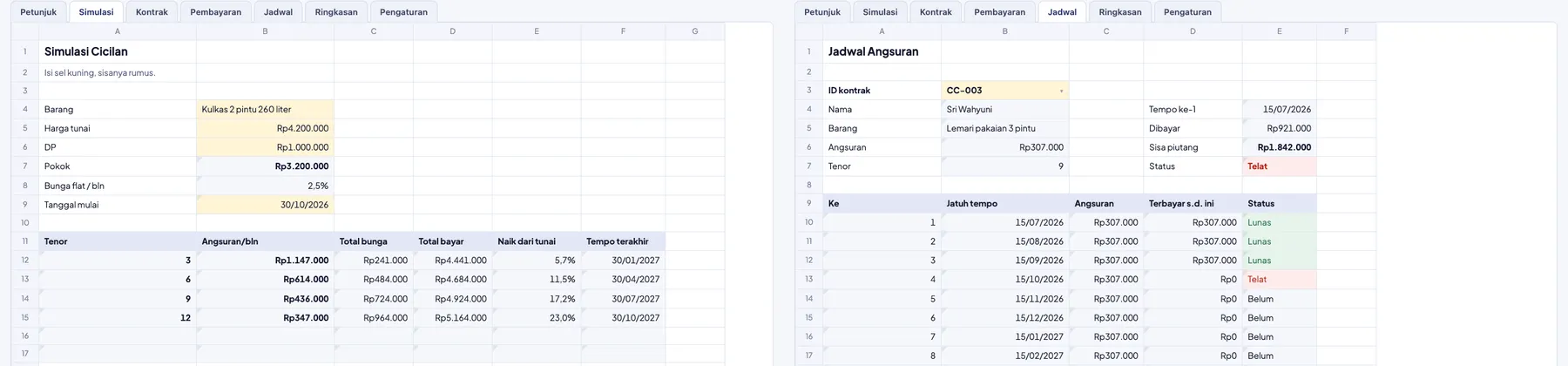
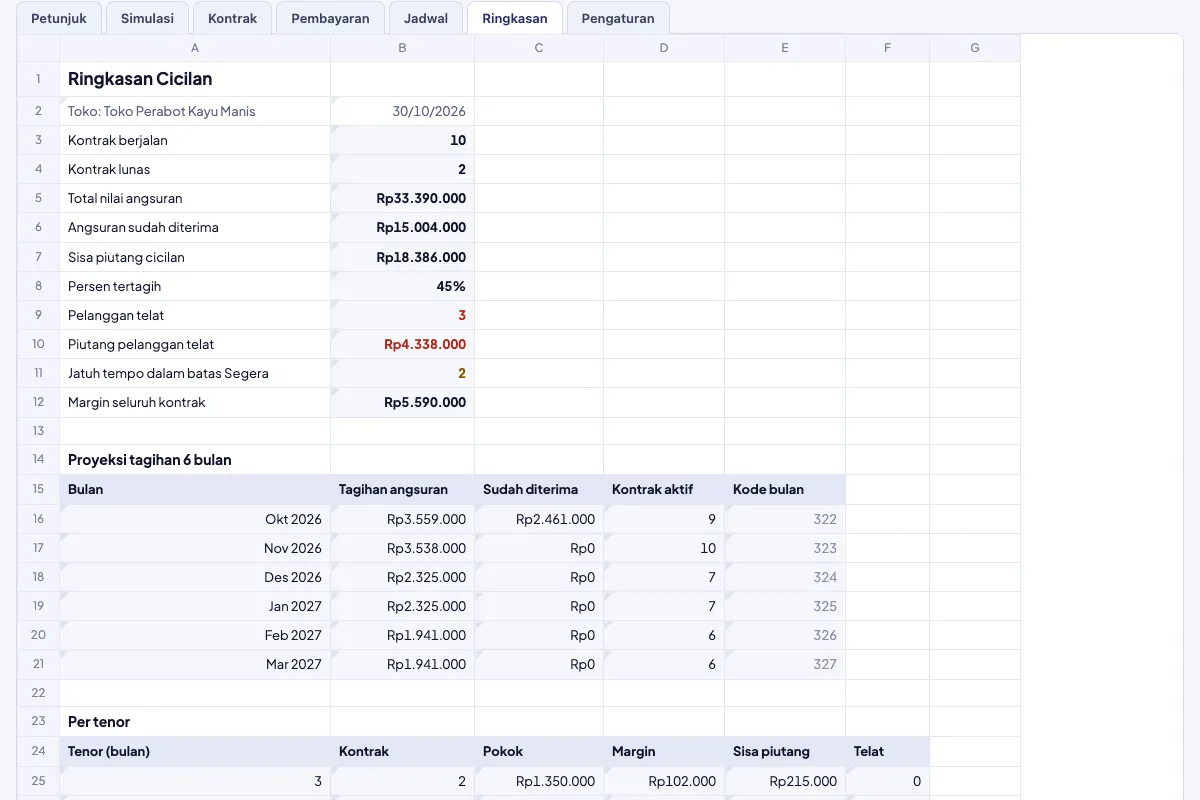
An Excel file for small shops that sell goods on their own instalment plans: an instalment simulation from price, down payment, term, and flat interest or margin comparing every term, a contract list per customer with outstanding balance, next due date, days late, and a Paid off, On track, Soon, or Late status, a record of every instalment received, a monthly schedule for the selected customer, and a summary of receivables, late accounts, a 6-month billing projection, and a per-term recap. Opens in Excel, Numbers, and Google Sheets.
Verified by SkillFlow
We checked every file in this skill automatically: no command that downloads and runs a program, no hidden code, no instruction telling your AI to ignore you.
- Loads from outside
- Fonts: Google Fonts SkillFlow: directory.skillflow.ai.id
See the 6 files inside
skill.json10 KBSKILL.md9 KBprompt.md9 KBprompt.en.md9 KBfiles/contoh/150-kontrak.html630 KBfiles/template.html357 KB
Checked 14 Nov 2026
Part of SkillFlow Pro
Pro opens every skill in every category: copy, ZIP, Send to AI, install, save, and request new skills.
Get Pro Already subscribed? Sign inWhat you get
- An .xlsx file with 7 sheets: Guide, Simulation, Contracts, Payments, Schedule, Summary, Settings
- An instalment simulation for every term: rounded instalment, total interest, total paid, last due date
- Balance, next due date, days late (DAYS), and status per contract worked out from payments
- An instalment schedule from 1 to 24 for one customer picked from a dropdown
- A summary of receivables, late customers, a 6-month billing projection, and a per-term recap
- A browser preview of the sheets with a Download Excel button
Good fit
- Furniture, electronics, phone, or gold shops selling on their own instalment plans
- Owners who want to work out instalments in front of a buyer without a calculator
- Shops that need to know total receivables and who is late every morning
Not for
- Not accounting software or a finance company system; it does not work out tax or late fees
- It uses flat interest; declining-balance or annuity interest needs different formulas
- It does not send reminders; you use the late list and WhatsApp numbers yourself
- The interest figure is only an example; compliance with the rules that apply stays with the shop owner
About this skill
/simulasi-cicilan-pelanggan Make an Excel instalment planner for Kayu Manis Furniture Shop: 3, 6, 9, and 12 month terms, 2.5 percent flat interest per month, with customer instalment records and who is paying late
Show more
An Excel file for small shops that sell goods on their own instalment plans: an instalment simulation from price, down payment, term, and flat interest or margin comparing every term, a contract list per customer with outstanding balance, next due date, days late, and a Paid off, On track, Soon, or Late status, a record of every instalment received, a monthly schedule for the selected customer, and a summary of receivables, late accounts, a 6-month billing projection, and a per-term recap. Opens in Excel, Numbers, and Google Sheets.
User reviews
FAQ
How is the instalment worked out?
Flat interest on the principal, which is the cash price minus the down payment: instalment = (principal + principal x interest x term) / term, rounded up to the nearest thousand. Set the interest to 0 if your shop sells instalments with no interest.
When is a customer counted as late?
When the next instalment's due date is past the check date by more than the grace days you set. The check date is today by default and can be changed to see the state on another day.
A customer paid part of an instalment. How do I record it?
Record the amount actually received in Payments. The balance drops right away, and on the Schedule sheet that month shows Partly paid, or Short once its due date has passed.
Which AI can I use it with?
Copy the prompt into a chat AI (ChatGPT, Claude, Gemini, DeepSeek); or download the ZIP and install it in an AI agent (Claude Code, Codex, Antigravity, Hermes Agent, Cursor, GitHub Copilot, Gemini CLI, OpenCode, Kimi Code, Trae), which then builds the files for you.
What is in the ZIP?
One folder named simulasi-cicilan-pelanggan with SKILL.md (the instructions an AI agent reads) and the prompt, 6 files in all. Extract it into your agent's skills folder, or install it with npx skillflow-ai add simulasi-cicilan-pelanggan. Pro only.
Is there a per-use fee or credits?
Not from SkillFlow. The skill runs on the AI you already use, so any cost follows that plan.
Which plan includes it?
SkillFlow Pro. It opens every skill in every category.
Can I use my own colours and brand?
Yes. Pick a colour theme on this page, or fill in your brand profile once; both go into the prompt you copy and into the ZIP.
Can I share what I made?
Pro members can upload the result and get a page at share.skillflow.ai.id to send to anyone. The page carries a small "Made with SkillFlow AI" mark.
Is there a download limit?
Yes, per day: 50 skills on Pro, 10 on other plans. Downloading a skill again on the same day does not count.



