


Seven slides: a diagram cover, four steps built up one by one, the full map, and the closing slide
SKILL.md contents
Premium subscribers can read, copy, and install this skill.
Unlock with Premium Sign inFour-Step Framework
Description
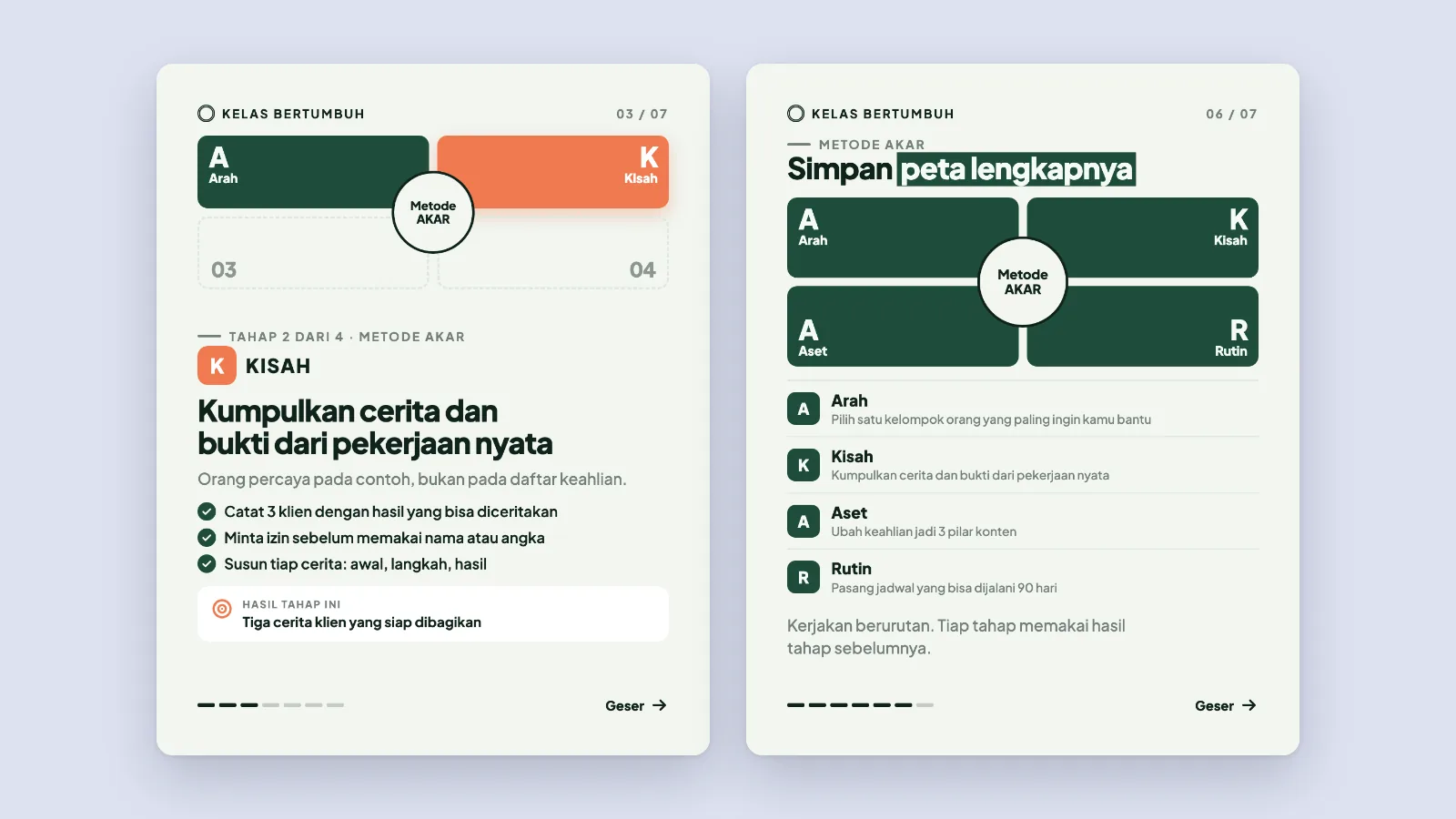
A carousel for coaches and consultants with a method of their own: a 3 to 5 step framework diagram (4 fits best) that builds up slide by slide. The cover shows the empty frame with each step's code, then every slide reveals one step: past steps filled dark, the current step in the accent colour, the next steps still dashed and numbered. Below the diagram: the step name, what to do, 2-3 actions, and what the step produces. It ends with the full map and a consultation call to action. Three diagram shapes (staircase, arrow flow, quadrant), 1080x1350 or 1080x1080, exported as PNG.
Verified by SkillFlow
We checked every file in this skill automatically: no command that downloads and runs a program, no hidden code, no instruction telling your AI to ignore you.
- Loads from outside
- Fonts: Google Fonts
See the 5 files inside
skill.json10 KBSKILL.md8 KBprompt.md5 KBprompt.en.md5 KBfiles/carousel.html383 KB
Checked 14 Nov 2026
Part of SkillFlow Pro
Pro opens every skill in every category: copy, ZIP, Send to AI, install, save, and request new skills.
Get Pro Already subscribed? Sign inWhat you get
- A 1080x1350 or 1080x1080 carousel: cover, one slide per step, full map, closing
- A method diagram that builds up: past steps dark, current step in the accent, next steps dashed
- Three diagram shapes: rising staircase, arrow flow, 2x2 quadrant with the method name in the centre
- Each step: code, name, what to do, 2-3 actions, and what the step produces
- A full map slide with the complete diagram and a one-line summary per step
- An HTML template with one config object, 4 palettes, PNG export per slide and a combined sheet
Good fit
- Coaches and consultants with their own way of working who want to show it as a named method
- Class teachers summarising a curriculum into a few memorable steps
- Agencies explaining their process to prospects before a meeting
- Educational creators who want content that gets saved and shared
Not for
- It does not invent a method for you; the steps must come from how you actually work
- Not a rotating cycle or a pyramid; the videos Coaching Cycle Framework and Priority Pyramid cover those
- Not a video; the result is a PNG per slide
- More than 5 steps do not fit the diagram; split it into two carousels
About this skill
/carousel-framework-metode Make a carousel for my coaching method, a four-step personal branding framework, with the actions and result of each step, ending with a consultation invitation on WhatsApp
Show more
A carousel for coaches and consultants with a method of their own: a 3 to 5 step framework diagram (4 fits best) that builds up slide by slide. The cover shows the empty frame with each step's code, then every slide reveals one step: past steps filled dark, the current step in the accent colour, the next steps still dashed and numbered. Below the diagram: the step name, what to do, 2-3 actions, and what the step produces. It ends with the full map and a consultation call to action. Three diagram shapes (staircase, arrow flow, quadrant), 1080x1350 or 1080x1080, exported as PNG.


User reviews
FAQ
Why are the next steps hidden?
Steps not yet covered show only as dashed numbers. Readers see there is more to unlock and keep swiping, while the overall shape of the method is visible from the cover.
Which shape should I pick?
Staircase for a method that climbs from foundation to result, arrow flow for a process done in order, and quadrant for four equal parts around the method name. Try all three with the shape parameter in the address before deciding.
What if my method has 5 steps?
Staircase and arrow flow take 3 to 5 steps, so the carousel simply gains one slide. Quadrant needs exactly 4; with any other count the template falls back to the staircase.
Which AI can I use it with?
Copy the prompt into a chat AI (ChatGPT, Claude, Gemini, DeepSeek); or download the ZIP and install it in an AI agent (Claude Code, Codex, Antigravity, Hermes Agent, Cursor, GitHub Copilot, Gemini CLI, OpenCode, Kimi Code, Trae), which then builds the files for you.
What is in the ZIP?
One folder named carousel-framework-metode with SKILL.md (the instructions an AI agent reads) and the prompt, 5 files in all. Extract it into your agent's skills folder, or install it with npx skillflow-ai add carousel-framework-metode. Pro only.
Is there a per-use fee or credits?
Not from SkillFlow. The skill runs on the AI you already use, so any cost follows that plan.
Which plan includes it?
SkillFlow Pro. It opens every skill in every category.
Can I use my own colours and brand?
Yes. Pick a colour theme on this page, or fill in your brand profile once; both go into the prompt you copy and into the ZIP.
Can I share what I made?
Pro members can upload the result and get a page at share.skillflow.ai.id to send to anyone. The page carries a small "Made with SkillFlow AI" mark.
Is there a download limit?
Yes, per day: 50 skills on Pro, 10 on other plans. Downloading a skill again on the same day does not count.



