

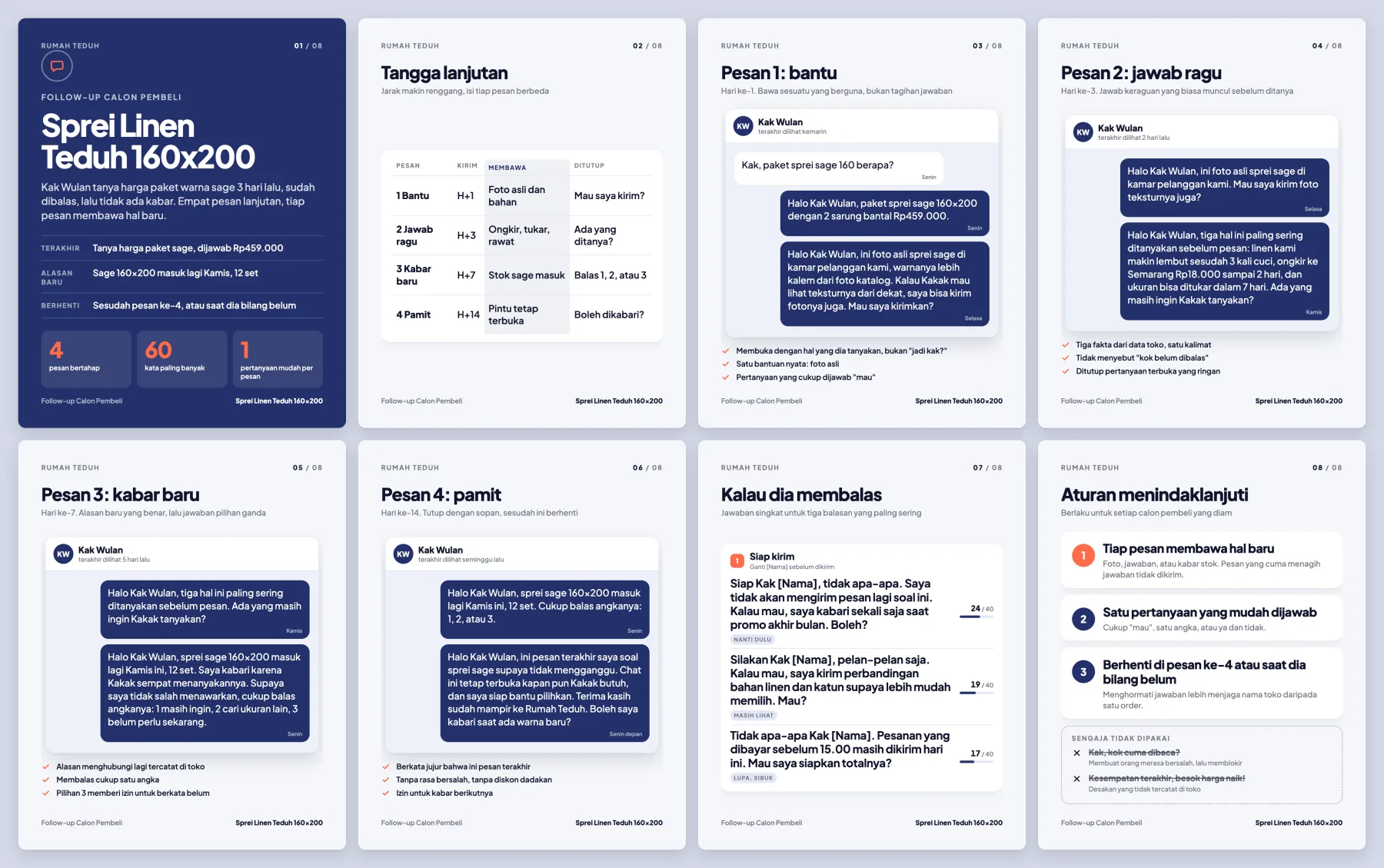
Eight cards: lead notes, the follow-up ladder, four messages, replies when they answer, and the rules
SKILL.md contents
Premium subscribers can read, copy, and install this skill.
Unlock with Premium Sign inLead Follow-up Messages
Description
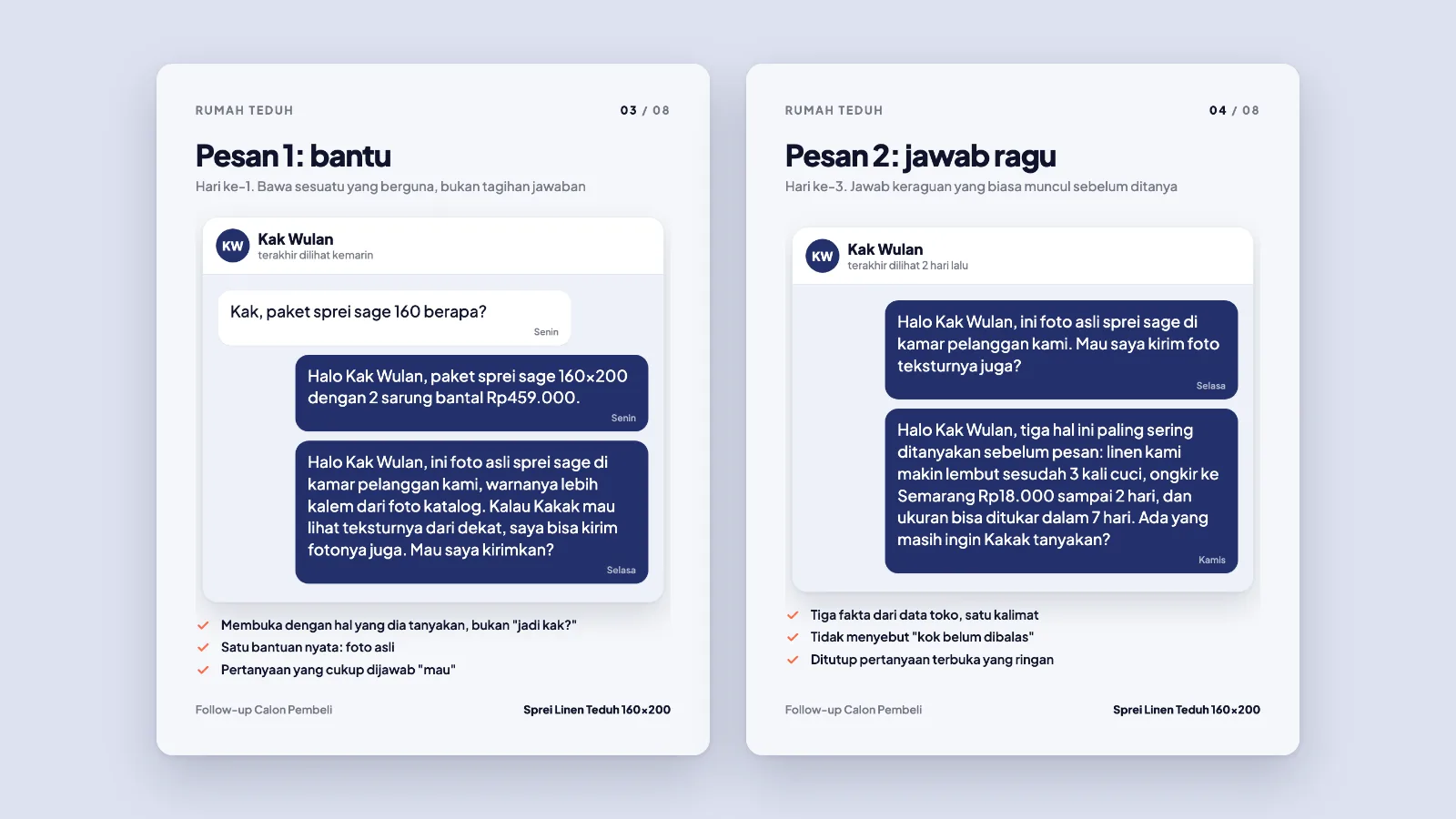
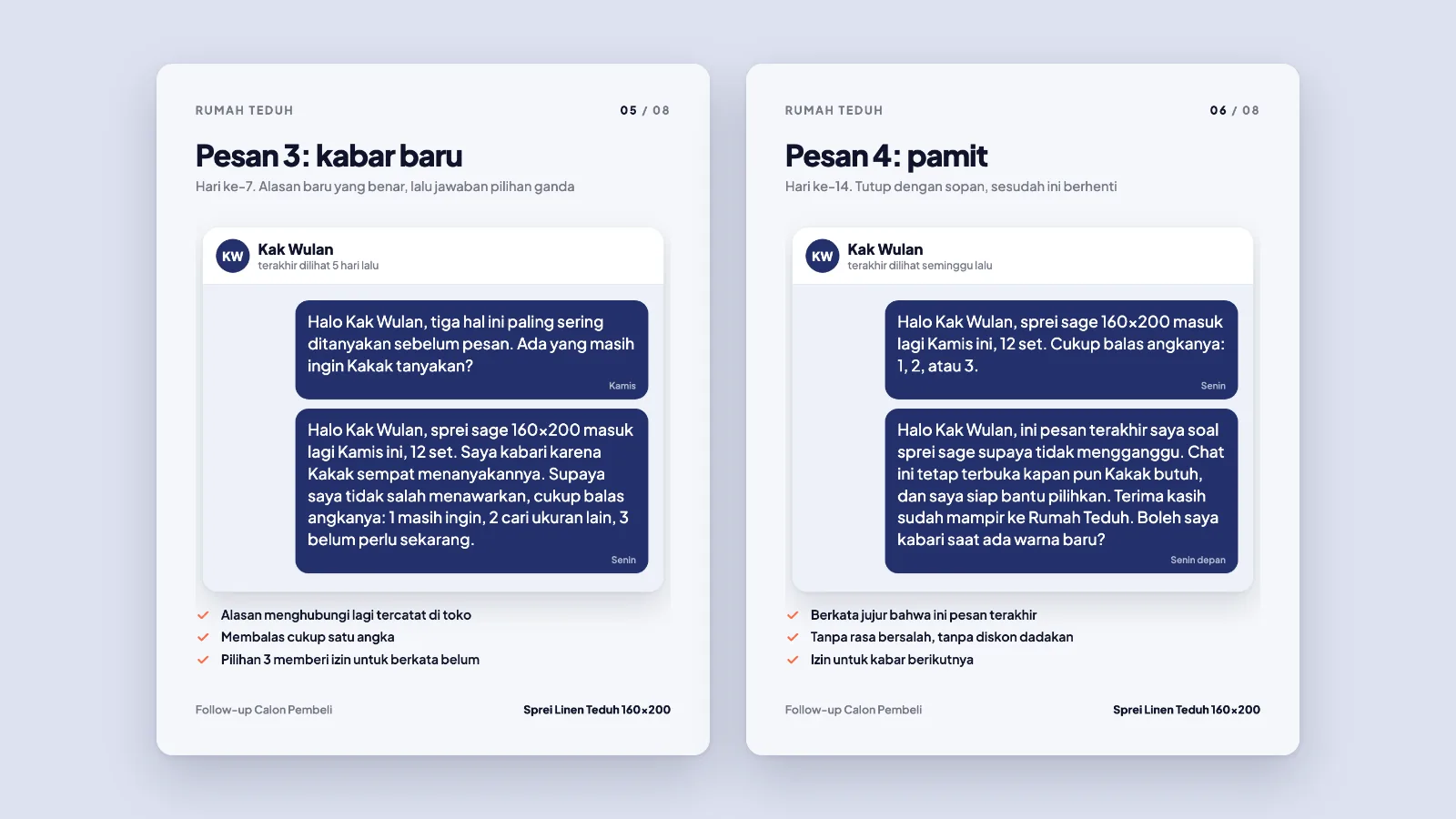
Four WhatsApp follow-up messages for prospects who asked a question and then went quiet, without sounding like you are chasing: day 1 brings real help (a real photo, sizing), day 3 answers the usual doubts before they are asked, day 7 shares true news with a numbered reply that includes "not yet", and day 14 says a polite goodbye. Each message stays under 60 words and ends with one easy question. Includes replies for when they say "maybe later", rules for when to stop, lines to avoid, and chat mockup cards.
Verified by SkillFlow
We checked every file in this skill automatically: no command that downloads and runs a program, no hidden code, no instruction telling your AI to ignore you.
- Loads from outside
- Fonts: Google Fonts
See the 7 files inside
skill.json8 KBSKILL.md7 KBprompt.md3 KBprompt.en.md3 KBfiles/brief.md1 KBfiles/contoh-hasil.md4 KBfiles/kartu.html65 KB
Checked 14 Nov 2026
Part of SkillFlow Pro
Pro opens every skill in every category: copy, ZIP, Send to AI, install, save, and request new skills.
Get Pro Already subscribed? Sign inWhat you get
- Lead notes: what they asked, what was answered, shop facts, and any true new reason
- A 4-message ladder: help, answer doubts, something new, goodbye, 60 words max each
- One easy question at the end of every message, including a numbered reply with a not-yet option
- Replies of 40 words max for maybe later, still looking, and forgot
- Follow-up rules for the team and lines deliberately left out
- 1080x1350 visual cards with the ladder table and a chat mockup for each message
Good fit
- Online shops where many chats stop after the price is sent
- Admins who need one schedule and script for every lead left hanging
- Service and course sellers who feel awkward contacting quiet prospects again
Not for
- It does not send or schedule messages; you send them on the days in the ladder
- Not for answering objections from a buyer who is still replying
- It does not invent news or promos; without a real reason, message 3 only asks
- Not for promo broadcasts to many contacts at once
About this skill
/copy-follow-up-calon-pembeli A prospect asked our bedding bundle price 3 days ago, I replied and heard nothing back. Write WhatsApp follow-ups that do not feel pushy. The colour they wanted is back in stock on Thursday.
Show more
Four WhatsApp follow-up messages for prospects who asked a question and then went quiet, without sounding like you are chasing: day 1 brings real help (a real photo, sizing), day 3 answers the usual doubts before they are asked, day 7 shares true news with a numbered reply that includes "not yet", and day 14 says a polite goodbye. Each message stays under 60 words and ends with one easy question. Includes replies for when they say "maybe later", rules for when to stop, lines to avoid, and chat mockup cards.
User reviews
FAQ
Why stop at the fourth message?
After four messages that each bring something new, silence is usually the answer. A fifth message more often gets the shop number blocked than produces an order. The goodbye message often gets a reply precisely because there is no pressure.
What if there is no new stock or promo?
Message three still goes out, but it is only the numbered question: still interested, looking for something else, or not yet. Made-up reasons are not used.
Can I use it for many leads at once?
Yes. Ask for the template version with [Name], save the four messages in your chat app, and change the part that mentions each lead's question and product before sending.
Which AI can I use it with?
Copy the prompt into a chat AI (ChatGPT, Claude, Gemini, DeepSeek); or download the ZIP and install it in an AI agent (Claude Code, Codex, Antigravity, Hermes Agent, Cursor, GitHub Copilot, Gemini CLI, OpenCode, Kimi Code, Trae), which then builds the files for you.
What is in the ZIP?
One folder named copy-follow-up-calon-pembeli with SKILL.md (the instructions an AI agent reads) and the prompt, 7 files in all. Extract it into your agent's skills folder, or install it with npx skillflow-ai add copy-follow-up-calon-pembeli. Pro only.
Is there a per-use fee or credits?
Not from SkillFlow. The skill runs on the AI you already use, so any cost follows that plan.
Which plan includes it?
SkillFlow Pro. It opens every skill in every category.
Can it use my brand details?
Yes. Fill in your brand profile once (name, product, price, contact) and it goes into every prompt you copy.
Can I share what I made?
Pro members can upload the result and get a page at share.skillflow.ai.id to send to anyone. The page carries a small "Made with SkillFlow AI" mark.
Is there a download limit?
Yes, per day: 50 skills on Pro, 10 on other plans. Downloading a skill again on the same day does not count.



