

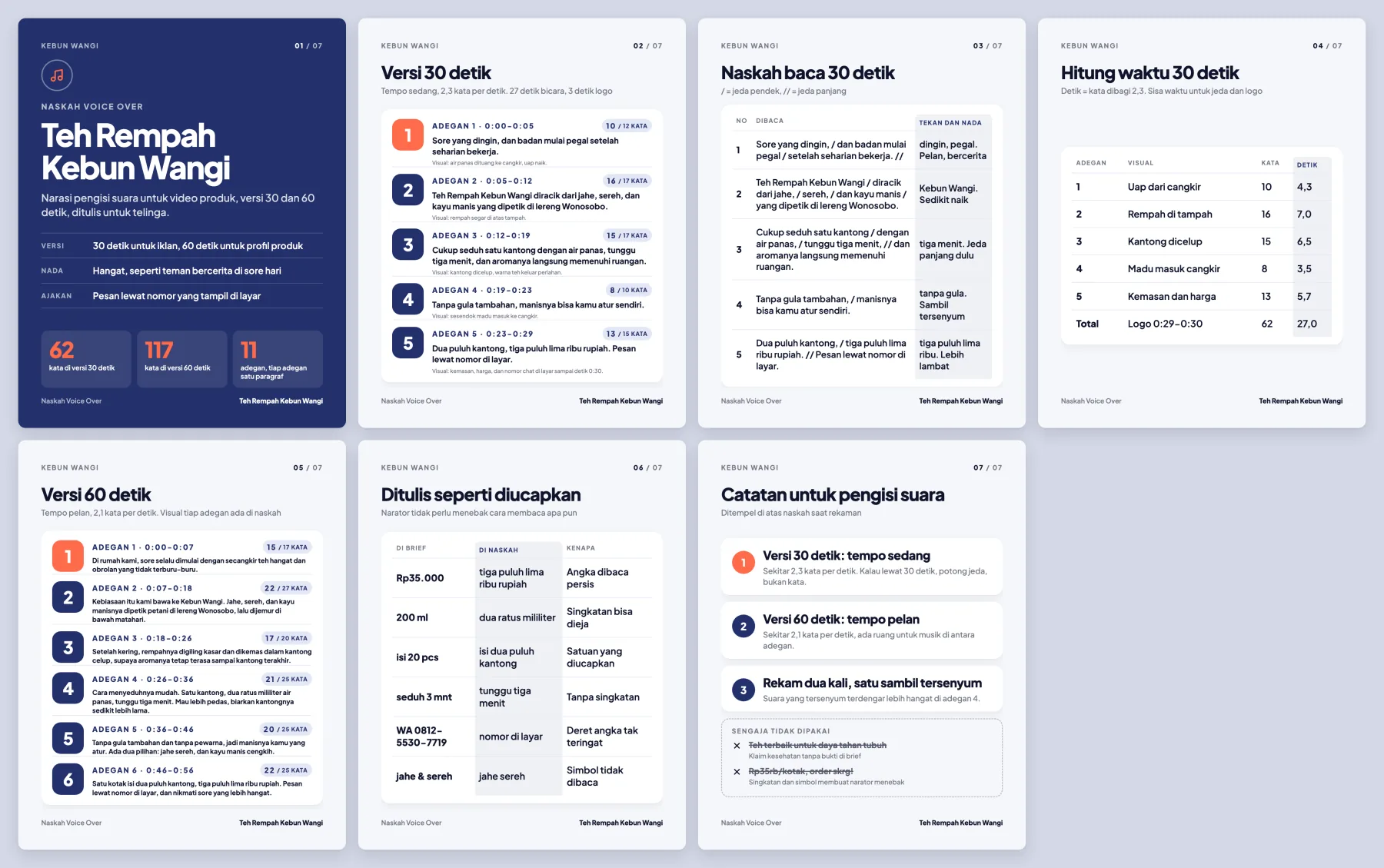
Seven cards: cover, 30-second version, read-aloud script, timing, 60-second version, writing numbers, talent notes
SKILL.md contents
Premium subscribers can read, copy, and install this skill.
Unlock with Premium Sign inVoice-over Script
Description
A narration script for product videos, explainers, and company profiles, written for the ear: scene by scene with visual cues, short sentences that are easy to say, numbers and abbreviations written the way they are read, short and long pause marks, stressed words, tone and pace notes, and timing worked out from words per second. Always two versions, 30 and 60 seconds, plus notes for the voice talent and lines deliberately left out, rendered as visual cards.
Verified by SkillFlow
We checked every file in this skill automatically: no command that downloads and runs a program, no hidden code, no instruction telling your AI to ignore you.
- Loads from outside
- Fonts: Google Fonts
See the 7 files inside
skill.json9 KBSKILL.md8 KBprompt.md3 KBprompt.en.md3 KBfiles/brief.md1 KBfiles/contoh-hasil.md6 KBfiles/kartu.html65 KB
Checked 14 Nov 2026
Part of SkillFlow Pro
Pro opens every skill in every category: copy, ZIP, Send to AI, install, save, and request new skills.
Get Pro Already subscribed? Sign inWhat you get
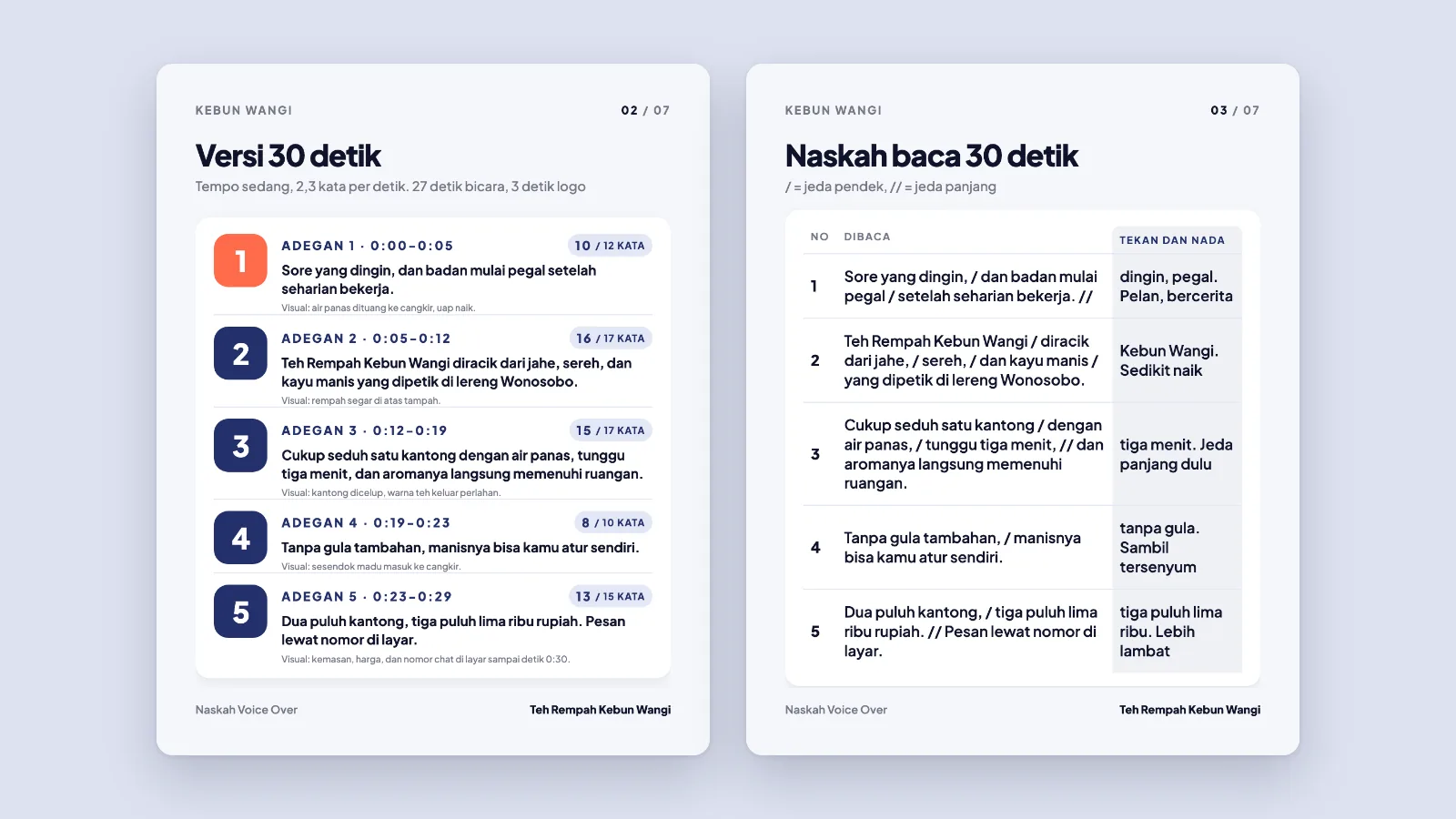
- A 30-second version scene by scene: visual cue, narration, word count, and a word budget from the scene length
- A read-aloud script with pause marks (/ and //), stressed words, and tone per scene
- A timing table: words divided by pace, total spoken seconds, and time left for the logo
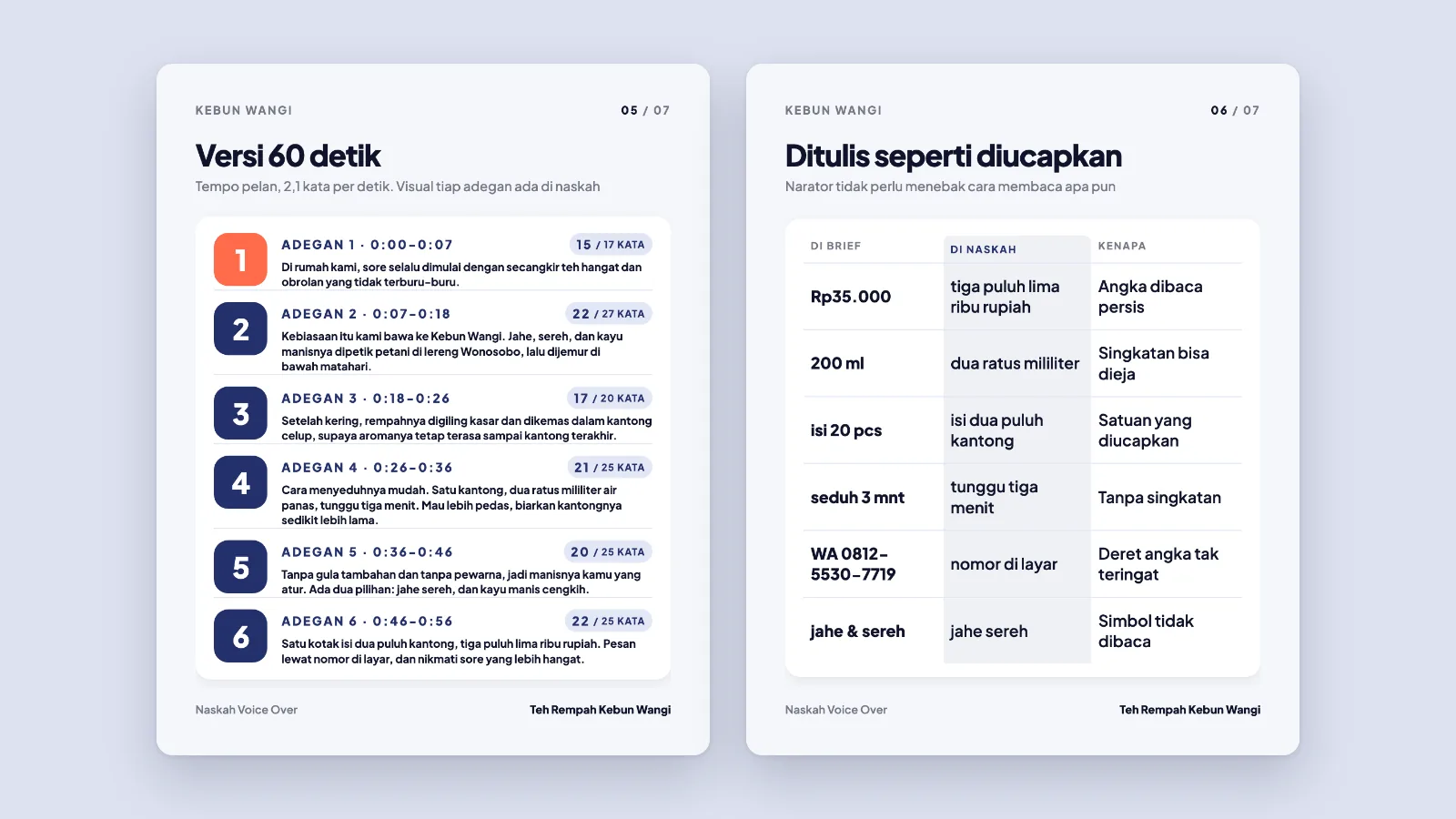
- A 60-second version with the same structure
- A table of numbers, units, and abbreviations written the way they are spoken
- Notes for the voice talent, lines deliberately left out, and ready-to-send visual cards
Good fit
- Business owners making a product video or company profile with a hired voice talent
- Video editors and agencies needing a script that fits the length before recording
- Brands recording their own narration who want to know where to pause and stress
Not for
- It does not record or generate a voice; you get a text script and cards
- Seconds are an estimate from words per second; still time it while reading aloud
- For vertical social videos with on-screen text use a short video script, for audio spots with sound effects use a radio ad script
About this skill
/copy-naskah-voice-over Write a 30 and 60-second voice-over script for a product video for Kebun Wangi Spiced Tea, warm tone, ending with a call to order via the number on screen
Show more
A narration script for product videos, explainers, and company profiles, written for the ear: scene by scene with visual cues, short sentences that are easy to say, numbers and abbreviations written the way they are read, short and long pause marks, stressed words, tone and pace notes, and timing worked out from words per second. Always two versions, 30 and 60 seconds, plus notes for the voice talent and lines deliberately left out, rendered as visual cards.
User reviews
FAQ
Why are numbers written out in words?
So the voice talent never has to guess. A price can be read several ways, so the script spells it the way it must be said, and the figure itself appears on screen.
How many words fit in 30 seconds?
Around 60 to 65 words at a medium pace (2.3 words per second), leaving 2 to 3 seconds for the logo. A calm tone or a company profile runs slower, about 2.1 words per second.
What do / and // mean?
One slash is a short pause, a small breath. Two slashes is a long pause, usually before a key line or a scene change. Stressed words are in bold in the script.
Which AI can I use it with?
Copy the prompt into a chat AI (ChatGPT, Claude, Gemini, DeepSeek); or download the ZIP and install it in an AI agent (Claude Code, Codex, Antigravity, Hermes Agent, Cursor, GitHub Copilot, Gemini CLI, OpenCode, Kimi Code, Trae), which then builds the files for you.
What is in the ZIP?
One folder named copy-naskah-voice-over with SKILL.md (the instructions an AI agent reads) and the prompt, 7 files in all. Extract it into your agent's skills folder, or install it with npx skillflow-ai add copy-naskah-voice-over. Pro only.
Is there a per-use fee or credits?
Not from SkillFlow. The skill runs on the AI you already use, so any cost follows that plan.
Which plan includes it?
SkillFlow Pro. It opens every skill in every category.
Can it use my brand details?
Yes. Fill in your brand profile once (name, product, price, contact) and it goes into every prompt you copy.
Can I share what I made?
Pro members can upload the result and get a page at share.skillflow.ai.id to send to anyone. The page carries a small "Made with SkillFlow AI" mark.
Is there a download limit?
Yes, per day: 50 skills on Pro, 10 on other plans. Downloading a skill again on the same day does not count.



