

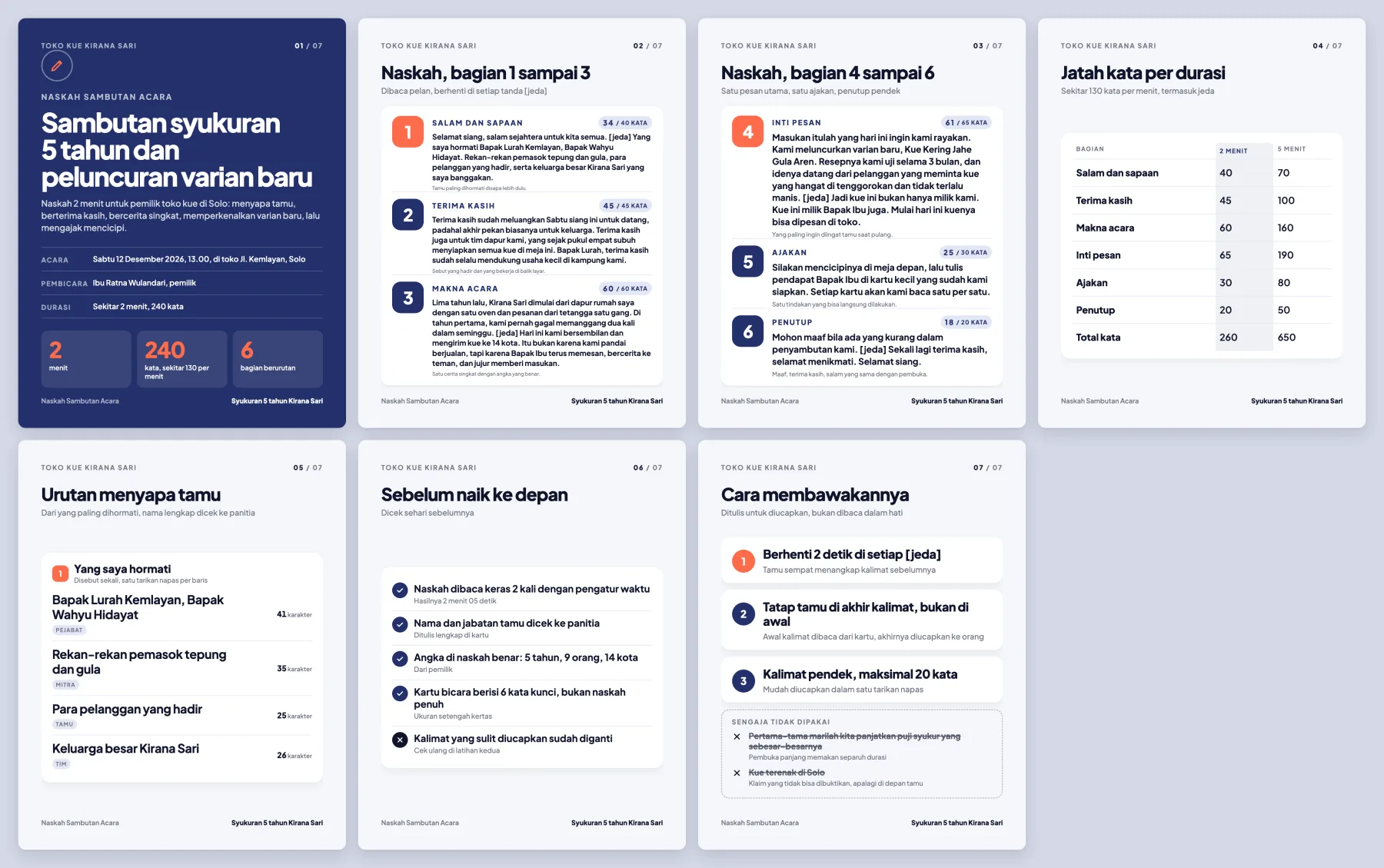
Seven cards: event cover, the script in two parts, word budgets per length, greeting order, checks, and delivery
SKILL.md contents
Premium subscribers can read, copy, and install this skill.
Unlock with Premium Sign inEvent Speech Script
Description
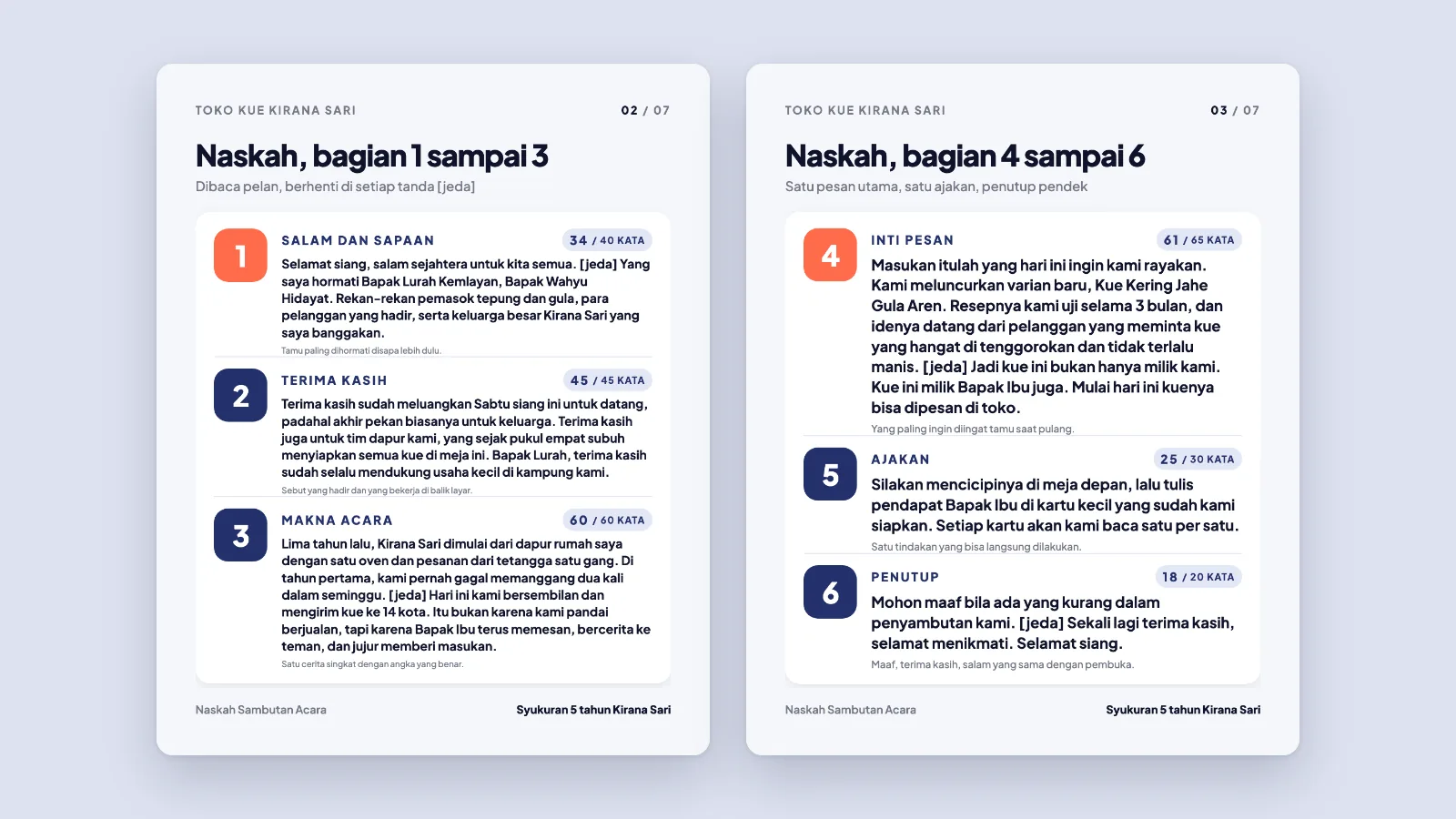
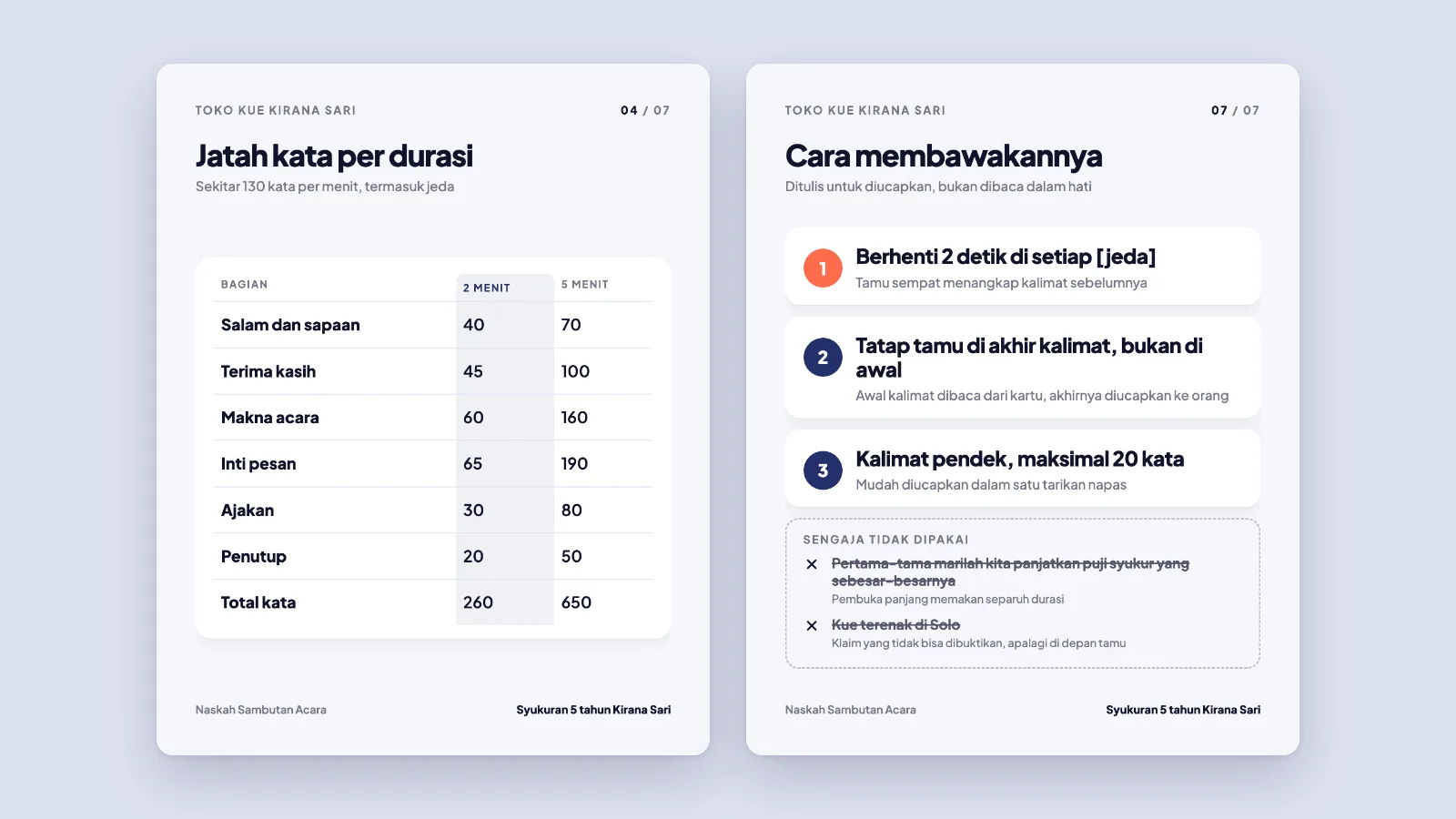
Write a welcome speech or opening remarks for a business owner, committee chair, or host at a product launch, business anniversary, seminar, or community event. Pick the length (2, 3, or 5 minutes) with a word budget per part at about 130 words per minute. Six parts in order: greeting and acknowledgements by seniority, thanks, why the event matters, the main message, an invitation, and the close, with [pause] marks. Includes the order of acknowledgements, a keyword speaker card, a pre-stage checklist, delivery tips, and visual cards that count words.
Verified by SkillFlow
We checked every file in this skill automatically: no command that downloads and runs a program, no hidden code, no instruction telling your AI to ignore you.
- Loads from outside
- Fonts: Google Fonts
See the 7 files inside
skill.json9 KBSKILL.md7 KBprompt.md3 KBprompt.en.md3 KBfiles/brief.md1 KBfiles/contoh-hasil.md4 KBfiles/kartu.html64 KB
Checked 14 Nov 2026
Part of SkillFlow Pro
Pro opens every skill in every category: copy, ZIP, Send to AI, install, save, and request new skills.
Get Pro Already subscribed? Sign inWhat you get
- A six-part speech with a word budget for the chosen length and [pause] marks
- The total word count and estimated time, at about 130 words per minute
- The order of acknowledgements, most senior first
- A 6-keyword speaker card, a pre-stage checklist, and delivery tips
- A brief form, a full sample result, a scoring rubric, and lines deliberately left out
- An HTML card template that counts words automatically and exports to PNG
Good fit
- Business owners speaking at an anniversary, celebration, or product launch
- Committee or community chairs opening a seminar, training, or members' meeting
- Speakers who often run over their time slot
Not for
- Not a live selling script; use the Live Selling Script
- Not a narration over video; use the Voice-over Script
- Not a full event rundown with an MC script from start to finish
- Names, titles, and numbers must come from you; anything uncertain is marked for checking
About this skill
/copy-sambutan-acara Write a 3-minute welcome speech from the committee chair opening a small business seminar at the district hall, with an interfaith greeting
Show more
Write a welcome speech or opening remarks for a business owner, committee chair, or host at a product launch, business anniversary, seminar, or community event. Pick the length (2, 3, or 5 minutes) with a word budget per part at about 130 words per minute. Six parts in order: greeting and acknowledgements by seniority, thanks, why the event matters, the main message, an invitation, and the close, with [pause] marks. Includes the order of acknowledgements, a keyword speaker card, a pre-stage checklist, delivery tips, and visual cards that count words.
User reviews
FAQ
How many words is a 2-minute speech?
The guide is about 130 words per minute, so the budget is 260 words. Aim a little under, 230 to 250 words, because everyone speaks slower in front of people and there are pauses.
What if there are many honoured guests?
Guests are acknowledged once in order of seniority, then simply as everyone. If the list is long, the extra words come out of the event story, not the main message.
Which AI can I use it with?
Copy the prompt into a chat AI (ChatGPT, Claude, Gemini, DeepSeek); or download the ZIP and install it in an AI agent (Claude Code, Codex, Antigravity, Hermes Agent, Cursor, GitHub Copilot, Gemini CLI, OpenCode, Kimi Code, Trae), which then builds the files for you.
What is in the ZIP?
One folder named copy-sambutan-acara with SKILL.md (the instructions an AI agent reads) and the prompt, 7 files in all. Extract it into your agent's skills folder, or install it with npx skillflow-ai add copy-sambutan-acara. Pro only.
Is there a per-use fee or credits?
Not from SkillFlow. The skill runs on the AI you already use, so any cost follows that plan.
Which plan includes it?
SkillFlow Pro. It opens every skill in every category.
Can it use my brand details?
Yes. Fill in your brand profile once (name, product, price, contact) and it goes into every prompt you copy.
Can I share what I made?
Pro members can upload the result and get a page at share.skillflow.ai.id to send to anyone. The page carries a small "Made with SkillFlow AI" mark.
Is there a download limit?
Yes, per day: 50 skills on Pro, 10 on other plans. Downloading a skill again on the same day does not count.



