

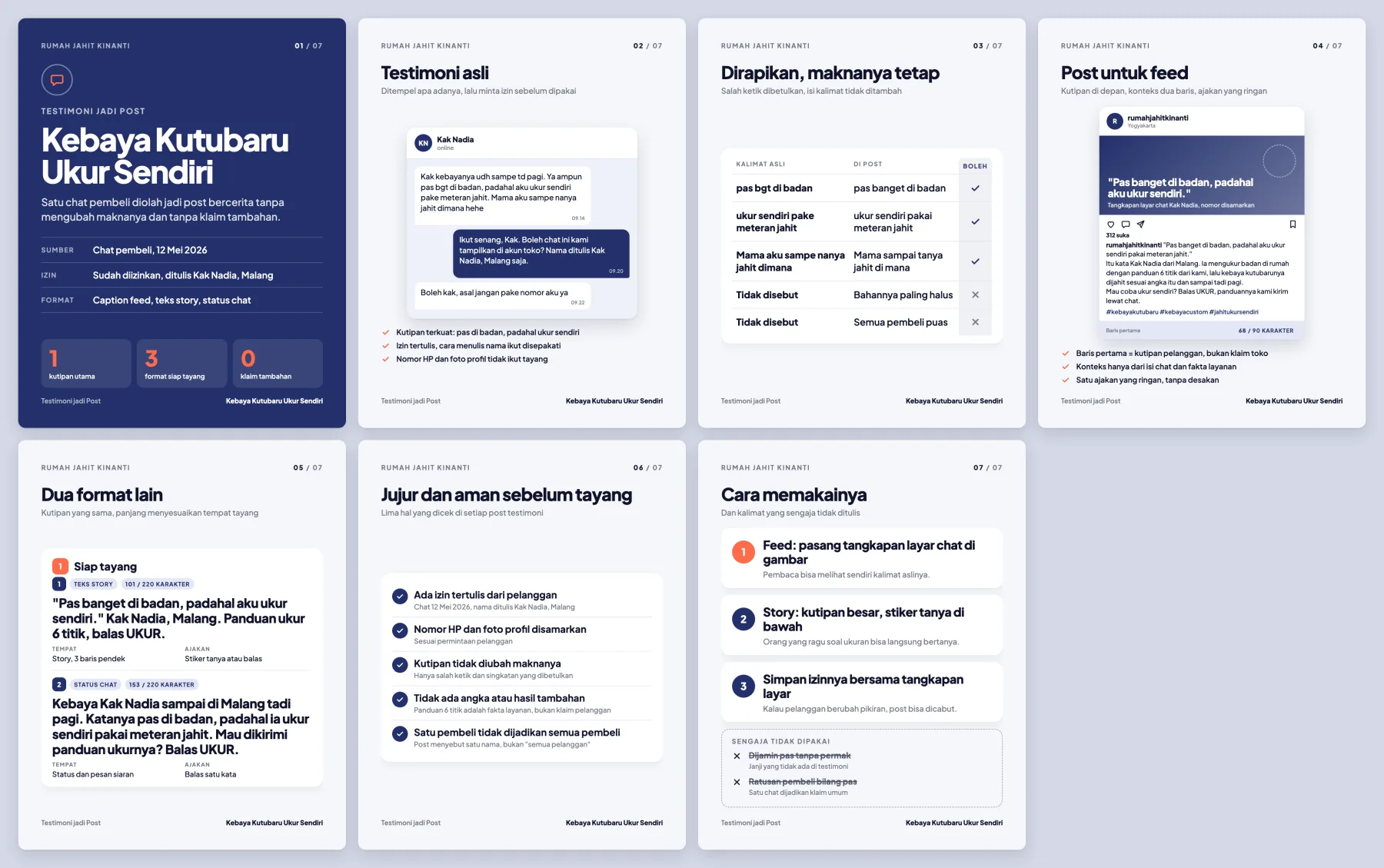
Seven cards: cover, original chat, editing table, feed post, two other formats, honesty check, how to use
SKILL.md contents
Premium subscribers can read, copy, and install this skill.
Unlock with Premium Sign inTestimonial into Post (Social Media Copy)
Description
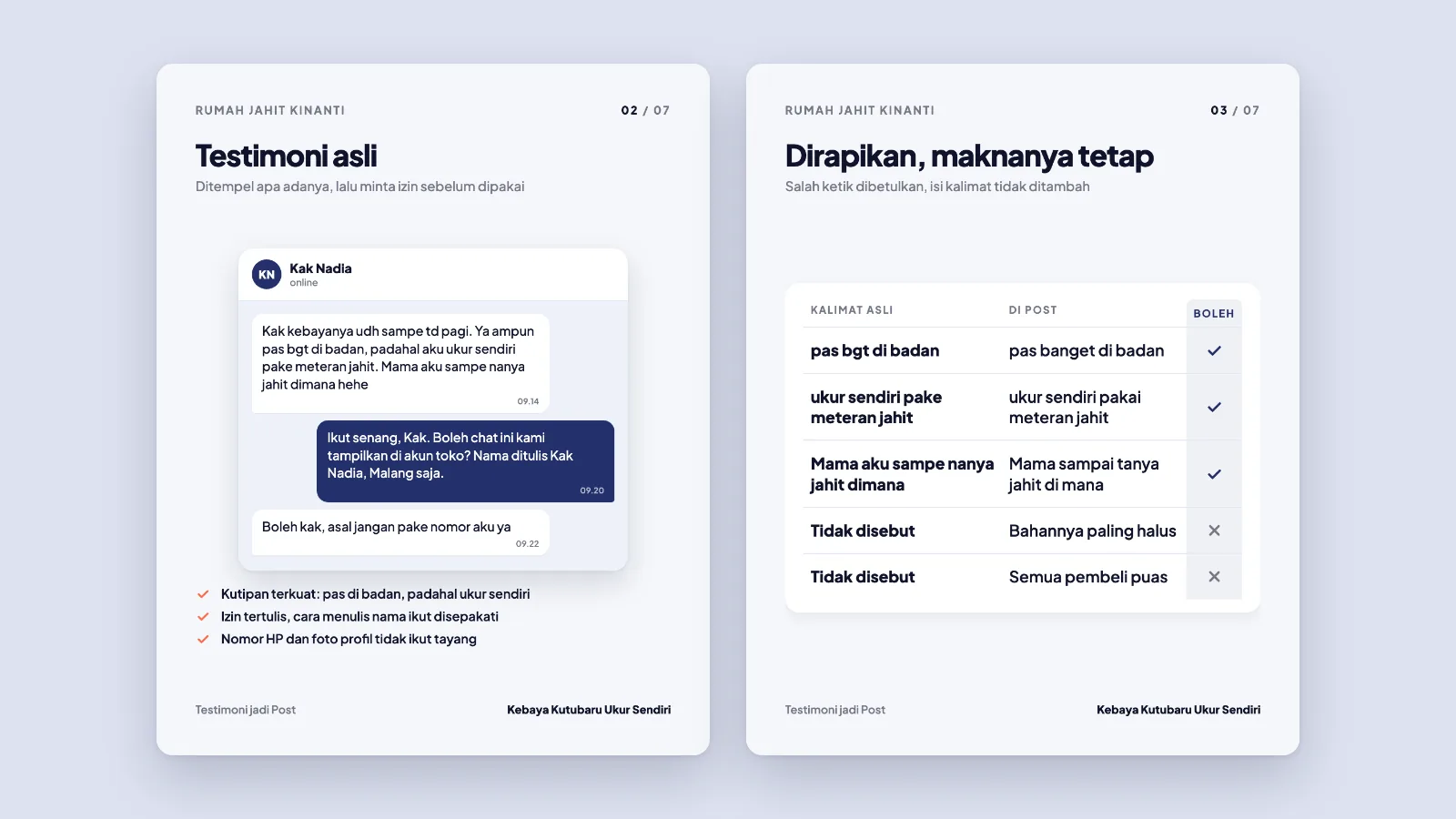
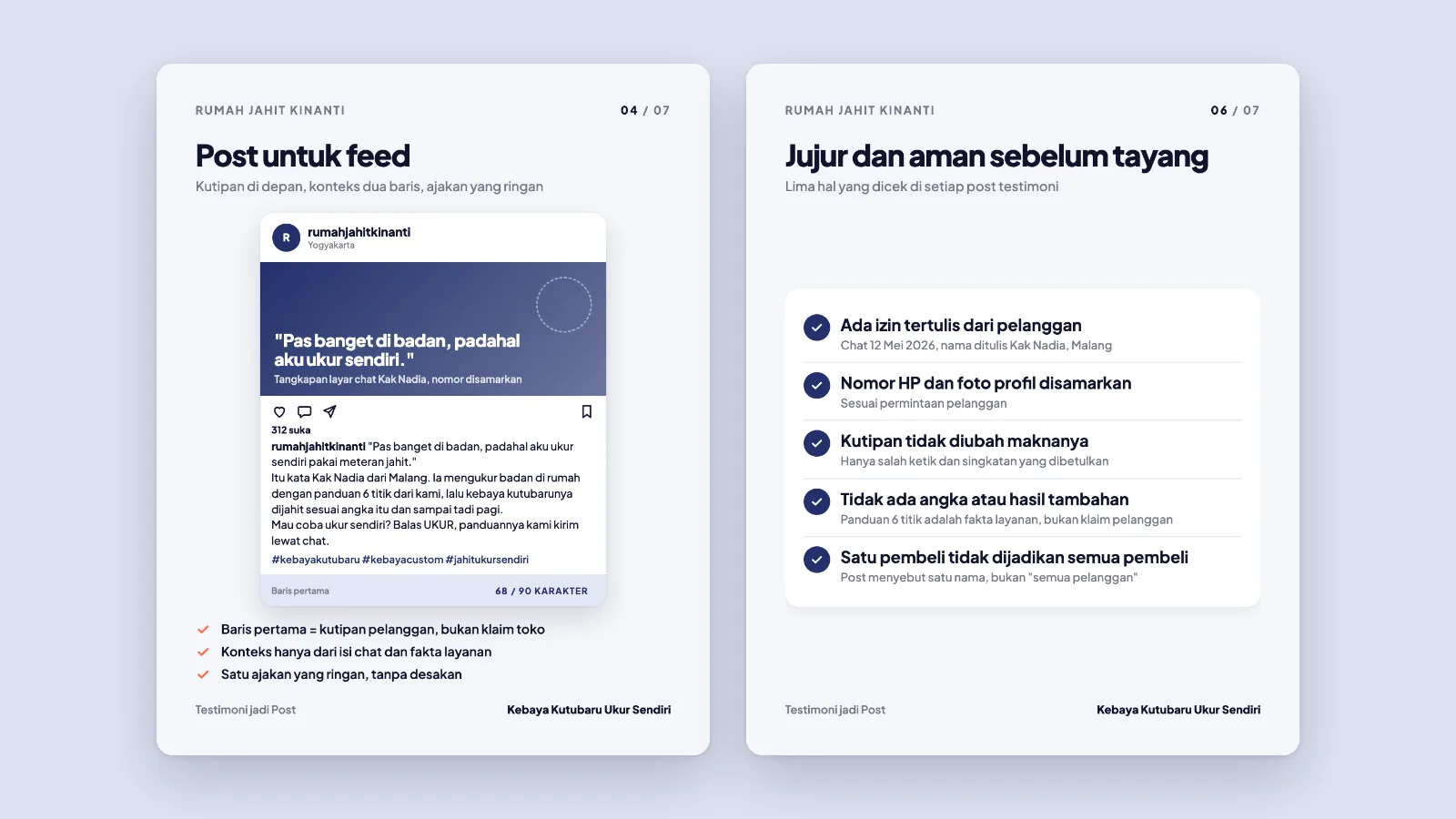
Turn a raw testimonial from a chat or review into a social post that tells a story but stays honest: the strongest quote on the first line, typos tidied without changing the meaning, context taken only from the testimonial and real service facts, then one soft call to action. Includes how to ask the customer for permission, a table of original and used lines, three formats (feed caption, story text, chat status), an honesty check before publishing, and lines deliberately left out, rendered as visual cards.
Verified by SkillFlow
We checked every file in this skill automatically: no command that downloads and runs a program, no hidden code, no instruction telling your AI to ignore you.
- Loads from outside
- Fonts: Google Fonts
See the 7 files inside
skill.json9 KBSKILL.md7 KBprompt.md3 KBprompt.en.md3 KBfiles/brief.md1 KBfiles/contoh-hasil.md4 KBfiles/kartu.html64 KB
Checked 14 Nov 2026
Part of SkillFlow Pro
Pro opens every skill in every category: copy, ZIP, Send to AI, install, save, and request new skills.
Get Pro Already subscribed? Sign inWhat you get
- The strongest quote picked from the testimonial, with the reason
- A permission message to the customer and how to credit their name
- A table of original lines, lines in the post, and rejected extra claims
- The post in 3 formats: feed caption, story text, chat status or broadcast
- An honesty and personal data check before publishing
- 1080x1350 visual cards that render every result
Good fit
- Sellers with plenty of buyer chat screenshots who are unsure how to write them up
- Service providers wanting social proof without sounding exaggerated
- Social media admins who need one testimonial in several formats at once
Not for
- It does not create new testimonials; without a real customer testimonial this skill cannot be used
- It does not merge several customers into one quote
- It does not design the post image; the cards only preview the text
- You still ask the customer for permission; this skill only drafts the message
About this skill
/copy-testimoni-jadi-post Turn this customer chat into an Instagram caption and a chat status for my kebaya shop, without changing the quote: [paste chat]
Show more
Turn a raw testimonial from a chat or review into a social post that tells a story but stays honest: the strongest quote on the first line, typos tidied without changing the meaning, context taken only from the testimonial and real service facts, then one soft call to action. Includes how to ask the customer for permission, a table of original and used lines, three formats (feed caption, story text, chat status), an honesty check before publishing, and lines deliberately left out, rendered as visual cards.
User reviews
FAQ
Can the testimonial's language be tidied?
Only typos, abbreviations, and punctuation. Nothing is added, nothing is cut so far that the meaning shifts, and no numbers are given that the customer did not say. The editing table shows every change.
What if the customer has not given permission yet?
The skill drafts a short permission message, including how the name will appear. The post only goes live after a written reply, and the permission is kept with the screenshot.
Which AI can I use it with?
Copy the prompt into a chat AI (ChatGPT, Claude, Gemini, DeepSeek); or download the ZIP and install it in an AI agent (Claude Code, Codex, Antigravity, Hermes Agent, Cursor, GitHub Copilot, Gemini CLI, OpenCode, Kimi Code, Trae), which then builds the files for you.
What is in the ZIP?
One folder named copy-testimoni-jadi-post with SKILL.md (the instructions an AI agent reads) and the prompt, 7 files in all. Extract it into your agent's skills folder, or install it with npx skillflow-ai add copy-testimoni-jadi-post. Pro only.
Is there a per-use fee or credits?
Not from SkillFlow. The skill runs on the AI you already use, so any cost follows that plan.
Which plan includes it?
SkillFlow Pro. It opens every skill in every category.
Can it use my brand details?
Yes. Fill in your brand profile once (name, product, price, contact) and it goes into every prompt you copy.
Can I share what I made?
Pro members can upload the result and get a page at share.skillflow.ai.id to send to anyone. The page carries a small "Made with SkillFlow AI" mark.
Is there a download limit?
Yes, per day: 50 skills on Pro, 10 on other plans. Downloading a skill again on the same day does not count.



