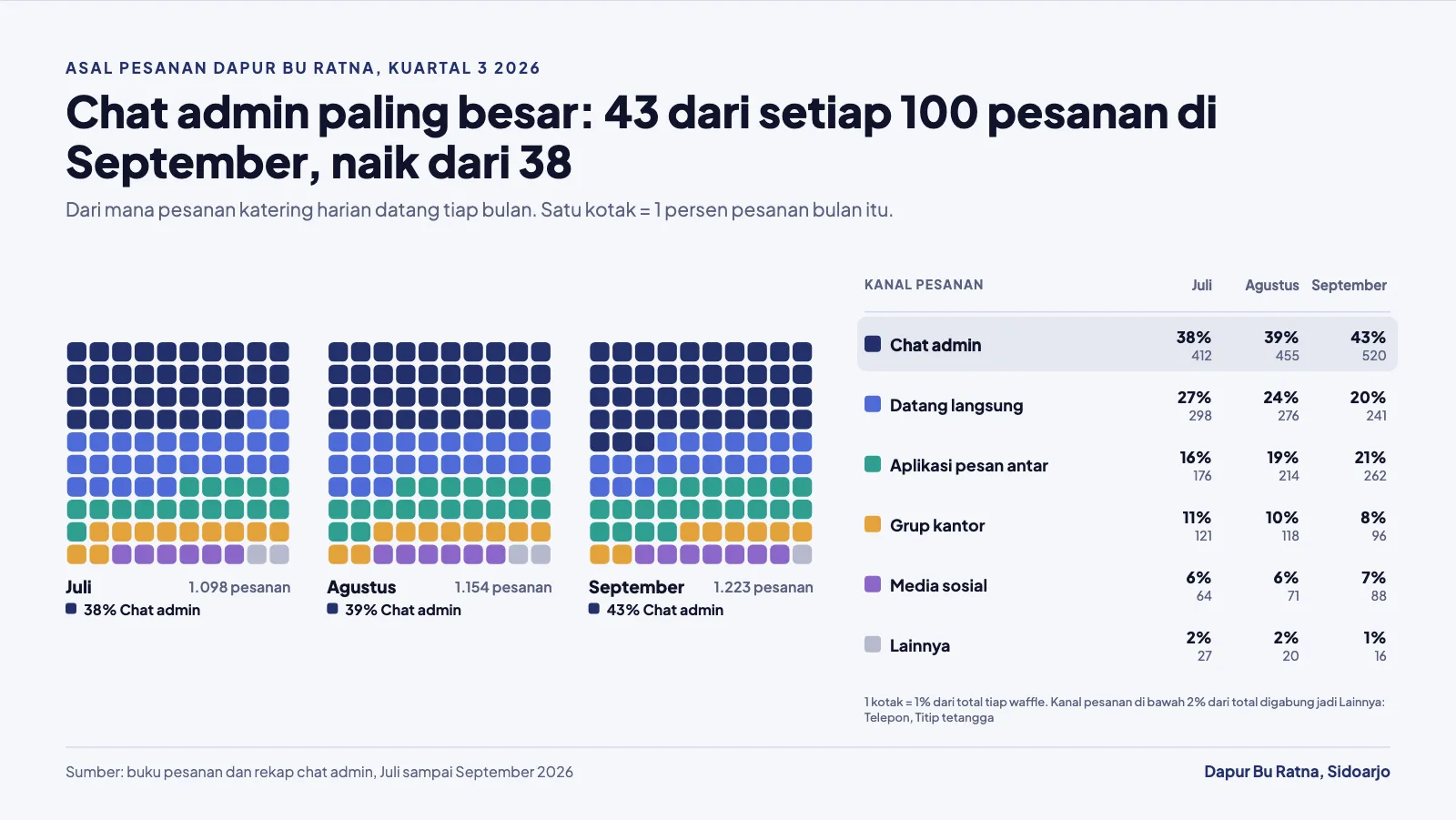
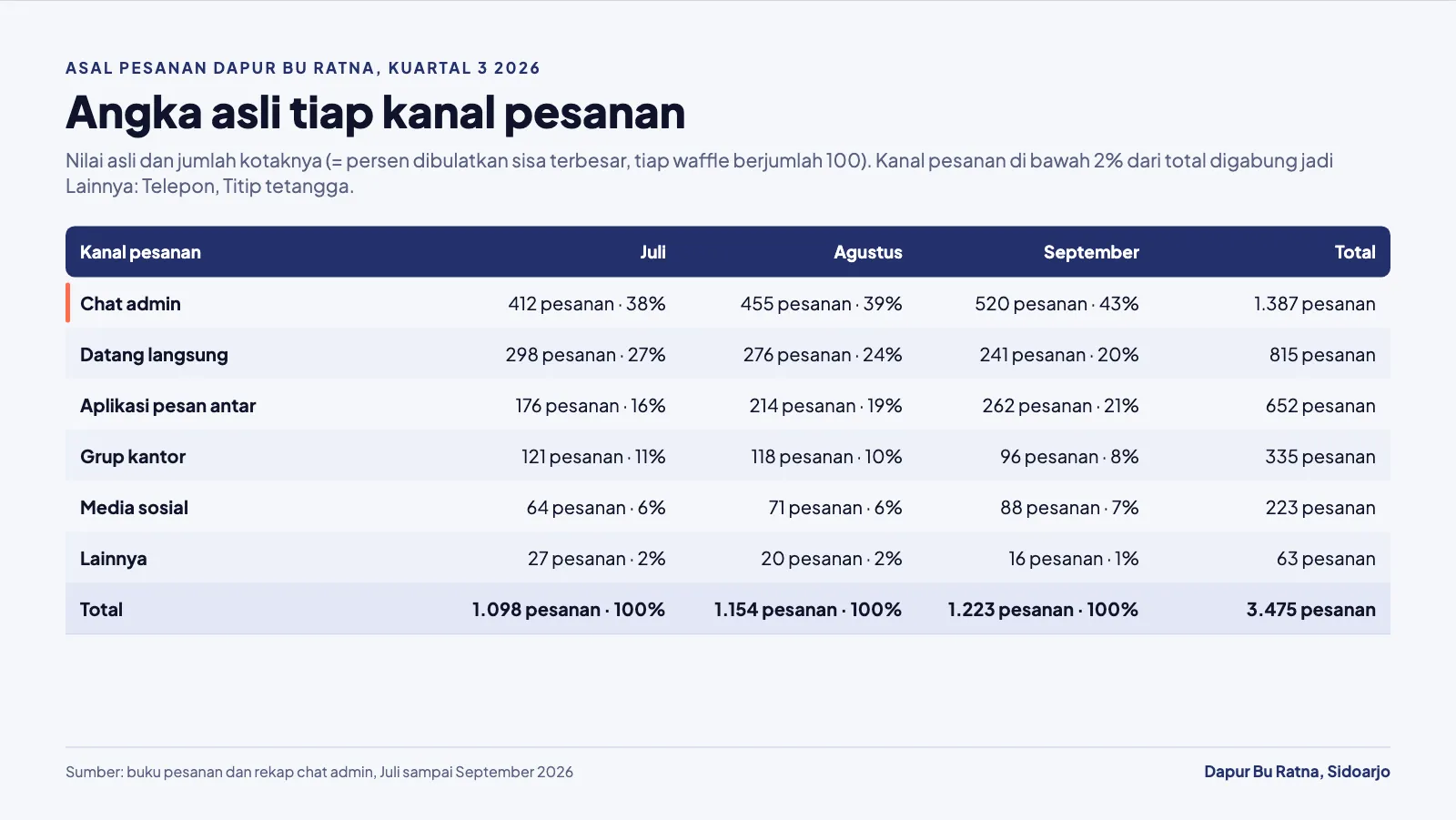
A caterer over 3 months: chat orders rose from 38 to 43 of every 100, 2 small channels into Other
SKILL.md contents
Premium subscribers can read, copy, and install this skill.
Unlock with Premium Sign inWaffle Proportion Chart
Description
A 10 x 10 waffle chart where 1 square = 1 percent, so anyone can read the proportion: "43 out of every 100 orders come through admin chat". One to six waffles side by side to compare months or branches, squares rounded with the largest remainder so there are always exactly 100, small categories combined into Other, a legend with percent and raw numbers, an automatic title from the largest category, a focus page with one big waffle, and a raw number table. Paste data from a spreadsheet, download PDF, PNG, Word, or Excel.
Verified by SkillFlow
We checked every file in this skill automatically: no command that downloads and runs a program, no hidden code, no instruction telling your AI to ignore you.
- Loads from outside
- Fonts: Google Fonts SkillFlow: directory.skillflow.ai.id
See the 6 files inside
skill.json10 KBSKILL.md7 KBprompt.md7 KBprompt.en.md7 KBfiles/contoh/cabang-6-tempel-rupiah-4x5.html39 KBfiles/diagram.html41 KB
Checked 14 Nov 2026
Part of SkillFlow Pro
Pro opens every skill in every category: copy, ZIP, Send to AI, install, save, and request new skills.
Get Pro Already subscribed? Sign inWhat you get
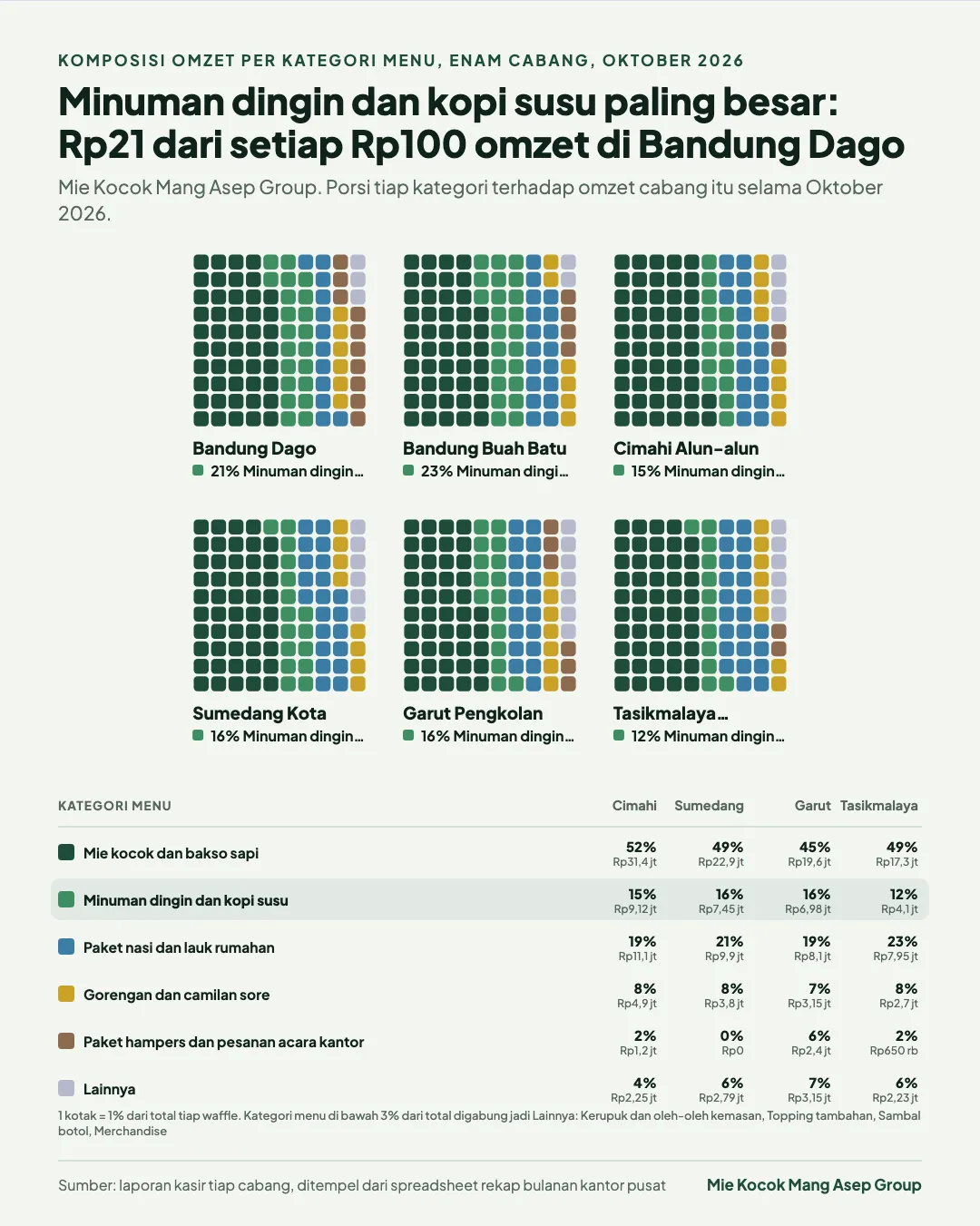
- 1 to 6 waffles of 10 x 10 side by side, the total and highlighted percent under each
- Squares rounded with the largest remainder, every waffle exactly 100 squares, <1% marked
- A legend with percent and raw numbers per waffle, small categories combined into Other
- An automatic title from the largest category, plus up or down from the first waffle
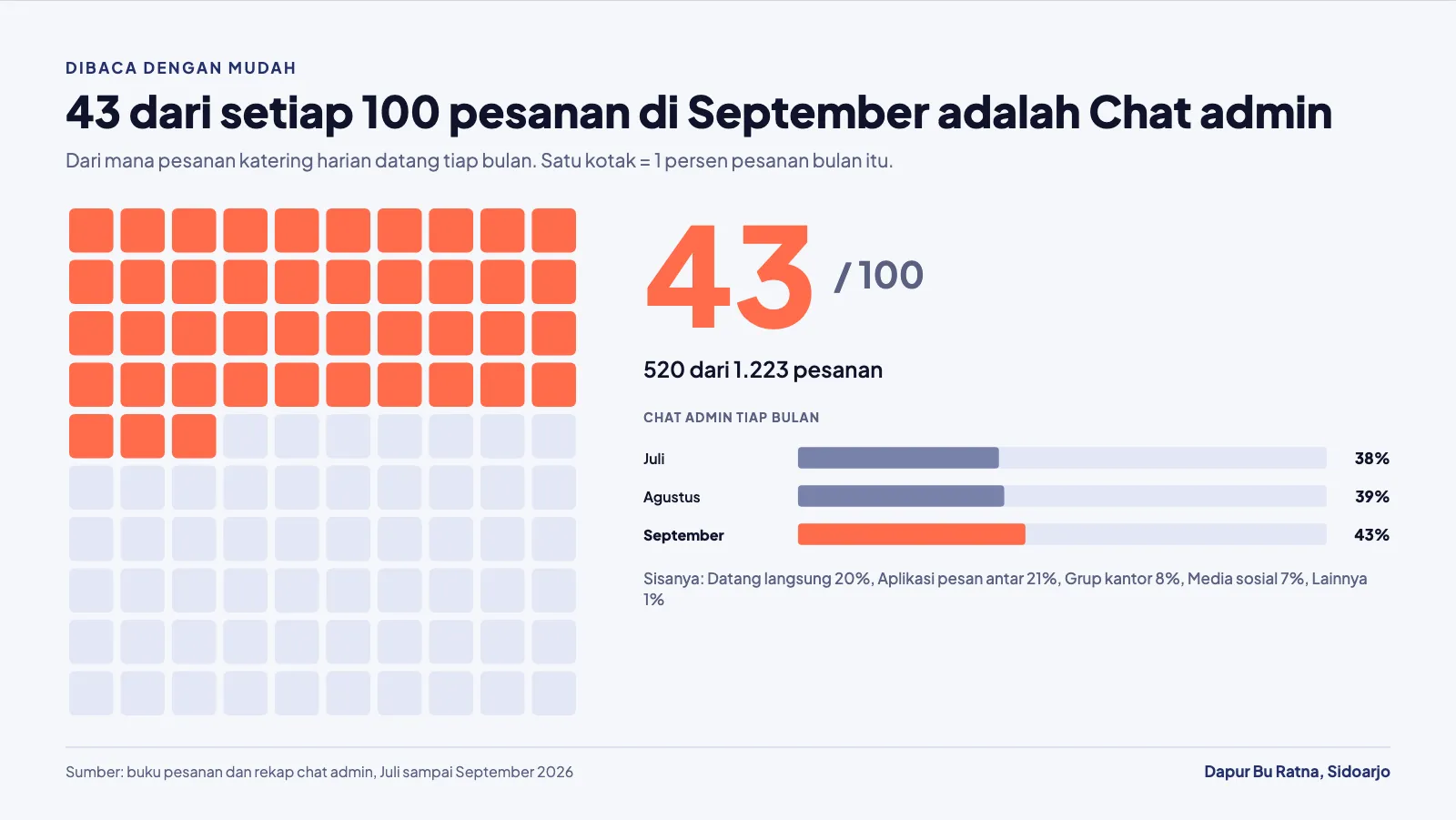
- Focus page: one big waffle, a 43 / 100 figure, and that category's bar in every waffle
- Raw number table, data pasted from a spreadsheet, download PDF, PNG, Word, Excel, 16:9 or 4:5
Good fit
- Owners reporting to partners, boards, or members who are not used to reading charts
- Comparing the same split across several branches or months in one picture
- Social media infographics in the "out of every 100 customers" style
- Teachers and organisers reporting the make-up of participants or members
Not for
- Not a chart of totals over time; it only shows shares
- Not for numbers that cannot be added into a total, such as ratings or conversion rates
- Precision is 1 percent per square; a very small category can get 0 squares and is shown as
- At most 6 waffles and 8 colours; anything beyond that is in the table and Excel
About this skill
/grafik-proporsi-waffle Make a waffle chart of where my catering orders come from, by channel, for July, August, and September 2026, so my partners can see how many of every 100 orders come through chat
Show more
A 10 x 10 waffle chart where 1 square = 1 percent, so anyone can read the proportion: "43 out of every 100 orders come through admin chat". One to six waffles side by side to compare months or branches, squares rounded with the largest remainder so there are always exactly 100, small categories combined into Other, a legend with percent and raw numbers, an automatic title from the largest category, a focus page with one big waffle, and a raw number table. Paste data from a spreadsheet, download PDF, PNG, Word, or Excel.
User reviews
FAQ
Why does a square count sometimes differ by 1 from the percent I worked out?
Percentages are rounded with the largest remainder method so every waffle has exactly 100 squares. Normal rounding can give 99 or 101. The exact percent with decimals is still in the Percent sheet of the Excel file.
Can I use it for revenue in money?
Yes. Set the unit to your currency and the sentence becomes "43 out of every 100 in revenue" with short raw numbers. For people or orders, set the unit word, for example customers.
What is the difference between filling by rows and by columns?
By rows fills squares left to right from the top, read like text. By columns fills them bottom to top from the left, so it feels like a rising bar. The square counts are the same, only the arrangement changes.
Which AI can I use it with?
Copy the prompt into a chat AI (ChatGPT, Claude, Gemini, DeepSeek); or download the ZIP and install it in an AI agent (Claude Code, Codex, Antigravity, Hermes Agent, Cursor, GitHub Copilot, Gemini CLI, OpenCode, Kimi Code, Trae), which then builds the files for you.
What is in the ZIP?
One folder named grafik-proporsi-waffle with SKILL.md (the instructions an AI agent reads) and the prompt, 6 files in all. Extract it into your agent's skills folder, or install it with npx skillflow-ai add grafik-proporsi-waffle. Pro only.
Is there a per-use fee or credits?
Not from SkillFlow. The skill runs on the AI you already use, so any cost follows that plan.
Which plan includes it?
SkillFlow Pro. It opens every skill in every category.
Can I use my own colours and brand?
Yes. Pick a colour theme on this page, or fill in your brand profile once; both go into the prompt you copy and into the ZIP.
Can I share what I made?
Pro members can upload the result and get a page at share.skillflow.ai.id to send to anyone. The page carries a small "Made with SkillFlow AI" mark.
Is there a download limit?
Yes, per day: 50 skills on Pro, 10 on other plans. Downloading a skill again on the same day does not count.