

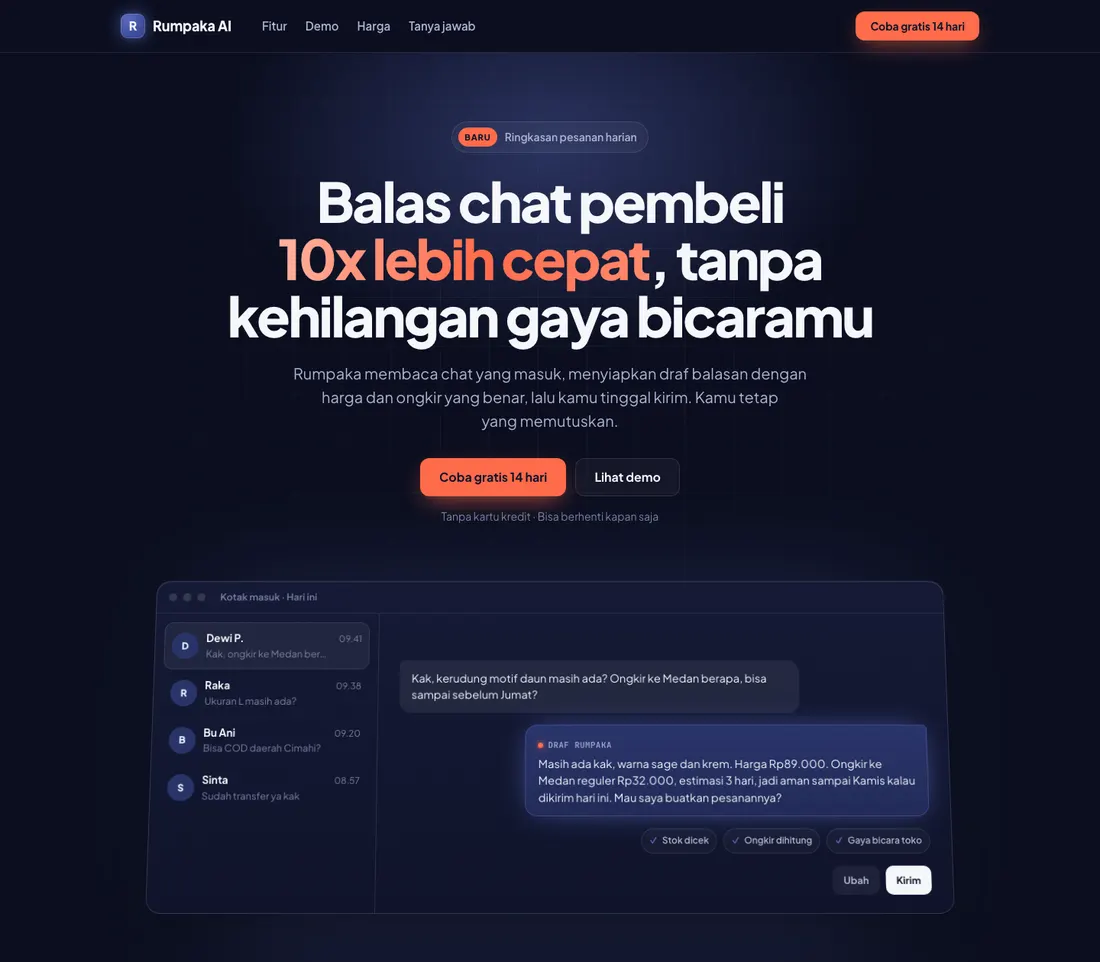
Dark glowing hero with an app window and an AI draft
SKILL.md contents
Premium subscribers can read, copy, and install this skill.
Unlock with Premium Sign inDark AI Product Page
Description
A product page for an AI app or service in a dark, glowing style: a centred hero with a pill badge, a tilted app window showing a sample conversation and an AI draft, then a clickable prompt demo (sample requests typed out letter by letter with answers you write yourself), glowing icon features, three-step how it works, stats, 3 plans with monthly/yearly prices in your currency, an FAQ about data and safety, and calls to action to WhatsApp or a sign-up link. One responsive HTML file, every word from a single config object.
Verified by SkillFlow
We checked every file in this skill automatically: no command that downloads and runs a program, no hidden code, no instruction telling your AI to ignore you.
- Loads from outside
- Fonts: Google Fonts
See the 5 files inside
skill.json10 KBSKILL.md6 KBprompt.md3 KBprompt.en.md3 KBfiles/produk-ai.html37 KB
Checked 14 Nov 2026
Part of SkillFlow Pro
Pro opens every skill in every category: copy, ZIP, Send to AI, install, save, and request new skills.
Get Pro Already subscribed? Sign inWhat you get
- A one-file responsive HTML AI product page for desktop and phone, no build step
- A dark glowing hero with an app window showing a sample conversation and AI draft
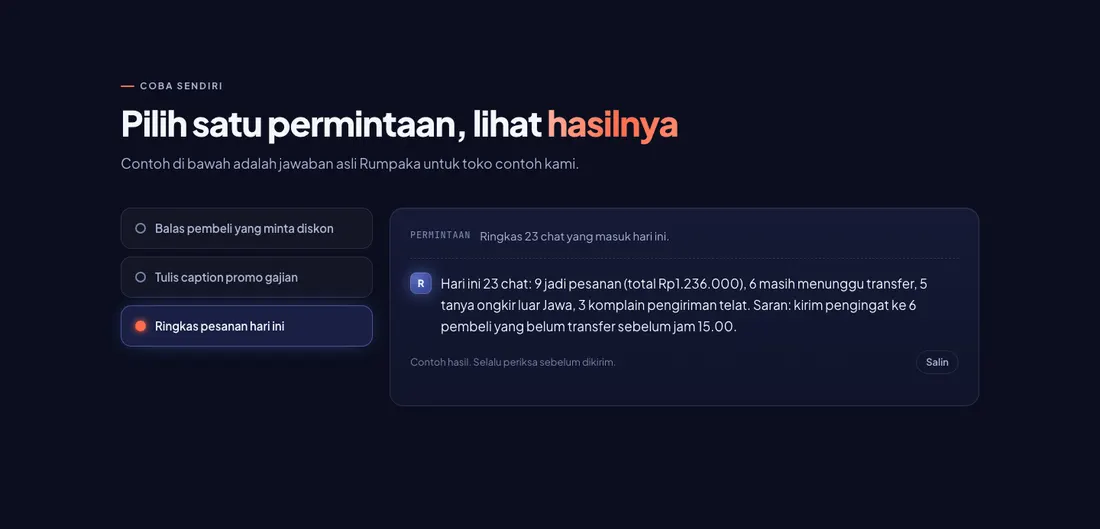
- An interactive prompt demo: 3-5 sample requests with typed-out answers, plus a copy button
- 6 icon feature cards, 3-step how it works, a stats row, and an FAQ about data
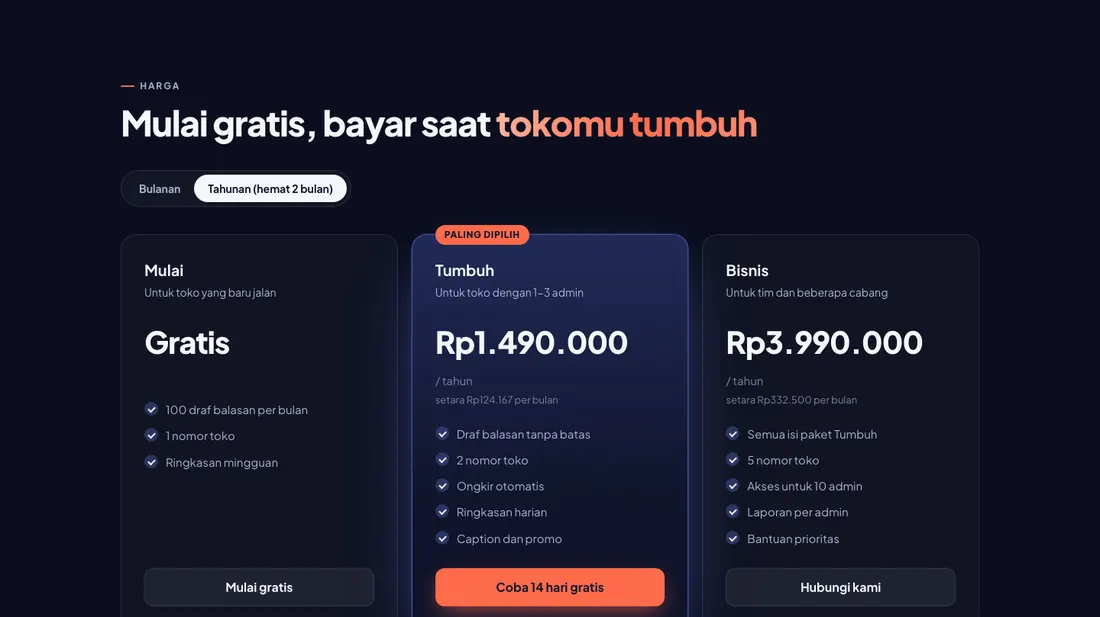
- 2-4 plans with a monthly/yearly toggle and per-month equivalent, buttons to WhatsApp or a link
- 3 dark palettes (night, deep indigo, graphite) and full copy
Good fit
- Makers of subscription AI apps like chat reply assistants, caption writers, or meeting summarisers
- Providers of chatbots or AI agents for businesses
- Sellers of paid prompt templates or automation services
- Other tech products wanting a dark, modern look
Not for
- The demo is a static example, not a live AI running on the page
- Demo answers must be real output from your product, not nicer made up ones
- It does not process subscriptions or payments; buttons go to WhatsApp or your own sign up link
- No fake numbers, made up testimonials, or other companies' logos
About this skill
/halaman-produk-ai-gelap Build a product page for our AI assistant that replies to buyer chats, 4 real conversation demos, 6 features, 3 plans monthly and yearly, a data FAQ, and a sign up button to WhatsApp
Show more
A product page for an AI app or service in a dark, glowing style: a centred hero with a pill badge, a tilted app window showing a sample conversation and an AI draft, then a clickable prompt demo (sample requests typed out letter by letter with answers you write yourself), glowing icon features, three-step how it works, stats, 3 plans with monthly/yearly prices in your currency, an FAQ about data and safety, and calls to action to WhatsApp or a sign-up link. One responsive HTML file, every word from a single config object.

User reviews
FAQ
Can I use a real product screenshot instead of the HTML window?
Yes. Replace the app window content with an image about 1060 px wide and keep the frame. The default window holds a sample conversation and AI draft with made up names.
How are yearly prices shown?
A monthly and yearly toggle switches prices, and yearly plans show the equivalent monthly price. A price of 0 shows Free, and one plan can be featured with a badge.
What must the FAQ answer?
What user data is used for and whether it can be deleted, what happens when the AI gets it wrong, and how to cancel. Answer honestly according to your product's policy.
Which AI can I use it with?
Copy the prompt into a chat AI (ChatGPT, Claude, Gemini, DeepSeek); or download the ZIP and install it in an AI agent (Claude Code, Codex, Antigravity, Hermes Agent, Cursor, GitHub Copilot, Gemini CLI, OpenCode, Kimi Code, Trae), which then builds the files for you.
What is in the ZIP?
One folder named halaman-produk-ai-gelap with SKILL.md (the instructions an AI agent reads) and the prompt, 5 files in all. Extract it into your agent's skills folder, or install it with npx skillflow-ai add halaman-produk-ai-gelap. Pro only.
Is there a per-use fee or credits?
Not from SkillFlow. The skill runs on the AI you already use, so any cost follows that plan.
Which plan includes it?
SkillFlow Pro. It opens every skill in every category.
Can I use my own colours and brand?
Yes. Pick a colour theme on this page, or fill in your brand profile once; both go into the prompt you copy and into the ZIP.
Can I share what I made?
Pro members can upload the result and get a page at share.skillflow.ai.id to send to anyone. The page carries a small "Made with SkillFlow AI" mark.
Is there a download limit?
Yes, per day: 50 skills on Pro, 10 on other plans. Downloading a skill again on the same day does not count.



