Rendered sample video
SKILL.md contents
Premium subscribers can read, copy, and install this skill.
Unlock with Premium Sign inMotion Numbers Report
Description
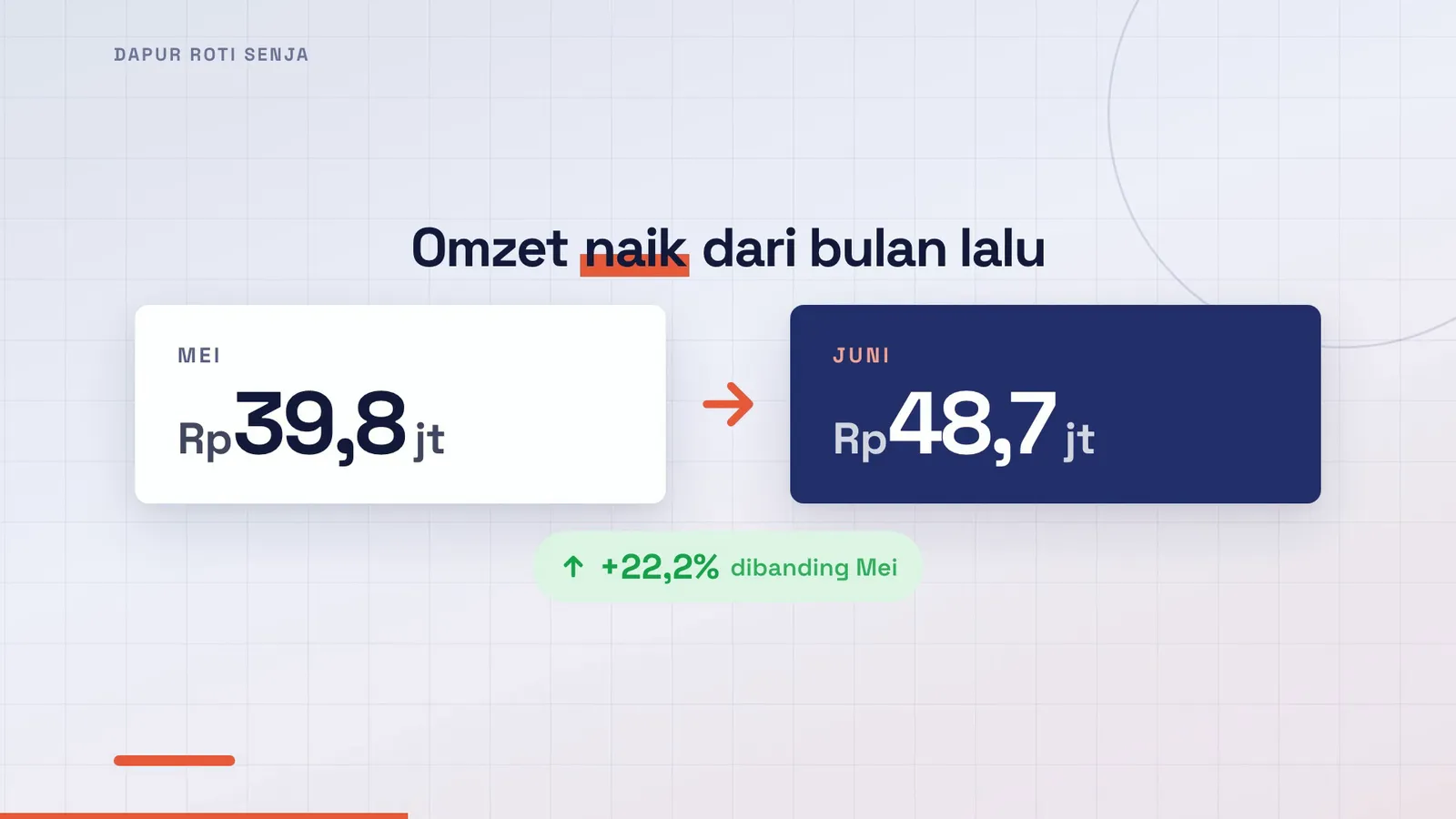
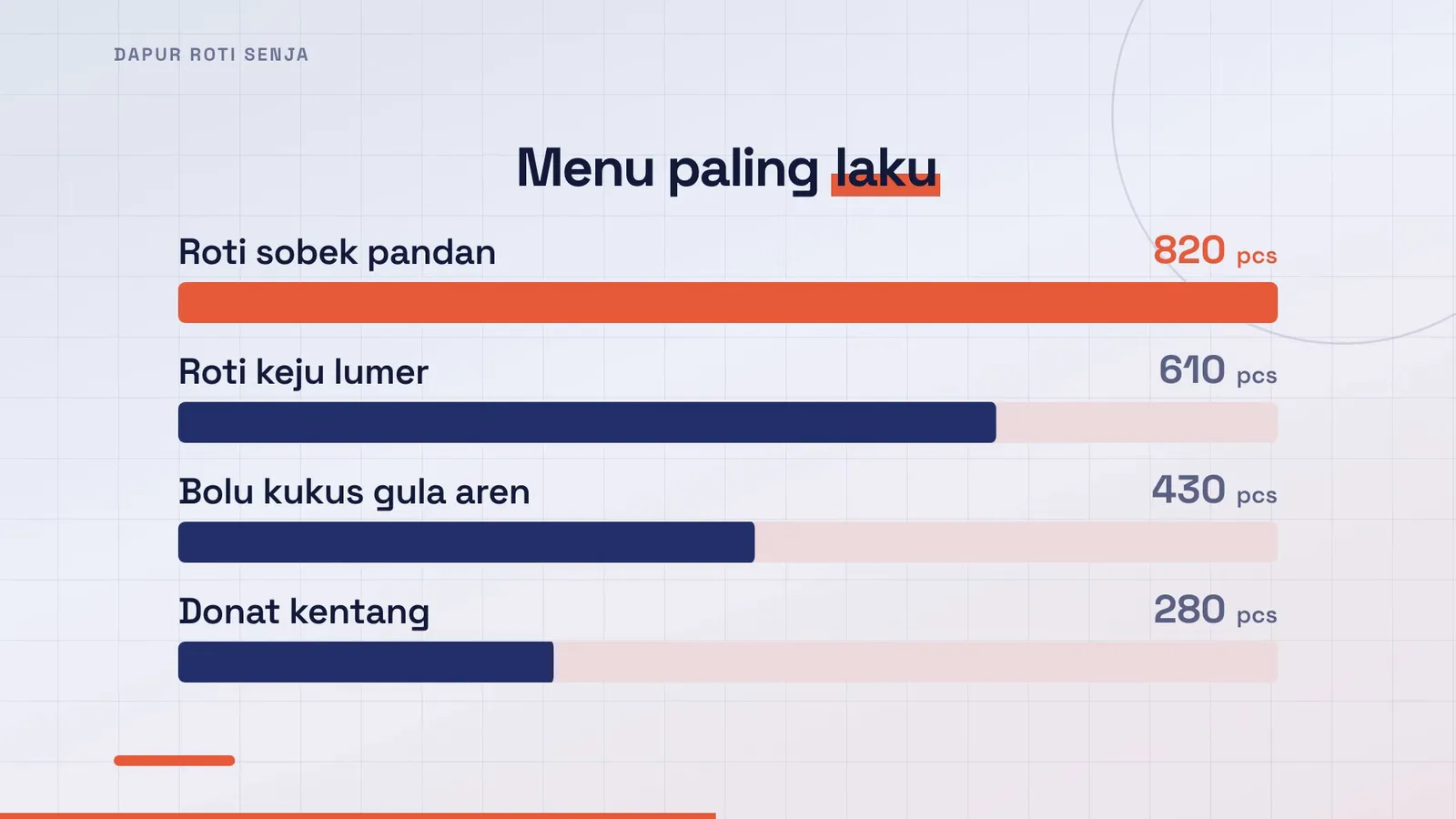
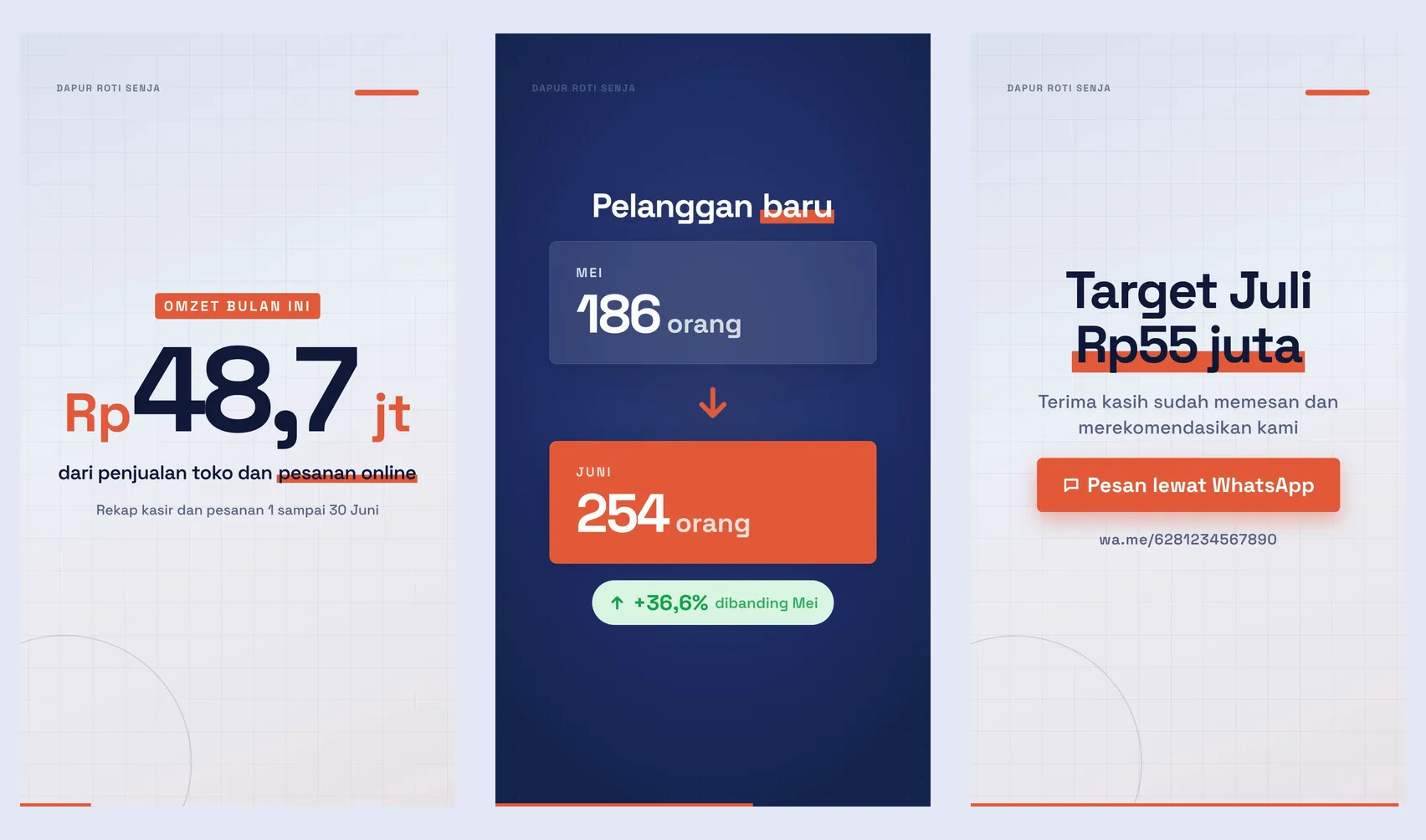
Turn a monthly report or campaign results into a 30-90 second data video with no voice over, built by the agent on your computer: a report title, big numbers that count up (48.7 m, 2,140 orders), a horizontal bar chart with one highlighted bar, before and after cards with the percentage change calculated automatically, a list of highlights, and a closing call to action. Paste a table or CSV, the agent lays out scenes on a fixed timeline, checks text and contrast, then renders 16:9 and 9:16 MP4s with home-made sound effects. Your own music can be added.
Verified by SkillFlow
We checked every file in this skill automatically: no command that downloads and runs a program, no hidden code, no instruction telling your AI to ignore you.
Good to know: Starts programs on the computer (files/alat/motion-cut.mjs), Starts programs on the computer (files/alat/motion-mix.mjs), Starts programs on the computer (files/alat/motion-render.mjs), Starts programs on the computer (files/alat/motion-sfx.mjs), Starts programs on the computer (files/alat/motion-transcribe.mjs) . These are tools that run on your own computer when you ask your agent to use them.
- Loads from outside
- Fonts: Google Fonts
See the 13 files inside
skill.json9 KBSKILL.md10 KBprompt.md3 KBprompt.en.md3 KBfiles/alat/kit-lib.mjs7 KBfiles/alat/motion-check.mjs9 KBfiles/alat/motion-cut.mjs12 KBfiles/alat/motion-mix.mjs8 KBfiles/alat/motion-render.mjs9 KBfiles/alat/motion-sfx.mjs2 KBfiles/alat/motion-transcribe.mjs6 KBfiles/alat/package.json1 KBfiles/video.html120 KB
Checked 14 Nov 2026
Part of SkillFlow Pro
Pro opens every skill in every category: copy, ZIP, Send to AI, install, save, and request new skills.
Get Pro Already subscribed? Sign inWhat you get
- A scene plan (time, type, numbers) from your table or CSV, shown before rendering
- 16:9 1920x1080 and/or 9:16 1080x1920 MP4, 30 fps, 30-90 seconds
- Before and after cards with the rise or fall percentage calculated by the engine from the raw numbers
- Home-made sound effects on each scene, your own music optional (levelled to -14 LUFS)
- 6 themes with two swappable brand colours
- An HTML template for next month's report: change the numbers, render again
Good fit
- Business owners sharing monthly results with their team, investors, or followers
- Agencies and freelancers reporting campaign results to clients
- Cooperatives, communities, and foundations summarising quarterly or yearly figures
- Social media admins who need regular data content without recording a voice
Not for
- It does not pull data from your till, online store, or ads: you supply the numbers
- No line charts, pie charts, or maps; it uses horizontal bars and number cards
- No voice over: for narration, record it yourself and use a voice-over motion skill
- It does not run in an ordinary web chat: it needs an agent that can run programs on your computer
About this skill
/laporan-angka-motion Make a 60-second report video of my bakery's June revenue from this table, one for YouTube and one for Reels
Show more
Turn a monthly report or campaign results into a 30-90 second data video with no voice over, built by the agent on your computer: a report title, big numbers that count up (48.7 m, 2,140 orders), a horizontal bar chart with one highlighted bar, before and after cards with the percentage change calculated automatically, a list of highlights, and a closing call to action. Paste a table or CSV, the agent lays out scenes on a fixed timeline, checks text and contrast, then renders 16:9 and 9:16 MP4s with home-made sound effects. Your own music can be added.
User reviews
FAQ
Is the percentage change calculated by the AI?
No. You or the agent only write the before and after numbers, and the video engine calculates the percentage from the full figures and picks green or red. The number on screen always matches the data you gave.
How long does rendering take?
A 60-second video takes about 25-45 seconds per format on a fast computer; an ordinary laptop can take 3-5 times longer. It needs Node, a browser, and ffmpeg, plus internet while rendering for the fonts.
Where does the music come from?
This skill ships no music because of licensing. The video already has home-made sound effects; if you have a licensed music file, the agent adds it and levels the audio to -14 LUFS.
Which AI can I use it with?
Download the ZIP and install it in an AI agent (Claude Code, Codex, Antigravity, Hermes Agent, Cursor, GitHub Copilot, Gemini CLI, OpenCode, Kimi Code, Trae), which then builds the files for you.
What is in the ZIP?
One folder named laporan-angka-motion with SKILL.md (the instructions an AI agent reads) and the prompt, 13 files in all. Extract it into your agent's skills folder, or install it with npx skillflow-ai add laporan-angka-motion. Pro only.
Is there a per-use fee or credits?
Not from SkillFlow. The skill runs on the AI you already use (and, if you use an AI voice instead of your own recording, the voice service you pick), so any cost follows that plan.
Which plan includes it?
SkillFlow Pro. It opens every skill in every category.
Can I use my own colours and brand?
Yes. Pick a colour theme on this page, or fill in your brand profile once; both go into the prompt you copy and into the ZIP.
Can I share what I made?
Pro members can upload the result and get a page at share.skillflow.ai.id to send to anyone. The page carries a small "Made with SkillFlow AI" mark.
Is there a download limit?
Yes, per day: 50 skills on Pro, 10 on other plans. Downloading a skill again on the same day does not count.