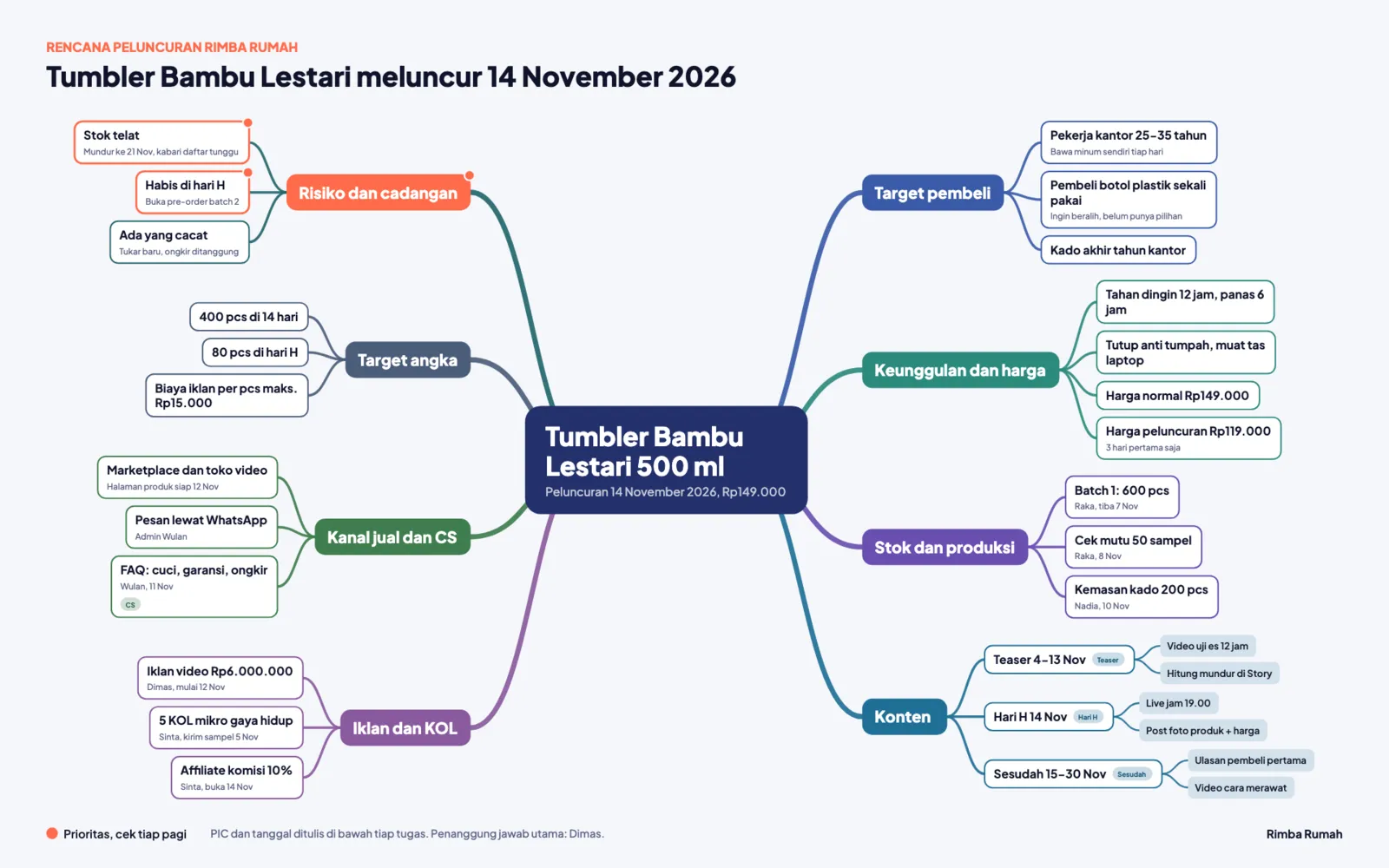
Bamboo tumbler launch plan: 8 branches, owner and date on every task, risks marked
SKILL.md contents
Premium subscribers can read, copy, and install this skill.
Unlock with Premium Sign inProduct Launch Plan Mind Map
Description
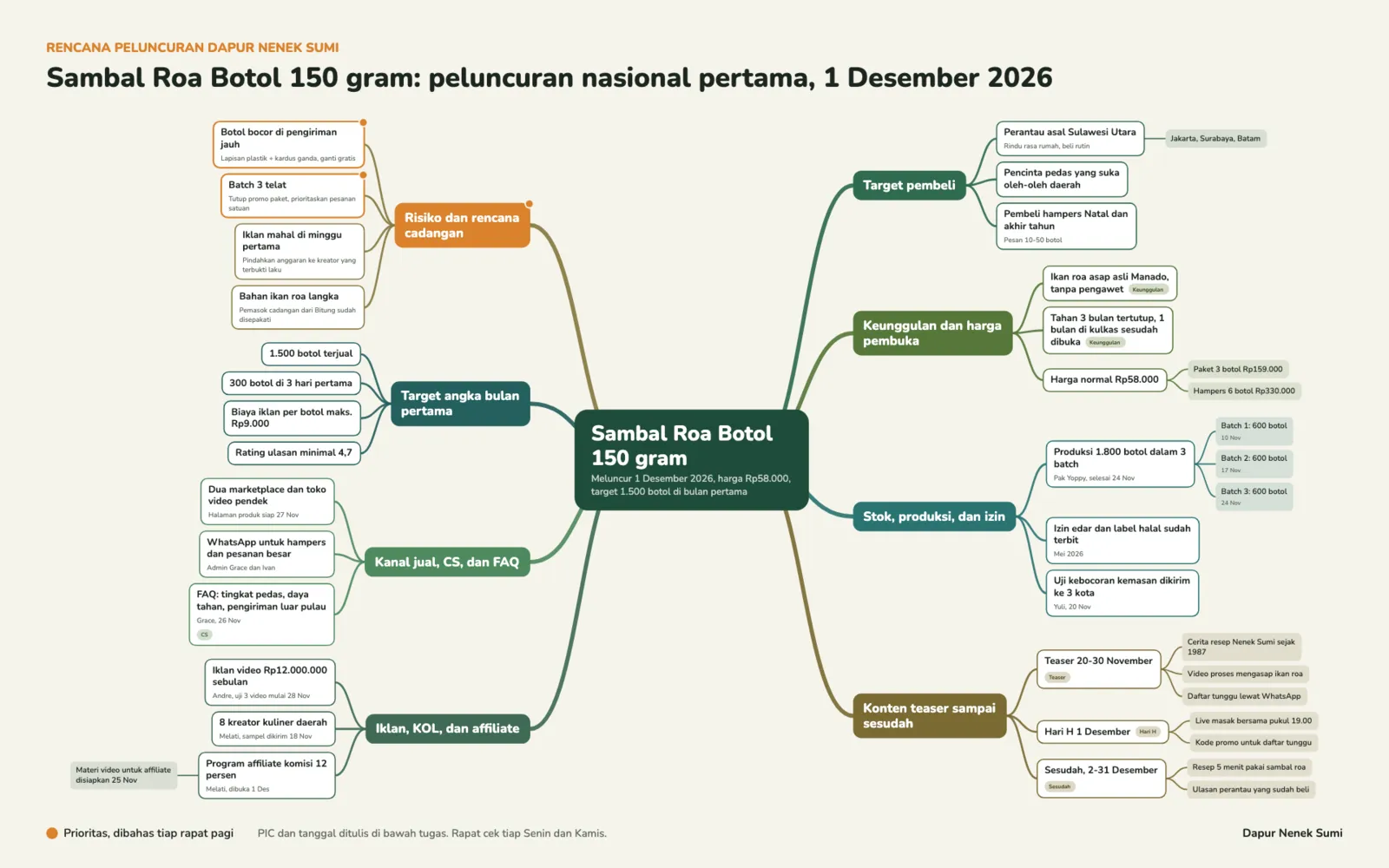
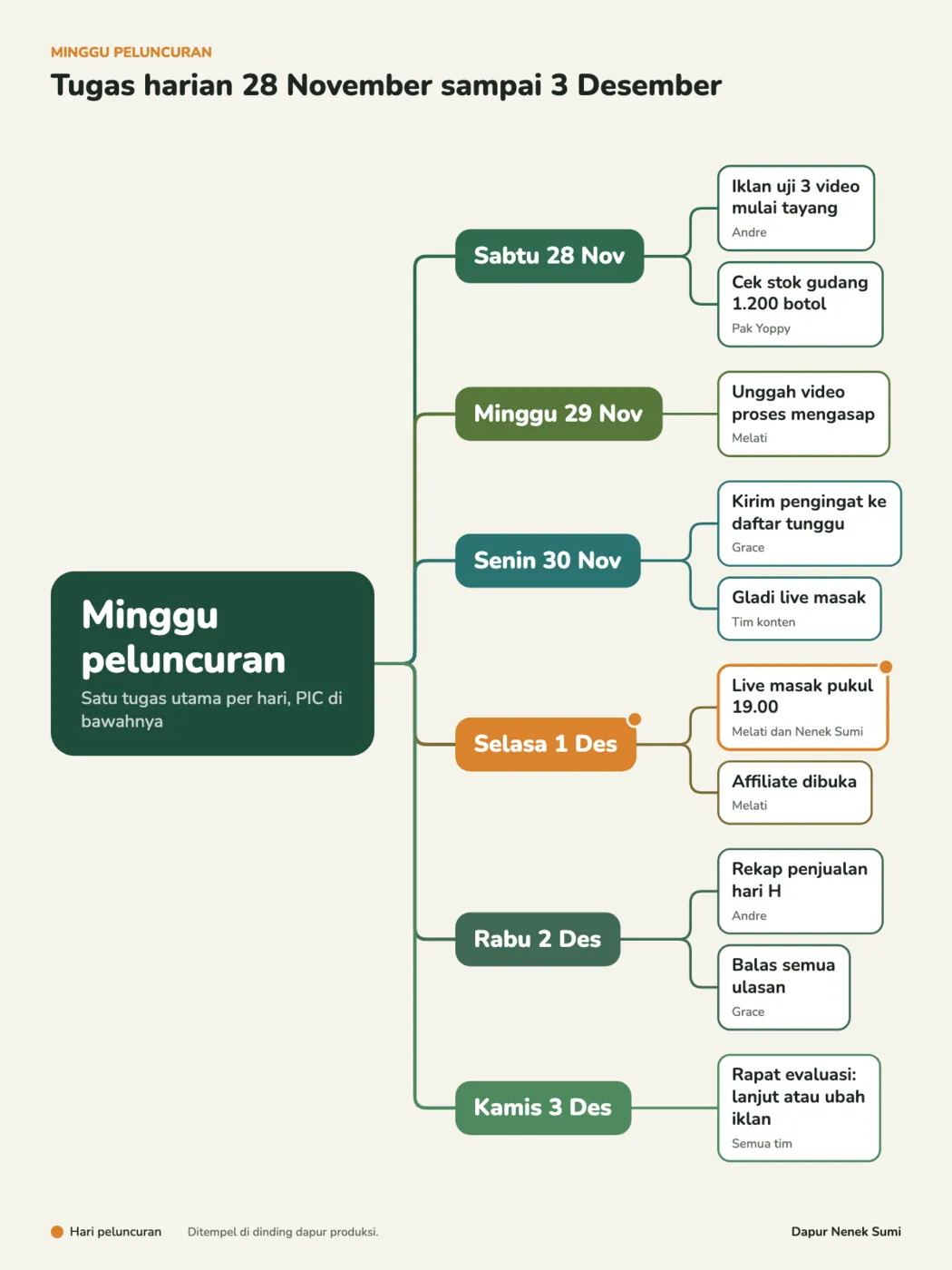
A one-page work map for launching one new product: the product, date, and price in the centre, eight work-area branches (target buyers, strengths and price, stock and production, content from teaser to after launch, ads and creators or affiliates, sales channels and support, number targets, risks and backups), tasks as leaves with an owner and date, and the risk branch marked as a priority. An optional second map holds the daily tasks for launch week. Downloads as PDF and PNG.
Verified by SkillFlow
We checked every file in this skill automatically: no command that downloads and runs a program, no hidden code, no instruction telling your AI to ignore you.
- Loads from outside
- Fonts: Google Fonts SkillFlow: directory.skillflow.ai.id
See the 6 files inside
skill.json9 KBSKILL.md10 KBprompt.md5 KBprompt.en.md5 KBfiles/contoh/sambal-roa-2-peta.html30 KBfiles/mindmap.html28 KB
Checked 14 Nov 2026
Part of SkillFlow Pro
Pro opens every skill in every category: copy, ZIP, Send to AI, install, save, and request new skills.
Get Pro Already subscribed? Sign inWhat you get
- A 1920x1200 mind map (or 1200x1600 portrait) with 8 launch work-area branches
- Tasks as leaves with owner and date in the note; content split into Teaser, Launch day, After
- A Risks and backups branch marked as a priority, with a backup plan for each risk
- An optional second map: daily tasks for launch week, launch day marked
- Download PDF and Download PNG buttons (more than one map becomes a ZIP)
- An HTML template with one MINDMAP object and 3 palettes
Good fit
- Small teams who want everyone to see who does what before launch day
- Brand owners launching a new product on marketplaces and short-video shops
- Prep meetings that need one page to print or share in the group chat
Not for
- Not a task manager: tasks cannot be ticked on the map, edit the object and download again
- One map per product; launching many products at once is split per product
- It does not build strategy from scratch; dates, owners, and numbers come from your plan
About this skill
/mind-map-rencana-peluncuran-produk Make a launch plan mind map for my new roll-on perfume on 5 December, a team of 4, a target of 300 bottles in two weeks, with risks and backup plans
Show more
A one-page work map for launching one new product: the product, date, and price in the centre, eight work-area branches (target buyers, strengths and price, stock and production, content from teaser to after launch, ads and creators or affiliates, sales channels and support, number targets, risks and backups), tasks as leaves with an owner and date, and the risk branch marked as a priority. An optional second map holds the daily tasks for launch week. Downloads as PDF and PNG.
User reviews
FAQ
Why are there always eight branches?
Those eight areas are the ones most often missed in a launch, and the map reads best with at most eight main branches. If you do not use one, swap it for another area such as packaging or store partnerships.
When do I need a second map?
When you have more than about 40 tasks or the team needs a daily schedule. The second map covers the 5-7 days around launch day in portrait, and the PNG button downloads both as a ZIP.
Which AI can I use it with?
Copy the prompt into a chat AI (ChatGPT, Claude, Gemini, DeepSeek); or download the ZIP and install it in an AI agent (Claude Code, Codex, Antigravity, Hermes Agent, Cursor, GitHub Copilot, Gemini CLI, OpenCode, Kimi Code, Trae), which then builds the files for you.
What is in the ZIP?
One folder named mind-map-rencana-peluncuran-produk with SKILL.md (the instructions an AI agent reads) and the prompt, 6 files in all. Extract it into your agent's skills folder, or install it with npx skillflow-ai add mind-map-rencana-peluncuran-produk. Pro only.
Is there a per-use fee or credits?
Not from SkillFlow. The skill runs on the AI you already use, so any cost follows that plan.
Which plan includes it?
SkillFlow Pro. It opens every skill in every category.
Can I use my own colours and brand?
Yes. Pick a colour theme on this page, or fill in your brand profile once; both go into the prompt you copy and into the ZIP.
Can I share what I made?
Pro members can upload the result and get a page at share.skillflow.ai.id to send to anyone. The page carries a small "Made with SkillFlow AI" mark.
Is there a download limit?
Yes, per day: 50 skills on Pro, 10 on other plans. Downloading a skill again on the same day does not count.