

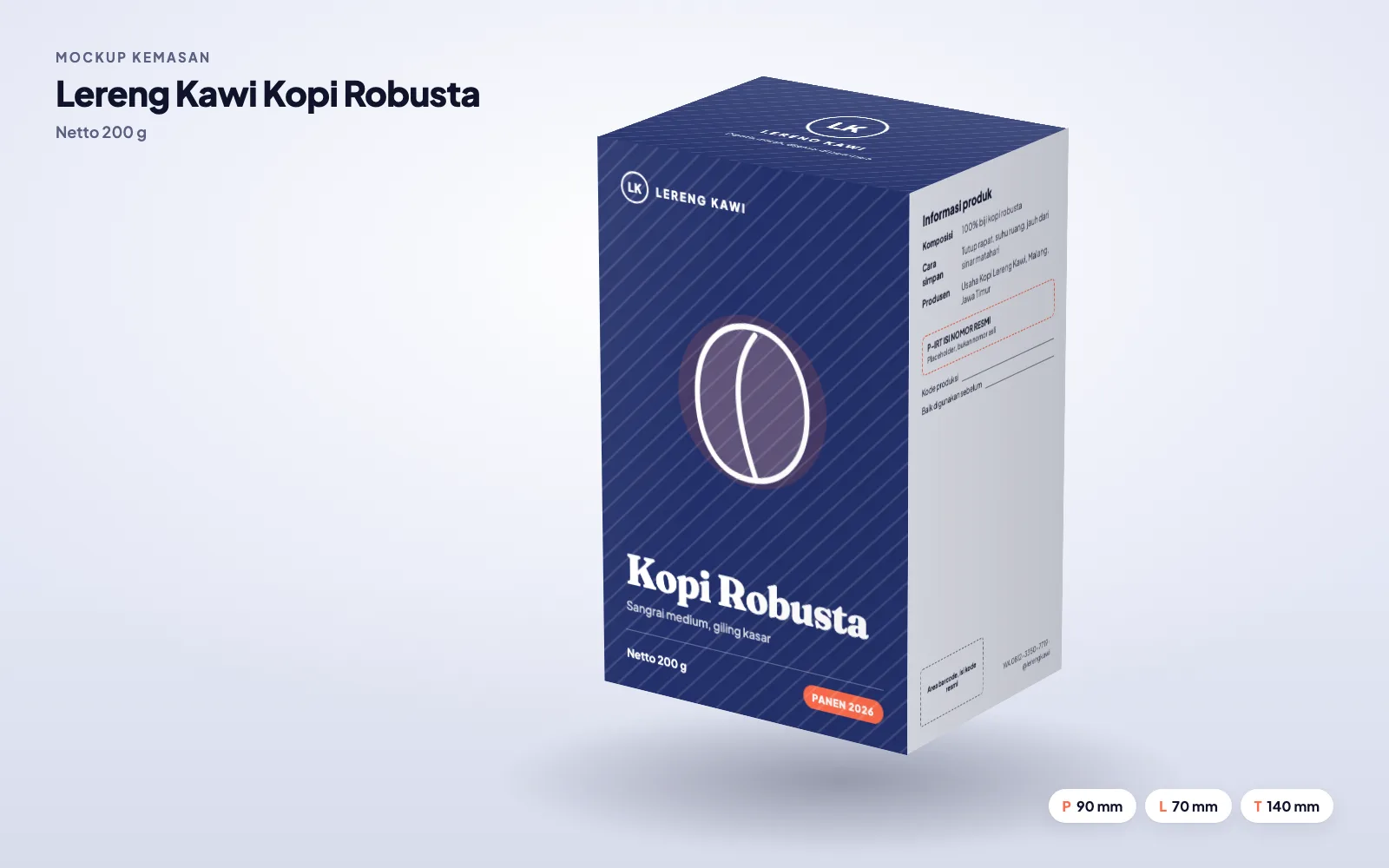
A three-side 3D mockup of a 90 x 70 x 140 mm coffee box with measurements in the corner
SKILL.md contents
Premium subscribers can read, copy, and install this skill.
Unlock with Premium Sign inPackaging Box Mockup
Description
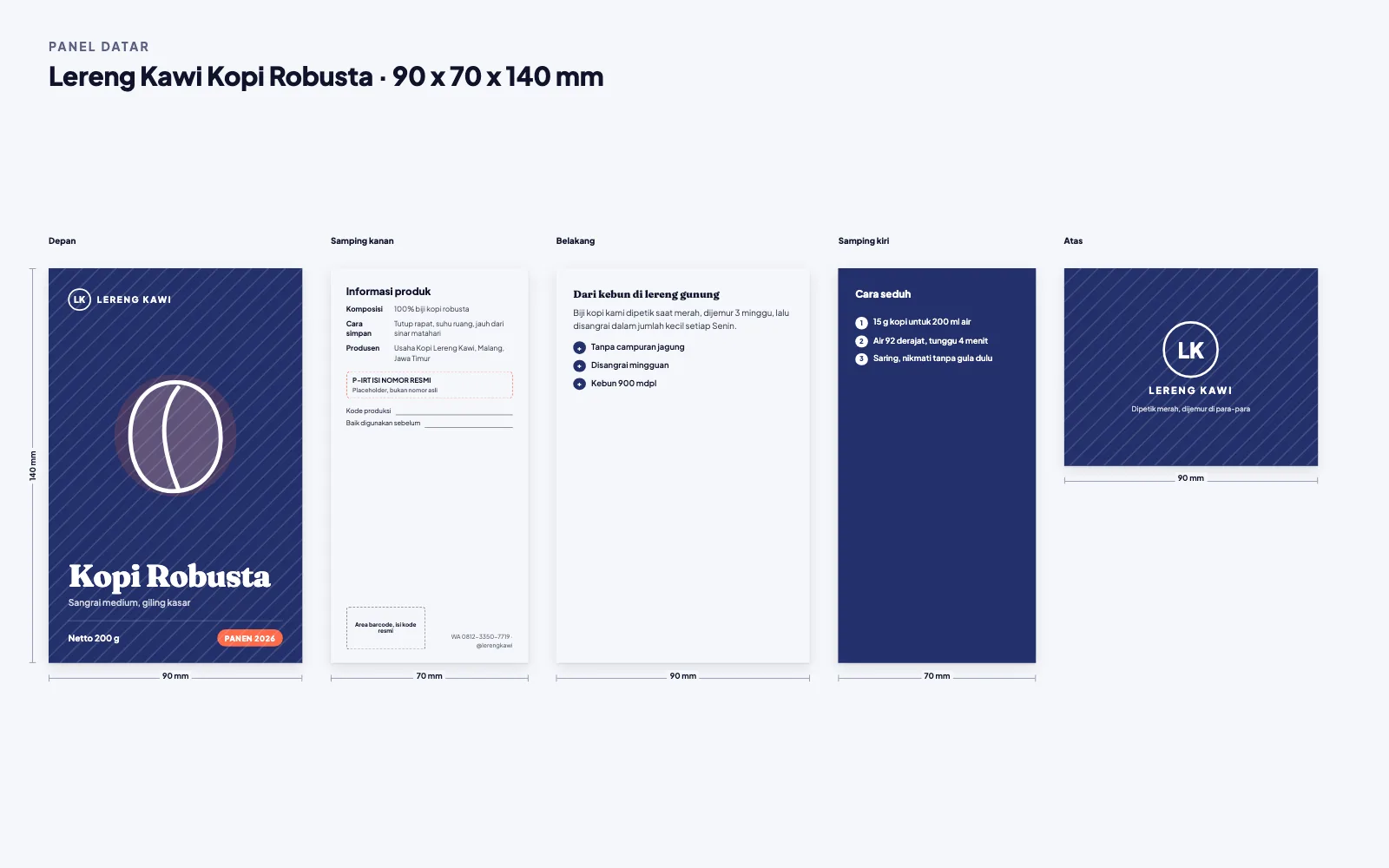
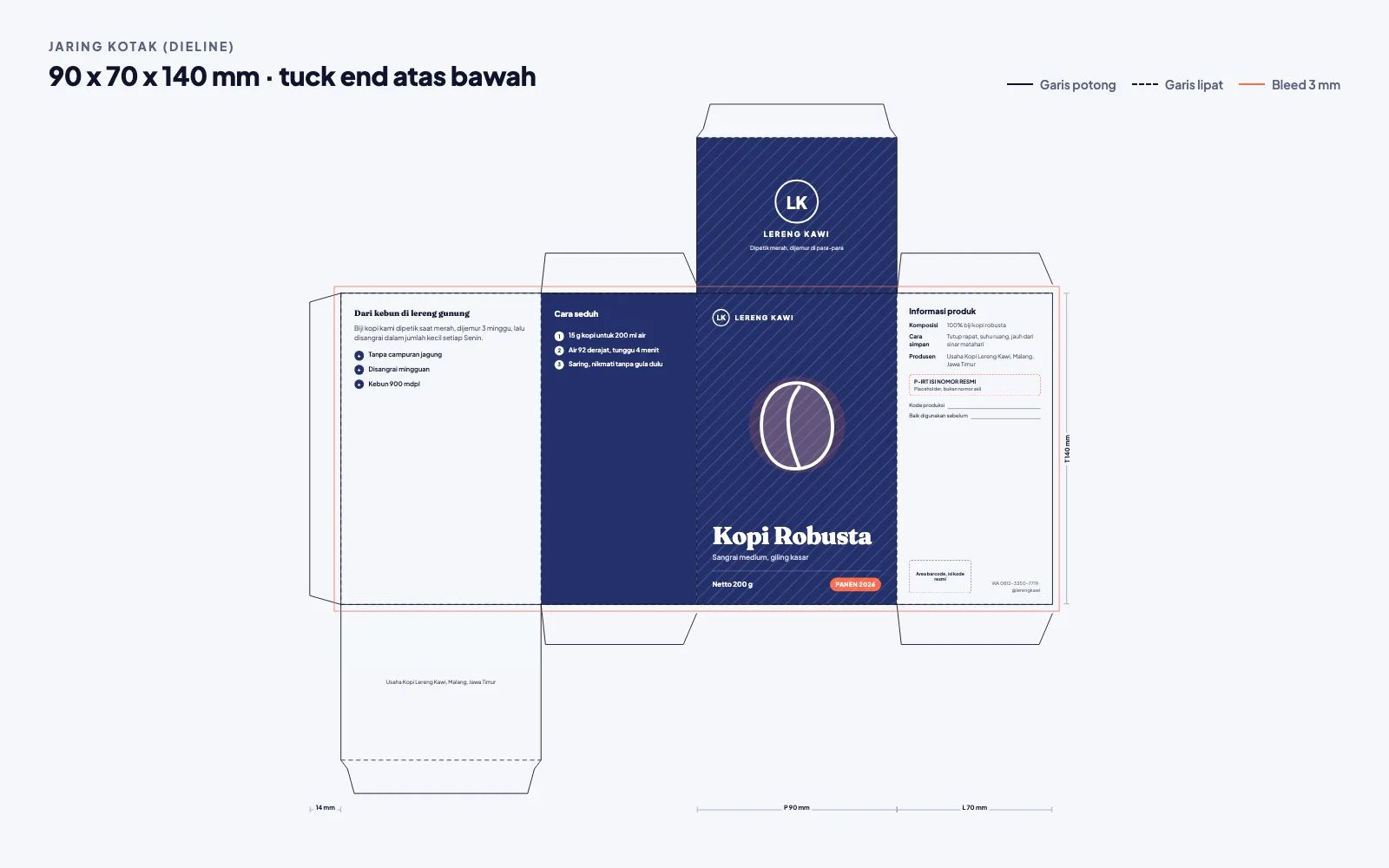
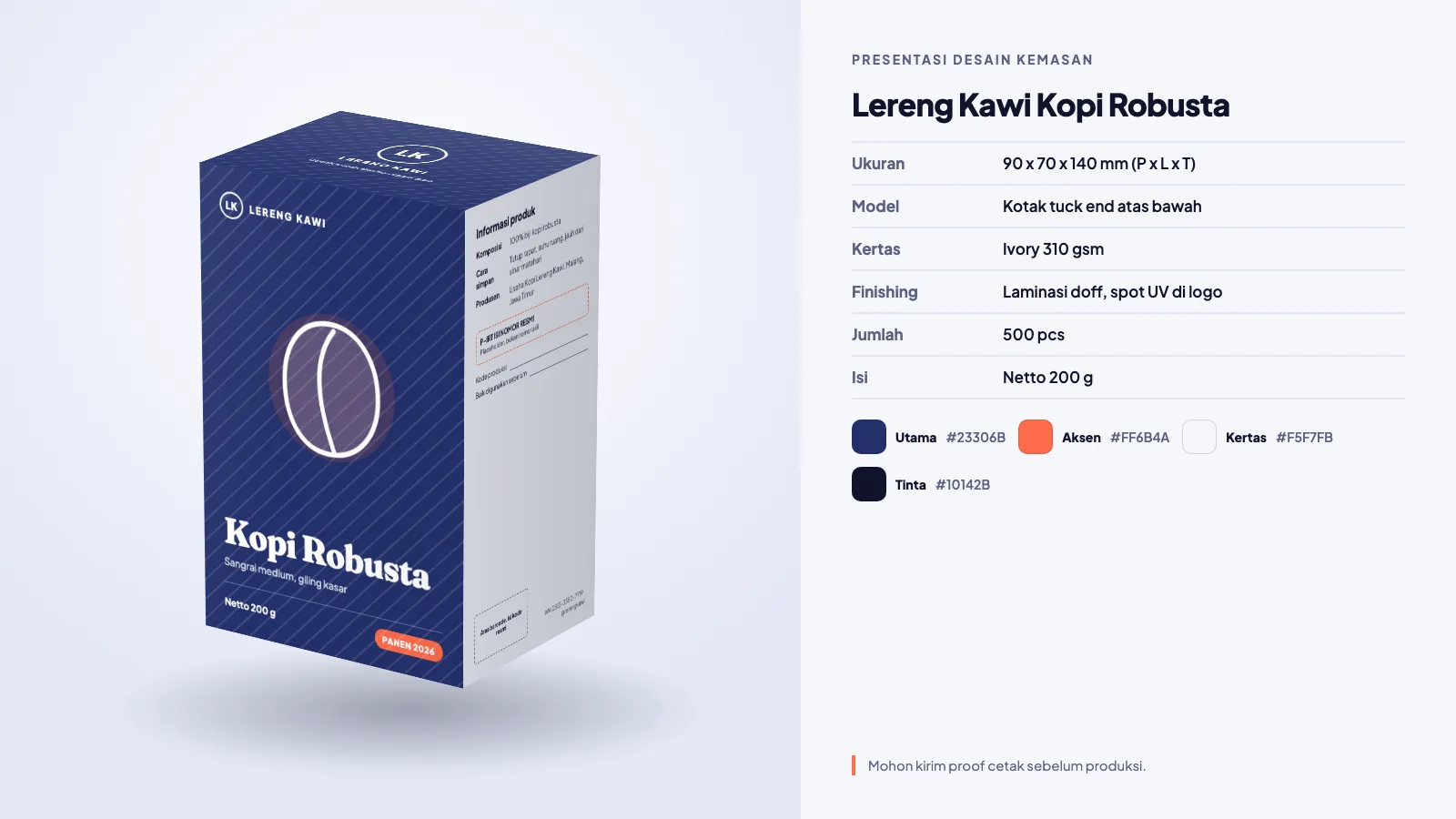
A packaging box design for small business products in one millimetre-based template: a three-side 3D mockup (front, side, top) with a floor shadow, flat panels of every side with measurements, a box net (dieline) with cut lines, fold lines, and a 3 mm bleed that prints at 1:1 to PDF, and a presentation sheet with size, paper, finish, quantity, and colour codes for the factory and prospective buyers. Works for tall and wide boxes, and the permit number and barcode show as placeholders until the official ones are filled in.
Verified by SkillFlow
We checked every file in this skill automatically: no command that downloads and runs a program, no hidden code, no instruction telling your AI to ignore you.
- Loads from outside
- Fonts: Google Fonts
See the 5 files inside
skill.json10 KBSKILL.md8 KBprompt.md4 KBprompt.en.md4 KBfiles/kotak.html31 KB
Checked 14 Nov 2026
Included in Basic and Pro
Basic copies the prompt. Pro also downloads the ZIP, sends to AI, installs into agents, and opens every category.
Get Pro Get Basic Already subscribed? Sign inWhat you get
- A three-side 3D mockup PNG at 1600x1000 or 1080x1080 for catalogues and presentations
- Flat panels of every side (front, two sides, back, top) with millimetre measurements
- A tuck end box net with cut lines, fold lines, a 3 mm bleed, printable at 1:1 to PDF
- A 1600x900 presentation sheet: size, style, paper, finish, quantity, colour codes
- Info side content: ingredients, storage, maker, batch code, best before, permit, barcode
- A one-config HTML template with 3 palettes and 5 front illustrations
Good fit
- Small food, drink, cosmetics, and craft businesses printing their first packaging box
- Designers who need to present a box design to a client before printing
- Owners who want to request a printer quote with clear sizes and specs
- Sellers who need a box mockup image for a catalogue or pre-order
Not for
- The box net is a starting point; the final dieline with paper tolerances comes from the printer
- Not a real product photo; the mockup is a simple 3D drawing, not a photorealistic render
- It does not create permit numbers, barcodes, or nutrition figures; they stay placeholders until you add official data
- Only rectangular tuck end boxes, not pouches, bottles, or window boxes
About this skill
/mockup-kotak-kemasan Design a packaging box for our robusta coffee at 90 x 70 x 140 mm, 200 g net, with product information on the side, plus a three-side mockup and a box net to send to the printer
Show more
A packaging box design for small business products in one millimetre-based template: a three-side 3D mockup (front, side, top) with a floor shadow, flat panels of every side with measurements, a box net (dieline) with cut lines, fold lines, and a 3 mm bleed that prints at 1:1 to PDF, and a presentation sheet with size, paper, finish, quantity, and colour codes for the factory and prospective buyers. Works for tall and wide boxes, and the permit number and barcode show as placeholders until the official ones are filled in.
User reviews
FAQ
How do I measure the box correctly?
Measure the product that goes inside, then add 2 to 3 mm on each side so it slides in easily. P is the front width, L the side width, T the height. If the printer already has a standard box size, use that.
Can I send the box net straight to the printer?
Yes, as a guide and design file, since it is in millimetres and prints at 1:1 to PDF. Printers usually adjust the dieline for paper thickness and their cutting die, so ask for a print proof before production.
What if I do not have a permit number yet?
Leave it blank. The permit box shows a dashed accent outline reading ISI NOMOR RESMI and a placeholder note. Do not write an invented number, because a number that looks real can mislead buyers.
Which AI can I use it with?
Copy the prompt into a chat AI (ChatGPT, Claude, Gemini, DeepSeek); or download the ZIP and install it in an AI agent (Claude Code, Codex, Antigravity, Hermes Agent, Cursor, GitHub Copilot, Gemini CLI, OpenCode, Kimi Code, Trae), which then builds the files for you.
What is in the ZIP?
One folder named mockup-kotak-kemasan with SKILL.md (the instructions an AI agent reads) and the prompt, 5 files in all. Extract it into your agent's skills folder, or install it with npx skillflow-ai add mockup-kotak-kemasan. Pro only.
Is there a per-use fee or credits?
Not from SkillFlow. The skill runs on the AI you already use (and, for image prompts, the image AI you pick), so any cost follows that plan.
Which plan includes it?
Basic and Pro. Basic copies the prompt; Pro also downloads the ZIP, sends to AI, installs into agents and shares results by link.
Can I use my own colours and brand?
Yes. Pick a colour theme on this page, or fill in your brand profile once; both go into the prompt you copy and into the ZIP.
Can I share what I made?
Pro members can upload the result and get a page at share.skillflow.ai.id to send to anyone. The page carries a small "Made with SkillFlow AI" mark.
Is there a download limit?
Yes, per day: 50 skills on Pro, 10 on other plans. Downloading a skill again on the same day does not count.



