

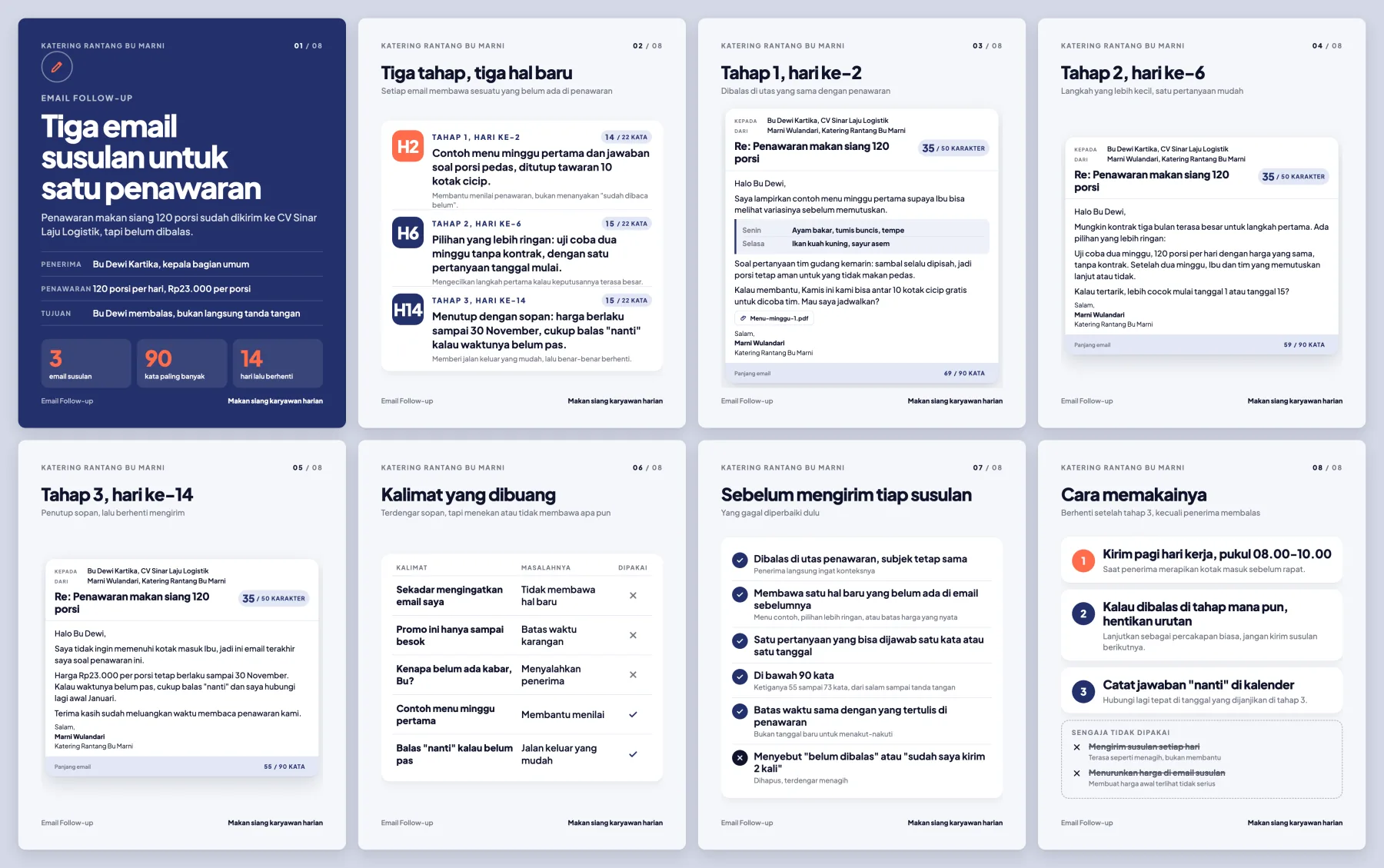
Eight cards: brief, the three-stage map, three emails in the inbox, lines left out, a pre-send check, how to use it
SKILL.md contents
Premium subscribers can read, copy, and install this skill.
Unlock with Premium Sign inFollow-up Email After a Proposal
Description
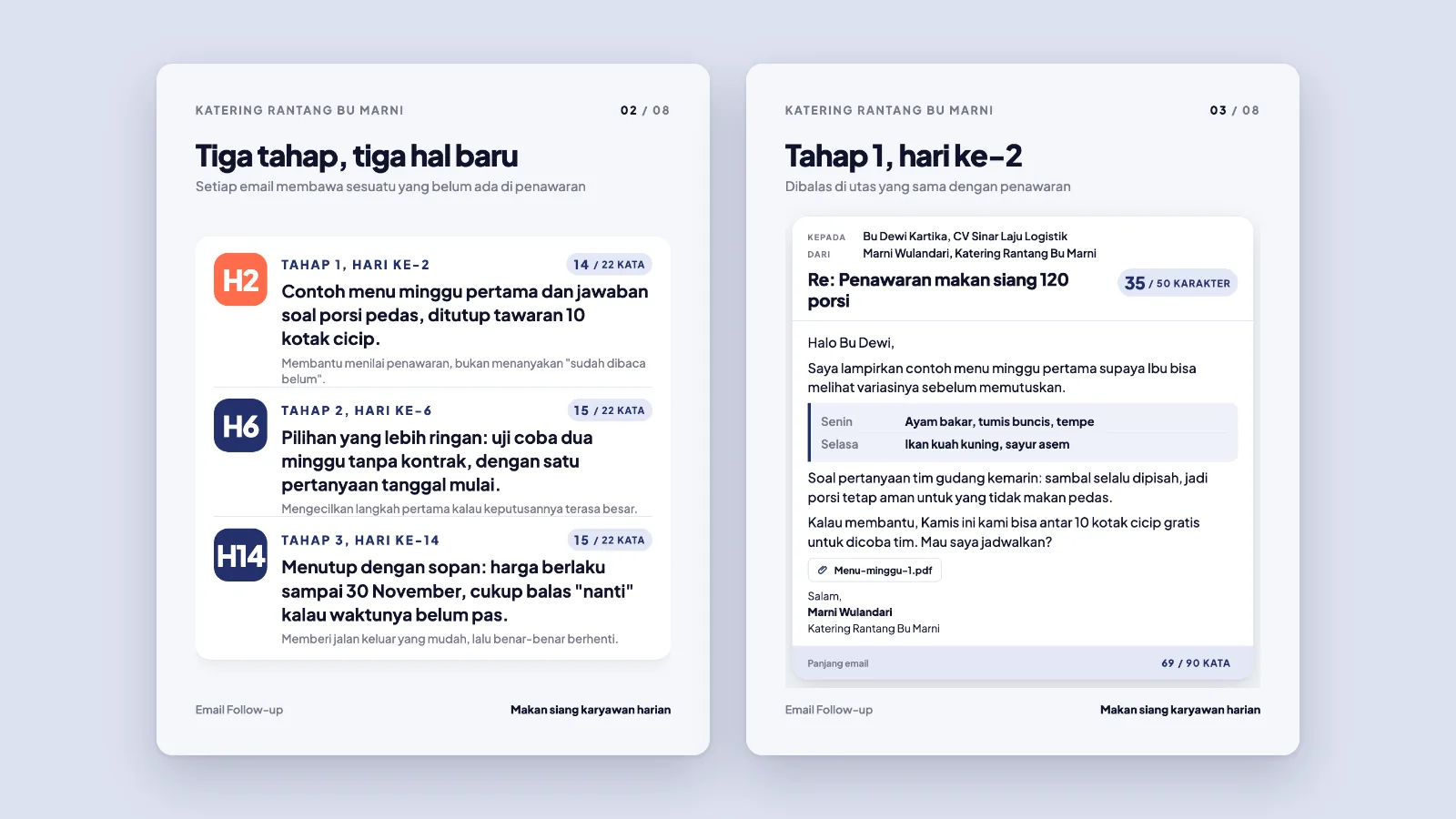
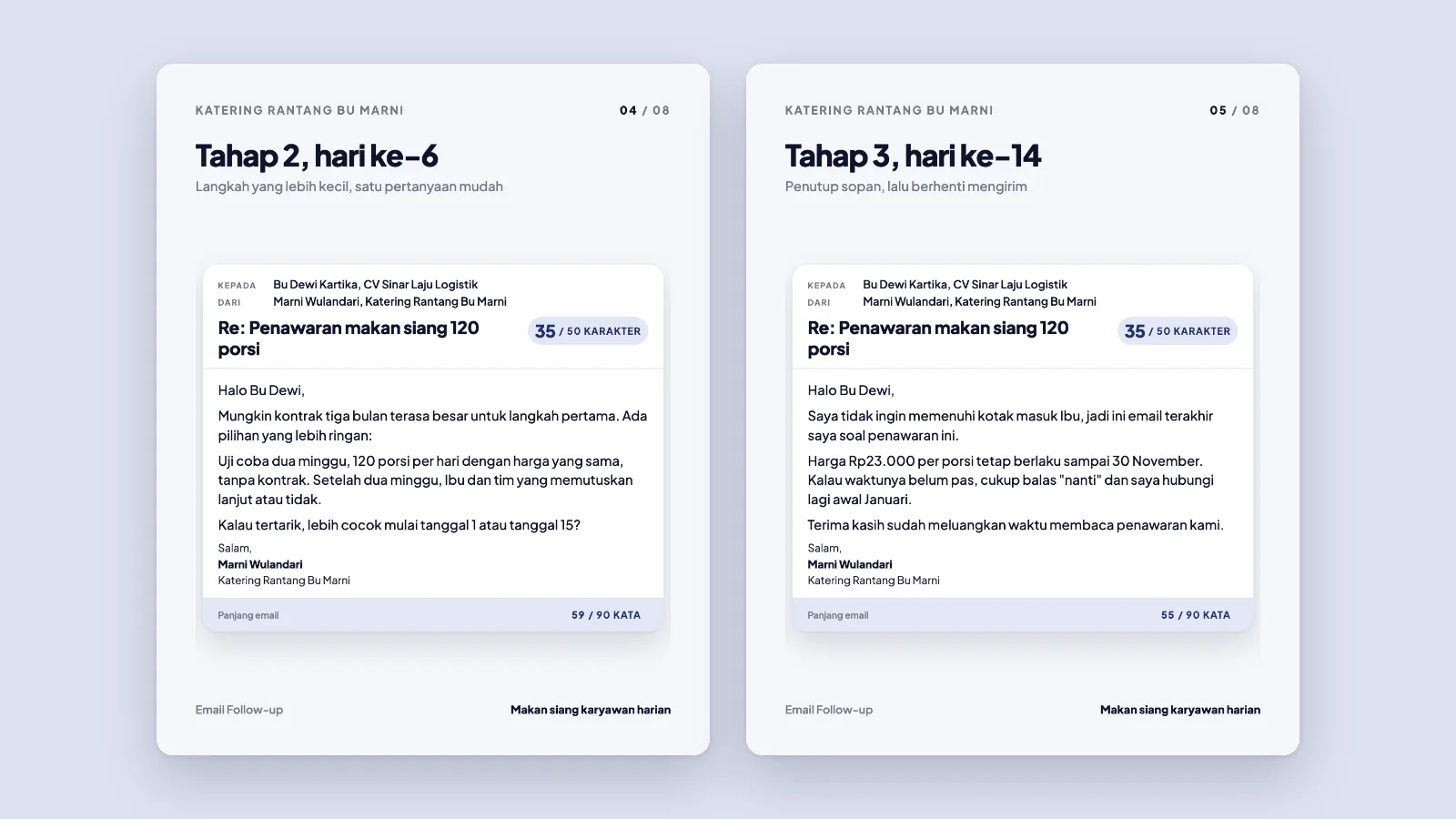
Three follow-up emails for a proposal or quote that has not been answered, written to help the recipient decide rather than chase them: stage 1 on day 2 brings material to evaluate, stage 2 on day 6 offers a smaller step without lowering the price, stage 3 on day 14 closes politely using the expiry written in the proposal and an easy "reply later" way out. Each email under 90 words, sent in the same thread, with one easy question. Comes with a stage map, lines left out, a pre-send check, and visual cards with an inbox mockup.
Verified by SkillFlow
We checked every file in this skill automatically: no command that downloads and runs a program, no hidden code, no instruction telling your AI to ignore you.
- Loads from outside
- Fonts: Google Fonts
See the 7 files inside
skill.json10 KBSKILL.md7 KBprompt.md3 KBprompt.en.md3 KBfiles/brief.md2 KBfiles/contoh-hasil.md5 KBfiles/kartu.html65 KB
Checked 14 Nov 2026
Part of SkillFlow Pro
Pro opens every skill in every category: copy, ZIP, Send to AI, install, save, and request new skills.
Get Pro Already subscribed? Sign inWhat you get
- A three-stage map: when, what new thing each email brings, and its one question
- Three ready-to-copy emails (day 2, 6, and 14) under 90 words with word counts
- A table of lines that sound polite but push, with the reason each is left out
- A check before sending each follow-up and how to run the sequence
- A fill-in brief, a complete sample result, and examples deliberately left out
- An HTML card template with an inbox mockup that counts words and characters automatically
Good fit
- Freelancers and agencies whose client went quiet after a proposal
- Caterers, event vendors, and B2B services that send quotes by email
- Consultants who want to follow up without sounding like they are chasing
- Sellers replacing "just checking in" follow-ups with emails that are actually useful
Not for
- Not a first email to someone who does not know you; use Cold Email for that
- It does not chase invoices or payments already agreed
- It does not set up automated sending or email tracking
- It does not create new discounts or deadlines; it only uses what your proposal already says
About this skill
/copy-email-follow-up I sent a proposal for daily lunch catering, 120 portions, to an office's general affairs manager a week ago and have not heard back; write three polite follow-up emails
Show more
Three follow-up emails for a proposal or quote that has not been answered, written to help the recipient decide rather than chase them: stage 1 on day 2 brings material to evaluate, stage 2 on day 6 offers a smaller step without lowering the price, stage 3 on day 14 closes politely using the expiry written in the proposal and an easy "reply later" way out. Each email under 90 words, sent in the same thread, with one easy question. Comes with a stage map, lines left out, a pre-send check, and visual cards with an inbox mockup.
User reviews
FAQ
Why does every email need something new?
An email that only reminds gives the recipient one option: feel guilty and stay quiet. Something new (a sample, an answer to their question, a smaller step) gives them a reason to reply and helps them decide.
Can I lower the price in a follow-up?
Not by default. Stage 2 makes the step smaller (a trial, a smaller package) at the same price, because a sudden discount makes the original price look unserious. If you have actually agreed a different price, put it in the brief.
What happens after stage 3?
Stop sending. If the recipient replies "later", note it and get in touch on the date you promised. If they reply at any stage, stop the sequence and carry on as a normal conversation.
Which AI can I use it with?
Copy the prompt into a chat AI (ChatGPT, Claude, Gemini, DeepSeek); or download the ZIP and install it in an AI agent (Claude Code, Codex, Antigravity, Hermes Agent, Cursor, GitHub Copilot, Gemini CLI, OpenCode, Kimi Code, Trae), which then builds the files for you.
What is in the ZIP?
One folder named copy-email-follow-up with SKILL.md (the instructions an AI agent reads) and the prompt, 7 files in all. Extract it into your agent's skills folder, or install it with npx skillflow-ai add copy-email-follow-up. Pro only.
Is there a per-use fee or credits?
Not from SkillFlow. The skill runs on the AI you already use, so any cost follows that plan.
Which plan includes it?
SkillFlow Pro. It opens every skill in every category.
Can it use my brand details?
Yes. Fill in your brand profile once (name, product, price, contact) and it goes into every prompt you copy.
Can I share what I made?
Pro members can upload the result and get a page at share.skillflow.ai.id to send to anyone. The page carries a small "Made with SkillFlow AI" mark.
Is there a download limit?
Yes, per day: 50 skills on Pro, 10 on other plans. Downloading a skill again on the same day does not count.



