

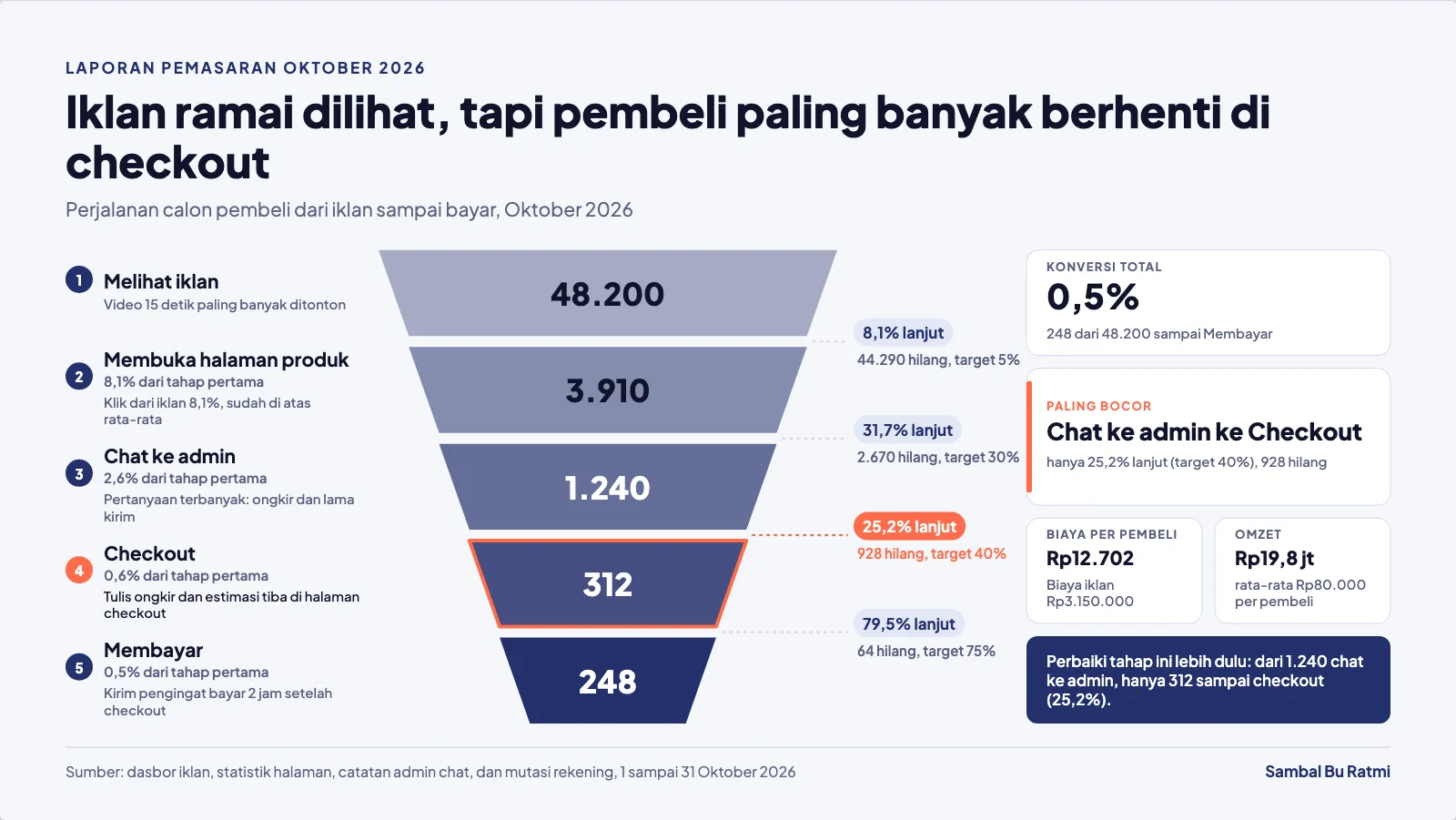
Ad to payment funnel: targets per stage, checkout marked as the leakiest
SKILL.md contents
Premium subscribers can read, copy, and install this skill.
Unlock with Premium Sign inSales Funnel Chart
Description
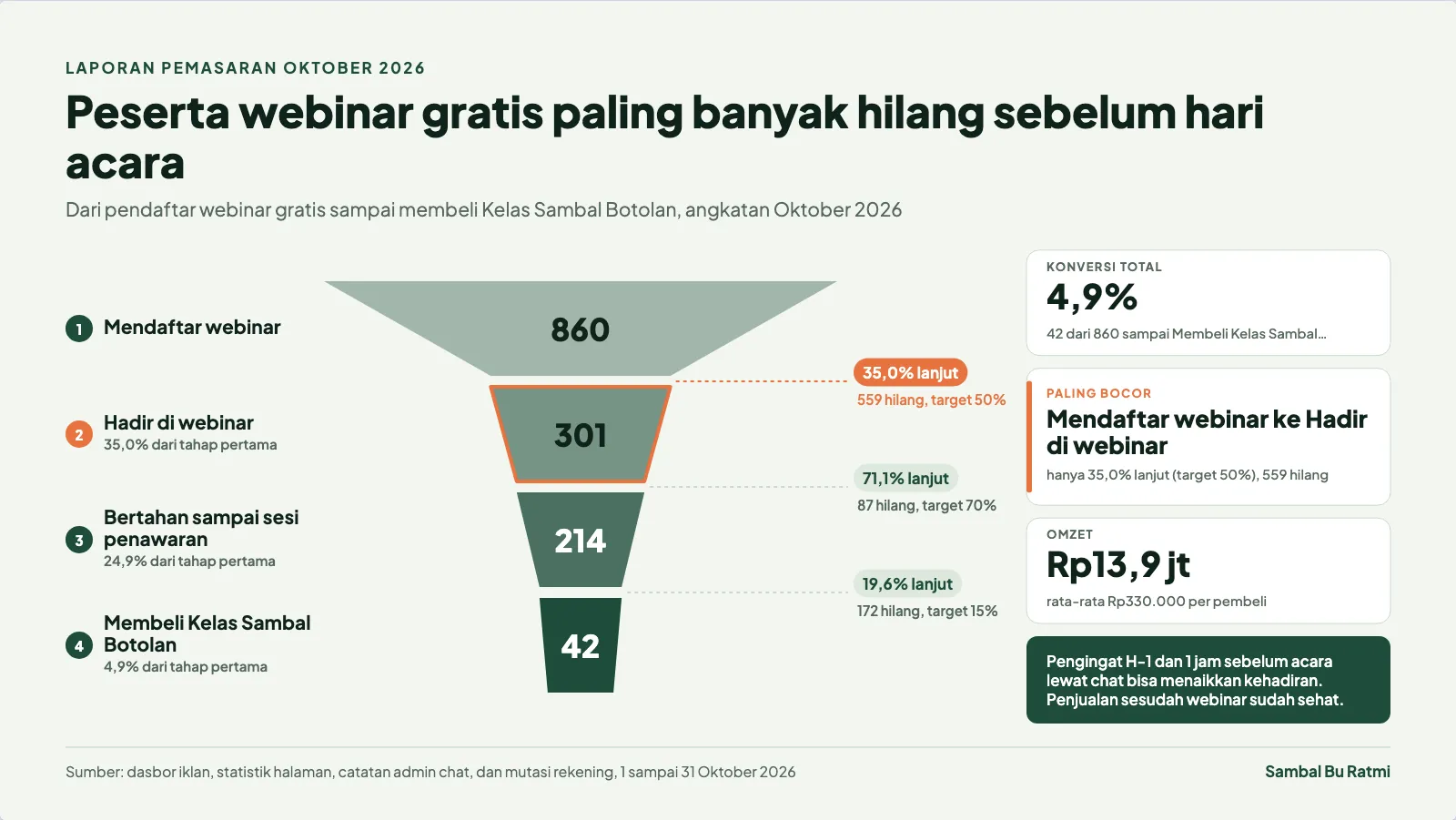
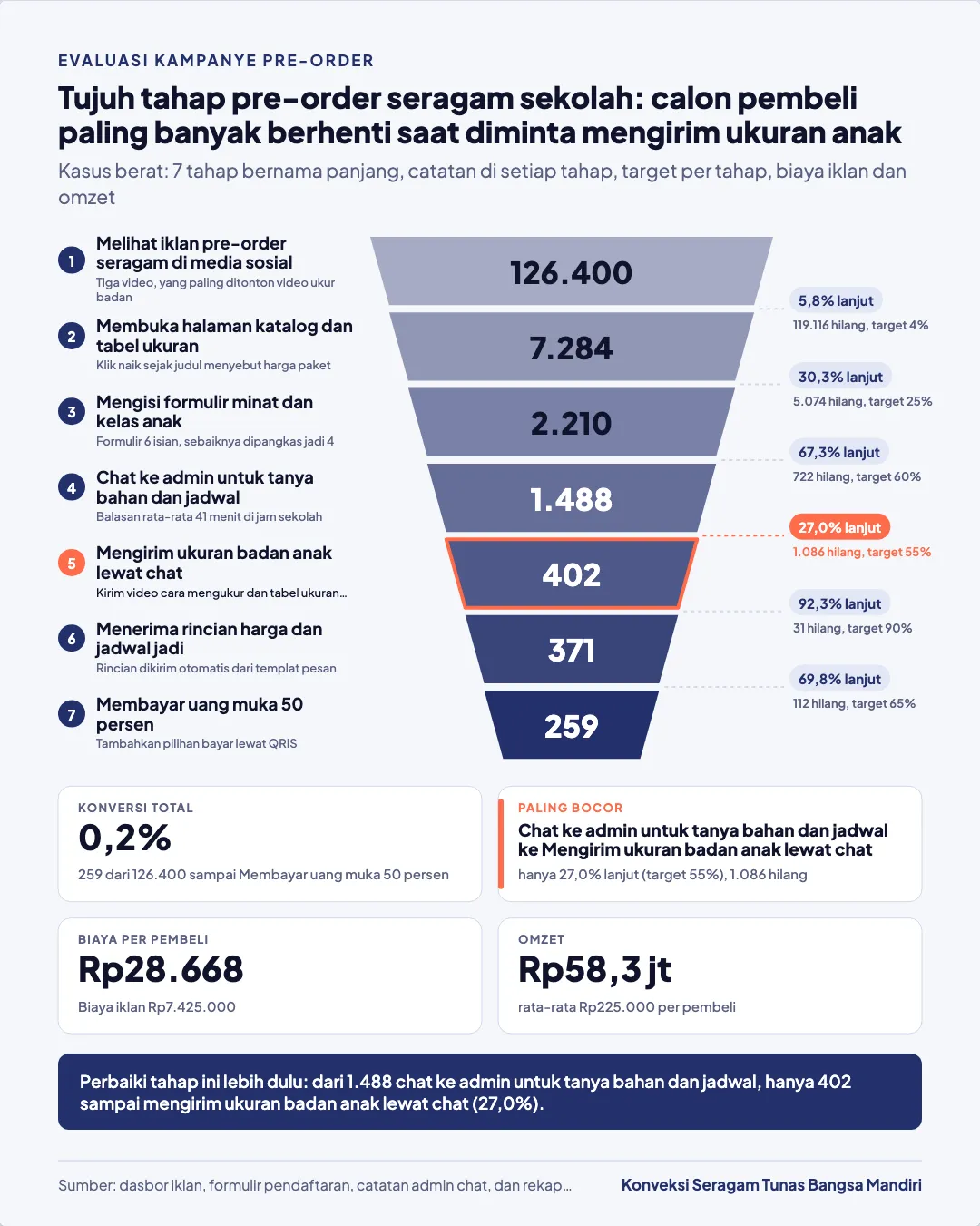
A sales funnel chart for reports: enter how many people reached each stage (saw the ad, visited the page, chatted, checked out, paid), and the pass-through rate to the next stage, the share of the first stage, the number lost, and total conversion are worked out for you. The leakiest stage is marked in the accent colour, or the one furthest below target when targets are set. Optional notes per stage, cost per buyer, and revenue. Download as PDF, PNG, Word, or Excel.
Verified by SkillFlow
We checked every file in this skill automatically: no command that downloads and runs a program, no hidden code, no instruction telling your AI to ignore you.
- Loads from outside
- Fonts: Google Fonts SkillFlow: directory.skillflow.ai.id
See the 6 files inside
skill.json9 KBSKILL.md5 KBprompt.md6 KBprompt.en.md6 KBfiles/contoh/tujuh-tahap-preorder-4x5.html31 KBfiles/diagram.html33 KB
Checked 14 Nov 2026
Part of SkillFlow Pro
Pro opens every skill in every category: copy, ZIP, Send to AI, install, save, and request new skills.
Get Pro Already subscribed? Sign inWhat you get
- A 2 to 7 stage funnel from the head count per stage, tapering evenly or by value
- Pass-through rate at every joint, share of the first stage, and number lost
- Total conversion and the leakiest stage marked, with optional targets per stage
- Optional advice note per stage, cost per buyer, and revenue per buyer
- An automatic summary box or your own line, several funnels in one file
- Download PDF, PNG (ZIP), Word, and Excel with every stage's numbers
Good fit
- Small businesses and online sellers who want to see where prospects stop
- Advertisers and agencies reporting campaign results to a client or manager
- Consultants and teachers explaining a sales funnel with real data
Not for
- Not an animated video; the result is a static image and files for a report
- It does not pull data from an ads dashboard or shop; you enter each stage's numbers
- One funnel holds at most 7 stages, and a stage should not be bigger than the one before
About this skill
/corong-penjualan Make a funnel chart of this month's ads: 48,200 saw the ad, 3,910 opened the page, 1,240 chatted, 312 checked out, 248 paid. Ad spend 3,150,000, revenue 19,840,000. Which stage leaks the most?
Show more
A sales funnel chart for reports: enter how many people reached each stage (saw the ad, visited the page, chatted, checked out, paid), and the pass-through rate to the next stage, the share of the first stage, the number lost, and total conversion are worked out for you. The leakiest stage is marked in the accent colour, or the one furthest below target when targets are set. Optional notes per stage, cost per buyer, and revenue. Download as PDF, PNG, Word, or Excel.
User reviews
FAQ
How is the leakiest stage chosen?
If you set target pass-through rates, it is the stage furthest below its target. Without targets it is the smallest pass-through rate. You can also highlight a specific stage by naming it.
Why set a target per stage?
The top step (from people who saw the ad to those who opened the page) almost always has the smallest rate, even when it is healthy. Targets make the highlight land on the stage that is actually below expectations.
What is in the Excel file?
One sheet per funnel: stage name, count, pass-through rate, share of the first stage, number lost, target, note, and a total conversion row, plus the chart image.
Which AI can I use it with?
Copy the prompt into a chat AI (ChatGPT, Claude, Gemini, DeepSeek); or download the ZIP and install it in an AI agent (Claude Code, Codex, Antigravity, Hermes Agent, Cursor, GitHub Copilot, Gemini CLI, OpenCode, Kimi Code, Trae), which then builds the files for you.
What is in the ZIP?
One folder named corong-penjualan with SKILL.md (the instructions an AI agent reads) and the prompt, 6 files in all. Extract it into your agent's skills folder, or install it with npx skillflow-ai add corong-penjualan. Pro only.
Is there a per-use fee or credits?
Not from SkillFlow. The skill runs on the AI you already use, so any cost follows that plan.
Which plan includes it?
SkillFlow Pro. It opens every skill in every category.
Can I use my own colours and brand?
Yes. Pick a colour theme on this page, or fill in your brand profile once; both go into the prompt you copy and into the ZIP.
Can I share what I made?
Pro members can upload the result and get a page at share.skillflow.ai.id to send to anyone. The page carries a small "Made with SkillFlow AI" mark.
Is there a download limit?
Yes, per day: 50 skills on Pro, 10 on other plans. Downloading a skill again on the same day does not count.



