

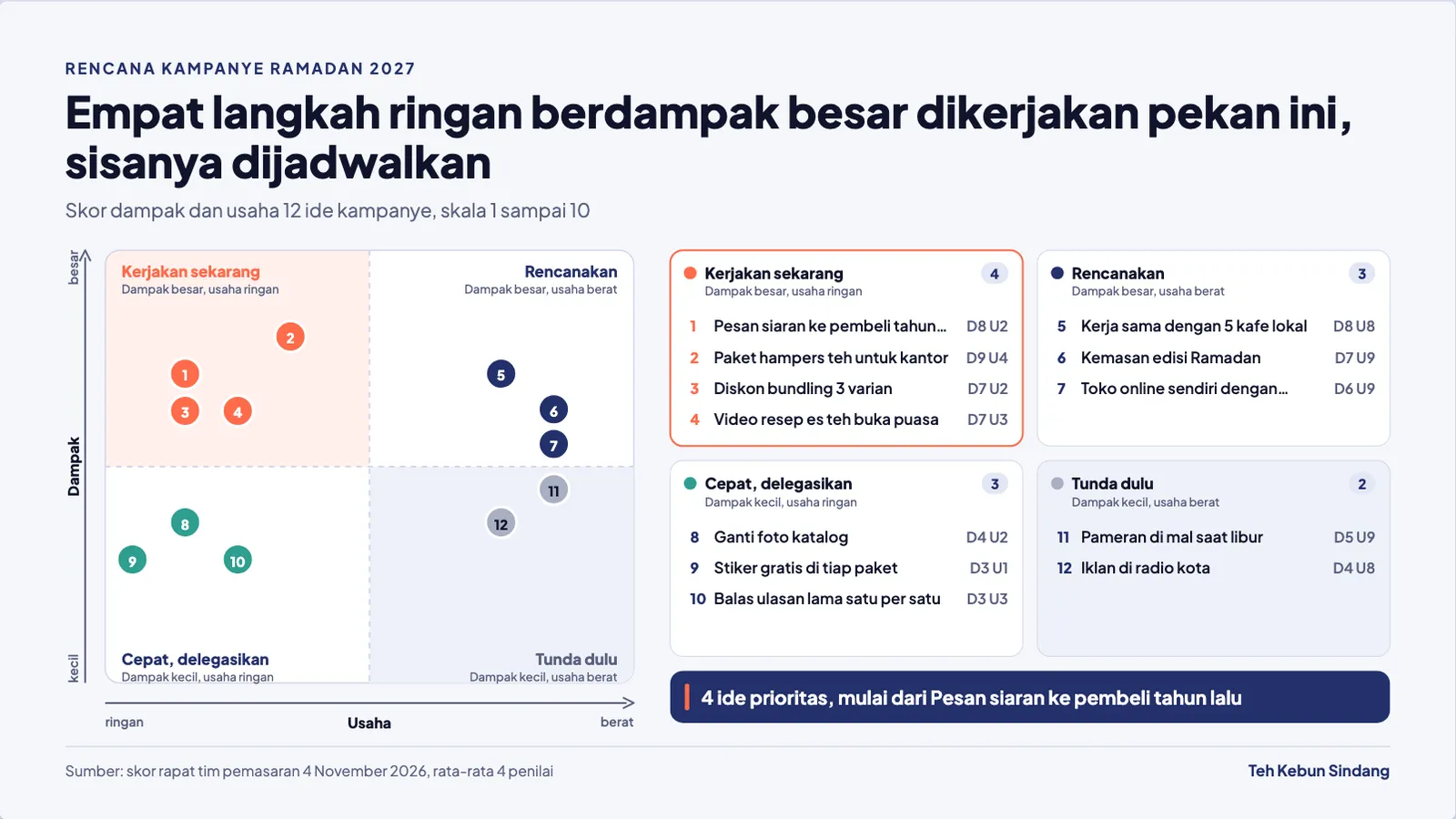
12 campaign ideas: numbered dots per quadrant, the do-now quadrant highlighted
SKILL.md contents
Premium subscribers can read, copy, and install this skill.
Unlock with Premium Sign in2x2 Priority Matrix
Description
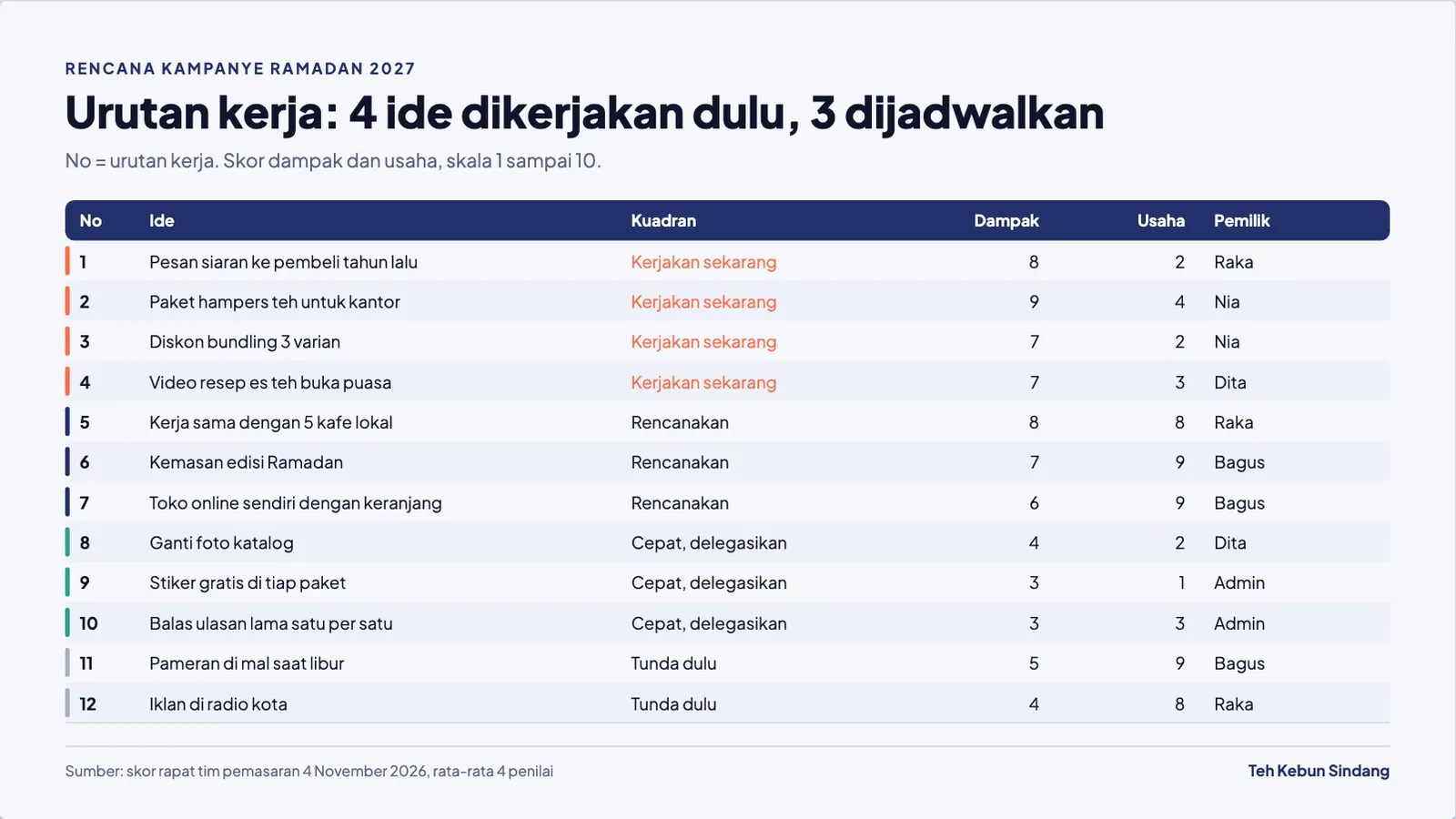
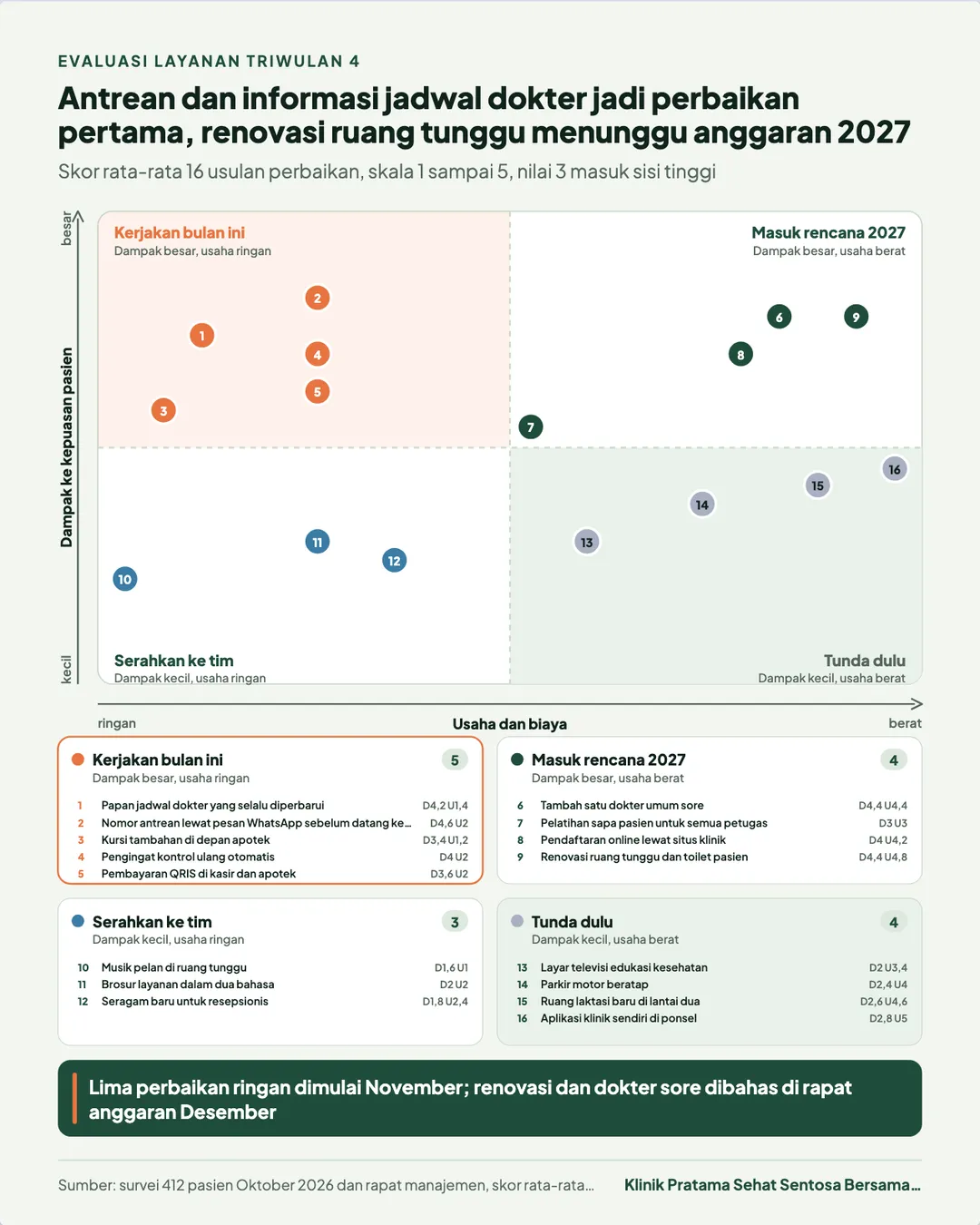
An impact versus effort matrix for sorting ideas, tasks, or proposals: give each item a score and the script places it as a numbered dot in four quadrants (do now, plan, quick or delegate, park). Dot numbers follow a work order worked out from the quadrant and the score gap, dots with the same score never pile up, and the legend beside it groups items by quadrant. A second page holds the work order table with owners. Downloadable as PDF, PNG, Word, or Excel.
Verified by SkillFlow
We checked every file in this skill automatically: no command that downloads and runs a program, no hidden code, no instruction telling your AI to ignore you.
- Loads from outside
- Fonts: Google Fonts SkillFlow: directory.skillflow.ai.id
See the 6 files inside
skill.json8 KBSKILL.md5 KBprompt.md5 KBprompt.en.md5 KBfiles/contoh/enam-belas-usulan-skala-5-4x5.html35 KBfiles/diagram.html35 KB
Checked 14 Nov 2026
Part of SkillFlow Pro
Pro opens every skill in every category: copy, ZIP, Send to AI, install, save, and request new skills.
Get Pro Already subscribed? Sign inWhat you get
- A 2x2 impact x effort matrix, numbered dots placed from the scores
- Work order worked out automatically: quadrant, then the impact minus effort gap
- Legend per quadrant with the idea count and each item's scores
- A work order table page with owners and notes
- Any score scale (1-5, 1-10) and renameable quadrants
- Download PDF, PNG (ZIP), Word, and Excel with every score
Good fit
- Founders and small teams with too many ideas who must pick what comes first
- Planning a campaign, service improvements, or a project task list
- Consultants and meeting facilitators scoring proposals with a client
Not for
- Impact and effort scores are never invented; unscored items are asked about first
- Not a risk matrix (likelihood x consequence) or a dated schedule; use a Gantt chart for schedules
- Up to 20 items per matrix; more than that are split across pages
About this skill
/matriks-prioritas-2x2 Help me sort 12 Ramadan campaign ideas for Teh Kebun Sindang. We already scored impact and effort in a team meeting; make a priority matrix and the work order
Show more
An impact versus effort matrix for sorting ideas, tasks, or proposals: give each item a score and the script places it as a numbered dot in four quadrants (do now, plan, quick or delegate, park). Dot numbers follow a work order worked out from the quadrant and the score gap, dots with the same score never pile up, and the legend beside it groups items by quadrant. A second page holds the work order table with owners. Downloadable as PDF, PNG, Word, or Excel.
User reviews
FAQ
How is the work order decided?
Quadrant first: do now, plan, quick or delegate, then park. Within a quadrant, the item with the biggest impact minus effort gap goes first, then the one with more impact.
Which quadrant gets a score right on the midline?
A score equal to the cut-off goes to the high side. The default cut-off is the middle of the scale (5.5 for 1 to 10, 3 for 1 to 5) and can be changed.
What if many ideas share the same score?
Their dots are nudged apart so they never stack, stay inside their quadrant, and a thin line points back to the exact score position.
Which AI can I use it with?
Copy the prompt into a chat AI (ChatGPT, Claude, Gemini, DeepSeek); or download the ZIP and install it in an AI agent (Claude Code, Codex, Antigravity, Hermes Agent, Cursor, GitHub Copilot, Gemini CLI, OpenCode, Kimi Code, Trae), which then builds the files for you.
What is in the ZIP?
One folder named matriks-prioritas-2x2 with SKILL.md (the instructions an AI agent reads) and the prompt, 6 files in all. Extract it into your agent's skills folder, or install it with npx skillflow-ai add matriks-prioritas-2x2. Pro only.
Is there a per-use fee or credits?
Not from SkillFlow. The skill runs on the AI you already use, so any cost follows that plan.
Which plan includes it?
SkillFlow Pro. It opens every skill in every category.
Can I use my own colours and brand?
Yes. Pick a colour theme on this page, or fill in your brand profile once; both go into the prompt you copy and into the ZIP.
Can I share what I made?
Pro members can upload the result and get a page at share.skillflow.ai.id to send to anyone. The page carries a small "Made with SkillFlow AI" mark.
Is there a download limit?
Yes, per day: 50 skills on Pro, 10 on other plans. Downloading a skill again on the same day does not count.



