

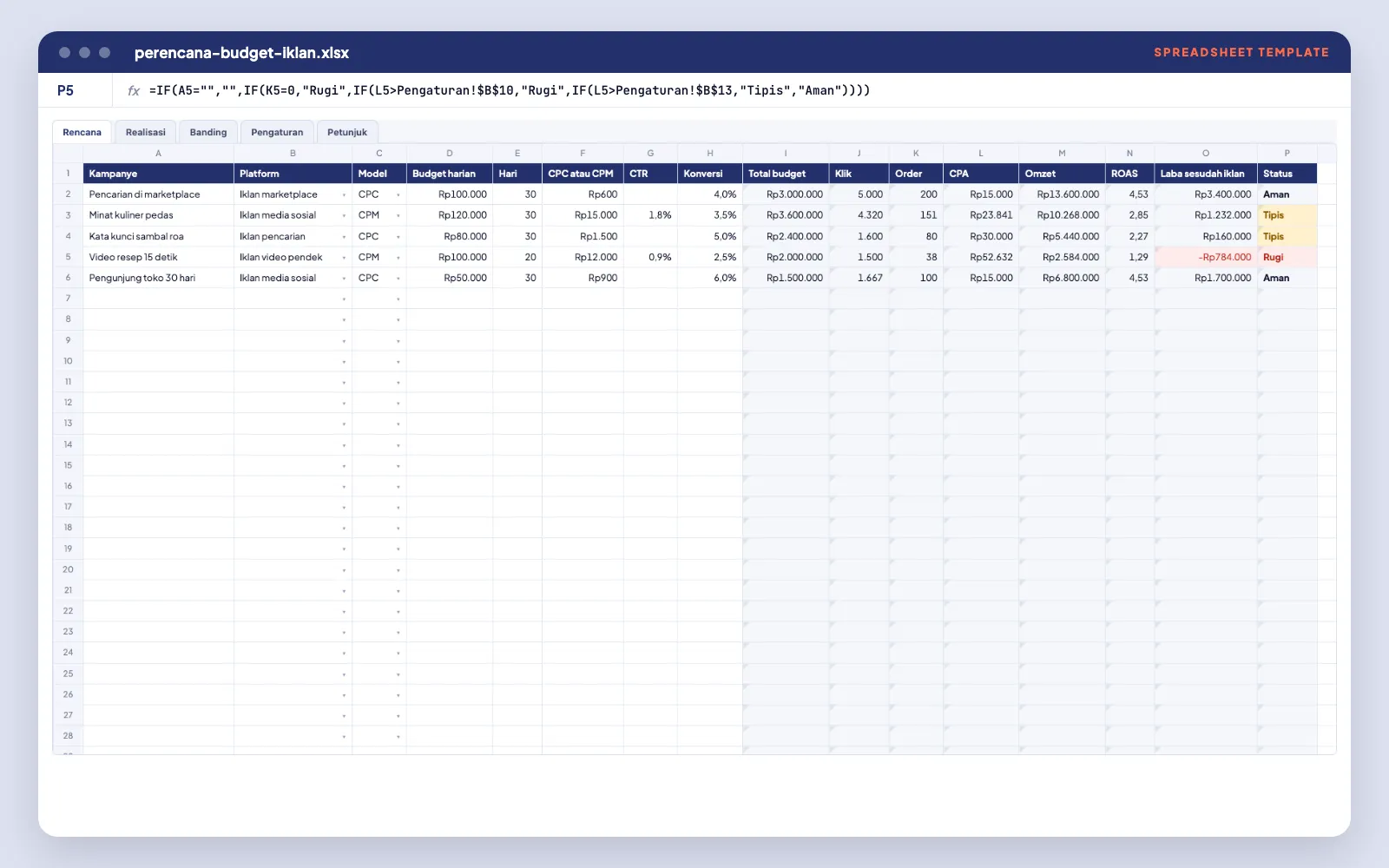
Plan: daily budget, estimated clicks, orders, CPA, revenue, profit after ads, and a Safe, Thin, Loss status
SKILL.md contents
Premium subscribers can read, copy, and install this skill.
Unlock with Premium Sign inAd Budget Planner
Description
An Excel file for planning an ad budget before money goes out: from the selling price, cost of goods, and other costs per order it works out the break-even cost per purchase (CPA), a target CPA that still leaves profit, break-even ROAS, and a budget cap from the order target. A plan per campaign with platform and pricing model from dropdowns, estimated clicks, orders, revenue, profit after ads, and a highlighted Safe, Thin, or Loss status. Weekly Actuals and a plan vs actual Compare sheet, plus Settings and Guide.
Verified by SkillFlow
We checked every file in this skill automatically: no command that downloads and runs a program, no hidden code, no instruction telling your AI to ignore you.
- Loads from outside
- Fonts: Google Fonts SkillFlow: directory.skillflow.ai.id
See the 5 files inside
skill.json11 KBSKILL.md7 KBprompt.md8 KBprompt.en.md8 KBfiles/template.html192 KB
Checked 14 Nov 2026
Part of SkillFlow Pro
Pro opens every skill in every category: copy, ZIP, Send to AI, install, save, and request new skills.
Get Pro Already subscribed? Sign inWhat you get
- An .xlsx file with Plan, Actuals, Compare, Settings, and Guide sheets
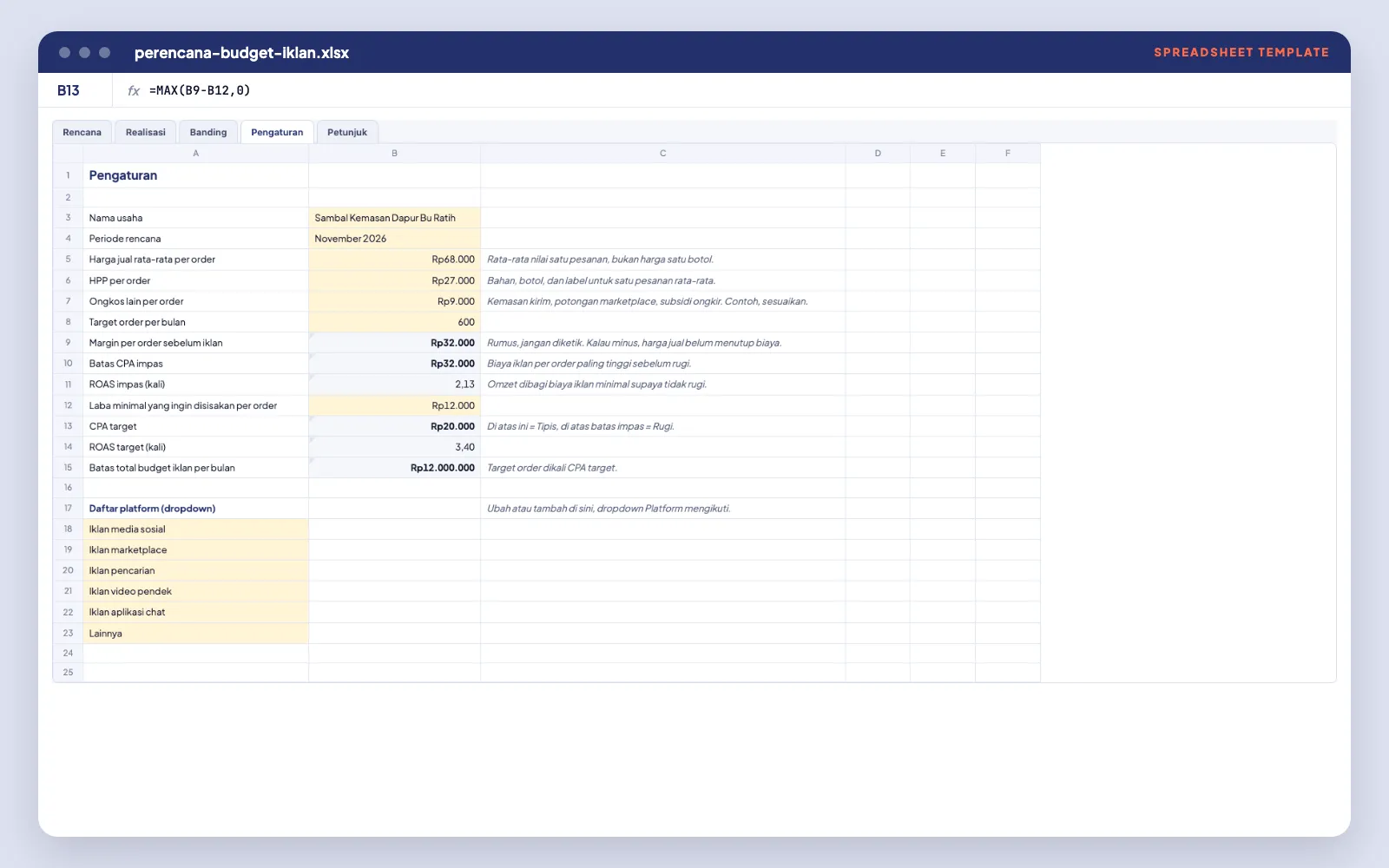
- Break-even CPA, target CPA, break-even and target ROAS, and a monthly budget cap worked out from the margin per order
- A plan per campaign: platform and pricing model from dropdowns, estimated clicks, orders, CPA, revenue, ROAS, profit
- A Safe, Thin, or Loss status per campaign highlighted yellow and red, formulas down to row 51
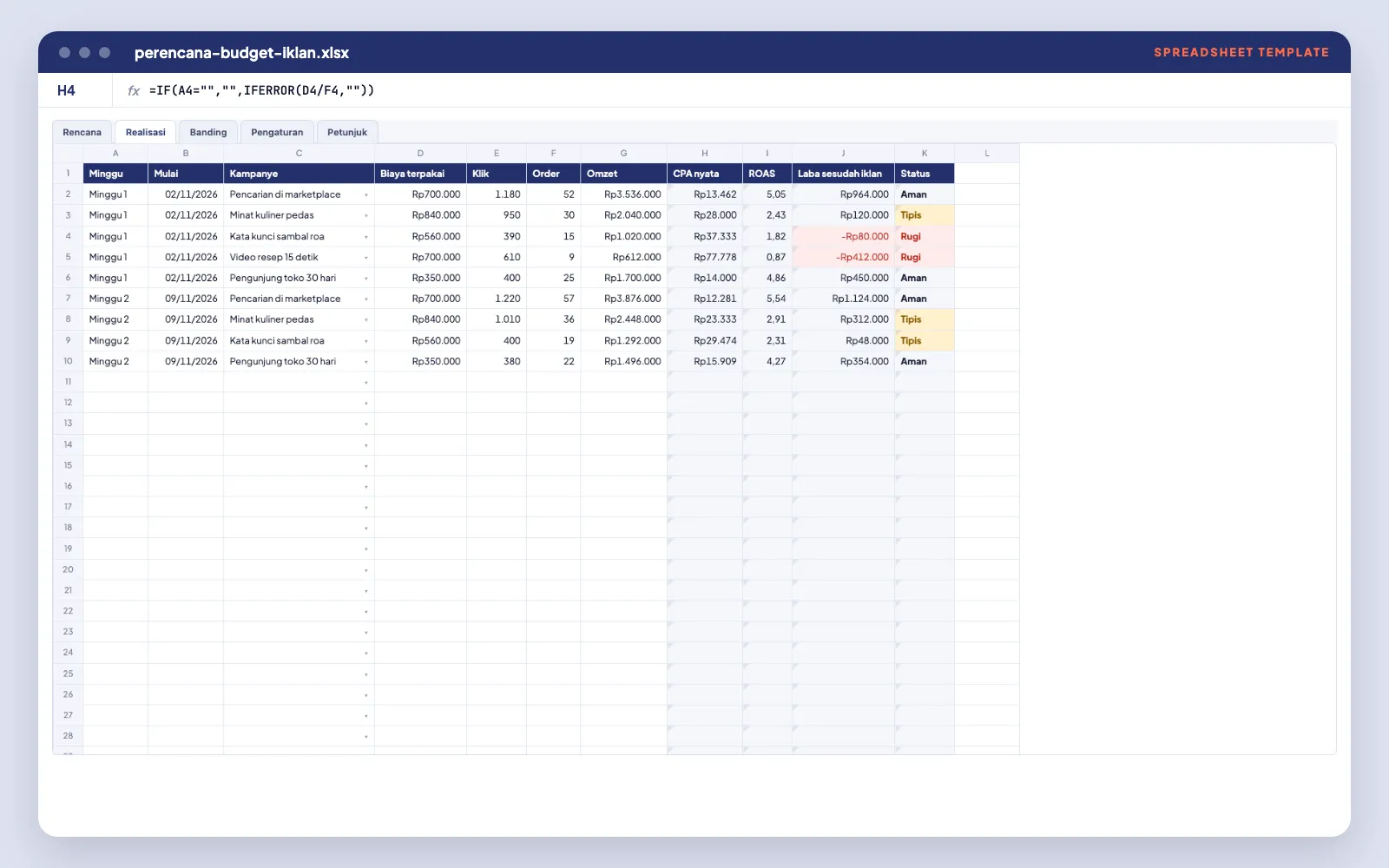
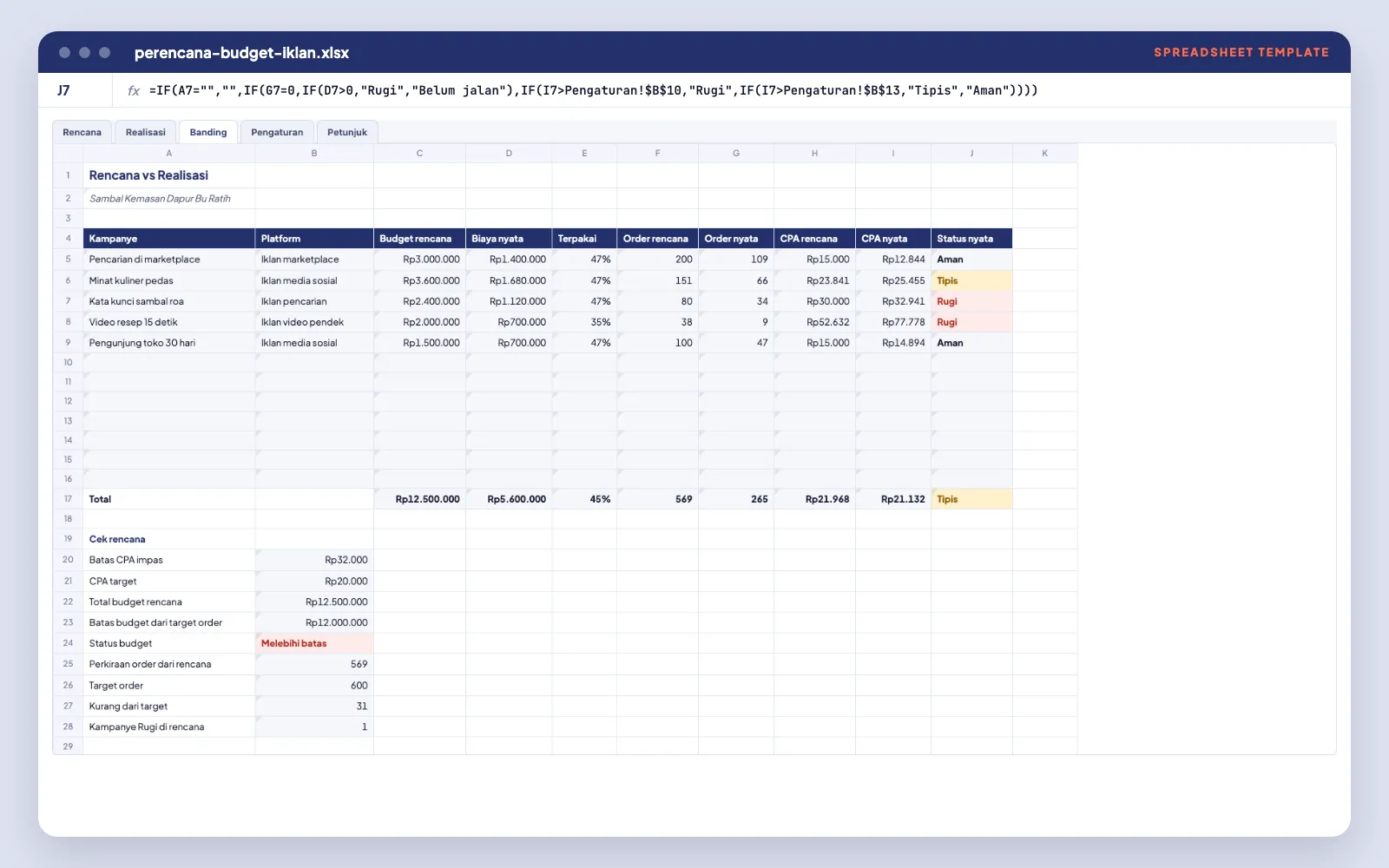
- Weekly actuals and a plan vs actual comparison per campaign, plus a budget check and the order shortfall
- An HTML template with a sheet preview and a Download Excel button
Good fit
- Online sellers who want to know the most they can pay per order before raising the budget
- Owners running several campaigns at once who need one monthly plan
- Ad managers reporting to an owner who want the plan and real results in one file
Not for
- It does not pull data from ad accounts; real results are typed in from the weekly reports
- Plan figures are estimates from the CPC, CTR, and conversion you enter, not promised results
- Margin uses an average per order; products with very different prices are better in their own file
- For charts of ads that are already running, use an ad performance dashboard
About this skill
/perencana-budget-iklan Make an ad budget planner for my packaged chilli sauce shop for November: average order value 68,000, cost of goods 27,000, other costs 9,000, a 600-order target, five campaigns across marketplace, social media, and search ads
Show more
An Excel file for planning an ad budget before money goes out: from the selling price, cost of goods, and other costs per order it works out the break-even cost per purchase (CPA), a target CPA that still leaves profit, break-even ROAS, and a budget cap from the order target. A plan per campaign with platform and pricing model from dropdowns, estimated clicks, orders, revenue, profit after ads, and a highlighted Safe, Thin, or Loss status. Weekly Actuals and a plan vs actual Compare sheet, plus Settings and Guide.
User reviews
FAQ
What is the break-even CPA?
The most you can spend on ads for one order before that order loses money: the selling price minus cost of goods and other costs. If the margin per order is 32,000 and the ads need 35,000 to win one order, every sale from ads loses 3,000.
Why is there a Thin status as well as Loss?
Thin means it is under break-even but above the target CPA, so the profit left is smaller than the one you set in Settings. Fix campaigns like this before raising their budget.
I do not know my cost per click yet. What should I enter?
Use figures from past campaigns, the estimate the platform shows while you build the ad, or run a small one-week test and copy its results from Actuals into the Plan.
Which AI can I use it with?
Copy the prompt into a chat AI (ChatGPT, Claude, Gemini, DeepSeek); or download the ZIP and install it in an AI agent (Claude Code, Codex, Antigravity, Hermes Agent, Cursor, GitHub Copilot, Gemini CLI, OpenCode, Kimi Code, Trae), which then builds the files for you.
What is in the ZIP?
One folder named perencana-budget-iklan with SKILL.md (the instructions an AI agent reads) and the prompt, 5 files in all. Extract it into your agent's skills folder, or install it with npx skillflow-ai add perencana-budget-iklan. Pro only.
Is there a per-use fee or credits?
Not from SkillFlow. The skill runs on the AI you already use, so any cost follows that plan.
Which plan includes it?
SkillFlow Pro. It opens every skill in every category.
Can I use my own colours and brand?
Yes. Pick a colour theme on this page, or fill in your brand profile once; both go into the prompt you copy and into the ZIP.
Can I share what I made?
Pro members can upload the result and get a page at share.skillflow.ai.id to send to anyone. The page carries a small "Made with SkillFlow AI" mark.
Is there a download limit?
Yes, per day: 50 skills on Pro, 10 on other plans. Downloading a skill again on the same day does not count.



